
Highlight
Apple explains the SoC, unified memory, AMP scheduling, secure boot, Rosetta and recovery process of Apple silicon Mac, and provides the migration entry point for macOS apps on Metal, Core ML, GCD, DriverKit and Rosetta detection.
Core Content
On Intel Macs, the CPU, GPU, T2, discrete graphics memory, and peripheral access paths are scattered among different components. Machines with discrete GPUs also need to move texture, image, and geometry data between CPU memory and GPU memory. Apple silicon Mac puts these capabilities into the same SoC. The CPU and GPU access the same set of unified memory, and graphics resources can be shared directly.
The first question developers need to ask is a practical one: How much of an existing app will need to be rewritten? The answer to this session was very restrained. Rather than requiring developers to switch to an entirely new set of platform APIs, Apple is emphasizing continued use of Metal, AVFoundation, VideoToolbox, Core ML, Accelerate, Compression, SIMD, and Grand Central Dispatch. The difference is that these frameworks are already optimized for Apple silicon.
The second practical issue is compatibility. Rosetta will run existing x86_64 apps, and the translation results will be signed, bound to a single machine, and securely stored; Xcode, Instruments, and LLDB also support debugging and analyzing translated apps. Native migration is still the goal, but Rosetta gives users and teams a transition window.
There are also new constraints on the underlying system. write XOR execute, kernel integrity protection, pointer authentication, and device isolation affect JIT, kernel extensions, and PCIe drivers. For driver developers, the old physical address access paths need to be migrated to IOMapper and IODMACommand; the long-term direction is to evaluate DriverKit as soon as possible.
The startup and recovery process has also changed. Apple silicon Mac uses an architecture based on iOS and iPadOS Secure Boot, and every step of the startup chain must pass Apple signature verification; Startup Options unifies the startup button, and macOS Recovery is responsible for the startup disk, security policy, Mac Sharing Mode, and recovery tools.
Detailed Content
1. Unify memory and platform framework
(01:00) Apple silicon Mac puts the CPU, GPU, video codec, Neural Engine and machine learning accelerator into a single SoC. Unified memory lets the CPU and GPU share graphics resources, eliminating the overhead of copying data over the PCIe bus.
(02:40) Developers still use existing frameworks to access these hardware capabilities. Use Metal for graphics work; AVFoundation and VideoToolbox for video encoding and decoding; and Core ML or Accelerate for machine learning. Core ML should avoid explicitly setting the model tocpuOnlyorcpuAndGPU,letcomputeUnitskeep defaultall, to have the opportunity to run to the Neural Engine.
Key points:
- Apple’s migration recommendation starts with the framework entry, not with the chip details.
- Metal, AVFoundation, VideoToolbox, Core ML and Accelerate are the entry points explicitly named by transcript.
- For Core ML apps, first check whether the configuration limits the computing unit to CPU or CPU+GPU.
2. AMP Scheduling and Parallel Work
(04:42) Apple silicon Mac uses asymmetric multiprocessing (AMP), which has both performance cores and efficiency cores in the same machine. macOS will schedule work to the appropriate core based on the performance requirements of the task.
(04:46) Developers must set quality of service (QoS) for all work items. QoS tells macOS whether this job is for maximum performance, or whether it’s better to prioritize energy efficiency. This signal affects which type of core a task falls on on an AMP system.
(05:26) Parallel work is recommended for Grand Central Dispatch.concurrentPerformSuch APIs will help the system allocate tasks to cores with different performance characteristics. There must be enough iterations for task splitting so that the system has room for load balancing.
Key points:
- Treat QoS as part of the performance and energy efficiency intent, don’t just set it haphazardly on the background queue.
- Multi-core splitting is handed over to GCD, which can reduce misjudgment of core performance differences when hand-written thread allocation.
- Large tasks must be broken into enough fragments so that the AMP system can effectively balance the workload.
3. Security model and PCIe driver
(07:11) Apple silicon forces write XOR execute, memory pages can be written or executed, but not in both states at the same time. In order to support JIT compilers such as Java and JavaScript, Apple has added a new API that can quickly switch writable and executable permissions at the thread level.
(08:13) Kernel integrity protection will make the kernel code immutable after loading, and pointer authentication will put the authentication code into the free bit of the 64-bit pointer to prevent pointer misuse. Apple had enabled pointer authentication in the kernel, system apps, and system services at the time, but had not yet allowed third-party apps to be released this way.
(09:14) Device isolation changes the way PCIe devices access memory. On Intel Macs, devices share a system memory view; Apple silicon Macs will give each device a separate memory mapping, limiting the device to only access the memory it should originally access.
The official PCIe DMA setting fragment is:
// Get the IOMapper for the device
IOMapper *mapper = IOMapper::copyMapperForDevice(device);

// Use an IODMACommand; pass the mapper when initializing
IODMACommand *dmaCommand = IODMACommand::withSpecification(
   outSegFunc, numAddressBits, maxSegmentSize, mappingOptions,
   maxTransferSize, alignment, mapper, refCon);

// Keep the IODMACommand prepared for the duration of the i/o
Key points:
IOMapper::copyMapperForDevice(device)Gets a mapper from the current device that matches Apple silicon’s isolated memory view. -IODMACommand::withSpecification(...)Pass in the mapper during initialization to let the DMA command take the new mapping path.- Direct pairing of old drivers
ioMemoryDescriptortunegetPhysicalSegmentThe path is not available for this platform. - The kernel extension is still available, but loading methods, higher user friction, and pointer authentication requirements will all drive driver migration to DriverKit.
4. Translation and Diagnosis of Rosetta
(11:31) Rosetta is used to run existing x86_64 apps. It covers macOS apps, Catalyst apps, games, and complex apps with embedded JIT compilers. Translated apps using Metal will generate commands for Apple GPUs, and translated apps using Core ML can also run on Neural Engine.
(12:08) Rosetta begins translating executable code when the App Store or package installer triggers installation. Translation products are code signed, bound to a single machine, stored securely, and refreshed after system updates. The system loads saved translations at startup; if untranslated code is encountered during runtime, Rosetta will compile it on the fly.
(13:37) There are differences between native Apple silicon processes and Intel Mac processes, including page size, memory ordering rules,mach_absolute_timeFrequency and partial floating point behavior. Rosetta will make the translated process match Intel Mac behavior, but it does not support x86 AVX vector extensions.
The official Rosetta detection snippet is:
// Use "sysctl.proc_translated" to check if running in Rosetta

// Returns 1 if running in Rosetta
int processIsTranslated() {
   int ret = 0;
   size_t size = sizeof(ret);

   // Call the sysctl and if successful return the result
   if (sysctlbyname("sysctl.proc_translated", &ret, &size, NULL, 0) != -1)
      return ret;

   // If "sysctl.proc_translated" is not present then must be native
   if (errno == ENOENT)
      return 0;

   return -1;
}
Key points:
- return
1Indicates that the current process is running in Rosetta. -sysctl.proc_translatedWhen not present, the code treats the result as native. - This detection is suitable for putting in diagnostic, logging and compatibility testing paths, but is not suitable for evading native migrations.
- Code paths that require AVX should continue to be checked with system capabilities and do not assume that Rosetta will override AVX.
5. Startup, Security Policy and Recovery
(16:00) The boot process of Apple silicon Mac is based on the Secure Boot architecture of iOS and iPadOS. Each startup component must be cryptographically signed by Apple, and the entire chain of trust must be verified before it is launched.
(16:46) The startup entry is unified into Startup Options. You can enter this interface by pressing and holding the Touch ID button on a Mac notebook or the power button on a desktop computer. macOS Recovery brings together Startup Manager, Startup Disk, security policies, and recovery tools into a single UI.
(17:38) Mac Sharing Mode replaces Target Disk Mode and uses SMB file sharing to provide file-level access and requires user authentication. Startup Disk can now choose between full security or reduced security for each volume that has macOS installed.
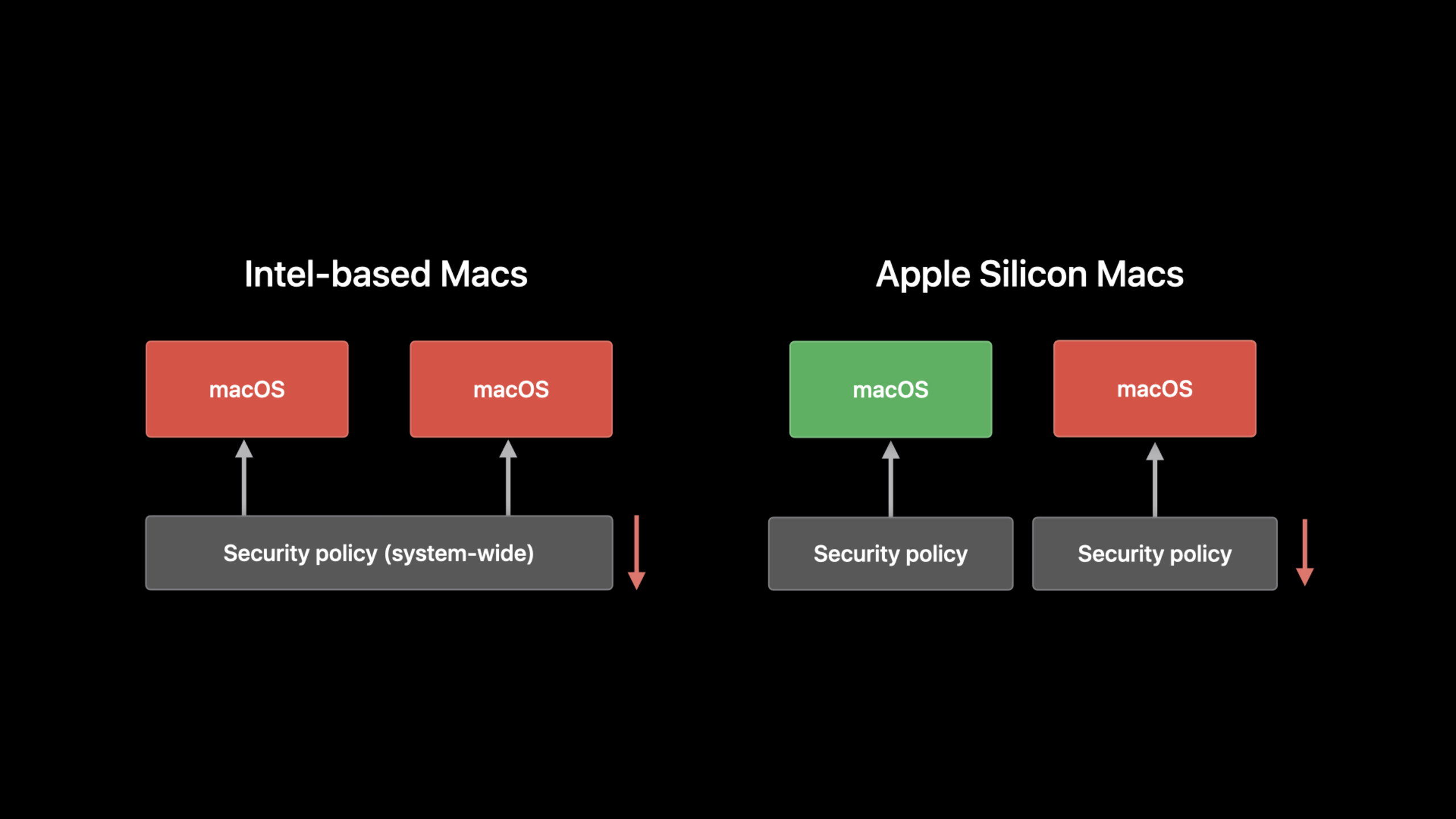
(19:34) Intel Mac’s active security policy affects the entire machine. Apple silicon Mac will maintain independent security policies for each macOS installation. The security level can be lowered for development or test systems and still maintain full security for everyday systems.
(21:53) Apple silicon Mac introduces System Recovery. It is a minimal macOS environment installed in a separate hidden container, used to reinstall macOS and macOS Recovery when macOS Recovery itself is unavailable. Apple Configurator 2 is still used in scenarios where System Recovery is also unavailable.
Key points:
- Booting from an external disk no longer requires lowering the security level of the entire machine.
- reduced security is a configurable mode for kernel extension development, research, and specific workflows.
- Support documentation distinguishes between macOS Recovery, System Recovery, and Apple Configurator 2 three-tier recovery paths.
Core Takeaways
-
Make an Apple silicon migration checkup page: What to do: List Metal, AVFoundation, VideoToolbox, Core ML, Accelerate, and GCD usage in the debug build of your macOS app. Why it’s worth doing: Session explicitly uses these frameworks as entrances to Apple silicon capabilities. How to get started: Check out Core ML’s
computeUnits, and then review the queue QoS and whether the parallelizable tasks are suitable for handing overconcurrentPerform。 -
Add JIT safety mode to the built-in script engine: What to do: Encapsulate the JIT memory management of Java, JavaScript or self-developed script engines into independent modules. Why it’s worth doing: write XOR execute requires that memory pages cannot be both writable and executable at the same time. Apple provides a new API for quickly switching permissions at the thread level. How to start: First, separate the three steps of generating code, switching permissions, and executing code, and prepare to switch permissions by thread in multi-threaded JIT.
-
Make a Driver Migration Reporting Tool: What it does: Scan PCIe or SCSI drivers and call them directly
getPhysicalSegmentDMA path. Why it’s worth doing: Apple silicon’s device isolation requires device-level memory mapping, and the old path won’t work. How to start: Change the target path to get it from deviceIOMapper, then use the one with mapperIODMACommandManage DMA while evaluating DriverKit migrations. -
Tag Rosetta for compatibility tests: What to do: Record whether the process is running under Rosetta in the app’s diagnostic log. Why it’s worth doing: page size, memory ordering,
mach_absolute_timeFrequency and floating point details vary on the native platform, and Rosetta emulates Intel Mac behavior. How to get started: Usesysctl.proc_translatedDetect translation status and put AVX capability check into startup self-test. -
Write a recovery path wizard for the support team: What to do: Make Startup Options, Mac Sharing Mode, full security, reduced security, System Recovery and Apple Configurator 2 a troubleshooting process. Why it’s worth doing: Recovery and security policies for Apple silicon Macs are managed by volume, and users don’t necessarily know which layer to operate on. How to start: Divide common problems into four categories: boot disk selection, file retrieval, kernel extension installation, and system recovery.
Related Sessions
- Port your Mac app to Apple silicon — Continuing on how to recompile existing macOS apps, build Universal apps, and handle low-level code and plug-in migration.
- iPad and iPhone apps on Apple silicon Macs — Explains how iOS and iPadOS apps are tested, adapted, and distributed on Apple silicon Macs.
- Bring your Metal app to Apple silicon Macs — Introducing the TBDR GPU architecture of Apple silicon Macs is a prerequisite for understanding Metal migration.
- Optimize Metal Performance for Apple silicon Macs — An in-depth talk about workload scheduling, rendering pipeline and shader optimization on Apple GPU.
- Modernize PCI and SCSI drivers with DriverKit — Talk about how PCI and SCSI drivers use DriverKit to move out of the kernel space.
Comments
GitHub Issues · utterances