
Highlight
Chapter 3 requires players to convert the rhythm on the Swan reels into
Pitch、NoteProtocoland fixed intervalsTimer, then useToneOutputPlay notes of different lengths.
Core Content
Chapter 2 only deals with one note length, fixed intervalsTimerEnough to complete the challenge. After returning to lizard’s cabin in Chapter 3, Swan’s new scroll requires players to play a melody with rhythmic differences: quarter notes, half notes, and dotted half notes are all possible. The original loop will only advance according to the same beat, and will lose its ability to express itself when it encounters long sounds.
Apple first breaks the problem into two models.PitchResponsible for tellingToneOutputwhich frequency to play,NoteProtocolResponsible for describing the tone and length of a note. The length is expressed in multiples of quarter notes, so half notes are returned2.0, eighth note returns0.5。
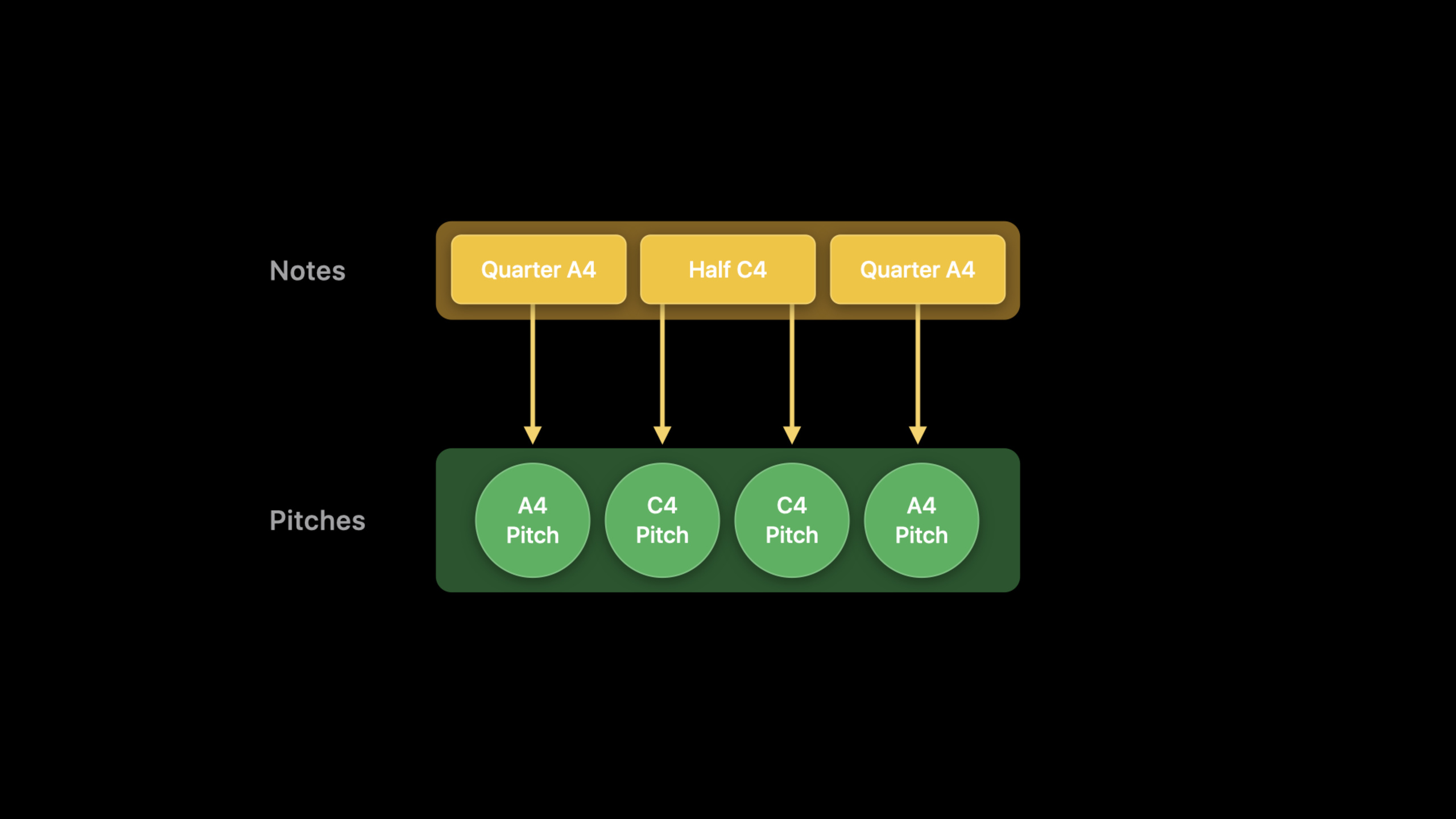
The difficulty is the timer. The verbatim draft clearly reminds,ToneOutputWill continue to vocalize until asked to stop. The method of this session is to putTimerFixed at the shortest supported note interval, and then split longer notes into multiple pitch commands. This way the loop remains simple but can express notes of varying lengths.
Detailed Content
Use Pitch to describe frequency
(01:50)Music.swiftThere are protocols reserved for players to implement. The first step is to map each pitch on the reel into a frequency forToneOutputuse.
// Example Pitch implementation

public enum Pitch: Double, PitchProtocol {
    case a4 = 440.0

    var frequency: Double {
        return self.rawValue
    }
}
Key points:
PitchobeyPitchProtocol,useDoubleraw value holds the frequency. -.a4Corresponding to 440.0, the verbatim script requires the player to add a case for each pitch in the Swan reel. -frequencyReturn the raw value directly, and the followingToneThis frequency will be read.
Use NoteProtocol to describe note length
(02:08) After the pitch is resolved, it is also necessary to express how long a note lasts. The official clip splits the note into two attributes: for playbacktone, and relative to quarter noteslength。
// Music.swift

public protocol NoteProtocol {

    /// Play this Note through a ToneOutput
    var tone: Tone { get }

    /// The duration of this Note as a multiple of quarter notes,
    /// e.g., a half note is 2.0, an eighth note is 0.5
    var length: Float { get }
}
Key points:
toneIt’s a giftToneOutputsound object. -lengthUsing the quarter note as the base, the half note is2.0, the eighth note is0.5.- This protocol allows the same melody array to carry both pitch and rhythm information.
The official note implementation first covers the smallest form: a quarter note case, converting pitch intoTone, and then return to the fixed length.
// Example Note implementation

public enum Note: NoteProtocol {
    case quarter(pitch: Pitch)

    var tone: Tone {
        switch self {
        case .quarter(let pitch):
            return Tone(pitch: pitch.frequency, volume: 0.3)
        }
    }

    var length: Float {
        switch self {
        case .quarter(_):
            return 1.0
        }
    }
}
Key points:
quarter(pitch:)Wrap a pitch into quarter notes. -toneUse pitchfrequencycreateTone, the volume is set to0.3。lengthReturns for quarter notes1.0, the player needs to continue adding cases for other lengths in the reel.
Fixed Timer interval
(03:18) OriginalTimerNote length is not automatically understood. The solution is to first tell the protocol how long the shortest supported note is, and then use this value to calculate the timer interval. The speaker uses 120 BPM as an example and the quarter note length is 500 milliseconds.
// Music.swift

public protocol NoteProtocol {

    /// Play this Note through a ToneOutput
    var tone: Tone { get }

    /// The duration of this Note as a multiple of quarter notes,
    /// e.g., a half note is 2.0, an eighth note is 0.5
    var length: Float { get }

    /// Length of the smallest Note supported
    static var shortestSupportedNoteLength: Float { get }
}
Key points:
shortestSupportedNoteLengthIs a type-level attribute, all notes share the same shortest unit.- The Swan scroll in the verbatim manuscript uses a quarter note as the shortest unit, so the example chooses quarter note.
-
TimerSubsequently, pressing this shortest unit is triggered, and long sounds are expressed by repeating the pitch command.
Split long notes into pitch commands
(04:15) Long notes need to be broken into a set of pitches. A quarter note gives one command, a half note gives two commands, and a dotted half note gives three commands. Officially named this stepsubdivide()。
// Music.swift

public protocol NoteProtocol {
    associatedtype PitchType: PitchProtocol

    /// Play this Note through a ToneOutput
    var tone: Tone { get }

    /// The duration of this Note as a multiple of quarter notes,
    /// e.g., a half note is 2.0, an eighth note is 0.5
    var length: Float { get }

    /// Length of the smallest Note supported
    static var shortestSupportedNoteLength: Float { get }

    /// Subdivide into a series pitches, according to the shortest
    /// supported note
    func subdivide() -> [PitchType]
}
Key points:
associatedtype PitchTypeConnect the note protocol to a specific pitch type. -subdivide()Returns an array of pitches, the length of which is determined by note length and the shortest supported length.- The timer loop no longer consumes notes directly, but consumes the expanded pitch.
Complete playback loop
(04:30) The last step is to expand all notes intopitches, and then let the fixed intervalsTimerPlay one by one.
// Play more than one tone redux

let toneOutput = ToneOutput()
let notes = [Note.quarter(pitch: .a4), .half(pitch: .a4), .quarter(pitch: .a4)]
var pitches = [Pitch]()
for note in notes {
    pitches.append(contentsOf: note.subdivide())
}
var index = 0

let interval = TimeInterval(Note.shortestSupportedNoteLength * 0.5)
Timer.scheduledTimer(withTimeInterval: interval, repeats: true) { timer in
    guard index < pitches.count else {
        timer.invalidate()
        owner.endPerformance()
        return
    }
    toneOutput.play(tone: Tone(pitch: pitches[index].frequency, volume: 0.3))
    index += 1
}
Key points:
notesRetain the original score structure,pitchesIt is the expanded result before playback. -for note in notesput each notesubdivide()The results are appended to the same array. -intervaluseshortestSupportedNoteLength * 0.5, corresponding to the 120 BPM example in the verbatim draft. -guard index < pitches.countStop the timer when the end is reached and end the performance. -toneOutput.playEach time you press the current pitchfrequencySound, cycle byindex += 1go ahead.
Core Takeaways
- What to do: Make a rhythm practice playground. Why it’s worth doing: This session has clearly explained the length relationship between quarter notes, half notes, and dotted half notes. How to start: Use
PitchProtocolandNoteProtocolDefine a small number of pitches and lengths, and then useToneOutputPlay the user’s arranged notes. - What to do: Make a music score checker. Why It’s Worth Doing: Swan’s challenge requires players to turn the “Ode to Joy” on the reels into a playable code. How to start: First hand over the note array entered by the user
subdivide()Expand and then check whether the expanded pitch number matches the expected beat. - What to do: Add a bass part to the melody. Why it’s worth doing: The side quest clearly reminds you that you can use multiple timers to stack tones, and lay bass chords under the main melody. How to start: Keep the main melody timer, and prepare a second set for the bass notes
pitchesand the second timer, using the same tempo base. - What: Make a playback debug output. Why it’s worth doing: Official full clip for use
indexAdvance one by onepitches, perfect for exposing the current playback position. How to start: Record the current index, pitch frequency and remaining pitch number next to the playback loop, so that learners can see the real playback sequence after subdivision.
Related Sessions
- Swan’s Quest, Chapter 2: A time for tones — Learn first
ToneOutput、Timerand the way fixed-length notes are played. - Swan’s Quest, Chapter 4: The sequence completes — Continuing the musical challenge into sequencers, MIDI notes, and tracks.
- Swan’s Quest, Chapter 1: Voices in the dark — Go back to the beginning of the Swan’s Quest series to understand the challenge structure of the playground book.
- Create Swift Playgrounds content for iPad and Mac — If you want to make a similar cross-platform playground book, you can continue to watch this one.
- Build a SwiftUI view in Swift Playgrounds — Learn how to edit, run, and preview live views in Swift Playgrounds.
Comments
GitHub Issues · utterances