
Highlight
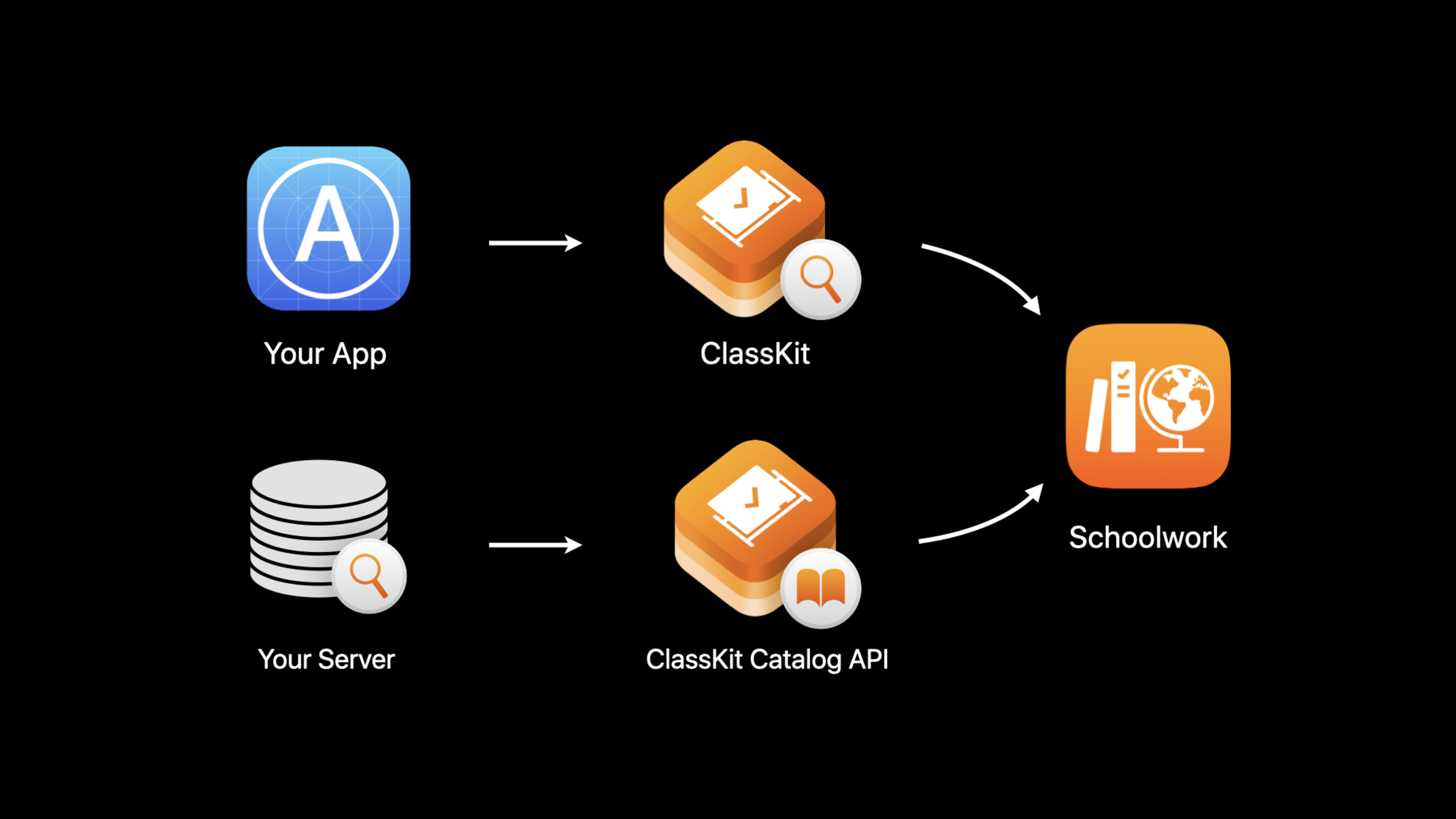
Apple added activity thumbnails, summaries, recommended ages, recommended completion times, and progress reporting capabilities to ClassKit in 2020, and launched the ClassKit Catalog API so that public learning content can be pre-entered into Schoolwork’s activity selector through web services.
Core Content
When educational apps are integrated into school scenarios, the difficulty often lies after the content is delivered. Teachers need to know which activities are appropriate to assign, students need to go directly to the correct location from Schoolwork, and developers need to report progress while protecting student privacy. ClassKit can already expose learning activities in the app to Schoolwork, but the focus in 2020 has become two more specific issues: activities must have enough information for teachers to judge, and the content directory must be managed independently from app updates.
The speech starts with Schoolwork’s App Activity Chooser. When teachers create a handout, they will see a hierarchy of ClassKit-enabled apps and activities in the selector. An activity could be a chapter in a book, a stream in a podcast, a test, or a quiz. For ClassKitCLSContextThese activities are represented and organized into a tree structure through the Main App Context. Student progress is reported only for activities assigned by the teacher, which is core to ClassKit’s privacy model.
newCLSContextMetadata makes activities more like instructional materials that teachers can use directly. Thumbnails, summaries, recommended ages, recommended completion times, and what progress data the activity reports will all appear in Schoolwork. When teachers see a test, they can judge whether it is suitable for the lesson without opening the app first.
The second half moves on to the ClassKit Catalog API. In the past, public content often relied on apps to create it locallyCLSContext, the directory will be gradually generated after the teacher or student device uses the app. New Web services let developers combine existingCLSContextThe hierarchy is translated to JSON and uploaded. Apple will generate the corresponding context when Schoolwork references the app. Public content uses the Catalog API, and dynamically generated or user-specific content continues to be reported using the native ClassKit API.
Detailed Content
Complete visible metadata for activities
(06:25) CLSContext is still the basic unit of activity. The 2020 focus is making a context carry information teachers can understand in Schoolwork. The presentation uses Measurements Quiz as an example: first create a quiz context, then write the summary and thumbnail.
// Create a context for quiz
let quizContext = CLSContext.init(type: CLSContextType.quiz, identifier: "science_Investigation_quiz", title: "Measurements Quiz")

// Add a summary describing this context
quizContext.summary = "A short quiz to test how much students know about scientific measurements and how to examine and analyze scientific data."

// Add a thumbnail for this context — ClassKit will downsize thumbnails to 330 x 330 px if needed
let bundle = Bundle.main
if let resourceURL = bundle.resourceURL {
    let imageURL = resourceURL.appendingPathComponent("measurements_quiz.jpg")
    if let thumbnail = thumbnailFromImage(atURL: imageURL) {
        quizContext.thumbnail = thumbnail
    }
}
Key points:
CLSContext.initDeclare the quiz as a quiz activity that can be browsed by Schoolwork. -summaryIt is a descriptive text for teachers and students. It should explain what this activity actually examines. -thumbnailwill appear in the activity selection process, ClassKit will shrink the image to 330 x 330 px as needed.- The code is taken from the app bundle
measurements_quiz.jpg, then give it tothumbnailFromImage(atURL:)Generate thumbnails.
Control the memory cost of thumbnails
(06:52) The speech specifically disassembles the thumbnail function because the large image is directly loaded intoUIImageMay significantly increase app memory. CoreGraphics can generate thumbnails according to the target size, suitable for use during Active Directory initialization.
// Create a thumbnail of maximum dimension 330 x 330 px from an image file
func thumbnailFromImage(atURL: URL) -> CGImage? {
   if let imageSource = CGImageSourceCreateWithURL(atURL as CFURL, nil) {
       let thumbnailOptions = [kCGImageSourceCreateThumbnailFromImageAlways as String: true,
                               kCGImageSourceThumbnailMaxPixelSize as String: 330]
       return CGImageSourceCreateThumbnailAtIndex(
           imageSource, 0, thumbnailOptions as CFDictionary);
   }
   return nil
}
Key points:
CGImageSourceCreateWithURLCreate image sources directly from file URLs. -kCGImageSourceCreateThumbnailFromImageAlwaysAsk the system to generate thumbnails. -kCGImageSourceThumbnailMaxPixelSizeLimit the maximum sides to 330, consistent with the dimensions used by Schoolwork.- function returns
CGImage?, can be assigned directly toCLSContext.thumbnail。
Mark age, time and progress type
(07:59) Age and estimated time are decision-making information when teachers choose activities. ClassKit expresses these two values as a range: A quiz is suitable for ages 9 to 11 and is expected to take 15 to 20 minutes to complete.
// Add suggested age range appropriate for the content — ages 9 to 11 years

quizContext.suggestedAge = NSRange(9...11)

// Add suggested time to complete this quiz — 15 to 20 minutes

quizContext.suggestedCompletionTime = NSRange(15...20)
Key points:
suggestedAgeuseNSRangeIndicates the age group for which the content is appropriate. -suggestedCompletionTimeuseNSRangeIndicates the estimated completion time, and the unit comes from ClassKit’s definition of this property.- These two fields do not change the internal logic of the app, but will affect teachers’ understanding of activities in Schoolwork.
(08:15) Progress reports also need to declare capabilities first. The speech mentioned two abilities: percentage progress and number of prompts used.detailsIt is user-visible text, so it needs to be localized at runtime according to the current locale.
// Add progress reporting capabilities

let reportingPercentDetails = "Reports percentage of progress"
let reportingCapabilityPercent = CLSProgressReportingCapability.init(
        kind: .percent,
        details: reportingPercentDetails)

let reportingQuantityDetails = "Reports number of hints used"
let reportingCapabilityQuantity = CLSProgressReportingCapability.init(
        kind: .quantity,
        details: reportingQuantityDetails)

quizContext.addProgressReportingCapabilities([reportingCapabilityPercent,
                                       reportingCapabilityQuantity])
Key points:
CLSProgressReportingCapabilityusekindTo describe the data type, usedetailsDescribe what this data means to users. -.percentFit for percent complete,.quantitySuitable for counting the number of prompts. -addProgressReportingCapabilitiesBy attaching these capabilities to the quiz context, Schoolwork can display the reportable progress types in the activity details. -detailsWill be seen by the user that the speech explicitly requires that the runtime be localized to the current locale.
Managing context trees and Catalog API
(10:01) The local management suggestions given by Apple are very straightforward: try to complete the metadata when creating the context; if you find that the context saved by the old version of the app is missing fields, update the missing attributes; if the app no longer supports an old context, delete it. Projects that use context provider app extension must also update the extension synchronously.
(11:12)CLSContextSeveral structural capabilities have also been added: read-onlyidentifierPathReturns the complete identifier path of the context; new context types includecourseandcustom; Custom context can set the name;isAssignableContainer nodes can be marked as unallocable activities. The book node in the lecture is the container: it is used to hold chapters and should not be allocated by the teacher for the entire book.
(14:00) The ClassKit Catalog API puts content management into web services. The developer puts theCLSContextTranslate the hierarchy into JSON payload and upload it toapi.classkit-catalog.apple.com/v1. Public content fits this approach; private, dynamically generated, user-specificCLSContextContinue to use the native API.
(15:40) Catalog API POST requests are divided into two categories: contexts and thumbnails. contexts request containsenvironmentquery parameters,Content-Type、Authorization, the body is a set of contexts to be created or updated. Each context is divided intodataandmetadata:datafromCLSContextfields,metadataContains locale, minimumBundleVersion and keywords.
(18:12) The contexts endpoint has three operation boundaries. A POST can contain up to 200 contexts; ancestor nodes must be submitted before submitting child nodes; deleting a context will delete it together with its descendants. Thumbnail endpoint To use PNG or JPEG, prepare the size as 330 x 330 px, and upload contexts first, then upload thumbnails to avoid thumbnails without any context references.
(21:19) Authentication uses JSON Web Token. Developers create ClassKit Catalog API key in Apple Developer portal, use key ID, team ID, UUID, issuance time and expiration time to form header and payload, and then use ECDSASHA256 to sign. in the requestAuthorizationheader needs to end withBearerThe prefix carries the token.
Core Takeaways
1. Make a teacher-friendly active directory
What to do: Create a program for each chapter, exercise, and quiz in the appCLSContextlevel, and complete summary, thumbnail, suggestedAge, and suggestedCompletionTime.
Why it’s worth doing: Schoolwork’s activity selector displays this information, so teachers don’t need to go into the app first to determine whether an activity is appropriate for the assignment.
How to start: Start with the 5 to 10 most frequently assigned activities, build a context tree in order from Main App Context to chapters, exercises, and tests, and then use the official thumbnail code to control the image size.
2. Make a test module that only reports the progress within the assignment
What to do: Divide the test progress into percentages, number of prompts, correct/error scores, total scores, etc., and compareCLSContextstatement above.
Why it’s worth doing: ClassKit’s privacy model only reports the progress of assigned activities, which is suitable for student data minimization requirements in school scenarios.
How to start: Log in firstCLSProgressReportingCapabilityof.percentand.quantity, make the user visibledetailsThe copywriter is connected to the existing localization system.
3. Make a non-distributable container node to organize content
What to do: Use books, courses, or units as container contexts, and put the actual chapters and tests to be assigned in child nodes.
Why it’s worth it: Teachers see a clearly structured table of contents without mistakenly sending students an entire book or course as an assignment.
How to start: Set a new context type for the container node and use it if necessarycustomand custom name, and then putisAssignableSet to false.
4. Create a Catalog API release pipeline
What to do: Separate the public course catalog from the app publishing process and upload contexts and thumbnails through the ClassKit Catalog API.
Why it’s worth doing: When public content changes, you can update the discoverable directory in Schoolwork without having to wait for a new version of the app to be released.
How to start: first put what you already haveCLSContextThe tree is exported into a JSON structure and submitted in batches of 200 contexts; for development environmentenvironmentTest the parameters and push them to production after confirmation.
Related Sessions
- What’s new in education — Look at the overall access route of education apps from the perspectives of Schoolwork 2.0, ClassKit, assessment and school equipment management.
- What’s new in assessment — Supplementary exam app How to use Automatic Assessment Configuration to control the environment of the device under test.
- Create Swift Playgrounds content for iPad and Mac — Continue to learn how content authors design Swift Playgrounds content for iPad and Mac.
- Swan’s Quest, Chapter 4: The sequence completes — Connect educational content, coding exercises, and a downloadable playground book with chapter examples from Swift Playgrounds.
Comments
GitHub Issues · utterances