
Highlight
Xcode 12 brings StoreKit in-app purchase testing to local configuration, Transaction Manager, and StoreKitTest automated processes, allowing developers to first verify purchases, refunds, Ask to Buy, and subscription renewals locally, and then use Sandbox to cover server receipt and subscription management scenarios.
Core Content
When implementing in-app purchases, developers used to have to first enter App Store Connect, register the app, define in-app purchases, and then create a Sandbox test account. Only after these preparations are completed, the StoreKit code in Xcode can actually obtain the product, initiate the purchase, and verify the receipt.
Problems with this path arise early in development. Product ID, price, subscription grouping, refund, Ask to Buy, subscription renewal and other statuses all need to be debugged repeatedly, but the team has to wait for the server configuration and Sandbox account to cooperate. In the Fruta example, the app has been writtenSKProductsRequest, but because App Store Connect has not yet configured the product, no recipes will be displayed in the simulator.
The change in Xcode 12 is to put the first round of StoreKit tests back into the local project. Created by developers.storekitConfiguration file to define consumable, non-consumable, and automatically renewing subscriptions. Point the Run Options of scheme to this configuration file, and StoreKit will return from the local test environment.SKProductmetadata.
Manual testing also becomes controllable. Transaction Manager can delete transactions, simulate refunds, approve or deny Ask to Buy. Subscription configuration can speed up time, allowing one-month renewals to happen in seconds. Once the local process is stable, then go into App Store Connect and Sandbox to test real servers, receipt signing, server notifications, and TestFlight coverage.
Detailed Content
Local StoreKit configuration
(04:13) The Fruta example first creates a StoreKit configuration file and writes the recipes to be sold into the project. This file can add consumable, non-consumable, and auto-renewable subscriptions. The product ID must match the value passed by the app to the StoreKit API. The price is filled in locally to control the value returned to the app.SKProduct。
StoreKit configuration file
Product ID copied from Store.swift
Run Options -> StoreKit Configuration
SKProductsRequest -> SKProduct
Key points:
StoreKit configuration fileIt is a local product directory, and the recipe was defined as non-consumable in the speech. -Product IDIt must be consistent with the product identification in the app code, otherwiseSKProductsRequestThe target product cannot be obtained.- scheme
Run OptionsWhen this configuration is selected, StoreKit uses the local test environment. - After modifying the product description, re-execute the app
SKProductsRequestYou will get the updated metadata without recompiling or restarting.
Transaction status and boundary process
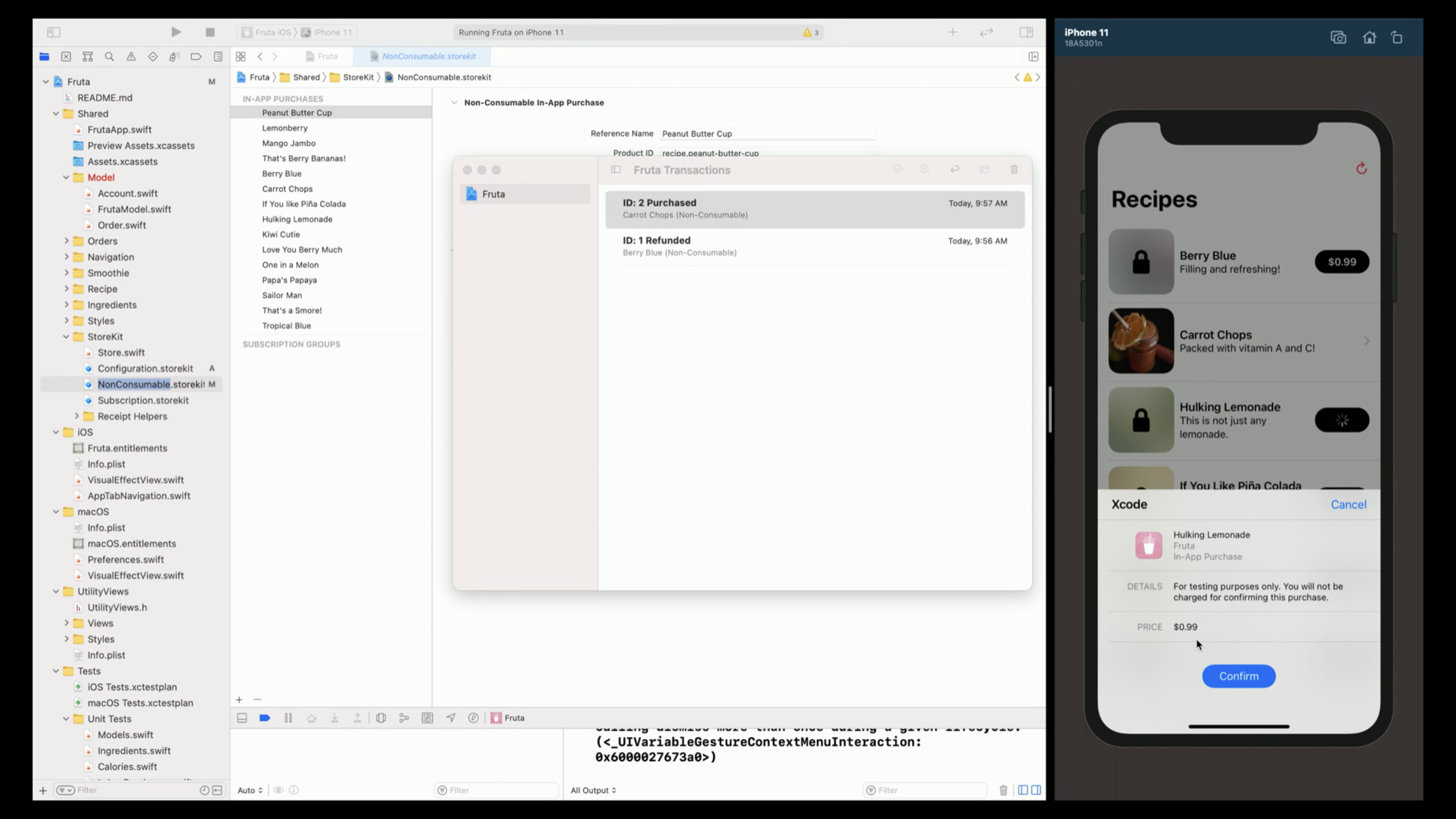
(08:39) Fruta got itSKProductCreated asSKPayment, and then join the payment queue. The simulator will display a payment form that is close to the real user experience, but no login is required during testing and no charges will be charged. Transaction Manager displays local purchase records and allows developers to delete purchases, simulate refunds, handle Ask to Buy, and switch interrupted purchases.
SKProduct -> SKPayment -> payment queue
Transaction Manager -> delete transaction
Transaction Manager -> refund transaction
Ask to Buy -> deferred transaction -> approve or decline
Interrupted purchases -> failed first transaction -> later transaction added to queue
Key points:
- Deleting a transaction can return the app to an unpurchased state, which is suitable for repeatedly debugging the same purchase process.
- After simulating a refund, the transaction is still in the Transaction Manager and receipt, but the receipt will have a cancellation date.
- Ask to Buy will cause the app’s payment transaction observer to receive the deferred status, which will then be approved or rejected by the Transaction Manager.
- Interrupted purchases will first return failure. After the user completes the account action, new transactions for the same product will be added to the queue.
Subscriptions, receipts and local certificates
(12:15) session demonstrates automatic subscription renewal with Recipes Plus and Recipes Pro. If two subscriptions are placed in the same subscription group, the app can provide an upgrade entry. The Time Rate of the configuration file can be set to one second to one day, and it will take a few seconds to observe the automatic renewal.
Auto-renewable subscriptions
Subscription group
Time Rate -> one second equals one day
StoreKit Test Certificate
debug macro for local receipt validation
Key points:
- The same subscription group supports apps to display different subscription levels and upgrade options.
- Time Rate allows renewal testing without waiting for real months to pass.
- The local StoreKit test receipt is signed with a different private key and cannot be processed directly according to the certificate chain of the Sandbox or production receipt.
- transcript It is recommended to use debug macro in client-side validation code and select StoreKit Test Certificate in debug build.
StoreKitTest and Sandbox fill-in
(17:22) After the manual process is run through, the StoreKitTest framework exposes the local test environment to XCTest. Testing can disable pop-ups, clean up old transactions, trigger purchases, trigger subscription renewal immediately, and allow the in-app purchase process to enter unit testing and UI testing.
StoreKitTest framework
XCTest
StoreKitTest session initialized with configuration file
Disable dialogs
Clear previous transactions
Buy recipe and confirm availability
Key points:
- The configuration file needs to be added to the test target so that the test can reference it.
- After disabling dialogs, the test does not need to wait for manual clicks on the payment form.
- Cleaning up previous transactions ensures that each test starts from a clean state.
- Sandbox is still used for App Store Connect product configuration, Sandbox Apple ID, App Store signed receipt, server-side receipt validation, and App Store server notifications.
Core Takeaways
- Local IAP Return Kit: What to do: Prepare for each IAP item
.storekitConfigure and test targets. Why it’s worth doing: Session shows that local purchases, deleted transactions, and refunds can all be done in Xcode. How to get started: Copy the product ID from the app code to the configuration file, then use StoreKitTest to clean up old transactions and perform purchase assertions. - Permission recovery test after refund: What to do: Verify whether the paid content is locked back immediately after the refund occurs. Why it’s worth doing: The transcript explains that the refund will be kept in the receipt with the cancellation date, and the app will receive updates. How to start: Use Transaction Manager to simulate a refund, and then check the local entitlement status.
- Ask to Buy Experience Check: What to do: Cover the process of child accounts requesting purchases, waiting for approval, and unlocking after approval. Why it’s worth doing: Local testing can set the transaction to deferred and then manually approve or decline. How to start: Enable Ask to Buy in the editor menu of the StoreKit configuration file and observe the payment transaction observer status changes.
- Subscription Renewal Acceleration Test: What to do: Compress monthly subscription renewals, upgrades, and permission refreshes into verification within seconds. Why it’s worth doing: Time Rate can set one second to one day, which is suitable for quickly checking auto-renewable subscriptions. How to start: Put multiple subscriptions into the same subscription group, and increase the Time Rate after purchase.
- Local receipt verification branch: What to do: Verify local receipt using StoreKit Test Certificate in debug build. Why it’s worth doing: The local receipt is signed with a different private key and the certificate chain is also different. How to get started: Export the certificate from the StoreKit configuration editor and select the certificate using the debug macro in the client-side validation code.
Related Sessions
- What’s new with in-app purchase — Continue the refunds, server notifications, receipts and StoreKit updates mentioned in this session.
- Architecting for subscriptions — In-depth subscription entitlement and subscription life cycle, suitable for server-side design after StoreKit Testing.
- What’s new in App Store Connect — Introducing updates to in-app purchases, subscriptions, and management tools in App Store Connect.
- Expanding automation with the App Store Connect API — Focus on App Store Connect API automation to complement the release and operations process after local testing.
Comments
GitHub Issues · utterances