
Highlight
For Apple
AVAssetDownloadTaskTo download a single HLS media selection, useAVAggregateAssetDownloadTaskDownload multiple sets of audio and subtitle selections and passAVAssetCache、AVContentKeySessionandAVAssetDownloadStorageManagerHandles offline playback, FairPlay keys, and system storage management.
Core Content
Many video apps already use HLS for online playback. Users will want to download the same content to their devices in advance before boarding a plane, going out, or when they do not want to consume cellular data. The idea given by Apple in this session is very straightforward: the same set of HLS resources can be used for online playback or offline playback after downloading through AVFoundation. Protected content can still use FairPlay Streaming.
The entry point of offline HLS is a download task. it runs onURLSessionIn the system, tasks will be scheduled according to system resources and network status. When the network is poor, it may not start immediately. AVFoundation will automatically retry if it encounters a timeout. What the App needs to do is to create tasks, monitor progress, save the download location, and then use the downloaded resources to create a player project.
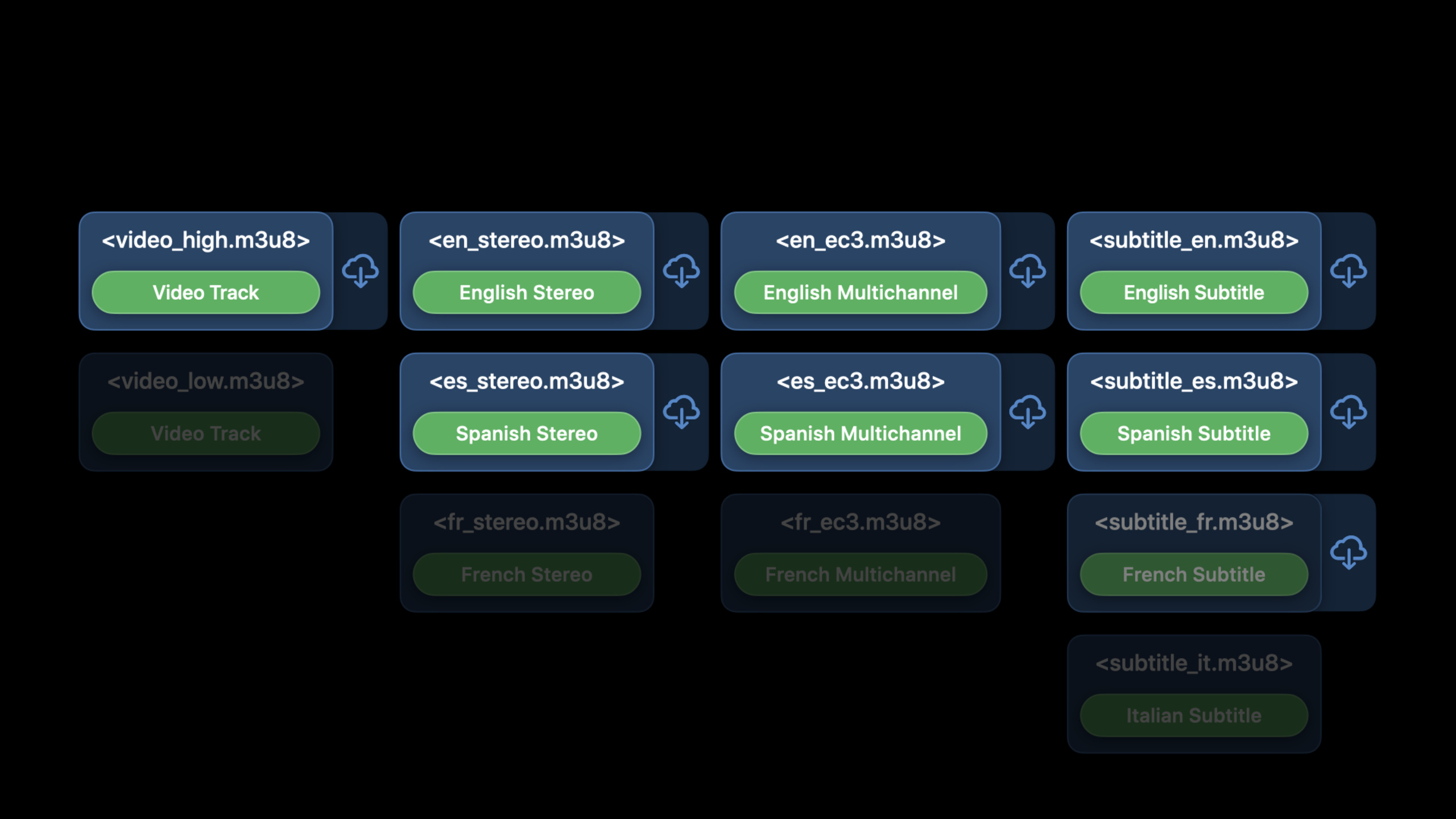
There are two download strategies.AVAssetDownloadTaskIdeal for downloading a set of video, audio and subtitle combinations, it automatically selects media selections by device region and localization preferences.AVAggregateAssetDownloadTaskIdeal for letting users explicitly select multiple sets of audio and subtitles, such as English audio tracks, Spanish audio tracks, and French subtitles to be saved together offline. The progress statistics also become complicated. The speech recommends dividing the video, audio, and subtitles according to weight and estimating them. In the example, the video accounts for about 70% of the download time.
Once downloaded, playback doesn’t have to reinvent a set of paths. While the download is still in progress, you can reuse the settings used when creating the task.AVAsset, allowing AVFoundation to share resources between playback and downloading. After the download is completed, if the original task object is no longer in the memory, use the saved file URL to recreate it.AVURLAsset。AVAssetCacheResponsible for answering whether the current asset can be played offline and which media selections can be played offline.
The key to protected content is the offline key. When playing online, the player can contact the key server on demand; when playing offline, the device may not have a network, so the App must pass theAVContentKeySessionGenerate and save offline key. The key server can set the expiration time. When the user deletes the download, the App should also actively invalidate the corresponding persistable content key.
iOS 14 updates focus on experience and governance. Download quality can be controlled by minimum bitrate, minimum display size, HDR preference and multi-channel audio preference. Storage management can be left toAVAssetDownloadStorageManager, allowing the system to clean up offline media according to expiration time and priority, and also allows users to delete these contents in the system settings.
Detailed Content
Create a single group of HLS download tasks
(02:52)AVAssetDownloadTaskDownload a set of video, audio and subtitle combinations. Before creating a task, create it with HLS URLAVURLAsset, then use backgroundURLSessionConfigurationcreateAVAssetDownloadURLSession. Pass in the exampleAVAssetDownloadTaskMinimumRequiredMediaBitrateKeyRequest a 2 Mbps download version.
let hlsAsset = AVURLAsset(url: assetURL)

let backgroundConfiguration = URLSessionConfiguration.background(
    withIdentifier: "assetDownloadConfigurationIdentifier")
let assetURLSession = AVAssetDownloadURLSession(configuration: backgroundConfiguration,
    assetDownloadDelegate: self, delegateQueue: OperationQueue.main())

// Download a Movie at 2 mbps
let assetDownloadTask = assetURLSession.makeAssetDownloadTask(asset: hlsAsset,
    assetTitle: "My Movie", assetArtworkData: myAssetArtwork,
    options: [AVAssetDownloadTaskMinimumRequiredMediaBitrateKey: 2000000])!
assetDownloadTask.resume()


// AVAssetDownloadTask uses automatic media selection
Key points:
AVURLAsset(url:)Point to the original HLS master playlist, downloading and playback are centered around this asset.- background configuration allows the download task to continue running after the app enters the background.
-
AVAssetDownloadURLSessionuseAVAssetDownloadDelegateCallback download status. -makeAssetDownloadTaskCreate a download task for a single media selection. -AVAssetDownloadTaskMinimumRequiredMediaBitrateKeyUsed to limit the minimum bitrate of the downloaded version. -AVAssetDownloadTaskWith automatic media selection, audio and subtitles are selected based on regional and localization preferences.
Monitor the progress of a single download task
(03:41) The download progress callback is expressed using the media time range, not the number of bytes. This way the progress is closer to the duration concept in the player interface. The completion status is passeddidCompleteWithErrornotify.
// Monitor AVAssetDownloadTask
public protocol AVAssetDownloadDelegate: URLSessionTaskDelegate {


	// Use to monitor progress
	func urlSession(_ session: URLSession, assetDownloadTask: AVAssetDownloadTask,
		didLoad timeRange: CMTimeRange, totalTimeRangesLoaded loadedTimeRanges: [NSValue],
		timeRangeExpectedToLoad: CMTimeRange)


	// Listen for completion
	func urlSession(_ session: URLSession, task: URLSessionTask,
		didCompleteWithError error: Error?)

}
Key points:
didLoad timeRangeCallback the media time range loaded this time. -loadedTimeRangesSummarizes the time range in which downloads have been completed. -timeRangeExpectedToLoadIs the total time range expected to load, suitable for calculating percentages. -didCompleteWithErrorIt not only indicates successful completion, but also carries an error message indicating that the download failed.
Allow users to select multiple sets of audio and subtitles
(04:55) If the user needs to download multi-language audio tracks or subtitles, first select the target option from the media selection group of the asset. Speech Example Write each choicemyMediaSelections, and then hand it over to aggregate download task.
let hlsAsset = AVURLAsset(url: assetURL)
let myMediaSelections = [] // audio media-selections followed by subtitle media-selections

guard hlsAsset.statusOfValue(forKey: "availableMediaCharacteristicsWithMediaSelectionOptions", error: nil)
   == AVKeyValueStatus.loaded else { return }

let mediaCharacteristic = //AVMediaCharacteristic.audible or AVMediaCharacteristic.legible
let mediaSelectionGroup = hlsAsset.mediaSelectionGroup(forMediaCharacteristic: mediaCharacteristic)
if let options = mediaSelectionGroup?.options {
    for option in options {
        // chose your media selection option
        if /* this is my option */ {
            let mutableMediaSelection = hlsAsset.preferredMediaSelection.mutableCopy()
            mutableMediaSelection.select(option, in: mediaSelectionGroup)
            myMediaSelections.append(mutableMediaSelection)
        }
    }
}
Key points:
availableMediaCharacteristicsWithMediaSelectionOptionsMust be loaded before optional audio and subtitles can be enumerated. -AVMediaCharacteristic.audibleCorresponding to audio,AVMediaCharacteristic.legibleCorresponding subtitles. -mediaSelectionGroup(forMediaCharacteristic:)Get an optional collection of the specified type. -mutableMediaSelection.selectWrite the user-selected option to a media selection. -myMediaSelectionsMultiple sets of download targets can be collected in order of audio and subtitles.
Create an aggregate download task
(05:11)AVAggregateAssetDownloadTaskUsed to download multiple media selections. it still usesAVAssetDownloadURLSession, the difference is that the media selections array is passed in when creating the task.
let hlsAsset = AVURLAsset(url: assetURL)
let myMediaSelections = ...

let backgroundConfiguration = URLSessionConfiguration.background(
    withIdentifier: "assetDownloadConfigurationIdentifier")
let assetURLSession = AVAssetDownloadURLSession(configuration: backgroundConfiguration,
    assetDownloadDelegate: self, delegateQueue: OperationQueue.main())

// Download a Movie at 2 mbps
let aggDownloadTask = assetURLSession.aggregateAssetDownloadTask(with: hlsAsset,
    mediaSelections: myMediaSelections,
    assetTitle: "My Movie",
    assetArtworkData: myAssetArtwork,
    options:[AVAssetDownloadTaskMinimumRequiredMediaBitrateKey: 2000000])!
aggDownloadTask.resume()
Key points:
aggregateAssetDownloadTaskBind the same HLS asset to multiple sets of media selections. -assetTitleandassetArtworkDataIt will be displayed to users when the system manages offline content.- Bitrate option still passes
AVAssetDownloadTaskMinimumRequiredMediaBitrateKeyincoming. - For multi-audio track and multi-subtitle downloads, the progress UI needs to be estimated separately by media selection.
Resume background download tasks
(07:04) The download task continues to run in the background. When the App is restarted, create a session with the same background configuration identifier, and then passgetAllTasksRetrieve existing tasks.
// Restore Tasks on App Launch
class MyAppDelegate: UIResponder, UIApplicationDelegate {
	func application(_ application: UIApplication,
			didFinishLaunchingWithOptions launchOptions: [UIApplication.LaunchOptionsKey: Any]?) -> Bool {
		let configuration = URLSessionConfiguration.background(withIdentifier:
			"assetDownloadConfigurationIdentifier")
		let session = URLSession(configuration: configuration)
		session.getAllTasks { tasks in
			for task in tasks {
				if let assetDownloadTask = task as? AVAssetDownloadTask {
					// restore progress indicators, state, etc...
				}
			}
		}
	}
}
Key points:
- The configuration identifier must be the same as when the download task was created.
-
getAllTasksWill return the tasks under the current session. - retrieve
AVAssetDownloadTaskAfterwards, the progress bar, status and task management interface can be restored. - transcript also mentioned that the original download task can be retrieved from
AVAssetKeep using it.
Determine which content can be played offline
(09:16) After the download is completed,AVAssetCacheTells the app whether the current asset can be played offline and which media selections are already available locally.
// What can I play offline?

public class AVURLAsset {

	public var assetCache: AVAssetCache? { get }

}

public class AVAssetCache {

	public var isPlayableOffline: Bool { get }

	public func mediaSelectionOptions(in mediaSelectionGroup: AVMediaSelectionGroup)
		-> [AVMediaSelectionOption]

}
Key points:
AVURLAsset.assetCacheIt is the entrance to the offline playable state. -isPlayableOfflineAnswer whether the entire asset can be played offline. -mediaSelectionOptions(in:)Returns the options in a media selection group that are available for offline playback.- This is suitable for driving interface states such as “Audio Track Downloaded” and “Subtitle Downloaded”.
Expired Offline FairPlay Key
(11:33) Offline HLS can continue to use FairPlay Streaming. App creates and saves the offline key during the download phase, and uses it to respond to key requests during offline playback. When the user deletes the download or needs to revoke the authorization in advance, useAVContentKeySessionInvalid corresponding key.
// Invalidate Offline Key

public class AVContentKeySession {

	func invalidatePersistableContentKey(_ persistableContentKeyData: Data,
		options: [AVContentKeySessionServerPlaybackContextOption : Any]? = nil,
		completionHandler handler: @escaping (Data?, Error?) -> Void)


	func invalidateAllPersistableContentKeys(forApp appIdentifier: Data,
		options: [AVContentKeySessionServerPlaybackContextOption : Any]? = nil,
		completionHandler handler: @escaping (Data?, Error?) -> Void)


}
Key points:
invalidatePersistableContentKeyUsed to invalidate a single saved offline key. -invalidateAllPersistableContentKeysYou can clear all keys according to the app ID corresponding to the FairPlay streaming application certificate.- Transcript Description The key server can set the offline key expiration time.
- If the key expires during a started playback, the current playback will continue to the end to avoid sudden stop in the middle.
Control offline download quality
(13:54) The faster the download, the lower the quality usually; the higher the quality, the more time and space it takes up. Session recommends providing users with two options: fast download and best quality, and then using download task options to constrain specific versions. iOS 14 adds display size and HDR preference controls.
// Quality Selection

public class AVAssetDownloadTask {

	public let AVAssetDownloadTaskMinimumRequiredMediaBitrateKey: String

	//Starting in iOS 14

	public let AVAssetDownloadTaskMinimumRequiredPresentationSizeKey: String

	public let AVAssetDownloadTaskPrefersHDRKey: String

}
Key points:
AVAssetDownloadTaskMinimumRequiredMediaBitrateKeyFilter downloaded versions with the lowest bit rate. -AVAssetDownloadTaskMinimumRequiredPresentationSizeKeyAvailable starting in iOS 14, constrain mass with display dimensions. -AVAssetDownloadTaskPrefersHDRKeyControls whether HDR presentation is preferred.- transcript Description The download task will prefer downloading available HDR presentations by default.
Leave offline content to system management
(15:51) Session It is recommended to let the operating system manage offline downloads. The system can reclaim space when storage is tight or during software updates, and users can delete media in system settings. App sets expiration time and priority through storage manager.
// AVAssetDownloadStorageManager
// Get the singleton
let storageManager = AVAssetDownloadStorageManager.shared()

// Create the policy
let newPolicy = AVMutableAssetDownloadStorageManagementPolicy()

newPolicy.expirationDate = myExpiryDate

newPolicy.priority = .important

// Set the policy
storageManager.setStorageManagementPolicy(newPolicy, forURL: myDownloadStorageURL)
Key points:
AVAssetDownloadStorageManager.shared()Get the download storage manager provided by the system. -AVMutableAssetDownloadStorageManagementPolicyDescribe the cleaning strategy for this content. -expirationDateParticipate in cleanup and judgment first,priorityThen decide on retention priority. -setStorageManagementPolicyApplies the policy to the system location where content is downloaded.- transcript Special reminder, please leave the downloaded content in the location provided by the system, and be prepared to deal with the state after the system deletes it.
Core Takeaways
-
Version selection page before offline download
- What to do: Provide “Quick Download” and “Best Quality” options on the video detail page, and display estimated audio track, subtitle, and quality selections.
- Why it’s worth doing: Session explicitly recommends giving users a choice between download time and quality, and download tasks also provide bitrate, display size, HDR and multi-channel preferences.
- How to start: Use
AVAssetDownloadTaskMinimumRequiredMediaBitrateKeyTo make a quick version, useAVAssetDownloadTaskMinimumRequiredPresentationSizeKeyandAVAssetDownloadTaskPrefersHDRKeyMake a high-quality version.
-
Multi-language offline package
- What: Let users select multiple audio tracks and subtitles before downloading, such as English audio, Spanish audio, and French subtitles.
- Why it’s worth doing:
AVAggregateAssetDownloadTaskYou can download multiple sets of media selections at one time to solve the problem of unclear automatic selection in a single task. - How to start: Read
AVMediaCharacteristic.audibleandAVMediaCharacteristic.legiblemedia selection group to assemble user options intomediaSelections。
-
Make download recovery center
- What: Resumes all background HLS download tasks after app launch, continuing to display progress, status, and errors.
- Why is it worth doing: The download task will continue to run in the background, and the same session identifier needs to be used to retrieve the task when restarting.
- How to start: Create a background session with the same identifier in app launch and call
getAllTasks,forAVAssetDownloadTaskRestore UI state.
-
Make offline authorization expiry reminder
- What to do: Display the expiration status of the FairPlay offline key in the offline video list, and refresh the expiring key in advance when connected to the Internet.
- Why is it worth doing: Transcript description The key server can set the offline key expiration time, and the App needs to create a new offline key before expiration.
- How to start: Record the authorization validity period when saving the offline key, and scan items that are about to expire when the App returns to the foreground or enters the download page.
-
Make system storage policy panel
- What to do: Set an expiration date and importance for offline videos, and prompt the user that the system may clean up the content when there is insufficient space.
- Why it’s worth doing:
AVAssetDownloadStorageManagerAllows the system to recycle offline media based on expiration time and priority, and also allows users to delete content in settings. - How to get started: Set for each download URL
AVMutableAssetDownloadStorageManagementPolicy, and useAVAssetCache.isPlayableOfflineReconfirm the local status.
Related Sessions
- Author fragmented MPEG-4 content with AVAssetWriter — Learn how to generate fragmented MPEG-4 content suitable for HLS output.
- Deliver a better HLS audio experience — Continue to learn about HLS audio encoding, bandwidth-constrained networks, and multichannel delivery.
- Improve stream authoring with HLS Tools — Use HLS tools to check the authoring quality of live and on-demand streams.
- What’s new in Low-Latency HLS — Understand the HLS protocol updates and low-latency playback links in the same year.
- Adapt ad insertion to Low-Latency HLS — Learn how ad insertion and content switching are handled in low-latency HLS.
Comments
GitHub Issues · utterances