
Highlight
iOS 14 introduces a new Photos picker (
PHPickerViewController), replacing the previousUIImagePickerControllerand manually request album permissions and then usePHAssetFiltering method.
Core Content
Many apps only want to complete a small task: change the avatar, attach a picture to a chat message, import a few photos into the editor. A common practice in the past was to request full photo gallery permissions and then usePhotoKitor oldUIImagePickerControllerBring in the photos. This scope of authority is too large. The user only clicks “Select Photos” once, but the App may gain access to the entire photo library.
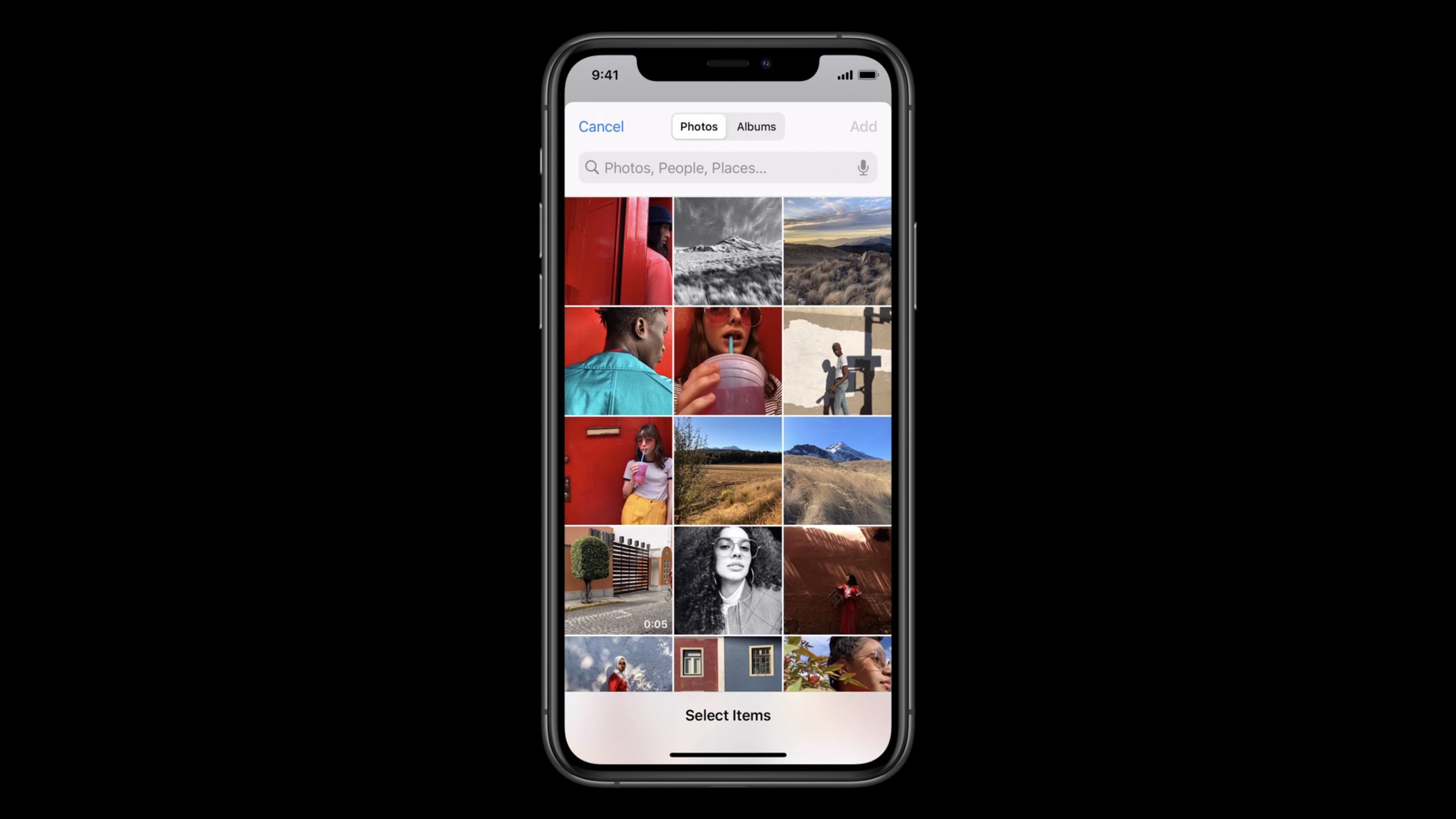
iOS 14PHPickerViewControllerChange this process to a system agent. Selectors are provided by the system and run in a separate process outside of the app. The app cannot see other content in the selector, nor can it intercept the selector interface; only the photos and videos selected by the user will be sent back to the app as results. (01:06)
This change also solves the experience problem of the old selector. The new Photos picker has the same grid, search, zoom, multi-select, and selected content preview as the system Photos app. Developers use configuration objects to limit the optional types and number of choices, and then receive the results through delegates. (00:24)
The boundaries given by Apple are clear. Most apps that only require photo or video data do not need to be used directlyPhotoKit. Only necessary operations such as non-destructive image editing and photo library organizationPHAssetApps should request photo library permissions and handle iOS 14’s Limited Photos Library. (10:15)
Detailed Content
Configure selection range and number of multiple selections
(02:27)PHPickerConfigurationIt’s the entrance. It controls two key decisions: the maximum number of items the user can select, and which media types can appear in the selector.
import PhotosUI

var configuration = PHPickerConfiguration()

// “unlimited” selection by specifying 0, default is 1
configuration.selectionLimit = 0

// Only show images (including Live Photos)
configuration.filter = .images
// Uncomment next line for other example: Only show videos or Live Photos (for their video complement), but no images
// configuration.filter = .any(of: [.videos, .livePhotos])
Key points:
import PhotosUIIntroduce the frame where the Photos picker is located. -PHPickerConfiguration()Create a variable configuration object, and the subsequent selection number and filter conditions are written here. -selectionLimitDefault is 1; set to 0 for unlimited multiple selection. -.imagesPictures are displayed, including Live Photos. -.any(of: [.videos, .livePhotos])is another filter example from the official snippet, used to display the video portion of videos and Live Photos.
Render picker and receive results
(03:07) After the configuration is completed, use it to initializePHPickerViewController. The app itself is responsible for presenting and closing the picker; after the user confirms, the delegate will get[PHPickerResult]。
import UIKit
import PhotosUI

class SingleSelectionPickerViewController: UIViewController, PHPickerViewControllerDelegate {
    @IBAction func presentPicker(_ sender: Any) {
        var configuration = PHPickerConfiguration()
        // Only wants images
        configuration.filter = .images

        let picker = PHPickerViewController(configuration: configuration)
        picker.delegate = self

        // The client is responsible for presentation and dismissal
        present(picker, animated: true)
    }

    func picker(_ picker: PHPickerViewController, didFinishPicking results: [PHPickerResult]) {
        // The client is responsible for presentation and dismissal
        picker.dismiss(animated: true)

        // Get the first item provider from the results, the configuration only allowed one image to be selected
        let itemProvider = results.first?.itemProvider

        if let itemProvider = itemProvider, itemProvider.canLoadObject(ofClass: UIImage.self) {
            itemProvider.loadObject(ofClass: UIImage.self) { (image, error) in
                // TODO: Do something with the image or handle the error
            }
        } else {
            // TODO: Handle empty results or item provider not being able load UIImage
        }
    }
}
Key points:
- The controller needs to comply with
PHPickerViewControllerDelegate, otherwise the user selection result will not be received. -PHPickerViewController(configuration:)Turn the previous configuration into the system selector interface. -picker.delegate = selfSpecifies that the current controller receives the selection completion callback. -didFinishPickingofresultsMay be empty; this occurs when the user deselects. -PHPickerResultpassitemProviderProvide data representation, use it before loadingcanLoadObject(ofClass:)Check type. -loadObject(ofClass:)It is an asynchronous API. Errors must be handled in the callback and UI updates must be switched back to the main thread.
Load images on demand when multiple selections are made
(07:34) Multiple selection does not require loading all images into memory at once. The demo app only saves the returnedNSItemProvider, and then use the iterator to load the next image on demand.
import UIKit
import PhotosUI

class ViewController: UIViewController {

    @IBOutlet weak var imageView: UIImageView!

    var itemProviders: [NSItemProvider] = []
    var iterator: IndexingIterator<[NSItemProvider]>?

    @IBAction func presentPicker(_ sender: Any) {
        var configuration = PHPickerConfiguration()
        configuration.filter = .images
        configuration.selectionLimit = 0

        let picker = PHPickerViewController(configuration: configuration)
        picker.delegate = self
        present(picker, animated: true)
    }

    func displayNextImage() {
        if let itemProvider = iterator?.next(), itemProvider.canLoadObject(ofClass: UIImage.self) {
            let previousImage = imageView.image
            itemProvider.loadObject(ofClass: UIImage.self) { [weak self] image, error in
                DispatchQueue.main.async {
                    guard let self = self, let image = image as? UIImage, self.imageView.image == previousImage else { return }
                    self.imageView.image = image
                }
            }
        }
    }

    override func touchesEnded(_ touches: Set<UITouch>, with event: UIEvent?) {
        displayNextImage()
    }

}

extension ViewController: PHPickerViewControllerDelegate {

    func picker(_ picker: PHPickerViewController, didFinishPicking results: [PHPickerResult]) {
        dismiss(animated: true)

        itemProviders = results.map(\.itemProvider)
        iterator = itemProviders.makeIterator()
        displayNextImage()
    }

}
Key points:
selectionLimit = 0When unlimited multi-selection is turned on, picker will display an interface and Add button suitable for multi-selection. -itemProvidersOnly save data provider references, do not decode all images in advance. -iteratorRecord the current display progress,displayNextImage()Only the next item is processed at a time. -previousImageandguardUsed to prevent asynchronous callbacks from overwriting changedimageView。touchesEndedUsed in the demo to switch to the next image, a real app can apply the same logic to buttons, pagination, or thumbnail lists. -results.map(\.itemProvider)Convert all selection results into subsequently loadable data sources.
Connect back to PhotoKit when PHAsset is needed
(11:13) A few apps need to continue to be usedPhotoKit, such as non-destructive editing or photo library organization. Can be used at this timePHPhotoLibraryInitialize the configuration and read it in the resultassetIdentifier, then use the standardPhotoKit API fetch PHAsset。
import UIKit
import PhotosUI

class PhotoKitPickerViewController: UIViewController, PHPickerViewControllerDelegate {
    @IBAction func presentPicker(_ sender: Any) {
        let photoLibrary = PHPhotoLibrary.shared()
        let configuration = PHPickerConfiguration(photoLibrary: photoLibrary)
        let picker = PHPickerViewController(configuration: configuration)
        picker.delegate = self
        present(picker, animated: true)
    }

    func picker(_ picker: PHPickerViewController, didFinishPicking results: [PHPickerResult]) {
        picker.dismiss(animated: true)

        let identifiers = results.compactMap(\.assetIdentifier)
        let fetchResult = PHAsset.fetchAssets(withLocalIdentifiers: identifiers, options: nil)

        // TODO: Do something with the fetch result if you have Photos Library access
    }
}
Key points:
PHPhotoLibrary.shared()Get the current photo library object and configure the object using it andPhotoKitAlignment. -PHPickerConfiguration(photoLibrary:)It’s a needPHAssetThe initialization method used for identifiers. -results.compactMap(\.assetIdentifier)Filter out results without local asset identifiers. -PHAsset.fetchAssets(withLocalIdentifiers:options:)Convert identifier toPHAssetQuery results.- The comment emphasizes the permission prerequisite: only apps that already have Photos Library access can perform subsequent processing on the fetch results.
- Limited Photos Library will not automatically expand as the user selects more photos in the picker
PHAssetAccessible scope; when additional authorization is required, a dedicated limited library management process must be used.
Core Takeaways
- What to do: Change avatar upload to one-time Photos picker
Why it’s worth doing: You only need one picture to upload an avatar, you shouldn’t ask for full photo library permission first.PHPickerViewControllerYou can allow the user to directly select a picture, and the App will only get the result of this selection.
How to get started: CreatePHPickerConfiguration(),set upconfiguration.filter = .images, keep the defaultselectionLimit = 1,existdidFinishPickingpassitemProvider.loadObject(ofClass: UIImage.self)Read the picture.
- What to do: Add multiple image insertions to chat or note-taking apps
Why it’s worth doing: The session shows the picker’s multi-selection, selection preview and Add button, allowing users to select a group of pictures at one time.
How to start: Putconfiguration.selectionLimitSet to 0 or the quantity allowed by the product; save in callbackresults.map(\.itemProvider), loaded one by one in message sending order or insertion order.
- What to do: Create a low-privilege import entry for the image editor
Why it’s worth it: Many editors only require the image data currently selected by the user, without browsing the entire photo library. returned by pickerNSItemProviderAlready able to loadUIImage。
How to start: Use firstPHPickerViewControllerDo a default import; if an advanced function really wants to trackPHAsset, and then request photo library access at the function entrance.
- What to do: Make a PhotoKit fork for a photo library organization app
Why it’s worth doing: Apps such as organizing photo albums and non-destructive editing are neededPHAssetand photo gallery access status. session gives the result taken from pickerassetIdentifierfetch againPHAssetpath.
How to start: UsePHPickerConfiguration(photoLibrary:)Initialize selector; collect in callbackassetIdentifier;Detect if user has granted Photos Library access; needs to be expandedPHAssetWhen accessing the scope, access the additional authorization process mentioned in session.
Related Sessions
- Handle the Limited Photos Library in your app — Explains the Limited Photos Library in iOS 14, and when PhotoKit apps should switch to PHPicker.
- Build trust through better privacy — Explaining iOS 14’s privacy design from the perspective of permissions, transparency, and user control.
- Build with iOS pickers, menus and actions — Introducing the new picker, menu and action controls in UIKit, suitable for understanding together with the system photo selection entrance.
- Design with iOS pickers, menus and actions — Explain from a design perspective what interaction scenarios pickers, menus and actions should be placed in.
Comments
GitHub Issues · utterances