
Highlight
iOS 14 for
NSPersistentCloudKitContainerOptionsIncreasedatabaseScope, allowing the Core Data store to sync to a CloudKit public database and handle the read and write boundaries of the public dataset with permission queries, polled imports, and soft delete strategies.
Core Content
2019NSPersistentCloudKitContainerThe Core Data store has been synchronized to the CloudKit private database. This model is suitable for users’ own data: the account must exist, the data only belongs to the current user, and CloudKit push notification can bring changes back to the local in time. (00:38)
The need for public database comes from another type of App. The developer wants to preset a set of application templates that all users can read, and also wants users to contribute shared data. The game’s high score list is the most direct example in the speech: high scores need to be read, sorted and queried locally by all players, and archives and character configurations should still remain in private databases. (05:14)
The changes in iOS 14 are small, but affect the entire data link. You can point a Core Data store to a public database to keep a complete local image on the device, while placing private data in another store. In this way, the UI still reads Core Data, the local fetch, sort, and order paths remain unchanged, and CloudKit is responsible for bringing in public data. (02:28, 05:58)
The trade-off is that public databases have more complex semantics. Users who are not logged in to iCloud can also read the public database. Only logged in users can create records. Modification and deletion depend on the record owner, store type and CloudKit zone capabilities. The focus of Session is to clear these boundaries and avoid moving the synchronization assumptions of the private database directly to the public database. (06:48)
Detailed Content
Configure public database store (02:28)
The minimal change in the presentation was to set the store description in the existing Core Data stackcloudKitContainerOptions, againNSPersistentCloudKitContainerOptions.databaseScopeset topublic. The complete sequence is: createNSPersistentStoreDescription, retain history tracking and remote change notifications, createNSPersistentCloudKitContainerOptions,set updatabaseScope, put the options back into the store description, and finally let the container load these stores.
Key points:
databaseScopeIt is a new API introduced in this session, used to select public database or private database. -NSPersistentCloudKitContainerOptionsTellNSPersistentCloudKitContainerThis store needs to be connected to CloudKit.- The public store is still loaded through the ordinary Core Data store description, and there is no need to change the UI layer to direct access.
CKDatabase. - If the App has both public data and private data, they can be put into different stores and managed by the same Core Data stack.
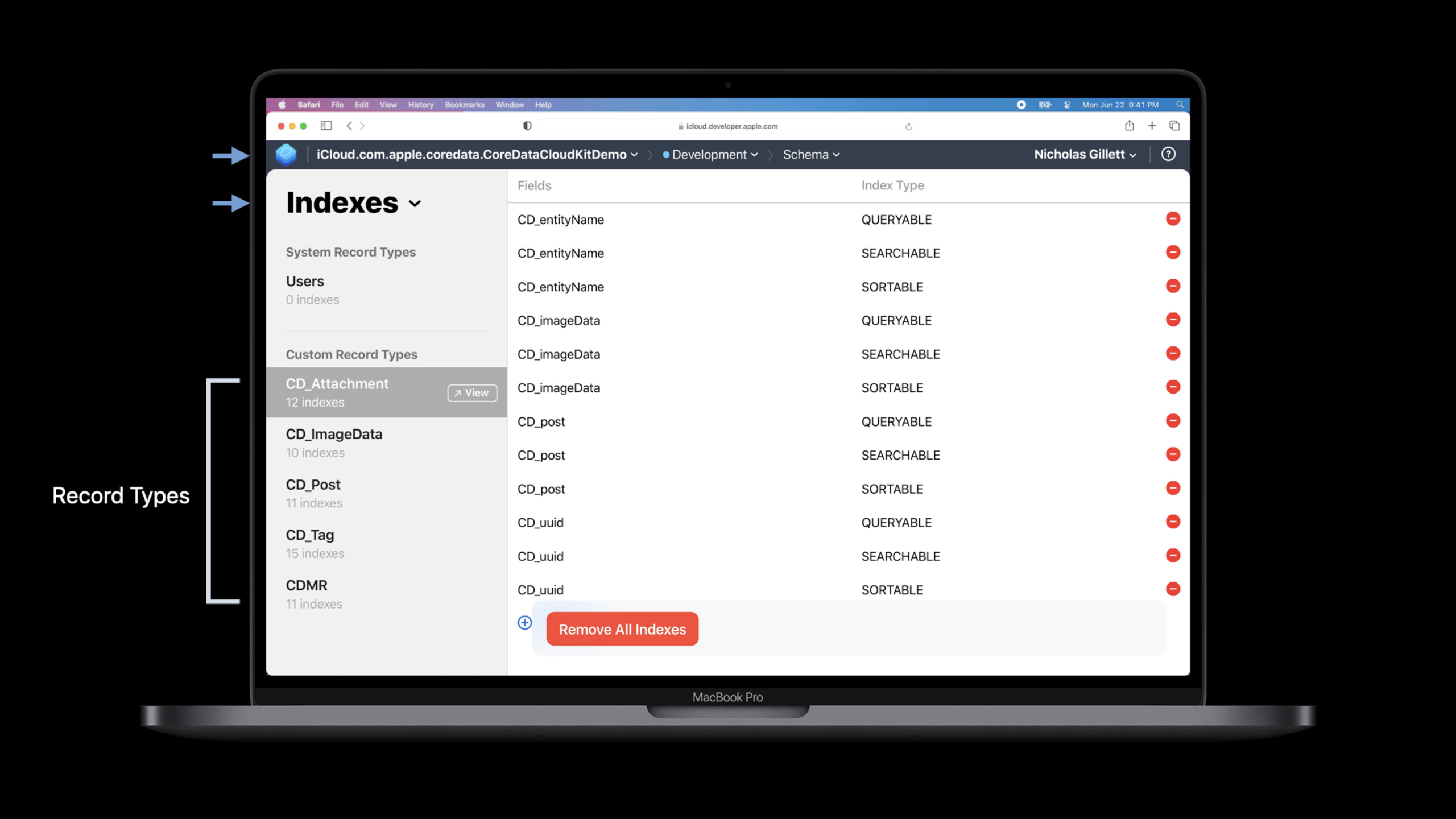
Add index in CloudKit Dashboard (03:30)
set updatabaseScopeFinally, you need to configure the CloudKit schema. The import method of public database depends on query, and each record type in Dashboard needs to berecordNameandmodifiedAtIncrease index. The example in the lecture has five record types, so this step needs to be repeated five times.
Key points:
- These indexes are used to support
NSPersistentCloudKitContainerInitiate a query against the public database. - If you cannot see the complete record type in the Dashboard, you need to do schema initialization first.
- The public database will form a complete local image on the device, so local queries can continue to go through Core Data.
- Each record type must be configured. Missing a type will affect the import of records of that type.
Control creation, modification and interface editing status (06:48)
The rules of private database are simple: iCloud cannot operate without logging in. After logging in, users have all their own data. Public database allows non-logged-in users to read data; creating records requires logging in; modifying records requires determining whether the current user has the right to modify this object. In the past, you could first request the current account from CloudKit, and thenNSPersistentCloudKitContainerTake out the record behind the managed object and compare it with the creator UserID, but this path is not suitable for every UI control.
Key points:
canUpdateRecord(forManagedObjectWithID:)Use a managed object ID to determine whether the current object is updateable.- This judgment will consider the current device account, the persistent store where the object is located, whether the store is supported by CloudKit, and account switching and other boundary conditions.
-
canModifyObjects(in:)It is suitable for more coarse-grained UIs such as list pages, and is used to determine whether an object in a store can be modified. - The edit button, new button, and detail page edit control should use these judgment results instead of just looking at whether the app is logged in to iCloud.
Understand the import rhythm of public database (10:08)
Private database can rely on push notification. After receiving the CloudKit push,NSPersistentCloudKitContainercreateCKFetchRecordsZoneChangesOperation, pull changed records back to the local store. public database cannot use this path, it must useCKQueryOperationQuery each record type, so posts, tags, attachments, images, many-to-many relationships will initiate requests separately.
Key points:
- public database uses polling instead of waiting for push notification.
-
NSPersistentCloudKitContainerIt will only be polled when the app is launched, or again after approximately 30 minutes of app use. - The freshness of a public database will be different from that of a private database. It cannot be assumed that every change in the cloud will immediately appear locally.
- The simpler the management object model, the fewer query requests required by the public database; public data entities should be restricted to specialized Core Data configurations.
Handle deletion semantics of public data with soft delete (13:35)
CloudKit leaves a tombstone behind when deleting a record from a private database. Subsequent imports can be made throughCKFetchRecordsZoneChangesOperationSee tombstone and delete local objects on other devices. When querying the public database, no queryable tombstone will be left after the record is deleted. Other devices that have downloaded the object may never receive the deletion event.
Key points:
canDeleteRecord(forManagedObjectWithID:)It can be judged whether the deletion of this object can be propagated according to the current store semantics.- return
falseAt that time, the speech suggested that “remove from the interface” and “delete from the public database” should be handled separately. - The example approach is to put the object’s
isTrashedset totrue, and then let the fetch request use predicate to filter the trashed records. - If you need to reclaim space, you can clear the fields that are no longer needed in the trash records; wait until you confirm that users have processed this update, and then clean up the records in the public database.
Core Takeaways
Shared template library
What to do: Provide a set of template libraries for creative apps that can be read by all users, and users’ own drafts continue to be saved in private databases.
Why it’s worth doing: The session clearly mentions that application templates and initial data set are typical requirements for public databases, and the device can also retain local images.
How to start: Put the template-related entities into the Core Data configuration of the public store and setdatabaseScopeforpublic, add to each record type in CloudKit DashboardrecordNameandmodifiedAtindex.
Ranking data contributed by the community
What to do: Record user-contributed high scores, level scores, or challenge results, and let all users sort and filter by score locally.
Why it’s worth doing: The talk considers high scores table as the most common request. The reason is that users need local fast fetch, sort and order, and also need to contribute records to a shared data set.
How to start: Only put the ranking entries into the public store; put the archive, role configuration and user preferences into the private store; add a new button based on the iCloud login status, and edit the control withcanUpdateRecord(forManagedObjectWithID:)judge.
Public label directory that can be taken offline
What to do: Maintain a set of public tags, categories, or curated collections for content apps. Administrators can remove expired items from the interface.
Why it’s worth doing: Deleting a public database will not propagate tombstones to downloaded devices. Direct delete may cause different results to be seen on different devices.
How to start: Add to public entityisTrashedfield; whencanDeleteRecord(forManagedObjectWithID:)returnfalseupdated whenisTrashed; List fetch request to filter trashed records.
Public repositories with clear refresh expectations
What to do: Make an offline-first public database, such as sample data, reference items or selected content, available after startup, and the refresh rate does not require seconds.
Why it’s worth doing:NSPersistentCloudKitContainerThe public database will be polled after startup and about 30 minutes of use, which is suitable for data that does not require high freshness.
How to start: Keep the public data model small and clear, and only put the entities that need to be synchronized to the public database into the corresponding configuration; the interface copy avoids promising real-time updates.
Related Sessions
- Core Data: Sundries and maxims — A deep dive into Core Data’s batch writes, persistent history, fetch clipping, and store change notifications.
- Data Essentials in SwiftUI — Understand how SwiftUI views rely on data sources and are suitable as complements to the Core Data UI layer.
- Synchronize health data with HealthKit — Compare HealthKit’s sync identifier, anchored query, and multi-device data consistency.
- The Push Notifications primer — Understand the push mechanism in background notification and private database import paths.
- Tap into Game Center: Leaderboards, Achievements, and Multiplayer — If the shared data target is the game high score list, you can compare Game Center’s system-level ranking scheme.
Comments
GitHub Issues · utterances