
Highlight
Swift AWS Lambda Runtime allows developers to write AWS Lambda functions in Swift, debug them with a local runtime simulator in Xcode, and package them for deployment to AWS Lambda through the Amazon Linux 2 Swift toolchain.
Core Content
Many Apple platform apps have a piece of server-side logic. The client is responsible for the interface and device capabilities, and the server is responsible for accessing data that is not on the device, processing background tasks, or undertaking more computationally intensive work. The problem is that the two ends often use different languages, different tool chains, and different debugging methods, and the team will also be divided into two sets of rhythms: client and server.
Serverless function reduces this matter to an event handling function. AWS Lambda receives events and allocates computing resources on demand, eliminating the need for developers to maintain dedicated servers when idle. The judgment given in the speech is straightforward: computing resource usage will affect system costs, and Swift’s low resource footprint and development friendliness are suitable for such short, event-driven tasks.
The solution Apple presented was the Swift AWS Lambda Runtime. Developers write an executable product in Swift Package, introduce the runtime library, and then useLambda.runRegister processing logic. The minimal version has only one closure; the performance-sensitive version can be connected to NIOEventLoop;Common JSON payload can be handed over directly toCodabletype.
What really changes the development experience is local debugging. The demo of the talk puts Lambda and iOS app in the same Xcode workspace. Developers set Lambda targetLOCAL_LAMBDA_SERVER_ENABLED=true, the runtime will start an HTTP server that simulates the AWS Lambda runtime engine on the local machine and listen tolocalhost:7000The invoke endpoint. Xcode manages the two processes of iOS app and Lambda at the same time. Breakpoints can be hit from the client request all the way to the Lambda processing function, and then back to the client response processing.
The deployment process hasn’t left Swift either. The sample script creates a Docker image based on the Swift.org Amazon Linux 2 image, compiles the Lambda executable in the container, zips the executable file and dependencies into the zip required by AWS Lambda, and then uploads and notifies the new code version through the AWS CLI. After going online, the AWS Lambda runtime engine is responsible for pulling work, calling user functions, and submitting results; API Gateway, S3, SQS, SNS, or custom events can all become trigger entries.
Detailed Content
Use closure to write minimal Lambda
(02:02) Minimum API fromAWSLambdaRuntimestart.Lambda.runReceives a closure, which gets the context, event payload and completion handler. The runtime library manages the program life cycle and is responsible for interacting with the underlying platform.
import AWSLambdaRuntime

Lambda.run { (_, name: String, callback) in
    callback(.success("Hello, \(name)!"))
}
Key points:
import AWSLambdaRuntimeIntroducing the Swift AWS Lambda Runtime library. -Lambda.runRegister the Lambda processing entry, and the runtime will call it when the event payload is available.- The first parameter is context, which is not used in this minimal example, so it is written as
_。 name: StringIs the event payload, the example takes it as a string input. -callback(.success(...))After the work is completed, the results are returned to the runtime.
Use EventLoop to handle performance-sensitive scenarios
(02:33) The second API is protocol-oriented, oriented to performance-sensitive use cases. It exposes NIO EventLoop, allowing Lambda processing functions and networking processing stacks to share the same thread, thereby reducing context switches. The price is that the handler cannot block the event loop.
import AWSLambdaRuntime
import NIO

struct Handler: EventLoopLambdaHandler {
    typealias In = String
    typealias Out = String

    func handle(context: Lambda.Context, event: String) -> EventLoopFuture<String> {
       context.eventLoop.makeSucceededFuture("Hello, \(event)!")
    }
}

Lambda.run(Handler())
Key points:
EventLoopLambdaHandlerIt is the handler protocol for EventLoop. -typealias Inandtypealias OutDeclare input and output types, here they areString。handle(context:event:)returnEventLoopFuture<String>, the results are handed over to NIO’s asynchronous model. -context.eventLoop.makeSucceededFuture(...)Successfully creates a future on the current event loop. -Lambda.run(Handler())Give the structure handler to the runtime for execution.
Use Codable to process JSON payload
(02:59) The speech then replaces the string payload with a request / response structure. Lambda payload is usually based on JSON, SwiftCodableSerialization between JSON and Swift types can be done.
import AWSLambdaRuntime

struct Request: Codable {
    let name: String
    let password: String
}

struct Response: Codable {
    let message: String
}

Lambda.run { (_, request: Request, callback) in
    callback(.success(Response(message: "Hello, \(request.name)!")))
}
Key points:
RequestRepresents input events. The demo in the lecture uses it to carry the registration form.nameandpassword。ResponseRepresents the JSON result returned by Lambda to the client.- Both types follow
Codable, the runtime can convert JSON payload into Swift type, and then convert the Swift result back to JSON. - Closure parameters
request: RequestLet the handler function directly face the business type. -Response(message: ...)is the return value, which the completion handler hands back to the runtime.
Debugging clients and Lambdas in Xcode
(04:22) The Xcode demo of the speech uses a workspace to hold two projects: a Lambda package manager project and an iOS app. If the Lambda target is run directly, an error will be reported because there is no real AWS Lambda runtime engine locally. The solution is to edit scheme and changeLOCAL_LAMBDA_SERVER_ENABLEDset totrue。
(05:09) After running again, the local server will listenlocalhost:7000, and receive events at the invoke endpoint. iOS app viaURLSessionSend a registration request to this address. Xcode manages two processes simultaneously: the iOS app and the Lambda function. In the lecture, breakpoints were hit in three places: constructing the request, entering the Lambda function, and processing the response. LLDB was also used to check the return value.
(07:08) This debugging mode is only for local use. For a deployed Lambda to be accessible to clients via HTTP, the endpoint needs to be exposed through AWS API Gateway. The focus of the demo is on the development phase: client and cloud functions can be strung together in the same Xcode debugging session.
Package and deploy to AWS Lambda
(07:53) Deploying the demo uses a script that wraps the AWS CLI. The script first creates a Docker image based on the Swift.org Amazon Linux 2 image, and then compiles the Lambda function in the container. It then zips the executable and dependencies, which is the package format that AWS Lambda expects, and finally uploads the zip and notifies the new code version.
(09:33) This deployment capability relies on two basic components. First, Swift.org began releasing the Swift toolchain for Amazon Linux 2 in May 2020, which can be used for AWS compute services such as EC2 and AWS Lambda. Second, the Swift Lambda runtime library implements the AWS Lambda runtime API, providing a multi-layer API from simple closures to performance-sensitive event handlers.
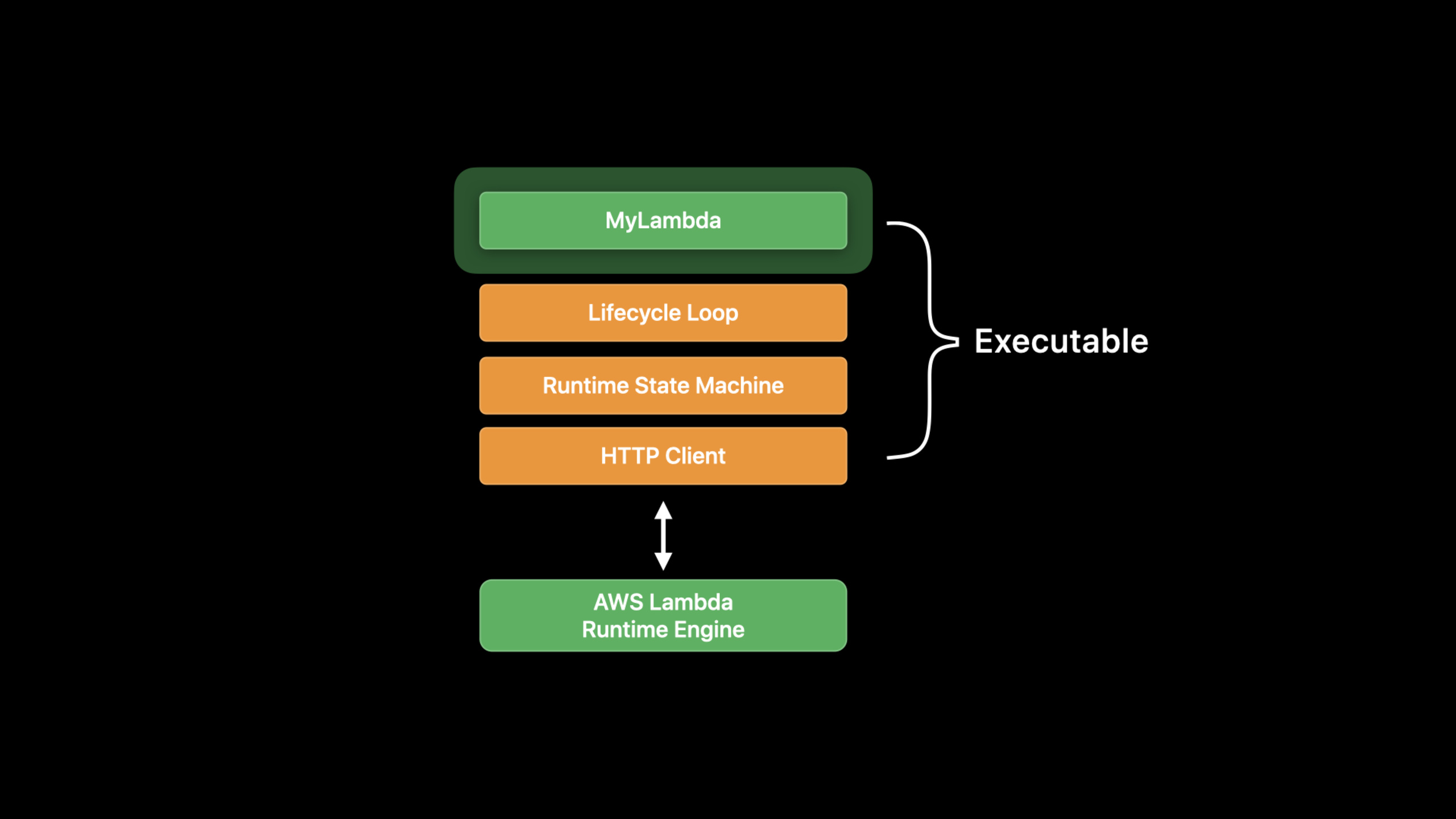
(10:14) The runtime library contains Lifecycle Loop and state machine, which is responsible for pulling work from the runtime engine queue, handing the work to the user function, and then submitting the results back to the runtime engine. It also embeds an asynchronous HTTP client tuned for the AWS Lambda runtime context. The compiled program links user code, runtime library and Swift dependencies into executable, which can be linked statically or dynamically according to requirements.
(11:15) AWS Lambda can run multiple copies of a serverless function on demand, so the function should remain stateless. The speech specifically reminds you to avoid global mutable state and avoid holding memory longer than needed. Trigger entries can come from S3, SQS, SNS, HTTP endpoints exposed through API Gateway, or custom events added by users.
Core Takeaways
-
Make a registration backend written in Swift: Submit the iOS registration form to Swift Lambda, enter
Request: Codable, for outputResponse: Codable. Why it’s worth doing: The talk fully demonstrates the use of iOS appsURLSessionTune local Lambda and debug with breakpoints across two processes in Xcode. How to start: Use local firstLOCAL_LAMBDA_SERVER_ENABLED=trueTune throughlocalhost:7000, and then expose the HTTP endpoint through API Gateway when it goes online. -
Move heavy calculation tasks from the client to Swift Lambda: Handle background tasks or calculation tasks on the device that are not suitable for immediate execution to the serverless function. Why it’s worth doing: Transcript clearly places the value of the server component on accessing cloud data, background tasks, and computing-intensive tasks. Swift’s low resource footprint is also suitable for on-demand computing. How to start: Use closure-based
Lambda.runMake the first version, confirm the payload and return value, and then use Amazon Linux 2 Docker image to package and deploy. -
Build an event-driven cloud processing pipeline: let S3, SQS, SNS or custom events trigger Swift Lambda. Why it’s worth doing: The runtime library provides extensible integration points, and the talk lists these AWS event sources. How to start: First define the event payload
Codabletype, and then select closure API orEventLoopLambdaHandler。 -
Make a set of local debugging templates for client and Lambda: Put the iOS app and Lambda package into the same Xcode workspace, and preset the scheme environment variables and breakpoint locations. Why it’s worth doing: The speech proves that Xcode can manage both client and Lambda executable targets at the same time, making debugging requests and responses more straightforward. How to start: Copy the demo structure: Lambda executable product depends on Swift AWS Lambda Runtime, the client uses
URLSessionCall the local invoke endpoint.
Related Sessions
- What’s new in Swift — Swift 2020 Overview includes Swift on AWS Lambda and complements runtime performance, development experience, and package ecosystem changes.
- Swift packages: Resources and localization — The Lambda example is built on the Swift Package executable product, which complements the way Swift packages are organized.
- Explore Packages and Projects with Xcode Playgrounds — Continue to see how Xcode supports exploratory development in projects, frameworks, and Swift packages.
- Become a Simulator expert — The debugging process of this Session runs the iOS app in the Simulator, which complements the Simulator and simctl workflow.
Comments
GitHub Issues · utterances