
Highlight
Apple explains the performance tuning path for Metal on Apple silicon Macs: reducing rendering pass dependencies and bandwidth, using tile shaders to retain on-chip data, and rewriting shaders according to Apple shader core features.
Core Content
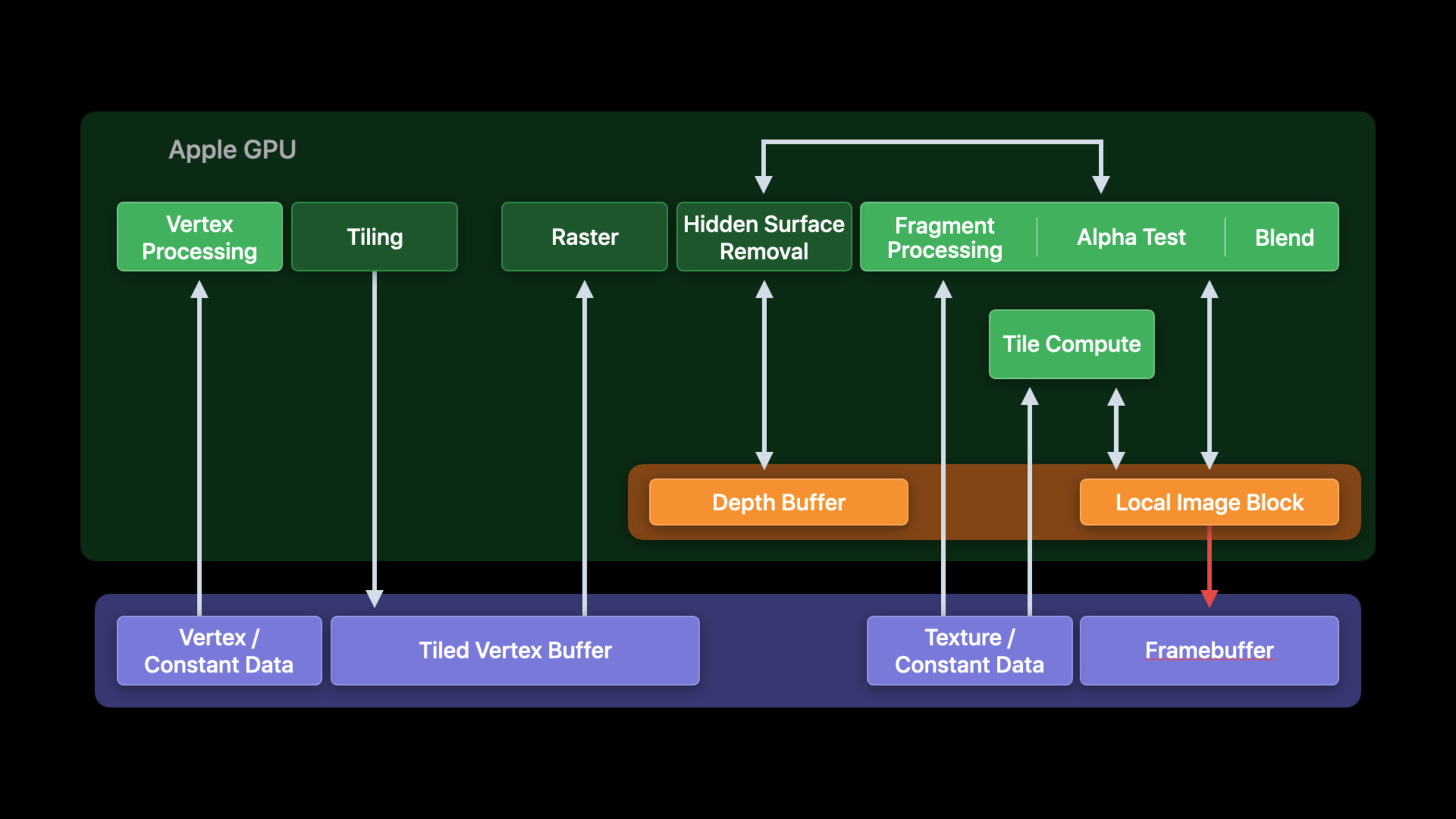
Many Mac graphics apps already have mature renderers. They’ve been running on Intel or AMD GPUs for years, and common optimizations revolve around Immediate Mode Rendering. After migrating to Apple silicon Mac, the App can be run through Rosetta first and then recompiled to the native version, but this only solves the “running” problem. What really affects frame rate and power consumption is whether the renderer understands the Apple GPU’s Tile-Based Deferred Rendering (TBDR, tile-based deferred rendering) architecture.
The key change in TBDR is tile memory (on-chip tile memory). Apple GPU will first process the vertices of a render pass, divide the geometry into screen tiles, and then complete the fragment work of each tile on the chip. The load action and store action determine how attachments are moved in and out of tile memory. In the past, the practice of splitting into multiple passes, frequently clearing, and frequently saving intermediate results will directly put pressure on the system memory bandwidth.
The narrative of this session is very clear: first find the holes in the GPU timeline, then reduce the load/store caused by the render pass, then use hidden surface removal to reduce ineffective shading, and finally change the deferred shading, light culling, and shader data types to shapes suitable for Apple GPUs.
For developers, the focus is not on API name replacement. The more practical work is to rearrange the workload, merge renderings that originally belong to the same logical pass, and select intermediate attachments.memoryless, and then use Metal System Trace, GPU frame debugger and pipeline statistics to verify the results.
Detailed Content
1. Let vertex, fragment, and compute overlap as much as possible
(04:17) Apple GPUs have independent hardware channels to handle vertex, fragment and compute work. Metal automatically overlaps them when there are no data dependencies. Performance problems often occur in false dependencies that “appear to be shared resources but have nothing to do with the actual data”.
(06:05) If the resource written by Render Pass 0 is read by the vertex stage of Render Pass 1, Metal will establish dependencies at the resource level. Even if two passes use different areas of the same resource, the scheduler has no way of knowing that the data is irrelevant. There are two types of solutions: split the data into different resources; or set the resources to untracked, and then let the developer use Metal fence or event to insert the necessary synchronization.
(07:23) Another low-cost method is pass re-ordering. Independent compute or render passes should be encoded as early as possible to fill the timeline holes with them. Metal sometimes rearranges independent passes, but the information it can see is limited and explicit rearrangement is more reliable.
The executable boundary here is: if adjacent passes share the same Metal resource, but read and write unrelated data, they will be split into different resources first. When it cannot be split, mark the resource as untracked so that Metal no longer relies on the entire resource to establish dependencies; then the application uses Metal fence or event to insert the synchronization that is really needed.
Key points:
- false dependency comes from resource-level tracking, not a miswritten API.
- Splitting the resource is the most direct fix, because Metal can automatically see that the two passes are not related.
- untracked resource will remove automatic dependencies, and developers must only use fence or event where real data depends.
- Pass re-ordering should be placed after resource dependency fixes, filling timeline holes with independent compute/render passes.
2. Use parallel render command encoder to merge logically identical passes
(09:08) Apple GPU render pass attachments are handled in tile storage. Each load and store of an attachment consumes system memory bandwidth. A common problem is to split different parts of the same G-Buffer into multiple command buffers for CPU multi-thread encoding. The GPU sees multiple render passes, so it repeatedly loads/stores the same batch of attachments.
(10:49) Metal’s parallel render command encoder solves this scenario: the CPU can still encode in multiple threads, and the GPU side is still a render pass.
// Encoding with parallel render commands

let parallelDescriptor = MTLRenderPassDescriptor()
// … setup render pass as usual …

let parallelEncoder = commandBuffer.makeParallelRenderCommandEncoder(descriptor:parallelDescriptor)

let subEncoder0 = parallelEncoder.makeRenderCommandEncoder()
let subEncoder1 = parallelEncoder.makeRenderCommandEncoder()

let syncPoint = DispatchGroup()
DispatchQueue.global(qos: .userInteractive).async(group: syncPoint) {
    /* … encode with subEncoder0 … */ }
DispatchQueue.global(qos: .userInteractive).async(group: syncPoint) {
    /* … encode with subEncoder1 … */ }

syncPoint.wait()
parallelEncoder.end()
Key points:
MTLRenderPassDescriptor()Use the same attachment configuration as the normal render pass, and all sub-encoders share this configuration. -makeParallelRenderCommandEncoderCreate a parallel encoder, and Metal will synthesize the sub-encoders into a single render pass for execution. -makeRenderCommandEncoder()The creation order determines the execution order of sub-encoder commands, so create them in the expected order first.- two
DispatchQueue.globalThe block distributes encoding to different worker threads, preserving CPU parallelism. -syncPoint.wait()Ensure that all subtasks are completed before callingparallelEncoder.end(), otherwise the parallel encoder has not yet completed the command stream.
3. Reduce attachment ping-pong and redundant stores
(12:12) Another bandwidth trap is to tear down the pass just because the load/store action changes. For example, the forward renderer draws opaque first, and then draws translucent. If the attachment collection is the same, the two draws can be combined in the same pass, and the color is only stored once at the end. If the depth attachment is no longer used outside of pass, the store action should be set to.dontCare, the texture can also be set to.memoryless。
(13:29) Attachment ping-pong is more subtle. For example, each light first generates a screen-space attenuation texture and then composites it into the main scene. One pass for each light will cause the main scene attachment to be loaded/stored repeatedly. Metal supports up to 8 color attachments per pass, and you can put the main scene and attenuation into the same pass.
// Multiple render target setup

let textureDescriptor = MTLTextureDescriptor.texture2DDescriptor(…)
let lightingTexture = device.makeTexture(descriptor: textureDescriptor)

textureDescriptor.storageMode = .memoryless
let attenuationTexture = device.makeTexture(descriptor: textureDescriptor)

let renderPassDesc = MTLRenderPassDescriptor()
renderPassDesc.colorAttachments[0].texture      = lightingTexture
renderPassDesc.colorAttachments[0].loadAction   = .clear
renderPassDesc.colorAttachments[0].storeAction  = .store
renderPassDesc.colorAttachments[1].texture      = attenuationTexture
renderPassDesc.colorAttachments[1].loadAction   = .clear
renderPassDesc.colorAttachments[1].storeAction  = .dontCare

let renderPass = commandBuffer.makeRenderCommandEncoder(descriptor: renderPassDesc);
Key points:
lightingTextureIt is the main scene output and is still needed after the pass ends, sostoreActionyes.store。textureDescriptor.storageMode = .memorylessUsed on intermediate attenuation textures to avoid allocating system memory backing for data used only within the pass. -colorAttachments[0]andcolorAttachments[1]Also appears in a render pass descriptor, eliminating ping-pong. -attenuationTextureofstoreActionyes.dontCare, since it is not read outside pass. -makeRenderCommandEncoderUse this descriptor to start a single pass to reduce intermediate load/store.
(15:17) Screen clearing should also be folded into the render pass that really requires it. A separate clear pass is only used to clear attachments, which will generate additional memory traffic. MSAA resolve is similar. Sample data is usually only useful within a pass and should be resolved within the previous pass. Multi-sampled attachment can be set to memoryless.
4. Let hidden surface removal do less invalid fragment work
(17:09) Apple GPU’s hidden surface removal (HSR, hidden surface removal) goal is to shade only visible pixels. The draw order will affect efficiency: first opaque, then feedback, and finally translucent. Opaque draw’s internal order is usually determined by the material system; feedback and translucent need to care about their own order.
(19:01) When fragment function writes buffer or non-render pass texture, Metal will execute these fragments by default to ensure memory write determinism. If the writing of the blocked fragment is not meaningful to the result, you can add the early fragment test attribute to the fragment function so that the fragment that fails the depth test will no longer be executed.
(19:47) Write mask also reduces HSR efficiency. The reserved channels need to be generated from the underlying fragment, causing additional shading.
let descriptor = MTLRenderPipelineDescriptor();
// ...
descriptor.colorAttachments[0].writeMask = .red | .green;
Key points:
MTLRenderPipelineDescriptorControls the pipeline’s color attachment behavior. -writeMask = .red | .greenIndicates that the fragment function only updates the red and green channels.- Blue and alpha channels are to retain old values, Apple GPU may require shade underlapping fragment to get these values.
- If you really need to write a mask, you can use it; if only the shader misses a certain attachment, you should fill in all attachments instead.
(21:15) An attachment is often accidentally missed during the G-Buffer generation phase. The fix given by session is to write values to all render pass attachments, even if a certain stage only needs to be initialized to 0.
struct FragInput { ... };
struct FragOutput { float3 albedo; float3 normals; float3 lighting; };

fragment FragOutput GenerateGbuffer(
                         FragInput in [[stage_in]]) {
    FragOutput out;
    out.albedo = sampleAlbedo(in);
    out.normals = interpolateNormals(in);
    out.lighting = float3(0, 0, 0);
    return out;
}
Key points:
FragOutputExplicitly list the three outputs of albedo, normals, and lighting, and align them with the G-Buffer attachment. -sampleAlbedo(in)Write material color. -interpolateNormals(in)Write normals. -out.lighting = float3(0, 0, 0)Actively initialize the lighting attachment to avoid write mask behavior due to unwritten. -return outReturn the complete output at once, making it easier for HSR to handle opaque fragments.
5. Use tile shader to keep deferred shading on the chip
(23:22) Deferred shading usually generates G-Buffer first, and then reads G-Buffer to calculate lighting. The traditional two-pass writing method will write albedo, normal, roughness and other attachments to the system memory, and then read them back immediately. A better way on Apple GPU is to use programmable blending and memoryless render target to keep the G-Buffer data in tile memory.
(28:29) When the renderer mixes render and compute, such as tile-based light culling, the ordinary compute encoder will split the process into multiple passes. Apple GPUs support tile-based compute dispatch starting with A11 Bionic. The Tile shader can be executed per tile within the render command encoder, reading imageblock, threadgroup memory and device memory.
(30:19) The following render pass descriptor sets G-Buffer to memoryless and.dontCareStore, only store the final lighting texture.
let renderPassDesc = MTLRenderPassDescriptor()

renderPassDesc.tileWidth = 32
renderPassDesc.tileHeight = 32

renderPassDesc.threadgroupMemoryLength = MemoryLayout<LightInfo>.size * 8

renderPassDesc.colorAttachments[0].texture      = albedoMemorylessTexture
renderPassDesc.colorAttachments[0].loadAction   = .clear
renderPassDesc.colorAttachments[0].storeAction  = .dontCare
renderPassDesc.colorAttachments[1].texture      = normalsMemorylessTexture
renderPassDesc.colorAttachments[1].loadAction   = .clear
renderPassDesc.colorAttachments[1].storeAction  = .dontCare
renderPassDesc.colorAttachments[2].texture      = roughnessMemorylessTexture
renderPassDesc.colorAttachments[2].loadAction   = .clear
renderPassDesc.colorAttachments[2].storeAction  = .dontCare
renderPassDesc.colorAttachments[3].texture      = lightingTexture
renderPassDesc.colorAttachments[3].loadAction   = .clear
renderPassDesc.colorAttachments[3].storeAction  = .store
Key points:
tileWidthandtileHeightDefine the on-chip tile size, the example uses 32×32, and align it with the light culling scheme. -threadgroupMemoryLengthAllocate threadgroup memory to each tile’s light list, the example is 8LightInfocalculate.- The three attachments albedo, normals, and roughness use memoryless textures and are not written back to the system memory at the end of the pass.
- these intermediate attachments
storeActionAll.dontCare, because subsequent stages consume them within the same render pass. -lightingTextureis the final output, so itsstoreActionyes.store。
(32:20) Tile shader can also rearrange imageblock layout. The example converts the imageblock from deferred shading to the layout required by multi-layer alpha blending, and saves the lighting and depth into the new structure.
// Transitioning from deferred rendering to multi-layer alpha blending layout
struct DeferredShadingFragment {
    rgba8unorm<half4> albedo;
    rg11b10f<half3>   normal;
    float             depth;
    rgb9e5<half3>     lighting;
};
struct MultiLayerAlphaBlendFragments {
    half4 color_and_transmittence[3];
    float depth[3];
};
struct FragmentOutput {
    MultiLayerAlphaBlendFragments v [[imageblock_data]];
};
fragment FragmentOutput my_tile_shader(DeferredShadingFragment input [[imageblock_data]]) {
    FragmentOutput output;
    output.v.color_and_transmittence[0] = half4(input.lighting, 0.0h);
    output.v.depth[0]                   = input.depth;
    return output;
}
Key points:
DeferredShadingFragmentDescribes the old imageblock layout, including albedo, normal, depth, and lighting. -MultiLayerAlphaBlendFragmentsDescribe the new layout and prepare color/transmittence and depth arrays for multi-layer transparency blending. -[[imageblock_data]]Mark data input and output in tile memory. -my_tile_shaderRead lighting and depth from the old layout and write to layer 0 of the new layout. -0.0hUse half literal, consistent with the 16-bit recommendation in the shader core chapter later.
6. Rewrite shader data access according to Apple shader core
(34:11) The address space of Metal Shading Language will affect performance.deviceSuitable for reading and writing, a large amount of data, the size is not fixed, and each thread accesses different elements.constantSuitable for data that is read-only, has limited size, and is read repeatedly by multiple threads in the same draw or dispatch.
(36:03) To make it easier for the compiler to preload the constant buffer into the uniform register, the constants should be organized into a single struct, throughconstantaddress space is passed by reference; the array size is best known at compile time. The focus of this section is on data organization, not new shader entry.
Key points:
deviceAddress space is suitable for data whose size is not fixed and each thread reads different elements. -constantAddress space is suitable for data that is read-only, has a limited size, and is read repeatedly by multiple threads.- When the constant array size is known at compile time, it is easier for the compiler to preload data into the uniform register.
- Constant data is passed in as a single struct by reference, which is more consistent with this optimization goal than reading a dynamic array from device address space.
(37:43) Apple GPUs are better optimized for 16-bit types. Can be usedhalfandshortdo not use the defaultfloatandint. The 16-bit type reduces register pressure, improves shader core occupancy, and often results in better ALU utilization.
(40:04) There are three memory access issues that are easily overlooked: avoid stack-allocated arrays with dynamic indexes; try to use signed type for memory indexes, so that the compiler does not have to retain unsigned wrapping semantics; fields that are read together in the structure should be as adjacent as possible, or directly changed to vector type to help the compiler merge loads.
Core Takeaways
1. Make a render pass bandwidth audit panel
- What to do: List the number of render passes per frame, load/store action of each attachment, and memoryless usage in the engine debugging menu.
- Why is it worth doing: Session defines load/store traffic as the main bandwidth source on Apple GPU. Splitting pass, independent clear, and MSAA sample store will amplify the cost.
- How to start: Collect attachment configuration from frame graph or render pass descriptor, put
.store、.load, non-memoryless intermediate texture highlighting, and then use Metal System Trace to verify.
2. Add single-pass Apple GPU path to G-Buffer pipeline
- What to do: Add an Apple GPU-specific path to the deferred renderer, and put G-Buffer, light culling and lighting into one render pass as much as possible.
- Why it’s worth doing: Programmable blending, memoryless render target and tile shader can keep the intermediate G-Buffer in tile memory, reducing system memory reads and writes.
- How to start: First change albedo, normal, and roughness to memoryless attachment, then use tile shader to build a per-tile light list in the render command encoder, and only store the final lighting texture.
3. Make an HSR-friendly draw sort checker
- What to do: Mark opaque, feedback, translucent draw in the renderer’s debug build and check if they are submitted in this order.
- Why it’s worth doing: Apple GPU’s hidden surface removal can save the shading of obscured fragments; wrong order, unintentional write mask, and fragment resource write will reduce efficiency.
- How to start: Record the status of blending, discard, depth output, write mask, etc. in material or pipeline metadata. When it is found that the attachment is missing in the opaque stage, it will prompt zero padding output.
4. Add shader address space and 16-bit type lint
- What to do: Add static check for Metal shader, the prompt can be changed to
constantThe read-only data can be changed tohalf/shortThe local calculation of , lack ofhhalf literal of suffix. - Why it’s worth it: session points out that constant preload, 16-bit ALU, and lower register pressure impact Apple shader core performance.
- How to start: First scan the buffer parameters, array size, float literal and unsigned loop index in the shader, output the candidate points as warnings, and then use the GPU frame debugger to view pipeline statistics.
5. Compare Rosetta to native performance for ported Mac games
- What to do: Record the GPU timeline and bandwidth metrics of Rosetta, native unoptimized, and native Apple GPU optimized in the same scene.
- Why is it worth doing: The beginning of the session explains that Rosetta and consistency features will bring performance costs. After native compilation, the pass and shader still need to be adjusted for TBDR.
- How to start: Capture Metal System Trace with a fixed camera path, apply pass merge, memoryless, HSR sorting and shader type optimization one by one, retaining each step of data.
Related Sessions
- Bring your Metal app to Apple silicon Macs — First understand the TBDR architecture, storage mode and migration differences of Apple GPU, and then enter this field of performance optimization.
- Harness Apple GPUs with Metal — From a more general perspective, talk about the cooperation of Apple GPUs with Metal rendering technology.
- Optimize Metal apps and games with GPU counters — Use GPU counters to quantify the workload overlap, bandwidth, and shader core issues mentioned in this session.
- Gain insights into your Metal app with Xcode 12 — Use Xcode’s Metal debugger and performance tools to locate graphics issues.
- Build GPU binaries with Metal — Optimize shader compilation and GPU binary distribution, and complete the delivery link after performance optimization.
Comments
GitHub Issues · utterances