
Highlight
Apple has added Binary Archives, Dynamic Libraries, and a new offline tool chain to Metal, allowing developers to collect, serialize, and distribute GPU binaries with apps, reducing backend compilation costs when creating Pipeline State Objects for the first time.
Core Content
When a large Metal game is started for the first time, a large number of Pipeline State Objects (PSOs) are often created. This can reduce hitch during the game, but it will concentrate the cost on the loading screen. Even if the shader has been compiled offline into AIR (Apple Intermediate Representation, intermediate representation), the device still generates machine code that is executable by the current GPU when creating each PSO.
The system-level Metal Shader Cache can speed up subsequent operations. Developers still have to wait for back-end compilation when the first installation, cold start after device restart, or the cache has not been filled. Sharing utility shader code has a similar problem: multiple compute pipelines may repeatedly compile the same batch of functions and store duplicate machine code in memory.
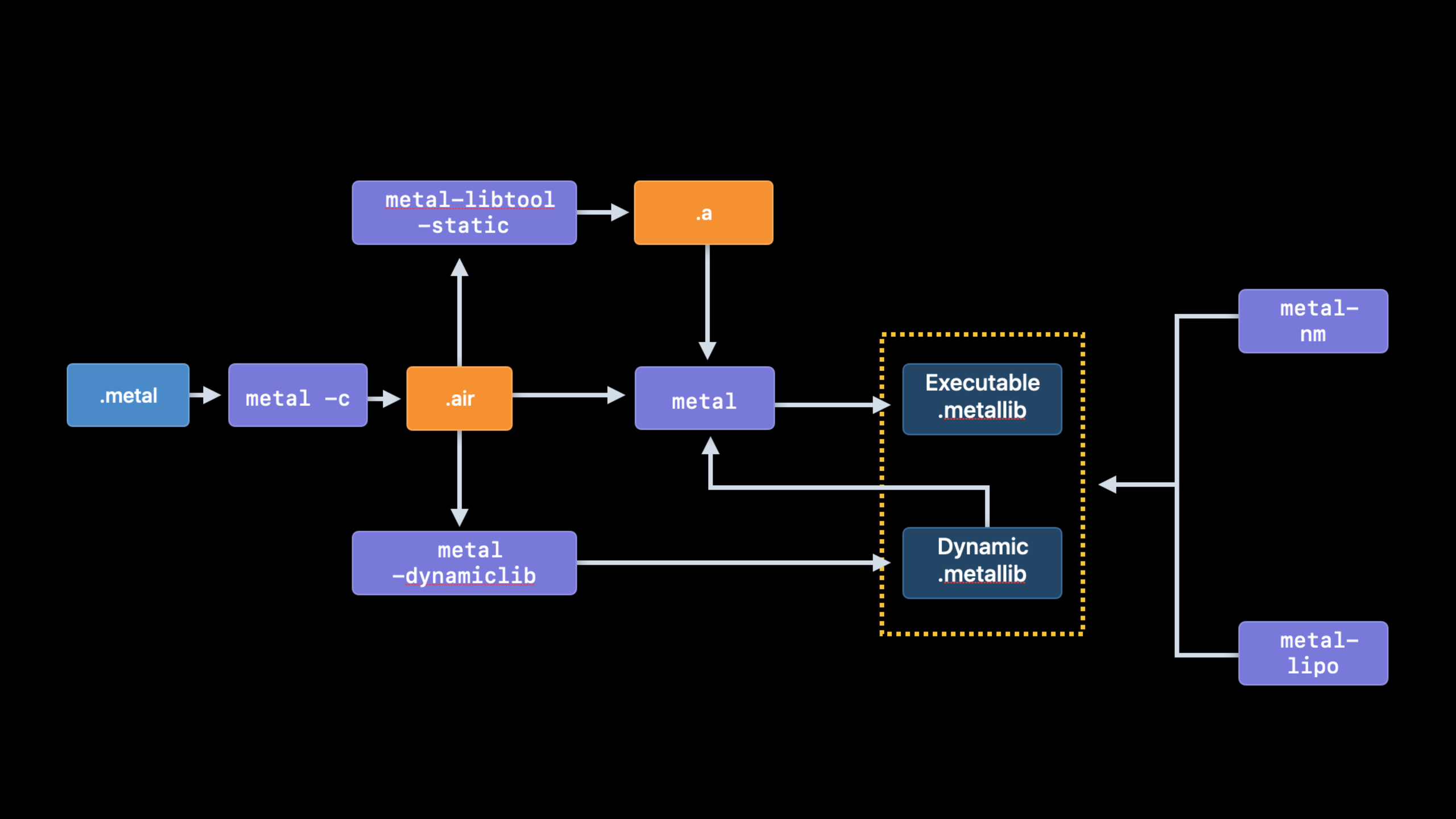
This session breaks the problem into three workflows. Metal Binary Archives let applications explicitly collect, save, and distribute pipeline compilation results. Metal Dynamic Libraries allow compute utility functions to be reused in the form of dynamic libraries. Metal Developer Tools puts AIR, static library, dynamic library, symbol inspection and binary slice management into the command line, and also supports the Windows build environment.
Detailed Content
Binary Archives: Explicitly manage pipeline cache
(03:03) Binary Archives give applications the ability to directly control pipeline caching. Developers can collect compiled pipeline functions into archives, group them by levels, scenes or commonly used pipelines, then harvest them from the device and distribute them to compatible devices with the same GPU and system version. When the device is incompatible, Metal will fall back to runtime compilation.
Create empty archive fromMTLBinaryArchiveDescriptorstart.
let descriptor = MTLBinaryArchiveDescriptor()
descriptor.url = nil
let binaryArchive = try device.makeBinaryArchive(descriptor:descriptor)
Key points:
MTLBinaryArchiveDescriptorDecide whether to create a new archive or load an existing archive from disk. -descriptor.url = nilIndicates creating a new empty archive. -device.makeBinaryArchivefrom currentMTLDeviceCreate an archive, and the binaries collected later will be related to GPU compatibility.
(06:47) The archive will not automatically collect all pipelines. The application needs to add the descriptor it cares about, and then Metal will perform back-end compilation and put the machine code into the archive.
// Render pipelines
try binaryArchive.addRenderPipelineFunctions(with: renderPipelineDescriptor)

// Compute pipelines
try binaryArchive.addComputePipelineFunctions(with: computePipelineDescriptor)

// Tile render pipelines
try binaryArchive.addTileRenderPipelineFunctions(with: tileRenderPipelineDescriptor)
Key points:
addRenderPipelineFunctionsCollect render pipeline functions. -addComputePipelineFunctionsCollect functions for the compute pipeline. -addTileRenderPipelineFunctionsCollect functions for the tile render pipeline.- When descriptor is added, backend compilation will be triggered, and the goal is to write machine code into the archive.
(06:56) When using archive, hook it to the pipeline descriptorbinaryArchiveson the array. Metal searches in array order. Once hit, PSO creation can skip backend compilation and not write to the system shader cache.
// Reusing compiled functions to build a pipeline state object from a file

let renderPipelineDescriptor = MTLRenderPipelineDescriptor()
// ...
renderPipelineDescriptor.binaryArchives = [ binaryArchive ]

let renderPipeline = try device.makeRenderPipelineState(descriptor:
                                                          renderPipelineDescriptor)
Key points:
binaryArchivesDeclare which archives to search when creating the pipeline.- Array order is search order.
-
makeRenderPipelineStateIt’s still the call site that creates the render PSO, but the function binary may come directly from the archive.
(07:15) After the collection is completed, the application serializes the archive to a writable location. Session also reminds that archive files will be memory-mapped into the process; releasing archives that are no longer used can free up virtual address space.
let documentsURL = FileManager.default.urls(for: .documentDirectory, in: .userDomainMask).first!
let archiveURL = documentsURL.appendingPathComponent("binaryArchive.metallib")

try binaryArchive.serialize(to: NSURL.fileURL(withPath: archiveURL))
Key points:
serializeWrite the collected archive into.metallibdocument.- This file can be reused on next launches or distributed as a GPU binary asset.
- Save commonly used pipelines and sub-level pipelines in groups, which helps to release unused cache in time.
(07:26) The next time you start, the descriptorurlPoint to an existing file and Metal will load the archive and immediately use it for subsequent pipeline creation.
let documentsURL = FileManager.default.urls(for: .documentDirectory, in: .userDomainMask).first!
let serializeURL = documentsURL.appendingPathComponent("binaryArchive.metallib")

let descriptor = MTLBinaryArchiveDescriptor()
descriptor.url = NSURL.fileURL(withPath: serializeURL)
let binaryArchive = try device.makeBinaryArchive(descriptor: descriptor)
Key points:
descriptor.urlWhen pointing to an existing archive, the call loads the binary on disk.- The loaded archive can be put into the pipeline descriptor
binaryArchives. - If you want to debug whether the archive is complete, you can use transcript mentioned
failOnBinaryArchiveMiss, allowing nil to be returned directly on miss.
(10:35) Apple did this with Epic Games’ Fortnite workload. This workload has over 11,000 PSOs. After presetting an archive that collected 1,700 PSO function variants, the pipeline build time dropped from 1 minute and 26 seconds to 3 seconds, which is approximately 28 times faster.
Dynamic Libraries: Reuse compute utility machine code
(13:52)MTLDynamicLibraryFor shared compute utility code. In the old model, when multiple pipelines relied on the same batch of utility functions, backend compilation and machine code storage may occur repeatedly. The dynamic library makes these functions into a linkable, loadable, and serializable machine code collection.
When creating a dynamic library at runtime, first useMTLCompileOptionsSpecify the dynamic library type and install name, and thenMTLLibrarygenerateMTLDynamicLibrary。
let options = MTLCompileOptions();
options.libraryType = .dynamic;
options.installName = "@executable_path/myDynamicLibrary.metallib"
let utilityLib = try device.makeLibrary(source: dylibSrc, options: options)
let utilityDylib = try device.makeDynamicLibrary(library: utilityLib)
Key points:
libraryType = .dynamicIndicates that this library will be used as a dynamic library. -installNameIt is the name of the dynamic library that the linker looks for when the pipeline is created. -makeDynamicLibraryCompile the Metal code backend into machine code; session says that you only need to do this compilation when creating a dynamic library.
(17:59) The kernel that relies on dynamic libraries passes during compilationMTLCompileOptions.librariesDeclare dependencies. The compilation phase checks that there is at least one matching function signature, and the actual binding implementation occurs when the pipeline is created.
let options = MTLCompileOptions()
options.libraries = [ utilityDylib ]
let library = try device.makeLibrary(source: kernelStr, options: options)
Key points:
options.librariesTell Metal which dynamic libraries this kernel will link to.- Compilation is checked for missing symbols and will fail if there is no matching signature.
- The specific implementation is selected when the pipeline is created, so the dynamic library can support alternative compute behavior.
(19:37) session also introducedinsertLibraries. it is similar toDYLD_INSERT_LIBRARIES: When creating a compute pipeline, the linker will first search for the inserted library, and then search for the originally linked library. This capability allows middleware to expose hooks and allows users to provide customized kernel behaviors without having to rebuild the location where the entry function is located.MTLLibrary。
(20:36) Dynamic libraries can be serialized and distributed with the App. The serialization results include precompiled binaries and generic AIR. When the target device cannot use precompiled slices, Metal will be recompiled from AIR; this compilation result will not enter the Metal Shader Cache, so the session is recommended to be serialized again and loaded next time.
Metal Developer Tools: Break down shader builds into automatable steps
(23:55) Ravi demonstrates the new Metal Developer Tools. The tool chain draws on the CPU to build the model:metalCompile source files into AIR,metal-libtoolCreate a static library, linker can generate executable or dynamic MetalLib. Static linking will copy the utility code into each executable MetalLib, making deployment simple but may increase the size of the bundle.
(26:05) The command line entry of the dynamic library is linker-dynamicliband-install_name。install_nameWill be written into the load command, which is used by the loader to locate the dynamic library at runtime. Metal support@loader_pathand@executable_path, the former resolves to the MetalLib path containing the load command, and the latter resolves to the executable MetalLib path containing the entry function.
(29:53) Dynamic linking also requires developers to manage symbol visibility. By default, Metal exports all symbols in the library. When two dynamic libraries inadvertently export functions with the same name, the loader may be bound to an unexpected implementation at runtime. session is recommendedmetal-nmCheck the export symbols and usestatic, anonymous namespace, visibility attributes, namespace andexported-symbols-listControl interface boundaries.
(31:02)metal-lipoUsed to view and merge harvested MetalLib slices. In the session example, the MetalLib harvested from the A13 device contains the A13 backend compilation slice and the general AIR slice. A13 devices can skip backend compilation, while other devices can still fall back from AIR. Merging A12, A13 and other slices can improve the startup experience of more devices, but will increase the App bundle size.
(34:40) Finally, Metal Developer Tools on Windows allow developers to build MetalLib for Apple platforms in macOS, Windows, or a hybrid environment. For gaming and graphics teams with existing Windows asset farms, this means shader builds can plug into existing infrastructure.
Core Takeaways
-
What to do: Create a first-build pipeline asset package for large-scale games. Why it’s worth doing: Binary Archives can distribute the back-end compilation results of key PSOs with the app, and the pipeline build time of the Fortnite workload in the session has been reduced from 1 minute and 26 seconds to 3 seconds. How to start: Run the scene covering the main menu, character selection and core levels on the build device, call
addRenderPipelineFunctions、addComputePipelineFunctionsCollect archives, serialize them and put them into bundles. -
What to do: Split the reused compute post-processing functions into Metal dynamic libraries. Why it’s worth doing:
MTLDynamicLibraryMultiple compute pipelines can share the same utility machine code, reducing repeated backend compilation and repeated storage. How to start: Set up stable function signatures for utility shaders, create.dynamiclibrary andinstallName, and then passed during kernel compilationMTLCompileOptions.librariesDeclare dependencies. -
What to do: Make replaceable filter hooks for image processing apps. Why it’s worth doing:
insertLibrariesYou can let the pipeline creation phase search the inserted dynamic library first, and the session sample uses it to change the pixel color function of full-screen post-processing. How to start: Define the function interface exported by both the default dynamic library and the replacement dynamic library, and insert the corresponding library according to the user’s choice when creating the compute pipeline. -
What to do: Incorporate shader builds into CI audits. Why it’s worth doing:
metal-libtool、metal-nm、metal-lipoCovering library construction, symbol checking and slice management respectively, suitable for settling into a repeatable release process. How to start: CI first generates AIR, then builds static or dynamic MetalLib, then checks the exported symbols and GPU slice manifest in the release package.
Related Sessions
- Harness Apple GPUs with Metal — Understanding the TBDR, Tile Memory and bandwidth model of Apple GPUs can help determine which pipelines are worth compiling in advance.
- Optimize Metal apps and games with GPU counters — Use GPU counters to find the Metal workloads that are really slowing down frames or loading.
- Gain insights into your Metal app with Xcode 12 — Continue to learn about Metal capture, debugger, and performance insights tools in Xcode 12.
- Debug GPU-side errors in Metal — Use Xcode to locate GPU-side errors after introducing a more complex shader build process.
- Get to know Metal function pointers — Function pointers and dynamic libraries are both part of Metal 2020’s shader extensibility updates.
Comments
GitHub Issues · utterances