
Highlight
Apple provides Delta Updates and the new 2020 DATERANGE skip capability for HLS live playlists, allowing clients to download only recent changes when reloading large DVR windows, reducing playlist bandwidth and improving playback stability.
Core Content
The live broadcast player has a very simple action: repeatedly request the media playlist to confirm whether there are new segments. When the window is small, this is inexpensive. The window becomes a long game, a large DVR replay area, and the playlist will become longer and longer; even using gzip, re-pulling the complete file every time will consume time and bandwidth.
This cost will in turn affect the playback quality. When the network is poor, playlist reload itself takes up the throughput, and the player may switch to a variant with a lower bit rate. What users actually experience is that the image quality is degraded, live broadcasting is slowed down, and advertising or event metadata cannot keep up.
Playlist Delta Updates solves the reloading method. The client first gets the complete playlist, and then carries the HLS skip delivery directive with subsequent requests. The server returns a delta playlist containing only new changes and a#EXT-X-SKIPLabel. The client merges delta with the local old playlist to get the current complete playlist on the server.
What’s new in WWDC20 is#EXT-X-DATERANGE. Many live broadcasts will write advertisements, events, chapters or timing information into DATERANGE; segments can be skipped, but the metadata is still large. The 2020 expansion lets servers declareCAN-SKIP-DATERANGES=YES, for client_HLS_skip=v2Request, reuse in deltaRECENTLY-REMOVED-DATERANGESTells the client which old DATERANGE has been deleted.
Detailed Content
1. Let the server declare that it can skip the old segment first.
(01:11) Delta Updates is an optional capability. The server must be in#EXT-X-SERVER-CONTROLStatement hereCAN-SKIP-UNTIL. This value is skip limit, which indicates how old content in the playlist can be skipped by delta update. session explicitly says it is at least six target duration.
# media playlist advertises delta support
#EXT-X-SERVER-CONTROL:CAN-SKIP-UNTIL=36

# transcript example:
# target duration: 6 seconds
# skip limit: 36 seconds
# visible window starts at segment 0 and ends at segment 20
Key points:
CAN-SKIP-UNTIL=36Corresponds to six target durations and meets the minimum requirements given by the session.- This statement is placed in the server control tag. The client will try to request delta update after seeing it.
- skip limit indicates how old content in the playlist can be skipped by delta update.
- The example of transcript is from segment 0 to segment 20, which is used to illustrate that the client has obtained a complete window.
- The client must download the complete playlist at least once before starting to request delta.
2. For client use_HLS_skip=YESRequest delta playlist
(01:35, 03:31) Add an HLS skip delivery directive to the playlist URL the next time the client reloads. Server returns with#EXT-X-SKIPdelta playlist, instead of sending the complete playlist repeatedly.
GET /live/stream.m3u8?_HLS_skip=YES# delta update returned by the server
#EXT-X-VERSION:9
#EXT-X-MEDIA-SEQUENCE:1
#EXT-X-SKIP:SKIPPED-SEGMENTS=19
segment 20
segment 21Key points:
_HLS_skip=YESIt is the delivery directive of the client requesting delta update.#EXT-X-MEDIA-SEQUENCE:1Tells the client that segment 0 in the complete playlist has been moved out of the window.#EXT-X-SKIP:SKIPPED-SEGMENTS=19Replaces a batch of segment URL lines that the client has already seen, and the media segment tags attached to those lines.- Segment 20 and the newly added segment 21 are the latest content that still needs to be returned after skip limit.
- The client takes the local old playlist, deletes the entries that have rolled out of the window, and then adds the new entries in delta to rebuild the current playlist.
3. UseCAN-SKIP-DATERANGESHandle large amounts of metadata
(04:12, 04:38) The 2019 Delta Updates work well for segments. The problem is that long live broadcasts often have many#EXT-X-DATERANGE. The WWDC20 extension allows the server to declare that it can also skip DATERANGE, and the client usesv2Form Request.
# media playlist advertises DATERANGE skipping
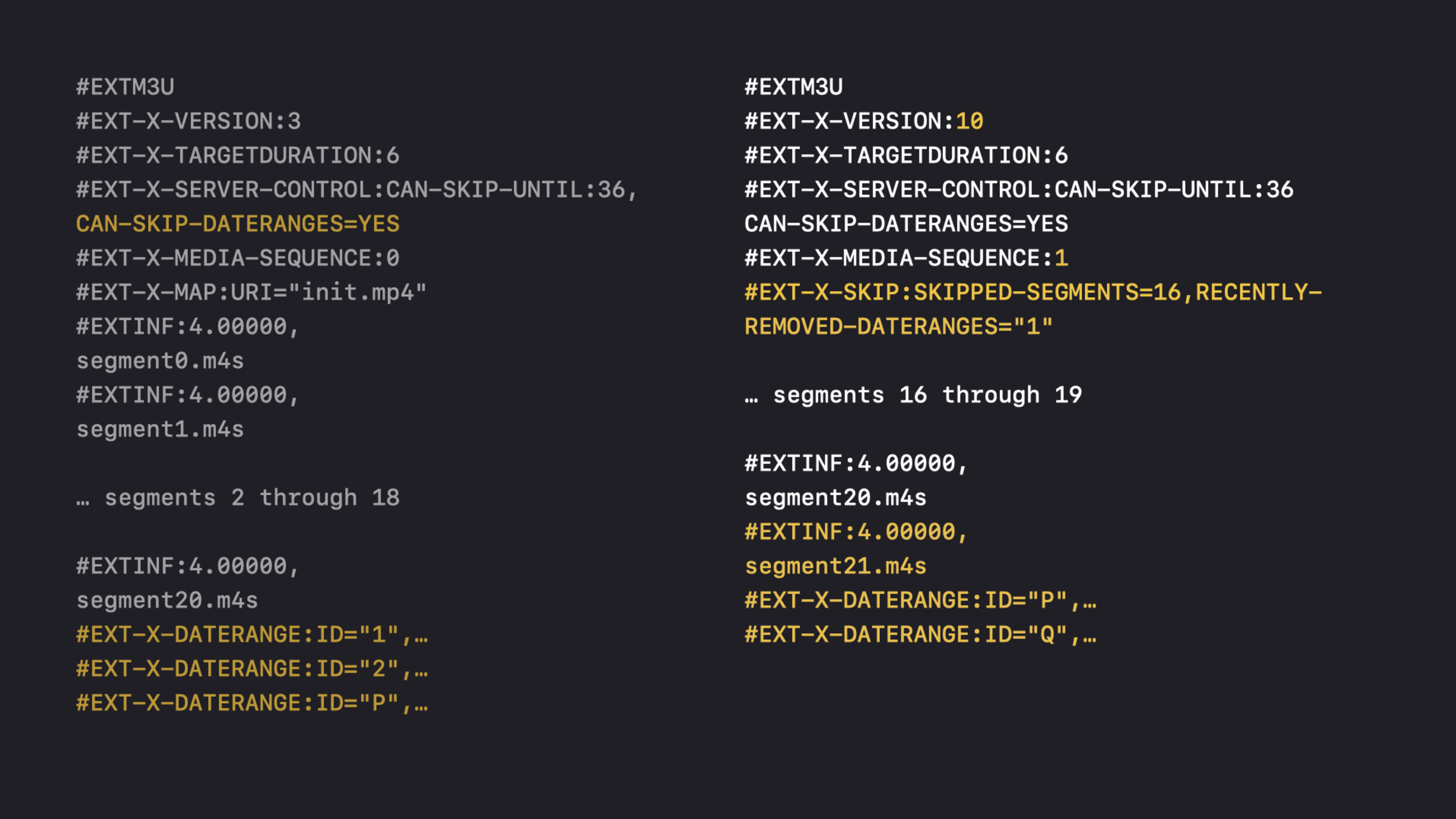
#EXT-X-SERVER-CONTROL:CAN-SKIP-UNTIL=36,CAN-SKIP-DATERANGES=YES

# client asks for the v2 form
GET /live/stream.m3u8?_HLS_skip=v2

# returned delta uses playlist version 10
#EXT-X-VERSION:10
Key points:
CAN-SKIP-DATERANGES=YESIt is the server’s capability statement to the client._HLS_skip=v2Is a new form of client request to skip DATERANGE.#EXT-X-VERSION:10Indicates that this delta update uses DATERANGE skipping.- DATERANGE can appear anywhere in the playlist, the session example putting them at the bottom is just the author’s choice.
- The server will skip DATERANGE added earlier than skip limit to prevent metadata from inflating delta again.
4. UseRECENTLY-REMOVED-DATERANGESSynchronous deletion of events
(05:02, 06:02) DATERANGE will not only be added, but will also be deleted from the playlist by the author. v2 delta passedRECENTLY-REMOVED-DATERANGESSynchronize these deletions to the client.
# v2 delta update with removed DATERANGE IDs
#EXT-X-VERSION:10
#EXT-X-MEDIA-SEQUENCE:1
#EXT-X-SKIP:SKIPPED-SEGMENTS=19,RECENTLY-REMOVED-DATERANGES="1"
segment 21
#EXT-X-DATERANGE:ID="P"
#EXT-X-DATERANGE:ID="Q"
Key points:
RECENTLY-REMOVED-DATERANGES="1"Tell the client that DATERANGE ID 1 in the local cache should be deleted.- DATERANGE P appears in delta to indicate that it is a recent DATERANGE added after skip limit.
- DATERANGE Q is the new DATERANGE and will be retained after the client merges.
- DATERANGE 2 is older than skip limit and is still valid, the client needs to retain it from the local old playlist.
- The merged result includes DATERANGEs that are still valid and excludes deleted IDs.
Core Takeaways
1. Enlarge the DVR window for live sports broadcasts
- What to do: Reserve a review window of tens of minutes to hours, allowing users to drag back key rounds.
- Why is it worth doing: When the playlist becomes longer, Delta Updates allows the client to only take the latest changes when reloading, reducing repeated transmissions in large windows.
- How to start: In the media playlist
#EXT-X-SERVER-CONTROLplusCAN-SKIP-UNTIL, confirm that the client first gets the complete playlist, and then observes_HLS_skip=YESThe requested return size.
2. Reduce metadata pressure for live broadcasts with advertisements
- What to do: Continue writing ad opportunities, ad segments and tracking events
#EXT-X-DATERANGE, but let delta skip premature metadata. - Why it’s worth doing: of WWDC20
CAN-SKIP-DATERANGESand_HLS_skip=v2Specifically designed to handle scenarios with a large number of DATERANGEs. - How to start: For streaming that supports this ability
CAN-SKIP-DATERANGES=YES, in delta#EXT-X-SKIPreturn inRECENTLY-REMOVED-DATERANGES, use the test player to check if the delete event is synchronized.
3. Maintain higher image quality for users with weak network connections
- What to do: In addition to the existing adaptive bit rate ladder, optimize the number of bytes of playlist reload to reduce the squeeze of control plane traffic on media throughput.
- Why it’s worth doing: The session clearly points out that repeated downloading of a large playlist will cause the player to drop to a lower quality tier on a poor network.
- How to start: Record compressed size of full playlist and delta playlist, compare reload cost by variant, network type and DVR window length.
4. Add merge consistency test to HLS server
- What: Automatically verify that “full playlist” and “old playlist plus delta” give the same result.
- Why is it worth doing: delta playlist cannot be parsed separately, and the correctness of client playback depends on the merged result.
- How to start: Save an old playlist in the server test, request
_HLS_skip=YESor_HLS_skip=v2, simulate deleting media sequence, retaining recent segments, and removingRECENTLY-REMOVED-DATERANGESThe specified ID.
Related Sessions
- What’s new in Low-Latency HLS — First understand partial segment, blocking reload and preload hint, and then look at how playlist delta reduces reload costs.
- Adapt ad insertion to Low-Latency HLS — DATERANGE skipping and advertising metadata are both playlist authoring issues for low-latency live broadcasts.
- Improve stream authoring with HLS Tools — Use the HLS authoring and validation tools to check whether the playlist complies with Apple HLS requirements.
- Deliver a better HLS audio experience — HLS audio session shows how playlist properties, codec and variant selection affect the real playback experience.
- Author fragmented MPEG-4 content with AVAssetWriter — If you need to generate HLS segments yourself, this session explains the fMP4 output path of AVAssetWriter.
Comments
GitHub Issues · utterances