
Highlight
Apple merges Low-Latency HLS tools back into HLS Tools, Media Stream Validator adds instant error reporting, Media Stream Segmenter can generate partial segments, and uses the SCORE attribute to help developers control variant selection in the main playlist.
Core Content
When doing HLS streaming, the difficulty is often not on the player side. What really takes time is the production link: how to slice the input, how to continuously update the live playlist, how to return low-latency requests, and how to combine a bunch of audio groups and video variations in the main playlist. One detail is wrong. Online users see slow startup, chaotic switching, and unsatisfactory sound quality, but developers have to go back to the tool output and playlist tags to troubleshoot.
In 2020, Apple took back the Low-Latency HLS Tools that were released separately the previous year into the unified HLS Tools release package. This way, the generation, validation, and reporting of low-latency flows is no longer a side tool set. Media Stream Validator also has an immediate option, so live validation does not have to wait for half an hour or an hour to see most errors.
The main line of this session is very clear: first run the low-latency test stream, and then process the audio codec and main playlist. The TS Recompressor is responsible for generating test input, the Media Stream Segmenter is responsible for cutting partial segments, and the Delivery Directives Interface script is responsible for processing the query parameters required by low-latency HLS. Finally, the master playlist uses the audio group, CODECS attribute, and SCORE attribute to tell the player which variant to prefer.
Detailed Content
2020 Updates for HLS Tools
(00:49) Apple first explained the changes in the way tools are distributed: After Low-Latency HLS comes out of beta, low-latency related tools return to a single HLS Tools package. The verification process has also changed. Media Stream Validator has a new immediate option, which reports errors immediately when errors are detected, making it suitable for long-running live broadcast verification.
# Three toolchain items to check closely in 2020
Media Stream Validator: immediate option
HLS Report: compiled binary
HLS Tools: single tool distribution with Low-Latency HLS tools
Key points:
Media Stream ValidatorUsed to authenticate HLS flows. The talk made it clear that the new immediate option will report errors as soon as they are found.HLS ReportFrom Python script to compiled binary, the old deprecated option is removed and the remaining functionality is retained.single tool distributionIndicates that low-latency tools are no longer placed in separate packages, and low-latency production links return to the regular HLS Tools workflow.
Use tools to generate Low-Latency HLS test flows
(02:41) The process of low-latency test flow consists of three stages. TS Recompressor generates a transport stream and sends it to multiple Media Stream Segmenters via UDP. Each segmenter outputs a media playlist and media segments. Since the live broadcast playlist will be continuously updated, the server also uses the Delivery Directives Interface script to interpret the query parameters and return the modified playlist.
TS Recompressor
  -> UDP transport stream for preview at 500 Kbps
  -> UDP transport stream for lower-quality video at 2 Mbps
  -> UDP transport stream for main output at 4 Mbps

Media Stream Segmenter for each output port
  -> media playlist
  -> media segments

Delivery Directives Interface script
  -> synthesized playlist with EXT-X-RENDITION-REPORT
Key points:
TS RecompressorIn this presentation, it is used to generate video and audio test inputs and send three outputs to different UDP ports.Media Stream SegmenterEach output port requires an instance to handle the input of the corresponding code rate.Delivery Directives Interface scriptResponsible for low-latency HLS query parameter processing and returning a modified playlist pointing to the same batch of media segments.EXT-X-RENDITION-REPORTTo allow the playlist of a certain variant to carry information about other variants, the script requires all variants to be written to subdirectories under the same parent directory to facilitate relative searches.
Segmenter generates partial segments
(04:18) Media Stream Segmenter adds partial segments and related tags for Low-Latency HLS. The speech named several key options:part-target-duration-msActivate partial segment generation,date-timewill be added to the playlistEXT-X-PROGRAM-DATE-TIMELabel.
Media Stream Segmenter options described in the session:
  part-target-duration-ms   # activates generation of partial segments
  target duration           # parent segment duration
  playlist parent segments  # how many parent segments stay in the playlist
  delete segments           # remove segments after they are no longer needed
  date-time                 # adds EXT-X-PROGRAM-DATE-TIME
Key points:
part-target-duration-msIt is a switch for low-latency slicing. Segmenter will generate partial segments.target durationStill controls the target duration of the parent segment.playlist parent segmentsControls how many parent segments are retained in the live playlist.delete segmentsClean up expired segments, which is consistent with the characteristics of dynamically adding and deleting segments in the live broadcast playlist.date-timewill writeEXT-X-PROGRAM-DATE-TIME, let the playlist contain program time information.
Organize audio groups for new audio codecs
(05:38) The most complicated place where the master playlist can get complicated is with audio. The speech mentioned that the 2020 tools have added audio codec support, including USAC or xHE-AAC, Apple Lossless, and FLAC. When building the master playlist, first select the video resolution and codec, and then list the language, audio codec, and number of channels. An audio group should be created for each codec and channel array combination, and each group should contain all languages.
Master playlist audio workflow:
  1. choose video resolutions and video codecs
  2. list audio languages, such as English and Chinese
  3. list audio codec families, such as AAC, FLAC, AC-3, USAC/xHE-AAC, and Apple Lossless
  4. create one audio group for each codec and channel-count pair
  5. put every language in every audio group
  6. replicate variant entries for the audio groups
Key points:
USAC / xHE-AAC、Apple Lossless、FLACis a new audio codec direction for speech roll call.- Each audio group must contain every language. For example, when both English and Chinese exist, the AAC group, FLAC group, and AC-3 group must each contain a complete language set.
stereo AAC groupShould always be present as it is playable on all devices, suitable as a fallback.- If multi-channel lossless audio codec is provided, Apple recommends providing multi-channel AAC codec at the same time to avoid losing multi-channel selection due to too high lossless bit rate.
- You can switch between AAC-LC, HE-AAC, HE-AACv2, USAC / xHE-AAC; you can also switch between lossless codec and AAC codec.
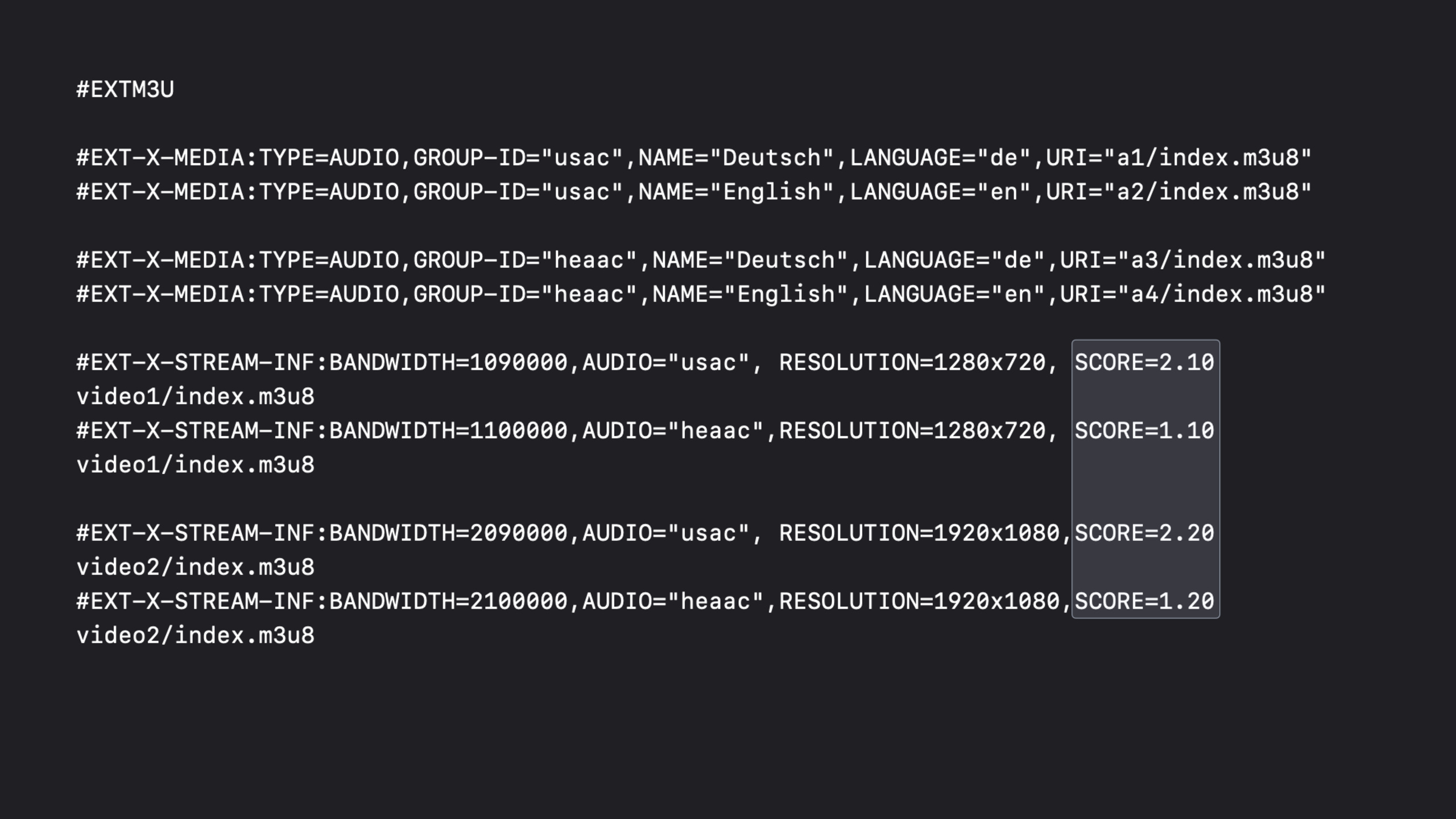
Use SCORE to control variant priority
(08:18) The default selection logic will select the highest bit rate in the currently playable collection. USAC and Dolby Digital Plus may cause selection sequences that developers do not intend. Apple added variants and I-Frame variantsSCOREproperty. After the player completes regular filtering, it uses the highestSCOREDecide on the final choice.
Variant selection with SCORE:
  1. player filters the master playlist to variants that can be played
  2. every variant and I-Frame variant must have SCORE if you want an ordered result
  3. the playable variant with the highest SCORE wins
  4. give USAC variants higher scores than matching HE-AAC variants when USAC should be preferred
Key points:
SCOREThe value is a floating point number. The speech clearly requires that if you want to set the order, you must put this attribute on all variants.- The player first filters the playable set according to regular rules, and then uses the highest
SCOREchoose. - Giving USAC variants higher scores will allow devices that support USAC to prefer USAC; devices that do not support USAC will still fall to HE-AAC.
- This attribute is suitable for solving the master playlist problem of “bandwidth sorting is correct, but the business wants to prioritize the audio codec”.
Core Takeaways
-
Make a low-latency HLS local pilot
-
What to do: Use TS Recompressor to generate three test inputs, and then use multiple Media Stream Segmenters to output low-latency media playlists.
-
Why it’s worth doing: Session provides workflows for preview, 2 Mbps, and 4 Mbps three-way variants, which are suitable for reproducing low-latency links before going online.
-
How to start: First prepare multiple variant subdirectories under the same parent directory, then let each UDP output port correspond to a segmenter, and enable it
part-target-duration-ms。 -
Make a live broadcast verification alarm script
-
What to do: Connect the immediate option of Media Stream Validator to the CI or live broadcast publishing process.
-
Why it’s worth doing: In long-term live verification, errors can be output when detected, and the team does not have to wait for the entire verification to end.
-
How to start: Collect validator output to the log system, and set alarm rules for errors related to playlist, segment, and codec.
-
Make a master playlist audio group generator
-
What: Input language, codec, number of channels, automatically generate complete audio groups and variant entries.
-
Why it’s worth doing: The speech emphasized that each codec/channel count pair must have an audio group, and each group must contain all languages.
-
How to start: First fix a stereo AAC fallback group, then expand the group for lossless, multi-channel AAC, AC-3 and other combinations, and finally copy the variant entries.
-
Make a SCORE Strategy Checker
-
What to do: Scan the master playlist, check if all variants have SCORE set, and verify if the target codec has a higher score.
-
Why it’s worth it: Apple requires that sorting be complete; missing SCORE may prevent the player from selecting as the developer intended.
-
How to start: Analysis
#EXT-X-STREAM-INFOK, extractAUDIO、BANDWIDTH、SCORE, generates a priority report for the USAC or specified codec.
Related Sessions
- What’s new in Low-Latency HLS — An overview of Low-Latency HLS, explaining the overall direction of low-latency expansion in 2020.
- Discover HLS Blocking Preload Hints — Dive into preload hints to complement the server-side background of the Delivery Directives Interface in this Session.
- Optimize live streams with HLS Playlist Delta Updates — Explains delta updates, suitable for continuing to optimize live playlist transmission costs.
- Deliver a better HLS audio experience — In-depth audio codec and audio experience, connecting the audio group recommendations of this Session.
- Adapt ad insertion to Low-Latency HLS — Talking about low-latency live broadcast ad insertion, suitable for continuing to process monetization links after existing low-latency streams.
Comments
GitHub Issues · utterances