
Highlight
XCTest can handle banner notification implicitly in Xcode 12 and provide
addUIInterruptionMonitorandXCUIApplication.resetAuthorizationStatus(for:), allowing UI tests to handle non-deterministic interruptions, expected alerts, and privacy permission initial states respectively.
Core Content
UI testing has a very subtle path to failure: when the test is about to click on an element, another UI temporarily blocks it. There is a notification banner in the recipe list. If it does not cover the current focus cell, the test can continue. After entering the details page, the same banner covers the return button. For testing, you need to process this panel first and then continue to click return.
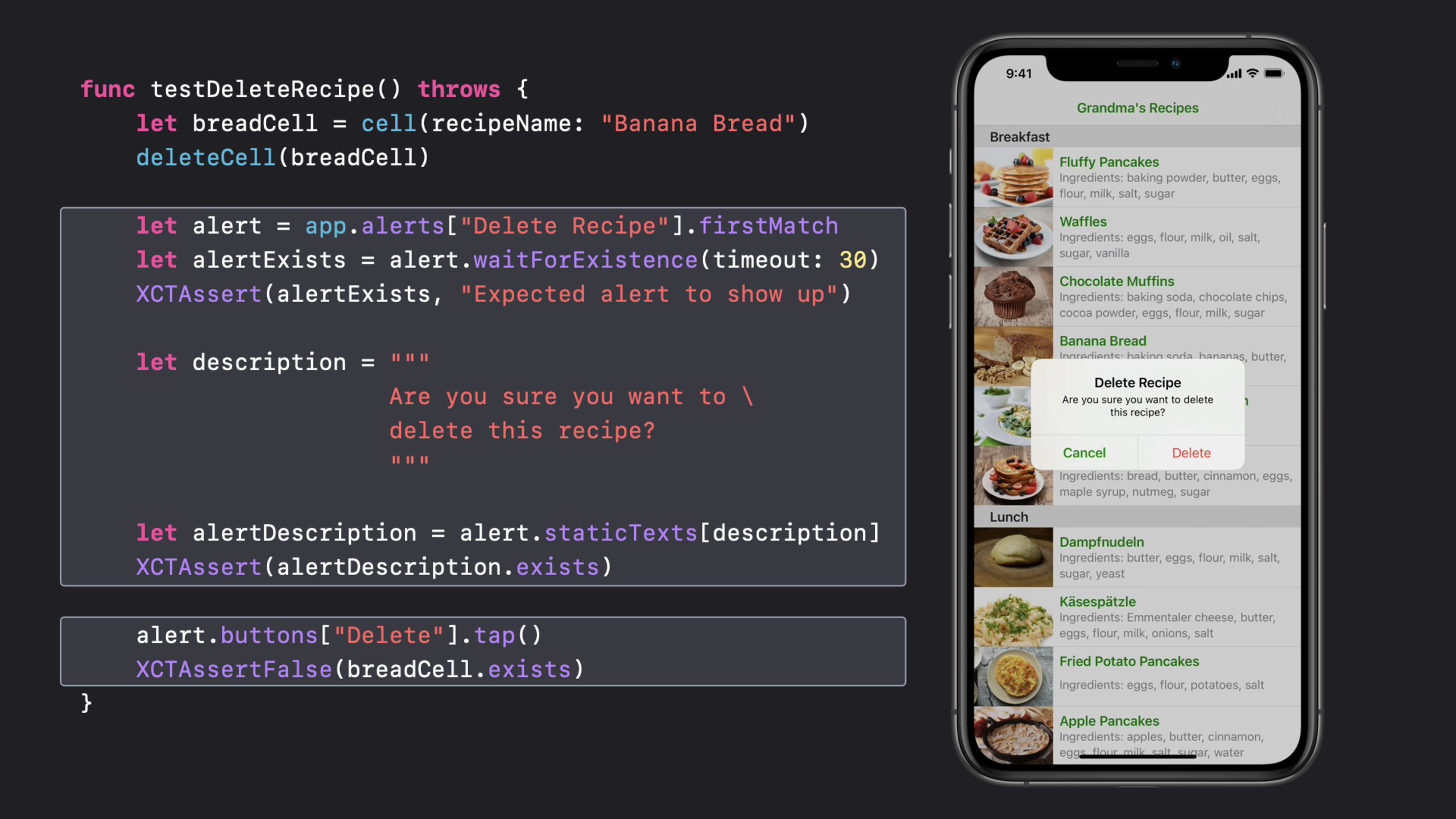
Apple gives this scenario a clear boundary: UI interruption is a UI that appears unexpectedly and non-deterministically and blocks the test target element. Banner, alert, dialog, and window may all become interruptions. Alerts triggered directly by test actions do not belong to this category, such as the confirmation box that appears after deleting a recipe. It should be queried, waited for, and asserted as part of the test process.
Provided by XCTestaddUIInterruptionMonitorRegister closure. Multiple handlers will form a stack, and the ones registered later will be executed first. The handler returns if the processing is successful.true, the test continues; if it cannot be processed, returnfalse, XCTest will continue to find the next handler. At the bottom level, there is also the implicit handler that comes with XCTest: iOS will handle interrupts with Cancel or default buttons, and Xcode 12 and above can also handle banner notifications; macOS will handle common permission dialog boxes and Bluetooth Setup Assistant.
Privacy permissions pose another type of problem. The system will remember the user’s selection of protected resources such as photos, microphones, and location. After running the test for the first time, the device is no longer clean. Starting with Xcode 11.4, iOS and tvOS 13.4, macOS 10.15.4,XCUIApplicationYou can reset the authorization status of protected resources to make the first-time authorization process a repeatable test path. The session also reminds developers: these alerts come from the system, and the query level must be written according to the system UI; resetting the authorization status may also terminate the app process.
Detailed Content
First register a handler for non-deterministic interrupts
(05:04) To test, first register an interruption monitor. This handler will be called when XCTest finds that alert blocks the target element. The minimal skeleton only gets the interrupting element and uses the return value to tell XCTest whether it has been processed.
addUIInterruptionMonitor(withDescription: "Handle recipe update failures") { element -> Bool in
    // TODO: Use this handler to retry the update action
    return false
}
Key points:
withDescriptionGive the handler a name so that you can know what type of interrupt it handles during failure diagnosis.- closure
elementIt is a UI element that blocks the current test action. - return
falseIndicates that the current handler is not processed, and XCTest will continue to call the next handler in the stack. - The handler will be automatically removed at the end of the test, and can also be removed manually during the test.
- The implicit handler that comes with XCTest is at the bottom of the stack; the custom handler returns
falseOnly then will it take its turn to try Cancel, the default button, or Xcode 12’s banner notification.
(05:16) The recipe details test itself is an ordinary UI test: start the app, click on Pancakes, assert the title, picture, ingredients, steps, and then click return. The problem is that when the server fails to update the recipe, the app will pop up an alert, blocking the elements to be accessed in the next step of the test.
func testRecipeDetailsNavigation() throws {

    let app = XCUIApplication()
    app.launch()

    let pancakeRecipe = app.cells.staticTexts["Fluffy Pancakes"].firstMatch
    pancakeRecipe.tap()

    // In the detail view
    let detailTitle = app.navigationBars.staticTexts["Fluffy Pancakes"].firstMatch
    XCTAssert(detailTitle.waitForExistence(timeout: 30))

    let expectedImage = app.images["Fluffy Pancakes Image"].firstMatch
    XCTAssert(expectedImage.exists)

    let ingredientsTitle = app.staticTexts["Ingredients Title"].firstMatch
    XCTAssert(ingredientsTitle.exists)

    let ingredientsContent = app.textViews["Ingredients Content"].firstMatch
    XCTAssert(ingredientsContent.exists)
    XCTAssert((ingredientsContent.value as! String).count > 0)

    let instructionsTitle = app.staticTexts["Instructions Title"].firstMatch
    XCTAssert(instructionsTitle.exists)

    let instructionsTextView = app.textViews["Instructions Content"].firstMatch
    XCTAssert(instructionsTextView.exists)
    XCTAssert((instructionsTextView.value as! String).count > 0)

    // Make sure we received the latest instructions:
    let expectedInstructions = """
                               1. Mix the flour, sugar, baking powder and salt.

                               2. Pour the milk, melted butter and egg into a well in the center and mix.

                               3. Heat a frying pan (don't forget to add a little bit of oil, grandson!), and fry until they're golden.

                               4. Optionally add maple syrup and/or fruits (they're healthy!).
                               """
    XCTAssertEqual((instructionsTextView.value as! String), expectedInstructions)

    // Go back to the list of recipes
    let backButton = app.navigationBars.buttons["Grandma's Recipes"].firstMatch
    backButton.tap()

    XCTAssert(pancakeRecipe.waitForExistence(timeout: 30))
}
Key points:
waitForExistence(timeout:)Used on navigation results to avoid reading elements before the page appears.firstMatchExplicitly use the first matching element so that the query does not swing between multiple candidates.- The test checks the complete instruction text to ensure that the latest recipe data is obtained.
- When you click the return button subsequently, if the alert or banner covers the button, the interruption handler will have a chance to intervene.
Let the handler handle the button you really want
(06:20) XCTest’s implicit handler can click Cancel or the default button. The business goal here is to get the latest recipe, so the test should point to Retry. The handler needs to check whether the element is alert, and then look for the Retry button.
addUIInterruptionMonitor(withDescription: "Handle recipe update failures") { element -> Bool in
    let retryButton = element.buttons["Retry"].firstMatch
    if element.elementType == .alert && retryButton.exists {
        retryButton.tap()
        return true
    } else {
        return false
    }
}
Key points:
element.elementType == .alertLimit the handler to the alert scenario.element.buttons["Retry"].firstMatchFind buttons from within the interrupting element, with a narrower scope than the global app query.retryButton.tap()Perform business-correct recovery actions.- return
trueAfterwards, XCTest will continue the original testing action.
Expected alert to enter test assertion
(07:37) The confirmation box that appears after deleting the recipe is the expected alert. It is triggered directly by the test action and occurs at a predictable time. Apple recommends handling it with the normal query and wait APIs, and letting alert copy and confirm actions participate in assertions.
func testDeleteRecipe() throws {
    let breadCell = cell(recipeName: "Banana Bread")
    deleteCell(breadCell)

    let alert = app.alerts["Delete Recipe"].firstMatch
    let alertExists = alert.waitForExistence(timeout: 30)
    XCTAssert(alertExists, "Expected alert to show up")

    let description = """
                      Are you sure you want to \
                      delete this recipe?
                      """

    let alertDescription = alert.staticTexts[description]
    XCTAssert(alertDescription.exists)

    alert.buttons["Delete"].tap()
    XCTAssertFalse(breadCell.exists)
}
Key points:
deleteCell(breadCell)It is a test action that triggers alert. The path of alert is controllable.app.alerts["Delete Recipe"].firstMatchDirectly query the target alert.waitForExistence(timeout:)Leave wait and failure messages in the test.- First assert the description copy, then click Delete, and finally confirm that the original cell disappears.
Reset the authorization status of protected resource
(10:29) The system will save the authorization selections for protected resources such as photos, microphones, cameras, and positioning. To test the process of requesting permission for the first time, you need to reset the app’s authorization status for a resource before starting the app.
func testAddingPhotosFirstTime() throws {
    let app = XCUIApplication()
    app.resetAuthorizationStatus(for: .photos)

    app.launch()

    // Test code…
}
Key points:
resetAuthorizationStatus(for: .photos)Let the app behave as if the photo permissions were never requested.- reset photos authorization status may terminate the app process, so the example is called after reset
launch()。 - The permission alert comes from the system, and the query needs to be written according to the system alert level.
- This API is suitable for breaking down the allow, deny, and first-time boot processes into repeatable UI tests.
- Cross-platform resources explicitly mentioned by session include Contacts, Calendar, Photos, microphone, camera, and location; iOS also covers Keyboard, Network Access, Bluetooth, and Health in Xcode 12 and iOS 14.
Core Takeaways
-
What to do: Add a Retry handler to the UI test that fails the network update. Why it’s worth doing: In 10220’s demo, an alert will pop up if the server fails occasionally. The default Cancel will make the test continue to use the old data. How to start: Register in the test setup
addUIInterruptionMonitor, only inelementType == .alertand existRetrybutton click it and returntrue。 -
What to do: Write expected alerts such as confirm deletion and abandon editing as explicit assertions. Why it’s worth doing: In anticipation of the alert being part of the user flow, the test should check the title, description text, and confirm button. How to start: Use
app.alerts["Alert Title"].firstMatchInquire, cooperatewaitForExistence(timeout:)Wait, then assertstaticTextsand final UI state. -
What to do: Write a first authorization test matrix for photo, microphone, and location permissions. Why it’s worth doing: The system saves the authorization decision, making it difficult to repeatedly overwrite the first request path without resetting the state. How to start: Called at the beginning of each permission test
app.resetAuthorizationStatus(for:), then re-launch(), the system alert uses the system UI level query, and then tests the allow and deny branches. -
What to do: Divide the interruption handler into a general layer and a business layer. Why it’s worth doing: XCTest will call multiple handlers in last-in-first-out order. Business tests can handle specific alerts first, then use the handlers to handle cancel/default class interrupts. How to start: Write a handler with description for each type of non-deterministic alert, and return only if the processing is successful.
true, unrecognized elements are returned uniformlyfalse。
Related Sessions
- XCTSkip your tests — Use XCTSkip to skip unsuitable tests at runtime and reduce test result noise.
- Get your test results faster — Continuing with Xcode test workflows, timeouts, parallelization, and faster feedback.
- Triage test failures with XCTIssue — Use XCTIssue to record test failures into problems that are easier to locate.
- Write tests to fail — Start with test design, so that when UI tests fail, they point to the real reason.
Comments
GitHub Issues · utterances