
Highlight
iOS 14 allows Core NFC’s tag API completion handler to use Result enum, and expands ISO15693’s large-capacity memory and secure operation support. Developers can directly write code according to the success or failure branch when processing NFC read and write results.
Core Content
The difficulty with NFC is usually not the scanning action itself, but the App process after scanning. After a parking meter, shared scooter, charging pile or restaurant menu is tagged with an NFC tag, users hope to enter the correct page when they touch it with their iPhone. Core NFC is responsible for reading the tag on the entity object and then passing the data to the App.
After iPhone 7, apps can initiate NFC read sessions for up to 60 seconds. Starting with iPhone XS, if the screen is on and the NFC Forum NDEF message contains Universal Link, the system can also read tags in the background and display notification banners. After the user clicks on the banner, this NDEF message will end withNSUserActivityEnter the App in the formUIApplicationDelegate restoration handler。
The focus of this session falls on two development details. First, Core NFC uses Swift in the tag API.Resultenum, put the success result and error result into the same completion handler parameter. second,NFCISO15693TagObtain the enhanced capabilities in the ISO15693 third edition specification, covering larger memory tags and security operations.
Both changes are geared towards real device debugging. Developers no longer need to judge the success or failure of a tag command from multiple optional return values; when processing ISO7816, MIFARE or ISO15693 tags, success data and error paths can also be clearly written separately.
Detailed Content
NDEF and background tag entry
(01:17) The basic model of Core NFC is a read session of up to 60 seconds. The speech clearly mentioned that Core NFC supports NDEF reading and writing, as well as native tag protocols such as ISO7816, FeliCa, MIFARE and ISO15693.
NFC tag contains an NFC Forum NDEF message with a universal link
-> iPhone XS or later reads the tag in the background while the screen is on
-> the system shows a notification banner
-> the user taps the banner
-> the app receives the NDEF message as NSUserActivity via UIApplicationDelegate restorationHandler
Key points:
- Background reading requires that the NDEF message contain Universal Link.
- The system displays the notification banner first, and then the user clicks it and then hands the data to the App.
- What is received on the App side is
NSUserActivity, the entrance is atUIApplicationDelegaterestoration handler. - Other native tag protocols are still handled within the app through Core NFC’s reader session.
Result enum makes ISO7816 commands clearer
(02:48) Before iOS 14, the ISO7816 tag’s send command completion handler had four parameters. The App needed to check the optional error first, and then parse the other parameters. New signatures return for iOS 14Result<NFCISO7816ResponseAPDU, Error>, obtained when successfulNFCISO7816ResponseAPDU, obtained on failureError。
detectedTag.sendCommand(apdu: apdu) { (result: Result<NFCISO7816ResponseAPDU, Error>) in
   switch result {
   case .success(let responseAPDU):
      /// Handle NFCISO7816ResponseAPDU object.
   case .failure(let error):
      /// Handle Error object.
   }
}
Key points:
detectedTag.sendCommand(apdu: apdu)Send APDU command to the detected ISO7816 tag.- completion handler only receives one
result, the type isResult<NFCISO7816ResponseAPDU, Error>。 .success(let responseAPDU)Corresponds to the response object obtained after successfully reading the tag..failure(let error)The error object corresponding to the failed command.switch resultKeep success and failure paths structurally separate.
MIFARE writing is also changed to Result processing
(03:49) Talk using WWDC 2019’s NFCFishTag sample project to demonstrate migration: inCouponViewControllerIn the write function, putsendMiFareCommandReplace with new oneResultsign. The success branch handles the returned data, and the error branch handles the error.
// You need to zero-pad the data to fill the block size
if blockData.count < blockSize {
  blockData += Data(count: blockSize - blockData.count)
}

let writeCommand = Data([writeBlockCommand, offset]) + blockData
tag.sendMiFareCommand(commandPacket: writeCommand) { (response: Result<Data, Error>) in
  switch (response) {
  case .success(let responseData):
    if responseData[0] != successCode {
      self.readerSession?.invalidate(errorMessage: "Write tag error. Please try again.")
      return
    }

    let newSize = data.count - blockSize
    if newSize > 0 {
      self.write(data.suffix(newSize), to: tag, offset: (offset + 1))
    } else {
      self.readerSession?.invalidate()
    }
  case .failure(let error):
    let message = "Write tag error: \(error.localizedDescription). Please try again."
    self.readerSession?.invalidate(errorMessage: message)
  }
}
Key points:
- Before writing
blockDataMake up for itblockSize, which is the first step in the official clip. writeCommandIt is composed of write command, offset and current block data.sendMiFareCommandThe completion handler returnsResult<Data, Error>。.success(let responseData)branch checkresponseData[0]Is it equal tosuccessCode。- When there is remaining data after writing, the code is called recursively
self.write, and putoffsetplus one. .failure(let error)The branch passes error information toreaderSession?.invalidate(errorMessage:)。
ISO15693 enhanced coverage of large capacity and secure operation
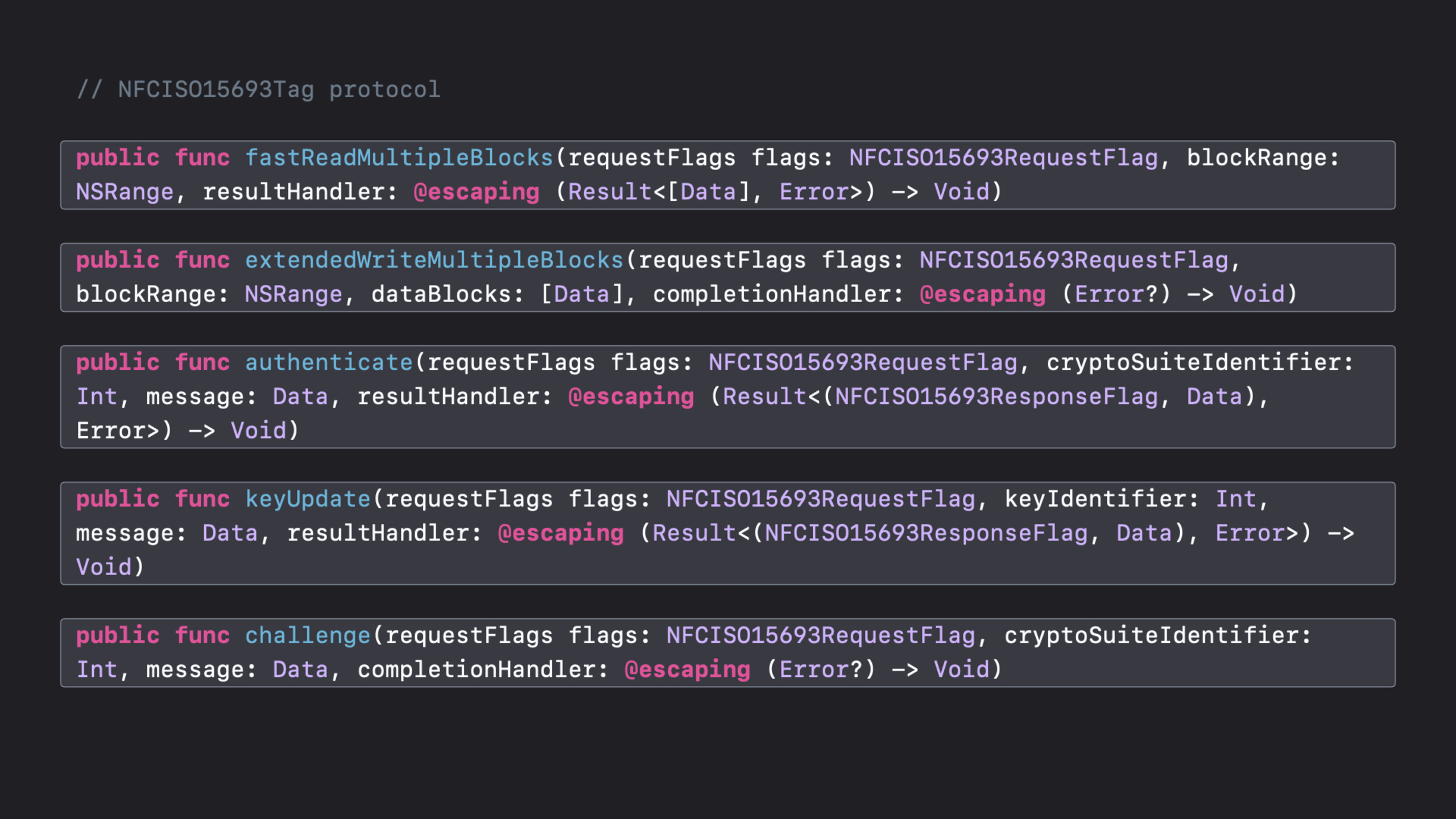
(04:37)Core NFC inNFCISO15693TagEnhancements defined by the ISO15693 third edition 2019 specification are added to the protocol. The uses given in the speech are very specific: larger memory size tags, and safe operations.
NFCISO15693Tag enhancements mentioned in the session:
- fast reading multiple blocks
- extended write multiple blocks
- authenticate
- key update
- challenge
- read buffer
- extended get multiple blocks security status
- extended fast read multiple blocks
- send request
Key points:
fast reading multiple blocksandextended fast read multiple blocksFor multi-block reading.extended write multiple blocksWrite for extensions.authenticate、key updateandchallengeIt is a security related operation.send requestIt is a new generic send command, used to send any data packets that the App needs.- This set of capabilities only appears in the lecture as a list of function signatures, and the article does not fill in the Swift method signatures that are not provided.
Core Takeaways
-
Make an on-site label writing tool: write NDEF URL to store, booth or equipment stickers. Why it’s worth doing: Both session and official resources point to the scenario of creating an NFC tag from an iPhone. How to get started: Use
NFCNDEFReaderSessionTo handle NDEF reading and writing, first write a Universal Link, and then use a real iPhone to verify the background reading path. -
Attach the parking, rental or charging entrance to the physical device: Let the user touch the tag to enter the payment or startup page. Why it’s worth doing: The talk lists parking meters, scooter rentals, and electric car charging stations as typical scenarios for Core NFC. How to start: Let the tag’s NDEF message contain Universal Link, and the App will start from
NSUserActivityRestore specific device or site context. -
Do ISO15693 inventory inspection or equipment maintenance App: Use iPhone to read status data on large-capacity ISO15693 tags. Why it’s worth doing: The ISO15693 enhancements added in iOS 14 cover multi-block reads, extended writes, and secure operations. How to start: Use
NFCTagReaderSessionConnect the ISO15693 tag, and then select fast read, extended write or authenticate according to the device protocol. -
Make a debugging panel for old protocol tags: Record the command responses of ISO7816, MIFARE, FeliCa and ISO15693. Why it’s worth it: Core NFC supports these native tag protocols, as of iOS 14
ResultSignatures make error paths clearer. How to start: First connect to the official websitesendCommandorsendMiFareCommandfragment, put.successresponse and.failureThe errors are written to the log respectively.
Related Sessions
- What’s new in Universal Links — Explains Universal Links and Associated Domains, which are suitable for completing the link basis for NDEF background tags to jump to App.
- Configure and link your App Clips — Explain how App Clips are called through NFC, QR code, App Clip Code and web links.
- Explore App Clips — Explains how to design real-world portals such as NFC into short, focused App Clips.
- Streamline your App Clip — Supplements common short-process transactions, notifications, and full App transition designs after NFC triggering.
Comments
GitHub Issues · utterances