
Highlight
iOS 14 and macOS Big Sur extend Siri Event Suggestions, allowing Apps, Safari, and Mail to write reservations to Calendar using Intents donations or schema.org markup, and improve the arrival and debugging process through Maps, Lock Screen, Simulator, and Console.
Core Content
After making a reservation at a restaurant, flight, hotel or ticketing app, the user’s task is not over yet. The confirmation page is just the first step. Then there are departure reminders, routes, flight check-in, time judgment before arriving at the store, and temporary modifications or cancellations. In the past, if this information only stayed in the app or email, it would be difficult for Calendar, Maps and Lock Screen to help users continue this matter at the right moment.
Siri Event Suggestions handle this breakpoint. At the beginning of the session, the capability boundaries are defined: the user completes the reservation in the App as usual, the system adds the reservation to the Calendar, and uses device-side intelligence to remind departure on the Lock Screen, give route suggestions in Maps, or prompt check-in before the flight (00:42).
The changes in 2020 are twofold. The first layer is App-side extensions: bus and boat reservations are supported, and macOS Big Sur and Mac Catalyst App can also donate reservations through the Intents framework; if the data donated by iOS and macOS Apps are consistent, the system will use end-to-end encryption to synchronize reservations between devices (02:28).
The second layer is Web and email. Users may place an order on the website, modify it in the app, and then check the confirmation information in the email. iOS 14 and macOS Big Sur allow websites and emails to express the same subscription using schema.org markup, and Safari and Mail are responsible for donating it to the system (04:12). This allows users who have not opened the app to get the same experience chain of Calendar, Maps and Siri Suggestions.
Detailed Content
Use schema.org to mark up reservations on the website and in emails
(05:34) Web and email integration use schema.org. Apple explicitly supports JSON-LD and Microdata. Below is the Microdata version in the official snippet, which structures the status, confirmation number, number of people, restaurant, time, phone number and address in a restaurant confirmation email.
<div itemscope itemtype="FoodEstablishmentReservation">
  <link itemprop="reservationStatus" href="http://schema.org/ReservationConfirmed"/>
  <meta itemprop="reservationId" content="IWDSCA"/>
  <meta itemprop="partySize" content="2"/>
  <div itemprop="reservationFor" itemscope itemtype="FoodEstablishment">
    <meta itemprop="name" content="EPIC Steak"/>
    <meta itemprop="startDate" content="2020-06-26T19:30:00-07:00"/>
    <meta itemprop="telephone" content="(415)369-9955"/>
    <div itemprop="address" itemscope itemtype="PostalAddress">
      <meta itemprop="streetAddress" content="369 The Embarcadero"/>
      <meta itemprop="addressLocality" content="San Francisco"/>
      <meta itemprop="addressRegion" content="CA"/>
      <meta itemprop="postalCode" content="95105"/>
      <meta itemprop="addressCountry" content="USA"/>
    </div>
  </div>
</div>
Key points:
reservationStatusDetermines whether the system treats this as a confirmed, modified, or canceled reservation.reservationIdIt is the key field for subsequent updates to the same Calendar event.startDateWith local time zone, users can avoid erroneous reminders when they cross cities or time zones.addressProvide a location basis for Maps and departure reminders; the session clearly states that the more complete the address, the better the user experience.
Both modification and cancellation must keep the same reservationId.
(06:49) When the user changes the time or cancels the reservation, markup should reflect the latest status. In Apple’s example, retaining when modifying restaurant reservationsIWDSCA, only change the time from 7:30 PM to 6:30 PM; when canceling, change the status toReservationCancelled. Siri relies on the samereservationIdFind the original Calendar event and update it.
<script type="application/ld+json">
{
  "@context": "http://schema.org",
  "@type": "FoodEstablishmentReservation",
  "reservationStatus": "http://schema.org/ReservationCancelled",
  "reservationId": "IWDSCA",
  "partySize": "2",
  "reservationFor": {
    "@type": "FoodEstablishment",
    "name": "EPIC Steak",
    "startDate": "2020-06-26T19:30:00-07:00",
    "telephone": "(415)369-9955"
    "address": {
      "@type": "http://schema.org/PostalAddress",
      "streetAddress": "369 The Embarcadero",
      "addressLocality": "San Francisco"
      "addressRegion": "CA",
      "postalCode": "95105",
      "addressCountry": "USA"
    }
  }
}
</script>
Key points:
reservationStatusAfter changing from confirmed to canceled, the system will cancel the corresponding Calendar event.reservationIdIt cannot change due to status changes; if it changes, it will be treated as another reservation by the system.startDate, the restaurant name and address are still retained to help the system locate the same thing to be processed.- This paragraph comes from the official snippet, and the field structure is retained according to session display.
For local debugging, domain name and HTTPS restrictions must be turned off.
(07:38) Before the official launch, the website domain name needs to be registered with Apple, the site must use HTTPS, and the email must have a valid DKIM signature. Restrictions can be temporarily relaxed during the development phase. Use two defaults commands on macOS, and turn on the corresponding switches in Developer Settings on iOS.
defaults write com.apple.suggestions SuggestionsAllowAnyDomainForMarkup -bool trueKey points:
- This switch is used to allow unregistered domain names, suitable for local or test environments.
- It does not replace formal registration; domain name and markup examples still need to be submitted before going live.
defaults write com.apple.suggestions SuggestionsAllowUnverifiedSourceForMarkup -bool trueKey points:
- This switch is used to allow unverified sources. The session demo uses it to handle environments where HTTPS is not available locally.
- Turning off verification is only suitable for development machines and should not enter the production process.
Provide a URL for booking and return to Safari if the device does not have the app
(19:44) App donatedINReservationAdded URL properties in iOS 14. If Calendar events are synced to a device that does not have the app installed, the system will display a “Show in Safari” button, allowing the user to open the web page you provided to continue managing the reservation. The official snippet for Web markup also demonstrates the same idea.
<script type='application/ld+json'>
{
  "@context": "http://schema.org",
  "@type": "http://schema.org/FoodEstablishmentReservation",
  "reservationId": "IWDSCA",
  "reservationStatus": "http://schema.org/ReservationConfirmed",
  "url": "http://localhost:3000/reservations/6",
  "underName": {
    "@type": "http://schema.org/Person",
    "name": "John Appleseed"
  },
  "broker": {
    "@type": "http://schema.org/Organization",
    "name": "Apple Reservations"
  },
  "startTime": "2020-06-26T19:30:00-07:00",
  "partySize": "2",
  "reservationFor": {
    "@type": "http://schema.org/FoodEstablishment",
    "name": "EPIC Steak",
    "telephone": "(415)369-9955",
    "address": {
      "@type": "http://schema.org/PostalAddress",
      "streetAddress": "369 The Embarcadero",
      "addressLocality": "San Francisco"
      "addressRegion": "CA",
      "postalCode": "95105",
      "addressCountry": "USA"
    }
  }
}
</script>
Key points:
urlLet the Calendar event take the user back to the specific booking page.underNameandbrokerSupplemented booking attribution and service providers.startTimeUse ISO 8601 and include the time zone of the booking location.- The same set of reservation information can be donated into the system from web pages, emails and apps, and field consistency will affect the update effect.
App donation needs to distinguish between reservation number, containerReference and itemReference
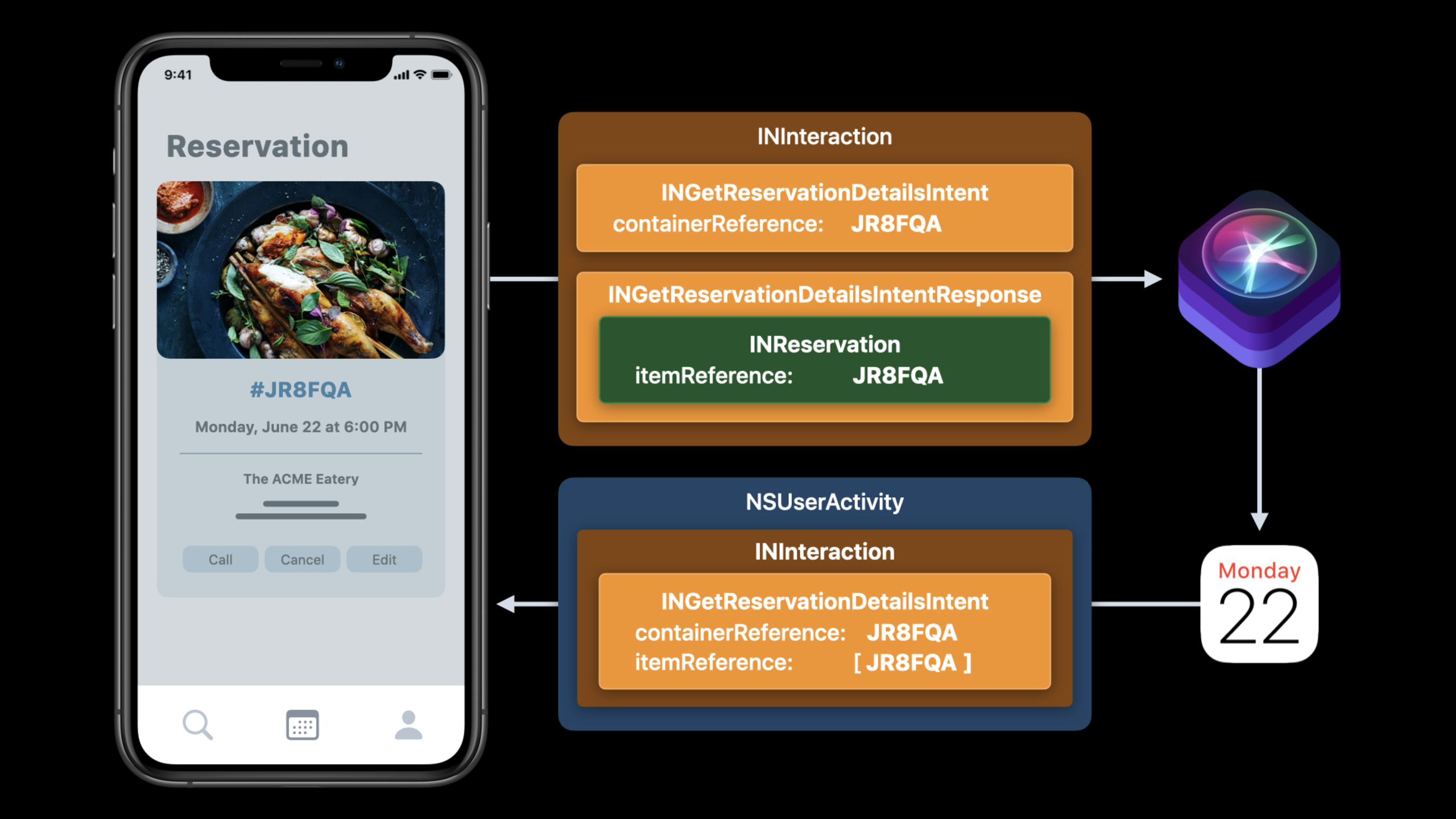
(13:43) The App starts from its own reservation model and maps the reservation details intoINReservationObject, and then put the intent response and interaction to donate to Siri. When the user clicks “Show in App” in Calendar, the system will constructINGetReservationDetailsIntent, the App uses the container and item reference in donation to retrieve the correct reservation.
App reservation details
-> INReservation objects
-> intent response + intent
-> donated interaction
-> Calendar event
-> INGetReservationDetailsIntent when user taps "Show in App"
Key points:
reservation numberUsed to identify the same booking across sources, App, email and website must be consistent.containerReferenceIdentifies an entire reservation within the app, which may contain multiple parts.itemReferenceIdentifies an individual part of a reservation, such as a section of a round-trip train ticket.- Multiple itineraries cannot reuse the same one
itemReference, otherwise the App cannot determine which paragraph to display when it is awakened.
Donation timing and debugging path must cover real changes
(20:22) Apple recommends donating when users view a list of upcoming reservations, individual reservations, specific parts of a reservation, and also updating system data after changes outside the app. Background App Refresh can check for updates periodically, and silent push can refresh and re-donate when changes occur.
Upcoming reservations list
Single reservation screen
Specific reservation part
Background App Refresh
Silent push notification
Key points:
- The system will only notify users when donating a reservation for the first time. Multiple donations within a short period of time will be intelligently grouped.
- When modification or cancellation occurs outside the app, a new donation must be made to avoid leaving old data in Calendar.
- iOS 14 supports testing the Siri Event Suggestions API in the Simulator.
(22:06) When debugging, look at Console.app and filter by categorysiri-event-suggestions. The session demo shows two common mistakes: two bus reservation parts reuse the sameitemReference;The new Simulator has not yet confirmed Calendar’s What’s New screen. Web markup can also use the same type of log positioning, such as when the subscription end time has passed.
Console.app
-> select device or Mac
-> search category: siri-event-suggestions
-> start streaming
-> trigger app donation or reload Safari page
Key points:
- Both donation and markup may be processed asynchronously, and the App cannot always get explicit errors in this process.
- Category filtering can converge system logs to Siri Event Suggestions related messages.
- Logs will point out specific field issues such as duplicates
itemReferenceor expired end time.
Core Takeaways
1. Add a Calendar outlet to the reservation system
What to do: Once the restaurant, event, hotel, flight or ticketing app confirms success, donate the reservation to Siri Event Suggestions to have the event automatically appear in Calendar.
Why it’s worth doing: The session explains that after the user completes the reservation, the system can continue to provide departure reminders, routes and check-in suggestions, and the value occurs outside the App.
How to start: First organize the internal order model into a unified reservation number, time, location, status and management URL; use the AppINReservationdonation, web and email use schema.org markup.
2. Let the email confirmation letter become the system entrance
What to do: Add JSON-LD or Microdata to the confirmation email HTML so that Mail can recognize the reservation in the background and add it to the Calendar.
Why it’s worth it: Users often check email for confirmation information. After Mail supports markup, users can get the Calendar banner and cancellation prompt without opening the app.
How to start: Start with the restaurant or event confirmation letter, guaranteedreservationStatus、reservationId, time, location and address are complete; register the domain name and check DKIM after passing the test.
3. Establish reference rules for multi-segment trips
What to do: Design for multi-part bookings such as round-trip tickets, multi-segment air tickets, and travel packagescontainerReferenceanditemReferenceNaming rules.
Why it’s worth doing: The session’s train and travel package examples illustrate that the system may only require the App to open a certain period of booking; repeated item references will cause the jump to fail.
How to start: Use the entire order number as the container; use the ticket number, flight number combination or partial ID generated by the server as the item; write spokenPhrase in a human-readable description.
4. Add web page fallback to Calendar event
What to do: Each reservation provides an openable management URL, allowing devices without the app to access the web page from Calendar.
Why it’s worth doing: Calendar events are synchronized across devices, and users don’t necessarily have to install the same app on each device.
How to start: Make the confirmation page a stable URL that supports viewing, modification and cancellation; App donationINReservationBoth use the same page address as web markup.
5. Create a set of Siri Event Suggestions debugging checklist
What to do: Write Simulator, Console category filtering, markup defaults, Calendar first use confirmation and expiration time check into the QA process.
Why it’s worth doing: The failures displayed by the session focus on easily missed details such as repeated fields, uninitialized Calendar, and expired subscriptions.
How to start: Open Console.app before each test and filtersiri-event-suggestions;App donation first tests the Simulator, and Web markup first uses defaults to release local domain names and unverified sources.
Related Sessions
- What’s new in SiriKit and Shortcuts — Take a first look at the global changes to SiriKit, Shortcuts, compact Siri UI, and system action portals in iOS 14.
- Empower your intents — Learn more about intent handling, in-app Intent handling, performance budgeting, and rich conversational experiences.
- Decipher and deal with common Siri errors — Add process, log, completion handler and device log checks in Siri and Shortcuts debugging.
- Design for intelligence: Make friends with “The System” — Understand how system intelligence learns and executes App capabilities from intents, donations, and extensibility.
- Design for intelligence: Discover new opportunities — Explain how system entrances such as Calendar, Maps, Lock Screen, and Search can improve the visibility of App capabilities.
Comments
GitHub Issues · utterances