
Highlight
HealthKit uses HKAnchoredObjectQuery to monitor additions and deletions, and uses HKMetadataKeySyncIdentifier and HKMetadataKeySyncVersion to deduplicate and update health samples written back by external servers across multiple devices.
Core Content
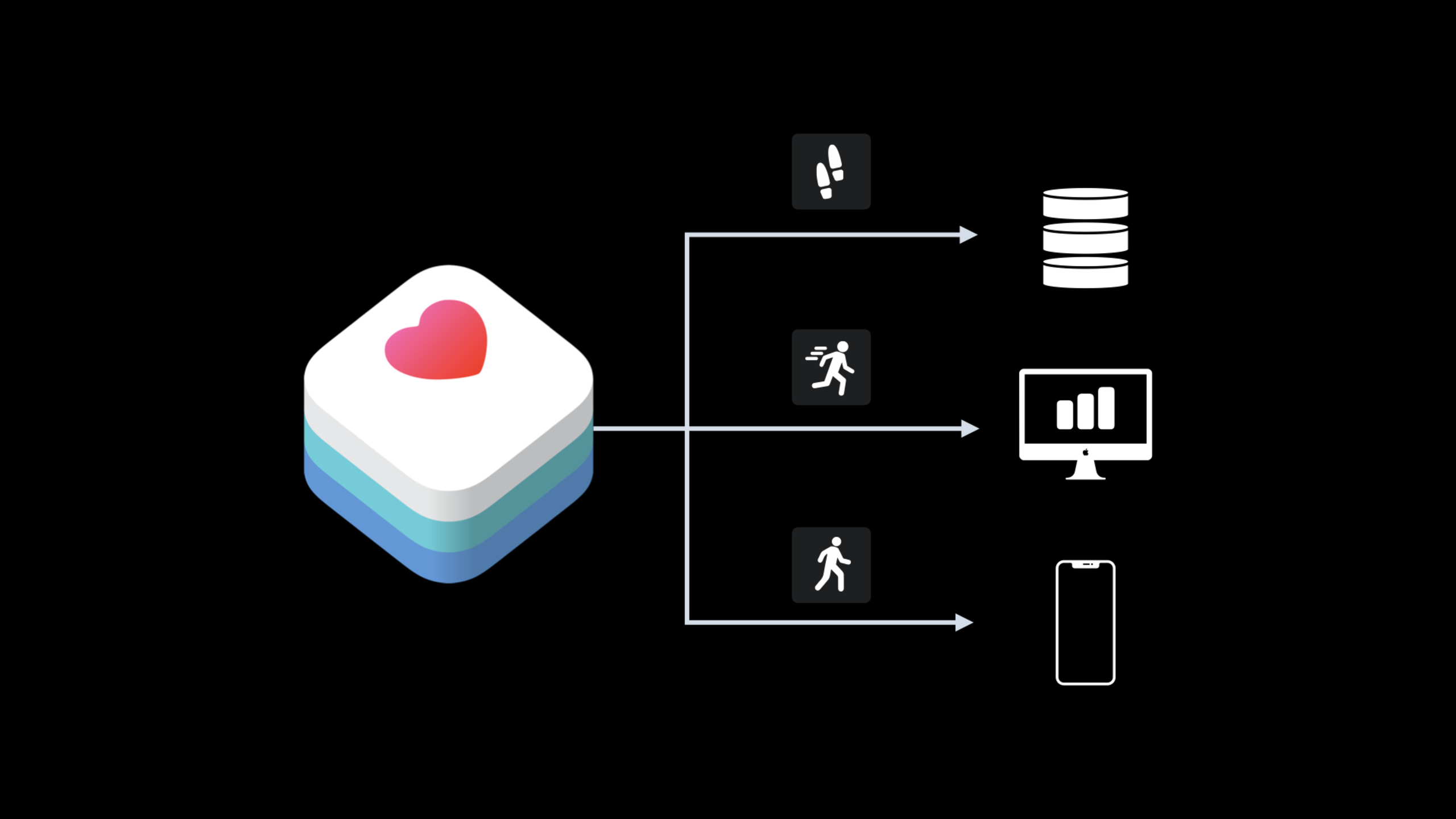
This session starts with a recovery app. Patients record their steps daily using iPhones and Apple Watches, and physical therapists record six-minute walk test results weekly. The patient cares about trends, the therapist needs to see the same data, and the app needs to sync the chart to the server.
If you only rely onHKStatisticsCollectionQueryScheduled refresh, the app needs to recalculate the number of steps for the entire week at startup or every few hours. When the health data has not changed, this will double the calculation; when there are only new step counts for one day, it may still send the entire week’s results to the server. The older the health data is, the more obvious the waste is.
The approach given by Apple is to split the query into two layers.HKAnchoredObjectQueryResponsible for telling App HealthKit which samples are added or deleted,HKStatisticsCollectionQueryOnly statistics for the affected dates are recalculated. What the server gets is the changed daily statistics, not the entire batch of historical data.
Synchronization in the opposite direction is more sensitive. A six-minute walk test from a therapist’s server is saved to the patient’s HealthKit; the same weekly report might go to an iPhone and then sync to an Apple Watch via HealthKit. The app cannot rewrite or delete user health data at will.HKMetadataKeySyncIdentifierandHKMetadataKeySyncVersionLeave this to HealthKit to do the version determination.
Detailed Content
Only using statistical queries will waste network and calculation
(02:56) The step chart should come to mind firstHKStatisticsCollectionQuery. It is suitable for summarizing step counts by day, and is also suitable for making recovery trend charts. The problem lies in the synchronization scenario: if the App reruns the statistical query with a fixed frequency, it does not know which day has changed in HealthKit.
Old flow
1. HKStatisticsCollectionQuery calculates the step chart for one week
2. The app runs the query again at launch or on a timer
3. Each run sends the full week's statistics to the server

Refactoring goal
1. First find the samples that changed in HealthKit
2. Recalculate only the dates affected by those samples
3. Send only the updated date results to the external data store
Key points:
HKStatisticsCollectionQueryResponsible for generating charts and not responsible for determining whether data has changed.- Fixed frequency refresh will cause repeated calculations and will repeatedly transmit unchanged data to the server.
- The external data store can be a remote server or local Core Data or SQLite.
Anchor allows the App to only get the change set
(04:32)HKAnchoredObjectQueryThe core is anchor. When querying for the first time, the anchor isnil, HealthKit returns all currently matched samples and gives a new anchor in the handler. The next query passes in the saved anchor, and HealthKit only returns the samples added and deleted after this.
First query
anchor = nil
Current HealthKit samples = A, B, C
handler receives = A, B, C
Save newAnchor

Subsequent query
HealthKit additions = D, E
HealthKit deletion = B
Query again with persistedAnchor
handler receives = D, E, deleted B
Save newAnchor again
Key points:
- Anchor represents the position where the HealthKit database has evolved to a certain point in time.
- The handler will receive new samples and deletion samples.
- After saving the anchor, the App does not need to scan old samples such as A and C that have not changed every time.
Cooperation of two queries: first locate the changes, and then recalculate the statistics
(07:18) This speech does not provide official code snippets, but the transcript gives the implementation sequence: the anchored query uses the step sample type and persistence anchor; the handler creates a predicate based on the date of the returned sample; then uses this predicate to create a statistics query collection and calculates the cumulative number of steps by day.
HKAnchoredObjectQuery
sampleType = step count
predicate = nil
anchor = persistedAnchor
initialResultsHandler = handler
updateHandler = handler

handler
1. Read the samples returned by HealthKit
2. Generate a predicate from the dates of the samples
3. Save the new anchor returned by HealthKit
4. Call fetchStatistics(predicate)

fetchStatistics(predicate)
1. anchorDate = Monday midnight
2. interval = one day
3. sampleType = step count
4. options = cumulativeSum
5. HKStatisticsCollectionQuery uses the predicate from the previous step
Key points:
initialResultsHandlerandupdateHandlerThe same processing block can be reused because both map changes to statistics refresh.- predicate comes from the date range of samples returned by anchored query, which is used to limit the calculation range of statistics query.
cumulativeSumCorresponds to the chart goal of “total steps per day”.- The entry point for executing query is still
healthStore。
The six-minute walk test must be saved as a sample
(10:24) In 2020 HealthKit added a new set of mobility data types, includingsixMinuteWalkTestDistance. The number of steps is suitable for summarizing by day. The frequency of the six-minute walk test is relatively low. Patients and therapists may need to review the results of each test, so each test in the weekly report should be saved as a separate sample here.
Server weekly report
1. Read the weekly report
2. Iterate over each serverHealthSample in the weekly report
3. Create HKQuantitySample
   - quantity uses meter units
   - value comes from serverHealthSample
   - sampleType = sixMinuteWalkTestDistance
   - startDate / endDate come from the test record
4. healthStore saves these samples
Key points:
- In the same App, different HealthKit data types can use different synchronization strategies.
- The number of steps has a large sample size, and a common goal is chart statistics.
- The six-minute walk test has a small sample size, and a single record itself has diagnostic and therapeutic significance.
- Before deleting a sample, you must first query to confirm that it was written by your own App, and the deletion must comply with the user’s intention.
Sync identifier and version are responsible for deduplication and updating
(13:54) When an external server updates a test record, the App cannot simply save it again. HealthKit provides two metadata keys:HKMetadataKeySyncIdentifierIt is a string used to identify the same sample in the healthy ecology;HKMetadataKeySyncVersionis a number used to determine whether the sample is updated.
Save server sample
metadata[HKMetadataKeySyncIdentifier] = serverHealthSample.syncIdentifier
metadata[HKMetadataKeySyncVersion] = serverHealthSample.syncVersion
HKQuantitySample uses this metadata
healthStore saves the sample

HealthKit behavior
Same syncIdentifier + same version written again -> ignore the duplicate sample
Same syncIdentifier + higher version written -> replace the old sample with the new sample
Operations based on sync identifier -> remain transaction-safe
Key points:
- The identifier must be a stable sample identifier from an external data source and cannot generate a new value each time.
- When version is increased, HealthKit will treat it as an update to the same sample.
- After the same weekly report is synced to iPhone and then synced to Apple Watch, HealthKit will identify duplicate writes.
- As long as the app maintains identifier and version, conflict resolution and multi-device consistency are handled by HealthKit.
Core Takeaways
- Rehabilitation Weekly Report Synchronization: What to do: Sync the Six Minute Walk Test Weekly Report from the therapist server to the patient’s app. Why it’s worth doing: Explicit use of session
sixMinuteWalkTestDistanceModel this test. How to start: Map the server sample toHKQuantitySample,useHKMetadataKeySyncIdentifierandHKMetadataKeySyncVersionWrite metadata. - Step Trend Sharing: What to do: After the patient authorizes it, synchronize the daily total step trend to the nursing team. Why it’s worth doing:
HKAnchoredObjectQueryYou can only monitor change samples to avoid uploading the entire week’s data each time. How to start: First use anchored query to find the change date, and then useHKStatisticsCollectionQueryCalculate these datescumulativeSum。 - Local Cache Reconciliation: What to do: Create a Core Data or SQLite cache for HealthKit data and only update the cache when the health data changes. Why it’s worth doing: transcript extends external data storage to native databases. How to start: Persist HealthKit anchor, convert the new and deleted samples returned by the handler into cached additions, deletions and modifications.
- Duplicate Import Protection: What to do: Stable external IDs to health samples from hospitals, coaches, or third-party devices. Why it’s worth doing: The same record may enter HealthKit multiple times from iPhone and Apple Watch. How to start: Write the server record ID
HKMetadataKeySyncIdentifier, write the server version number intoHKMetadataKeySyncVersion。
Related Sessions
- Getting started with HealthKit — This synchronous lecture directly uses the SmoothWalker example, and the prerequisite content talks about HealthKit authorization, reading and writing, and basic queries.
- Beyond counting steps — Continue to expand mobility metrics, suitable for reading after step counting and six-minute walk test.
- What’s new in HealthKit — A summary of new HealthKit capabilities in 2020, including ECG, symptom logging, and mobility data types.
- What’s new in CareKit — The end of the session recommends CareKit, which is used to build diagrams and task experiences in care scenarios.
Comments
GitHub Issues · utterances