
Highlight
Apple defines App Clip as the second application target submitted together with the complete App. It allows users to directly complete a short task in the QR code, NFC, Safari, Messages or Maps scenario through the experience URL registered with App Store Connect, the 10MB size limit and the system cleanup/migration mechanism.
Core Content
When making a meal ordering, parking payment, parking meter reminder or in-store checkout function, the complete app often goes all the way from the homepage, tab bar, list, and details page to the target operation. Users standing in front of the parking payment pile do not want to find a store, register an account, browse functions, and then find the payment entrance. The entry point of App Clip is this moment: the user is already on the scene, and the system should take him directly to that task. (04:40)
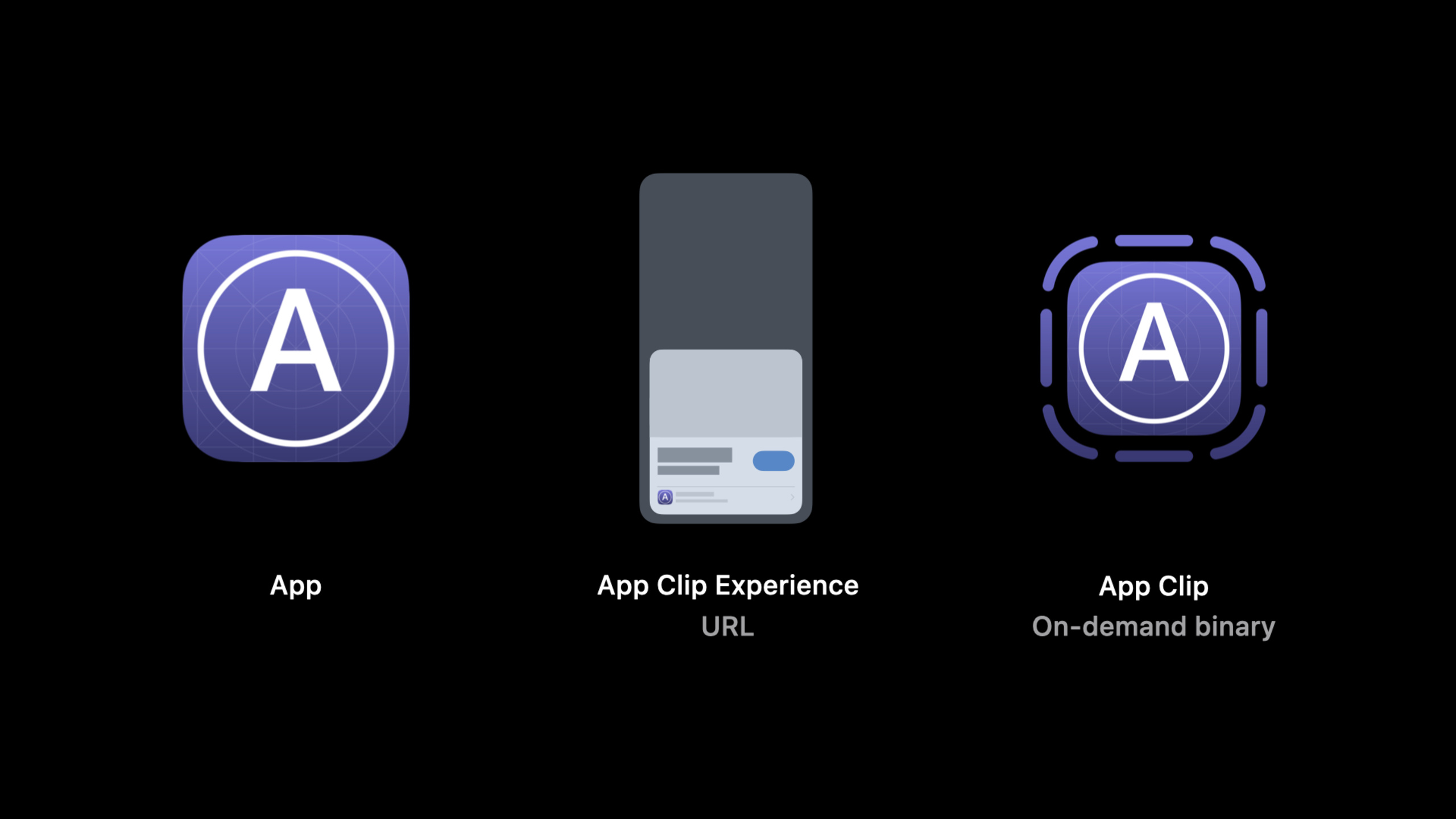
The model given by Apple consists of three parts: the full app, the App Clip Experience (experience URL), and the App Clip itself. The experience URL will be handed over to the App Clip on iOS 14. QR codes, NFC tags, Safari, Messages, and Maps are just the entrances to bring this URL to the system. (00:58)
There is no special magic in implementation. The developer creates a second application target in Xcode, adds the required code, dependencies, and resources to the App Clip target membership, and then submits it for review together with the complete App. When the complete App is installed, the system will open the full App first; when it is not installed, the system downloads and starts the App Clip. (02:55)
This also explains why App Clip needs to redesign the process. It cannot copy the navigation structure of the full app. Session directly recommends omitting top-level navigation such as Tab Bar and preparing separate URLs for each different experience, so that users can go directly to the corresponding tasks from the URL. In-store pickup, delivery orders, and different stores should all become different entrances. (05:06)
App Clip boundaries are equally clear. It must be less than 10MB after thinning; its data can be sanitized by the system; it cannot register custom URL schemes, document types, or Universal Links; if the user subsequently installs the full app, the system can migrate cameras, microphones, Bluetooth authorization, and let developers transfer business data through shared data containers. (03:46)
Detailed Content
Define entry with experience URL
(01:26) The foundation of App Clip Experience is the URL. Apple makes a special distinction between it and Universal Links: if you’ve dealt with Universal Links, the handling of App Clip URLs will be familiar; the difference is that App Clip URLs are not defined in the Apple-App-Site-Association file, but are registered with App Store Connect.
App Store Connect
└─ App Clip Experience URL
   ├─ QR code
   ├─ NFC tag
   ├─ Safari link
   ├─ Messages link
   └─ Maps business detail
Key points:
- URL is the identity of App Clip Experience, and the entry channel is only responsible for handing over this URL to the system
- After App Clip live in store, the system will display the corresponding experience when the URL is opened
- App Clip Code combines NFC and visual codes that users can tap or scan
Create a second target in Xcode
(06:53) Luming uses the Fruta demo to show the process of creating an App Clip. She creates a new App Clip target and names itFruta Clip, Xcode automatically embeds it into the complete App and fills in the name and bundle identifier. Then add the necessary dependencies, shared asset catalog, and Swift source files to the App Clip.
Fruta app
└─ Fruta Clip target
   ├─ Dependency: Nutrition Facts
   ├─ Shared Assets: app icon, colors, ingredient, smoothie
   ├─ Included source: Model, Orders, Smoothies, Ingredients
   └─ Excluded source: Store, Recipes, top-level tab navigation
Key points:
- App Clip target is built and submitted for review together with the complete App, and cannot be uploaded separately
- Target membership is the first door to control the volume. Only check the files needed to complete the current task.
- The demo retains the order path and removes recipe, store unlock and top-level tab navigation
Use compilation conditions to isolate complete App functionality
(09:38) The first build of Fruta Clip fails becauseOrderPlacedView.swiftReferences that have been excluded from the App ClipStore. The solution is to add both Debug and Release in Swift Compiler - Custom FlagsAPPCLIPconditions, thenStoreRelated references are conditionally compiled and isolated, so that this part only remains in the complete App target.
Key points:
APPCLIPIt is the custom compilation condition actually added in the demo- Build errors come from inconsistencies between target membership and code references
- Conditional compilation allows the complete app to retain advanced features while allowing the App Clip to only contain current tasks
Use NSUserActivity to route different experiences
(12:07) App Clip can use UIKit or the new SwiftUI app lifecycle. On launch, the App Clip or full app receivesNSUserActivity. If an App Clip supports multiple experiences, read the web page URL on the activity to determine which entry is currently being processed.
Launch event: NSUserActivity
Routing detail: read the web page URL on the activity
UI frameworks: UIKit or SwiftUI app lifecycle
Key points:
NSUserActivityIt is the startup input explicitly mentioned in this session.- Read the web page URL on the activity to distinguish multiple App Clip Experiences
- These experiences must continue to be processed after the complete App is installed. Users should not lose the original entrance due to installing the App.
Design data according to the life cycle of App Clip
(14:14) App Clip does not require user management. After the user is finished using it, iOS will delete the App Clip, its data container, and Keychain data if it is not opened again for a long time. The life cycle of frequently used App Clips will be extended, but developers should still treat local data as a temporary cache.
App Clip data
├─ standard container: temporary cache
├─ Keychain data: deleted with App Clip cleanup
└─ shared group container: migration path to the full app
Key points:
- The data in the standard container may be deleted by the system and is not suitable for storing unique business status.
- If the user installs the full app, the App Clip will be deleted
- The data that needs to be migrated should be put into the shared group data container in advance and copied after the complete App is installed.
Use system capabilities to reduce input costs
(17:36) App Clips aim to be short and fast. Session named several types of system capabilities: Apple Pay processes payments, Notifications reminds people to pick up food or park when parking expires, SwiftUI reuses widget-style interfaces,SKOverlayOr SwiftUI’s App Store overlay modifier guides you to download the complete App.ASAuthorizationControllerHandle login or Sign in with Apple.
Payment: Apple Pay
Upgrade: SKOverlay / App Store overlay modifier
Account: ASAuthorizationController
Federated sign-in callback: ASWebAuthenticationSession
Location check: location confirmation API
Key points:
- Apple Pay and Sign in with Apple can reduce form input in App Clips
- Do not rely on custom URL scheme for federated sign-in callback, it is recommended to use session
ASWebAuthenticationSession - The location confirmation API is used to confirm that the user is at the expected location to avoid asking for full location permissions from users who have just encountered the App Clip.
Core Takeaways
-
What to do: Split an existing purchase process into a store-specific App Clip. Why it’s worth doing: Session recommends using different URLs to represent different experiences. The store URL can skip the store chooser and directly enter the goods or services of the current store. How to start: First select a fixed scene, such as ordering at a counter; prepare an independent experience URL for each store, and read the web page URL on the activity in the App Clip to identify the store.
-
What to do: Do a target membership slimming exercise for the complete app. Why it’s worth doing: App Clip after thinning must be less than 10MB, Fruta demo controls the scope by excluding recipes, store unlock and Tab navigation. How to start: Create a new App Clip target, and add the model, current task page, and shared assets to target membership one by one; use it when the build fails
APPCLIPConditionally isolate complete app functionality. -
What to do: Change the local data of the App Clip to the two layers of “temporary cache + migrated data”. Why it’s worth doing: iOS may delete App Clips, standard containers, and Keychain data; when a user installs a complete App, only the shared group data container can take over the business data that needs to be migrated. How to start: Classify the latest order, user ID, and draft status; put the temporary display data in the standard container, and write the data to be retained after installation into the shared group container.
-
What to do: Make a zero-form transaction path with Apple Pay and Sign in with Apple. Why it’s worth doing: App Clip users usually don’t have the patience to fill out long forms. Session clearly recommends using Apple Pay,
ASAuthorizationControllerand Sign in with Apple reduce typing. How to start: Keep the visitor process first, then connect to Apple Pay before making payment; use Sign in with Apple to create or associate a user when an account is required, and then prompt to download the complete App after completing the main task. -
What to do: Design a complete app relay point for the App Clip. Why it’s worth doing: Users may install the complete app after liking App Clip. Session is recommended.
SKOverlayOr SwiftUI’s App Store overlay modifier guides the upgrade. How to start: Place the download entry on the task completion page, and do not intercept the user before the task; write the status in the App Clip to the shared container, so that the complete App can continue the previous context when it is first launched.
Related Sessions
- Design great App Clips — Complement the design judgment of App Clips from the perspective of user flow, notifications and download guidance.
- Streamline your App Clip — In-depth explanation of location confirmation, temporary notifications, SKOverlay and secure app group.
- Configure and link your App Clips — Continue to talk about App Clip Code, NFC, QR code, Safari banner and App Store Connect configuration.
- Create App Clips for other businesses — Suitable for scenarios where you need to provide the same App Clip binary for multiple merchants or brands.
- Get the most out of Sign in with Apple — Supplements account creation, credential checking, and user migration capabilities in App Clip.
Comments
GitHub Issues · utterances