
Highlight
Swift 5.3 focuses updates on runtime size and memory, Xcode diagnostics and completion, cross-platform support,
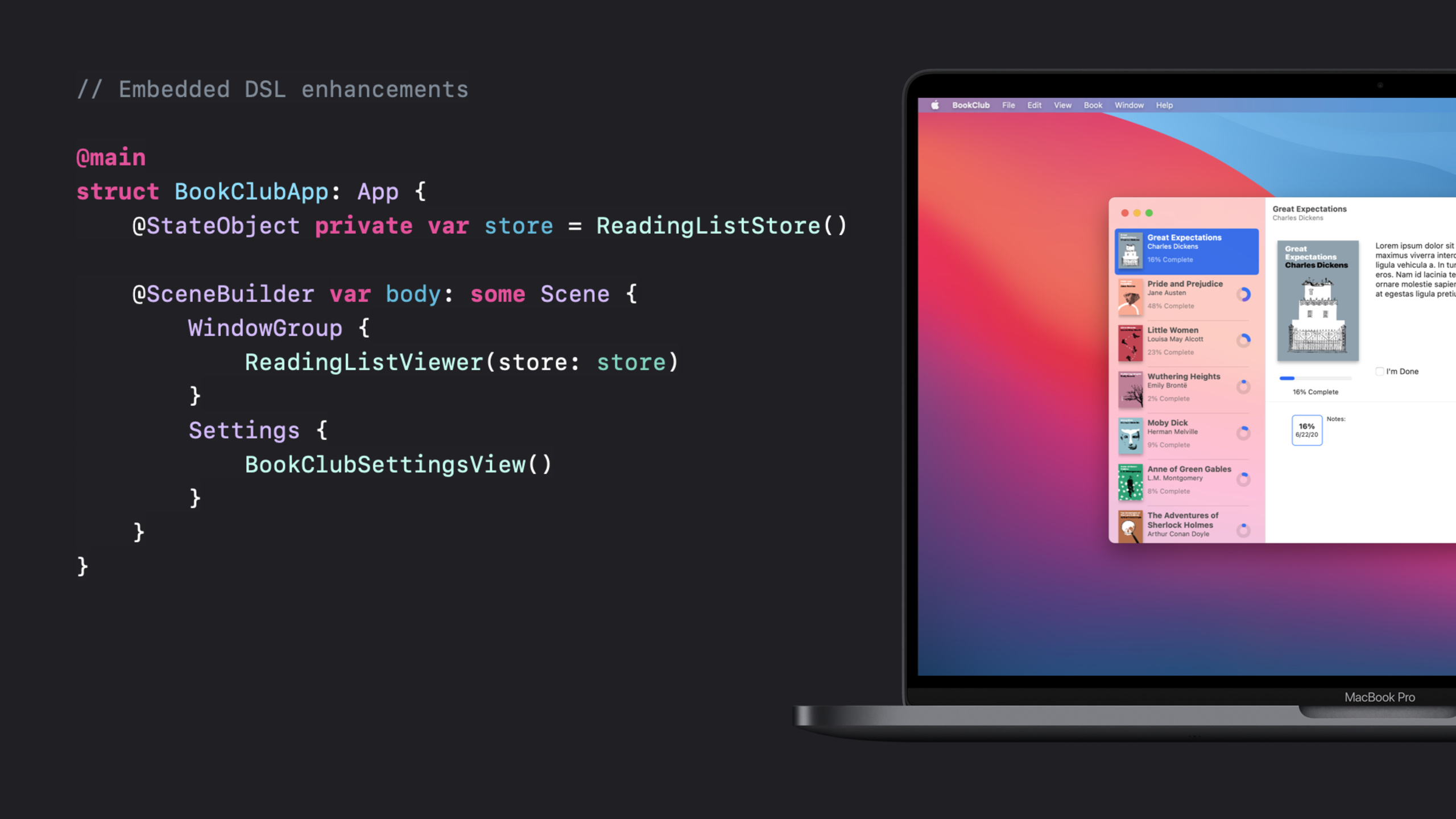
@mainWith multiple trailing closures, Apple Archive, OSLog, Swift Numerics, and ArgumentParser, Swift can cover apps, command-line tools, system-level libraries, and server functions.
Core Content
Swift 5 has completed ABI stability and API stability, and SwiftUI has also pushed Swift to the center of Apple platform development. By WWDC20, the question became another level: whether Swift is light enough, debugging enough, and suitable for system layer and server scenarios (00:14).
The answers to this session start with the underlying performance. Swift 5.3 continues to narrow the code size gap. The Swift version of UIKit app has been reduced to less than 1.5 times the code size of the Objective-C version; MovieSwiftUI’s application logic code size has been reduced by more than 40%. The heap memory also decreases simultaneously, and the same Swift app has runtime overhead during startup in the new version. It has dropped to less than one-third of the previous year’s version (02:29, 06:04).
Development experience is also placed in an equally important position. Compiler diagnostics begin to point to more precise locations and give more fix-it clues; SourceKit driver completion and indentation are optimized for SwiftUI chain calls, and some completion scenarios are up to 15 times faster than Xcode 11.5; LLDB can fallback from DWARF debug information to import C and Objective-C when Clang module import fails Types to make variable views and expression evaluation more reliable (07:18, [09:31](https://developer.ap ple.com/videos/play/wwdc2020/10170/?time=571), 10:58).
At the language level, Swift 5.2 and 5.3 added more than ten features. Session singles out a few points that will directly change the shape of everyday code: multiple trailing closures make calls with multiple closure parameters more suitable for DSLs;@mainChange the entry point from specialmain.swiftExpanded into type protocol capabilities; KeyPath expression can be passed as a function; enum can be automatically synthesizedComparable, you can also use enum case to satisfy static protocol requirement(15:02, [20:09](https://developer.apple. com/videos/play/wwdc2020/10170/?time=1209), 23:29).
The last part moves Swift from language update to ecological update. Float16, Apple Archive, Swift System and faster OSLog appear in the SDK; in addition to Swift Package Manager, there are Swift Numerics, Swift Argument Parser and Swift Standard Library Preview. Together they point to a change: Swift’s new capabilities will not only wait for the release of the system SDK, but will also first be available through open source packages Entering the hands of developers (26:04, [28:54](https://developer.apple.co m/videos/play/wwdc2020/10170/?time=1734), 30:38).
Detailed Content
Runtime optimization makes Swift more suitable for the system layer
(02:29) The optimization of Swift 5.3 comes from the accumulation of runtime and tool chain levels and does not correspond to a single API. Session gives two specific indicators: the code size of a Swift UIKit app is 1.5 times less than the Objective-C version; the application logic code size of MovieSwiftUI is reduced by more than 40%. This will affect the download size and the clean memory that can be reclaimed by the system.
(05:15) Heap memory examples illustrate the benefits of Swift value types: 400 model objects take up about 20KB of heap memory in Swift, and about 35KB in the Objective-C version. Swift 5.3 also reduces the overhead related to startup caches, protocol conformance, type information, and Objective-C bridging, allowing a Swift app’s heap memory to be less than one-third of the previous year’s version.
(06:52) After the Standard Library is placed below Foundation, Swift can be used to implement frameworks below the Objective-C level. This change explains why Apple continues to squeeze runtime memory: system daemons and low-level frameworks are sensitive to every byte.
Key points:
- Code size optimization, clean memory and heap memory are the main themes of this session, not incidental indicators.
- Value type, small string, and continuous array storage explain why Swift model data is more compact.
- The lowering of the Standard Library means that Swift can enter system-level scenarios that relied more on C in the past.
Cross-platform Swift and AWS Lambda
(12:34) Swift 5.3 updates Ubuntu support, adds CentOS and Amazon Linux 2, and previews initial Windows support. Session then brought cross-platform capabilities to AWS Lambda: writing serverless functions using the open source Swift AWS runtime.
import AWSLambdaRuntime

Lambda.run { (_, event: String, callback) in
    callback(.success("Hello, \(event)"))
}
Key points:
import AWSLambdaRuntimeExplain that this capability comes from the open source runtime package, not the Foundation or system SDK API. -Lambda.runRegister the Lambda handler, the closure receives the event and returns the result through callback. -event: StringShows the smallest input model in the demo, suitable for illustrating how Swift is started in a server function. -callback(.success(...))Handing the return value to the Lambda runtime, the example is deliberately kept to the “Hello, world” level.
@mainGive the entry point to the type
(20:09) In the past AppDelegate could be usedUIApplicationMainLet the compiler generate implicitmain.swift. Swift 5.3 generalizes this capability to@main: defined by the library author on the protocol or parent classstatic main, the user marks the entrance type as@main, the compiler generates entry code.
// Type-based program entry points

import ArgumentParser

@main
struct Hello: ParsableCommand {
    @Argument(help: "The name to greet.")
    var name: String

    func run() {
        print("Hello, \(name)!")
    }
}
Key points:
import ArgumentParserThe Swift open-source package is introduced, and the Argument Parser examples below will continue to extend it. -@mainmarked onHelloType-wise, the entry point changes from a separate file to part of the type declaration. -ParsableCommandProviding command line tool conventions, library authors can expose entry rules to users through the protocol. -@ArgumentDeclare command line positional parameters as attributes,run()This is where the command logic is actually executed.
enum automatic synthesisComparable
(23:29) Swift 4.1 can already synthesizeEquatableandHashable. Swift 5.3 continues expansion to qualifying enumsComparable, allowing state enums with a natural order to write less boilerplate code.
// Synthesized comparable conformance for enums

enum MessageStatus: Hashable, Comparable {
    case draft
    case saved
    case failedToSend
    case sent
    case delivered
    case read

    var wasSent: Bool {
        self >= .sent
    }
}
Key points:
MessageStatusAlso declareHashableandComparable, the comparison logic is synthesized by the compiler.- The declaration order of case is the comparison order,
.sentThe subsequent status means that it has been sent. -wasSentuseself >= .sentExpress business rules and are shorter than handwritten switches. - This example is suitable for enums with linear order such as state machines, message queues, and synchronization phases.
Apple Archive and Swift System
(26:55) Apple Archive is a new modular archive format based on the technology Apple uses to deliver system updates, offering Finder integration, command-line tools, and Swift APIs. The example shows writing the directory to.aarfile and compressed with LZFSE.
// Apple Archive

import AppleArchive

try ArchiveByteStream.withFileStream(
    path: "/tmp/VacationPhotos.aar",
    mode: .writeOnly,
    options: [.create, .truncate],
    permissions: [.ownerReadWrite, .groupRead, .otherRead]
) { file in
    // Receives raw bytes and writes compressed bytes to `file`
    try ArchiveByteStream.withCompressionStream(using: .lzfse, writingTo: file) { compressor in
        // Receives archive entries, and writes bytes to `compressor`
        try ArchiveStream.withEncodeStream(writingTo: compressor) { encoder in
            // Writes all entries from `src` to `encoder`
            try encoder.writeDirectoryContents(archiveFrom: source, keySet: fieldKeySet)
        }
    }
}
Key points:
ArchiveByteStream.withFileStreamCreate a target file stream,optionsandpermissionsUse strongly typed enumerations. -withCompressionStream(using: .lzfse, writingTo: file)Compress the original bytes and write them to the file. -ArchiveStream.withEncodeStreamReceive archive entries and pass them to the compressed stream. -writeDirectoryContents(archiveFrom:keySet:)Responsible for writing the source directory into archive, as shown in the examplesourceandfieldKeySetfrom the presentation context.- Session specifically pointed out that the FileStream constructor relies on Swift System, which uses strong typing to wrap low-level system calls and reduce the error-prone points of Darwin overlay’s original interface.
String interpolation and formatting for OSLog
(28:11) OSLog targets low overhead and privacy protection. Swift 5.3 accelerates OSLog through compiler optimization, and adds string interpolation and formatting options to make log writing closer to ordinary Swift strings.
logger.log("\(offerID, align: .left(columns: 10), privacy: .public)")
// Logs "E1Z3F    "

logger.log("\(seconds, format: .fixed(precision: 2)) seconds")
// Logs "1.30 seconds"
Key points:
privacy: .publicclearlyofferIDMarked as publicly viewable, consistent with unified logging’s design to protect sensitive data by default. -align: .left(columns: 10)Align fields in columns in the log for easier viewing later. -format: .fixed(precision: 2)Keep values to two decimal places and avoid manual string formatting.- If the project is still in use
printTo debug online problems, this set of APIs is the entry point for migrating to unified logs.
ArgumentParser keeps command line tools declarative
(29:48) Swift Argument Parser is a new open source package. Session uses the sameHelloCommand to continue demo: addcountoption, the tool can repeatedly output greeting and automatically obtain parameter verification and help information.
// Swift ArgumentParser

import ArgumentParser

@main
struct Hello: ParsableCommand {
    @Option(name: .shortAndLong, help: "The number of times to say hello.")
    var count: Int = 1

    @Argument(help: "The name to greet.")
    var name: String

    func run() {
        for _ in 1...count {
            print("Hello, \(name)!")
        }
    }
}
Key points:
@Option(name: .shortAndLong)letcountBoth short parameter and long parameter forms are supported. -var count: Int = 1Declare the type and default value at the same time, and the Argument Parser will parse and verify them accordingly. -@ArgumentContinue to represent positional parameters,helpThe copywriter enters the automatically generated help page. -run()Only business logic is retained in it, and entry, parameter parsing, and help screens are all handled by the package.
Core Takeaways
-
What to do: Perform a size and heap memory regression check on an existing Swift app. Why it’s worth doing: Swift 5.3’s code size, SwiftUI app logic size, and runtime heap overhead have all been clearly optimized, and old projects may directly benefit from upgrading. How to start: Use the same code to archive on old Xcode and Xcode 12 respectively, and compare the binary size; record the heap memory after startup in Instruments.
-
What to do: Change the internal script to the Swift Argument Parser command line tool. Why it’s worth doing:
@mainandParsableCommandEntrance, parameter declaration and help information can be put into one type to reduce handwritingmain.swiftand parameter parsing code. How to start: Create a new Swift Package and import itapple/swift-argument-parser, split the script parameters into@Optionand@Argument。 -
What to do: Create an OSLog wrapper layer for online diagnostic logs. Why it’s worth doing: Swift 5.3’s OSLog supports string interpolation, privacy marking and formatting, which can replace scattered
print, and can also reduce the risk of leaking sensitive information. How to start: Start with a key business link and defineLoggerClassify, keep user input private by default, and mark only necessary IDs as.public。 -
What to do: Split resource components into Swift Packages. Why it’s worth doing: This session mentions the Swift Package ecological extension, and related session 10169 continues to talk about resources and localization; component packages can contain code, pictures, storyboards, and localized strings at the same time. How to start: First draw a design system or empty state component package, press
Sources、Resourcesand.processOrganize the files and replace local references in the app target. -
What to do: Use Apple Archive as a development asset packaging tool. Why it’s worth it: Apple Archive provides Swift API, LZFSE compression, and command-line tools for archiving sample data, log packages, or design resources into transportable files. How to start: Put the session
withFileStream、withCompressionStream、withEncodeStreamThe example is changed to an internal CLI, input directory, output.aar。
Related Sessions
- Distribute binary frameworks as Swift packages — Use Swift Package to distribute XCFramework, configure binary target, and use checksum to ensure that the client gets the expected binary.
- Explore logging in Swift — Dive into the Swift unified logging API and understand privacy protection, string interpolation, formatting, and low-overhead log collection.
- Explore numerical computing in Swift — Introducing Swift Numerics, Float16, generic numerical protocols and complex number types, supplementing the numerical computing ecosystem mentioned in this session.
- Swift packages: Resources and localization — Explain how resource files, images, storyboards and localization strings are organized in Swift Package.
- What’s new in SwiftUI — Demonstrates SwiftUI’s new app, scene, widget, outline, grid, and toolbar capabilities in 2020.
Comments
GitHub Issues · utterances