
Highlight
Apple provides Swift native for unified logging system in Xcode 12
LoggerAPI that allows apps to log events using type-safe string interpolation, mask non-numeric sensitive data by default, and use Console andlog collectTrack down hard-to-reproduce problems.
Core Content
Fruta’s gift card page has a typical online bug: the card will continue to be loaded from the server when the list is scrolled to the bottom, and the current loading will stop when the user clicks on a card. Most of the time everything works fine, occasionally it fails after clicking a card during loading. The problem rarely occurs and does not appear stably next to the development machine, so breakpoint debugging cannot catch the scene. (01:19)
The solution provided by Apple in this session is to write key events into the unified logging system (Unified Logging). The new Swift API in Xcode 12 isLoggerThe type is entry, and developers can write structured logs at task start, failure, stop, retry, etc. The system will compress and archive these logs on the device for later use.log collectPull back to your Mac and filter by subsystem, category, and task ID in the Console. (02:24)
The focus of this API is not just toprint()Change your name. The log message will not be completely converted into a string at the call point; the compiler and logging library will retain the type information, and the formatting cost will only be paid when the log is actually displayed. Runtime data is also protected by default: non-numeric types such as strings and objects are obscured in the log, and only explicitly marked as.publicThe value will be displayed. (03:44)
Fruta’s example finally relies on task UUID to connect the timeline. The log shows: The task was first stopped due to a network error and waited for retry. The user then selected the gift card, and the code tried to stop a task that no longer existed, thus entering an inconsistent state. This conclusion comes from the logs on the real device and does not require recreating the same network timing locally. (07:35)
Detailed Content
1. Create a Logger and place it on the critical path
(02:44) Access is divided into three steps: Importosmodule, createLogger, calling the log method where important events occur.subsystemTypically use the App’s bundle identifier,categoryUsed to distinguish different functional areas in the program.
// Add logging to your app in three simple steps

import os

let logger = Logger(subsystem: "com.example.Fruta", category: "giftcards")

func beginTask(url: URL, handler: (Data) -> Void) {
    launchTask(with: url) {
       handler($0)
    }

    logger.log("Started a task")
}
Key points:
import osIntroducing unified logging API. -Logger(subsystem:category:)Attach source information to each subsequent log, and Console can use it to filter. -logger.logUse the default notice level, which is suitable for recording key events that must be retained when troubleshooting problems.- The log is written in
launchTaskAfterwards, it can be confirmed that the download task has been started.
2. Record runtime data while controlling privacy
(03:32)LoggerSupports Swift string interpolation. You can put runtime data such as task ID, server number, time consumption, etc. into the log, and then use these values to narrow the console search scope.
// Add runtime data to the log messsage using string interpolation

import os

let logger = Logger(subsystem: "com.example.Fruta", category: "giftcards")

func beginTask(url: URL, handler: (Data) -> Void) {
    launchTask(with: url) {
       handler($0)
    }
    logger.log("Started a task \(taskId)")
}
Key points:
\(taskId)It will be processed as typed data by the logging system and will not be turned into an ordinary string first.- The compiler and log library will retain the message structure and format it as needed when displaying the log.
- The ID suitable as a filter condition must be stable, such as the task UUID in this Fruta example.
(04:28) Privacy defaults are conservative. Non-numeric types, such as strings or objects, are masked as private data.
logger.log("Paid with bank account \(accountNumber)")Key points:
accountNumberis a string and will be displayed as private in the log output.- This default behavior is for apps that have been published to user devices to prevent logs from revealing personal information.
- Do not mark personal data such as your account, email address, name, etc. as public to facilitate search.
(05:01) If a value itself is not sensitive, it can be explicitly marked as public.
logger.log("Ordered smoothie \(smoothieName, privacy: .public)")Key points:
privacy: .publicLet the console and log archives show the real values.- Determine whether the data is likely to identify the user before tagging it publicly.
- The Fruta example marks the task UUID as public because it is only used to string together a download task.
3. Use log collect and Console to restore the scene
(05:20) After the log is written into the system, the operating system will save it on the device in compressed form. The speech did not show the complete command line parameters, but only clarified the troubleshooting process: connect the device and run it on Maclog collect, specify the device option, start time and output file name, and then open it with Console.logarchive。
log collect
device option
start time a few minutes before the bug
output log archive file
Key points:
- The start time should be chosen a few minutes before the bug is first seen to avoid collecting irrelevant logs.
- The output result is a log archive, which can be viewed in the Console app after double-clicking it.
- The archive contains logs of all processes on the system. The first step is to filter by subsystem to your own App.
(06:42) Console search and filtering are the core of the positioning problem. Fruta first filters out its own logs by bundle identifier, then appends the UUID of the failed task, retaining only a few records related to this failure.
logger.log("Starting a new task for loading cards \(currentTaskID, privacy: .public)")
logger.fault("Task \(currentTaskID, privacy: .public) is not runinng, cannot be stopped!")
logger.log("Task \(currentTaskID, privacy: .public) interrupted")
Key points:
- All logs carry the same
currentTaskID, Console can use it to string together download tasks. -logger.faultUsed in scenarios where the program is assumed to be corrupted, in this case the code is trying to stop a task that is not running. -privacy: .publicBy allowing the UUID to appear in the log, developers can filter out multiple records of the same task.
4. Select the appropriate log level
(09:27)LoggerFive levels are provided: debug, info, notice, error, fault. Level affects visual cues in the Console, whether to persist, retention time, and performance cost. Errors and faults will be highlighted in the Console. Debugging is the fastest but will not be persistent.
logger.debug("\(slowFunction(data))")Key points:
- Debug level messages will be discarded if they are not streamed.
- The Swift compiler avoids executing the code required to construct debug messages, so
slowFunction(data)There will be no cost to users. - Need to use afterwards
log collectThe key events retrieved should not be placed at the debug level.
(10:20) When selecting levels, you can layer them by purpose. Debug is reserved for development phase details, info records helpful but not necessary information, notice records events that must be known when troubleshooting problems, error records errors during execution, and fault records serious states caused by potential program bugs.
logger.log("Task \(currentTaskID, privacy: .public) interrupted")
logger.fault("Task \(currentTaskID, privacy: .public) is not runinng, cannot be stopped!")
Key points:
logger.logCorresponding to the default notice level, it is suitable for recording key process events such as task interruption. -logger.faultCorresponds to the most severe level, suitable for recording states that violate program expectations.- Errors and faults generally have longer persistence times, but device storage space still affects the retention period.
5. Format the log so that the data can be read and copied
(12:58) The log not only serves for error troubleshooting, but also can collect lightweight statistical data. Fruta records the task ID, gift card ID, server ID, and elapsed time. The raw output is difficult to read when it is not aligned,alignandformatReadability can be improved without increasing the cost of log calls.
import SwiftUI
import os

let statisticsLogger = Logger(subsystem: "com.example.Fruta", category: "statistics")

// Log statistics about communication with a server.
func logStatistics(taskID: UUID, giftCardID: String, serverID: Int, seconds: Double) {
    statisticsLogger.log("\(taskID) \(giftCardID, align: .left(columns: GiftCard.maxIDLength)) \(serverID) \(seconds, format: .fixed(precision: 2))")
}
Key points:
align: .left(columns:)Fixed gift card IDs to be the same width to make them easier to read in columns. -format: .fixed(precision: 2)Keep the time taken to two decimal places to reduce useless precision.- The aligned logs can be column selected using the Option key, and then pasted into Numbers for analysis.
- This example finds through the chart that the slow tasks all come from server three, so the server is taken offline for maintenance.
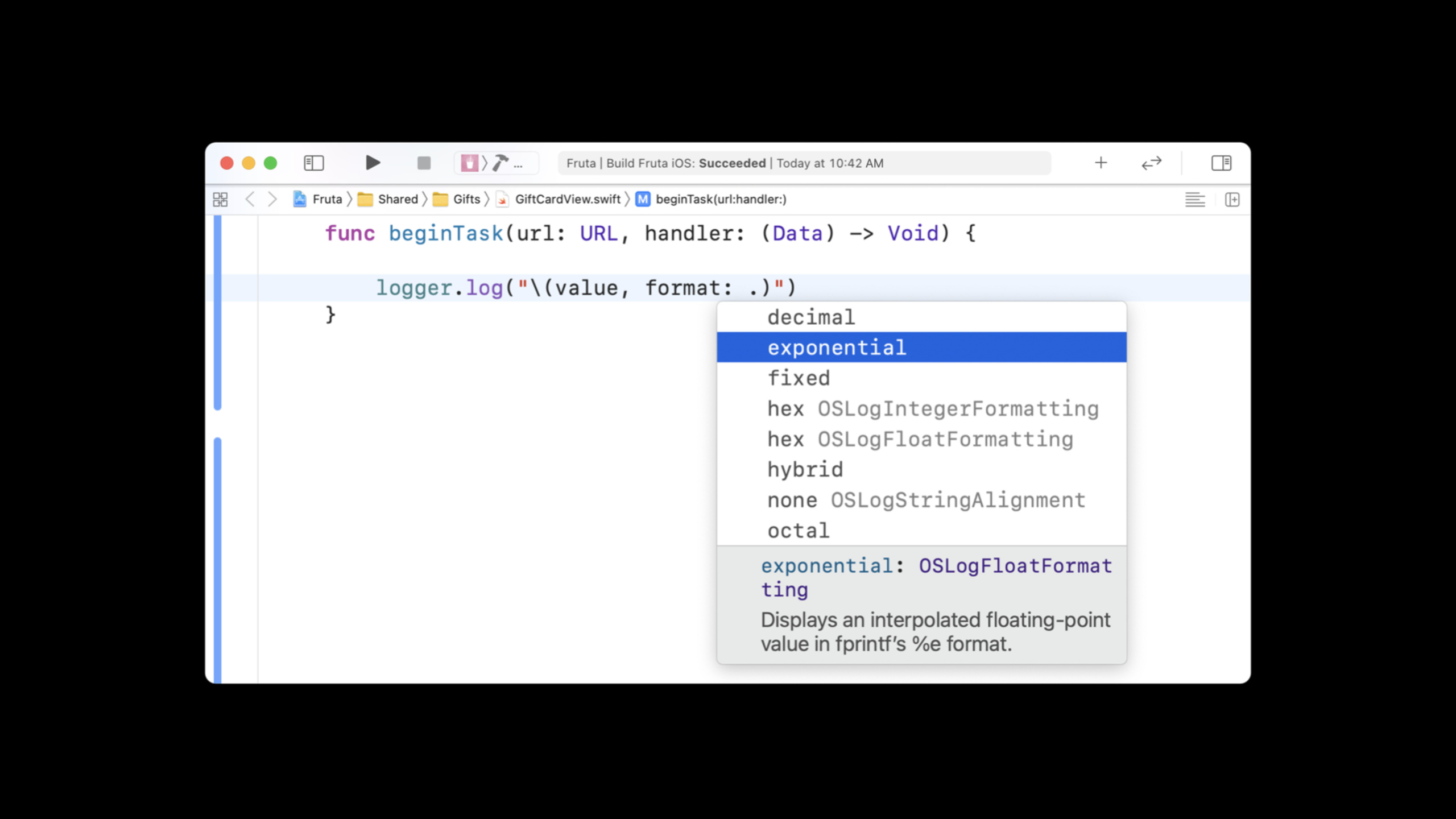
(15:00) Formatting options go beyond fixed decimals. In Xcode code completion, you can see options such as hexadecimal, octal, and exponential formats, and you can also right-align according to the column width.
logger.log("\(data, format: .hex, align: .right(columns: width))")Key points:
format: .hexSuitable for displaying binary or numeric data in hexadecimal. -align: .right(columns:)Align data of different lengths in the same column.- Formatting is handled by the logging system and the talk clearly states that it does not increase the cost of logging calls.
6. Use hash to mask sensitive values but retain matching capabilities
(15:25) Logging will continue after the app is released and can be collected by anyone with the device and password. Personal information should not be marked public. If you encounter a scenario where you need to determine whether two logs point to the same value, you can use equality-preserving hash.
logger.log("Paid with bank account: \(accountNumber, privacy: .private(mask: .hash))")Key points:
.private(mask: .hash)The original text of the bank account number is not displayed.- The same account will get the same hash, and developers can still determine whether the two logs are related.
- This method is suitable for filtering and aggregating the same sensitive value, but is not suitable for restoring sensitive content for human viewing.
Core Takeaways
Create a log timeline for asynchronous tasks
What to do: Generate task IDs for network requests, background downloads, and synchronization tasks, and write logs on start, retry, cancellation, completion, and failure.
Why it’s worth doing: Fruta’s bug relies on network errors and the timing of user clicks. The task UUID allows the Console to restore the sequence of events in the same task.
How to get started: CreateLogger(subsystem:category:), generated at each task entryUUID,useprivacy: .publicLog this ID as a non-sensitive meaning.
Write the log level into the project contract
What to do: Define the usage boundaries of debug, info, notice, error, and fault for the team.
Why it’s worth doing: The level determines whether it can be collected afterwards, and also determines the Console highlighting and retention time. Write critical errors as debug. There may be no logs after the problem occurs.
How to start: Write the user-perceivable error aslogger.error, write the state that violates the program assumption aslogger.fault, put the details of the high-frequency development period intologger.debug。
Do a privacy and security log audit
What to do: Examine the logs for names, accounts, orders, emails, geolocations, and device identifiers to determine which values should be masked, exposed, or hashed by default.
Why it’s worth doing: session clearly states that strings and objects are private by default. Logs can be collected by people with device access. Wrong.publicPersonal information will be exposed.
How to start: First remove the sensitive value.public;When you need to associate the same user or account, use instead.private(mask: .hash)。
Make performance troubleshooting logs directly analyzeable
What to do: Record the server number, time consumption, resource ID and other fields, and usealign、formatSort the output into columns.
Why it’s worth doing: The Fruta example copied the alignment log to Numbers and found that the slow tasks were concentrated in server three, and the log directly became diagnostic data.
How to get started: Use with fixed-width fieldsalign: .left(columns:), for time-consuming useformat: .fixed(precision: 2), use column select in the Console to copy to the table tool.
Related Sessions
- What’s new in MetricKit — Use MetricKit to collect performance indicators and diagnostic payloads on real user devices to supplement online troubleshooting clues beyond logs.
- Diagnose performance issues with the Xcode Organizer — View aggregated performance data, version regressions, disk write diagnostics, and scrolling stutter metrics from the Xcode Organizer.
- Decipher and deal with common Siri errors — String together a SiriKit multi-process debugging timeline with Xcode, device logs, and os_log.
- Build trust through better privacy — Understand the iOS 14 privacy principles to help determine which runtime data cannot be publicly written to logs.
- Build an Endpoint Security app — Handle system events in macOS security products and record detection and debugging information with privacy-friendly logging.
Comments
GitHub Issues · utterances