
Highlight
The new iOS and macOS Objective-C runtime in 2020 reduces system-level memory usage by splitting class read and write data, switching to relative method lists, and adjusting the arm64 tagged pointer format. At the same time, the app is required to only read object information through the public runtime and Foundation API.
Core Content
Most developers don’t open the Objective-C runtime header files every day. The problem is, almost every iOS and macOS app is built on it: Objective-C classes use it, and Swift classes share the same class infrastructure. Apple made it very straightforward at the beginning of this session: This is not a lecture to teach you to migrate new APIs. Ideally, if you do not change the code, the App will benefit from the smaller system runtime. (00:11)
The real risk comes from another type of code: debugging tools, performance tools, legacy libraries, or a third-party dependency that directly reads the internal structure of the runtime. Just because these field locations seemed stable in the past doesn’t mean they are APIs. The 2020 runtime just moved these internal layouts: the read and write data of the class was split, the method list was changed from 64-bit pointers to relative offsets, and the bit layout of the arm64 tagged pointer was also changed. Code that reads bits and structures directly will crash, or worse, mishandle user data. (00:32, 21:24)
The path Apple has given is clear. The runtime can continue to change inside, because the outside should passclass_getName、method_getImplementation、isKindOfClass:、CFGetTypeIDThis type of public API reads information. As a result, the system can keep more memory as clean memory, reducing the cost of dirty memory on iOS devices and allowing apps to obtain more available memory space. (07:01, 22:27)
Detailed Content
Class data: move out the rarely used read and write fields
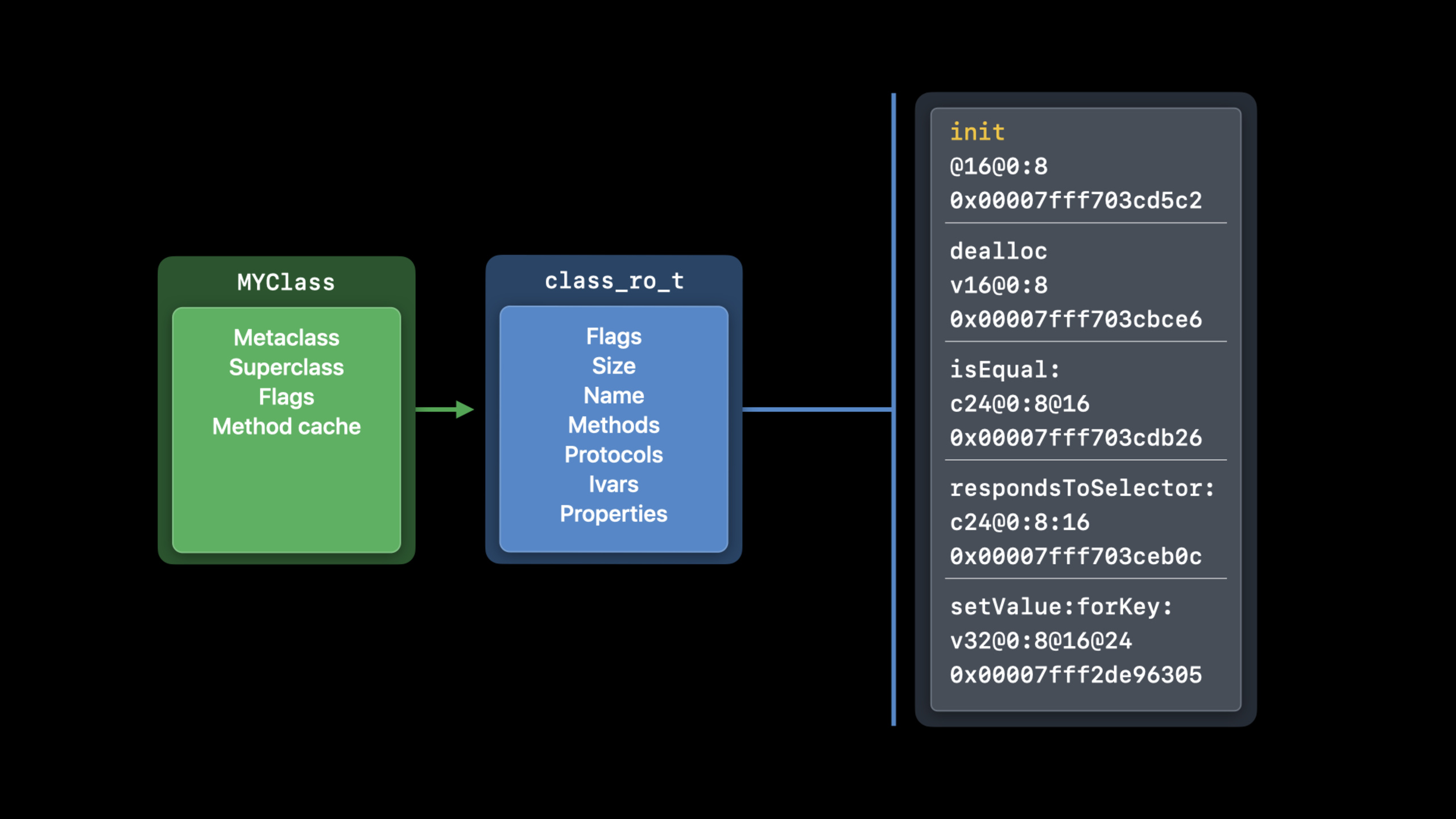
(01:16) The class object in the runtime saves the most frequently accessed information, such as metaclass, superclass, and method cache. More static information is placed inclass_ro_tinside,roIndicates read only, including class name, method, protocol and instance variables. When the class is used for the first time, the runtime will also allocateclass_rw_t, save data that is generated at runtime and may change.
The key difference is between clean memory and dirty memory.class_ro_tOnce read it is not changed and can be discarded and reloaded from disk when the system needs memory.class_rw_tIt will be modified while the process is running. iOS does not have swap, so the cost of dirty memory is higher. Apple measured it on a real device. In the systemclass_rw_tIt takes up about 30 MB, but only about 10% of classes actually modify methods, and the Swift demangled name field is not required by every Swift class. Therefore, the runtime moves the rarely used fields to extended records. About 90% of classes do not need to allocate this part of data, saving about 14 MB at the system level.
heap Mail | egrep 'class_rw|COUNT'Key points:
heap MailView the heap memory allocation of the Mail process. -egrep 'class_rw|COUNT'only keepclass_rw_tRelated rows and statistics headers.- In the session demo, Mail uses approximately 9,000
class_rw_t, only slightly more than 900 require extended information. - This command is not an App code path and is suitable for verifying the memory impact of changes in runtime data structures on Mac. (05:37)
Don’t judge a class by its internal fields. The class name, parent class, and method list all have public runtime APIs. (07:35)
class_getName

class_getSuperclass

class_copyMethodList
Key points:
class_getNameRead class names to avoid dependenciesclass_ro_tspecific layout. -class_getSuperclassRead the parent class to avoid assuming that the order of fields in the class object remains unchanged. -class_copyMethodListGets a list of methods that the runtime will handle for new and old internal formats.
Method list: Change 64-bit pointer to 32-bit relative offset
(08:04) Each Objective-C method entry contains three fields: selector, type encoding, and implementation. In the old format, each field is a pointer on 64-bit systems, and a method entry occupies 24 bytes. The method implementation and metadata are in the same binary image and do not need to point to the entire 64-bit address space, so the 2020 toolchain can turn these fields into 32-bit relative offsets within the binary.
This has three consequences. First, the method entry size is halved. Apple measures about 80 MB of system-level method data on a typical iPhone, and the new format saves about 40 MB. Second, the relative offset does not require the dynamic linker to correct the absolute address after loading, and can be retained in real read-only memory. Third, swizzling no longer rewrites the original method list, but maps the methods to the replaced implementation through a global table to avoid dirtying the entire page of method list with one swizzle. (10:40, 11:30)
Xcode will generate the corresponding format based on the minimum deployment target. When the target system is new enough, the toolchain automatically generates a relative method list; when support for older systems is still required, Xcode continues to generate the old format. The risk occurs when the deployment target of the build product is newer than the actual running system. The old runtime will read two 32-bit fields as a 64-bit pointer, and eventually crash when reading method information. (12:23, 13:31)
The same three fields can be read by the public API. (14:38)
method_getName

method_getTypeEncoding

method_getImplementation
Key points:
method_getNameReturn method selector. -method_getTypeEncodingReturn parameter and return value encoding for use by introspection and message forwarding. -method_getImplementationReturns the method implementation entry. The caller does not need to know whether the method list is in the old pointer format or the new relative offset format.
Tagged pointer: arm64 format changed, type checking API
(14:53) Tagged pointer uses the free bits fixed at 0 in the real object pointer to directly encode the small object into the pointer value.NSNumber、NSDateetc. types to avoid allocating heap objects for small values. Session also reminds that these values will be obfuscated with random values when the process starts. Trying to directly view the payload in memory will see the result of the obfuscation.
Intel uses low bits to mark tagged pointers. The arm64 old format uses the highest bit becauseobjc_msgSendYou can handle ordinary pointers, tagged pointers andnilcommon paths. The arm64 format in 2020 continues to retain the highest bit tag, but moves the tag number to the bottom three bits; the extended tag is placed in the high-order area that can be ignored by ARM Top Byte Ignore. In this way, the payload of the extended tagged pointer can accommodate a normal pointer pointing to constant data in binary, reducing the data that originally needs to be saved in dirty memory. (19:03, 20:08)
If the old code uses bit mask to determine the tagged pointer by itself, it may get the wrong answer after iOS 14. Both objects and CF types should follow the standard API. (21:52)
if ([obj isKindOfClass:[NSString class]]) {
    // a string
}
NSUInteger length = [obj length];


if (CFGetTypeID(obj) == CFStringGetTypeID()) {
    // a string
}
CFIndex length = CFStringGetLength(obj);
Key points:
isKindOfClass:Let Foundation handle the difference between the tagged pointer and the real object pointer. -[obj length]rightNSStringTo work normally, the caller does not need to read the payload. -CFGetTypeIDandCFStringGetTypeIDIt is the type judgment entry of the Core Foundation layer. -CFStringGetLengthReading the length through the CF API also does not rely on the tagged pointer bit layout.
Core Takeaways
Do a runtime dependency audit
What to do: List all code in the project and third-party dependencies that directly access the internal structure of the Objective-C runtime, hand-written tagged pointer bit mask, and assume the layout of the method list.
Why it’s worth doing: session reiterates that in 2020 these internal layouts have moved. Old code may crash after users upgrade their systems, or may misjudge object types.
How to start: Search firstclass_rw_t、method list、tagged pointer, judge the bit operation type, and then replace the code of reading class and method withclass_getName、class_copyMethodList、method_getImplementation。
Add deployment target check to binary product
What to do: Check the minimum deployment targets of the app, framework, and external binaries in CI to ensure that they are not higher than the minimum system version actually supported by the product.
Why it’s worth doing: relative method list relies on the new runtime to understand the new format. Libraries built with the new format running on older systems will spell the two 32-bit fields into incorrect pointers.
How to start: Put the build settings, the minimum system version of the third-party framework and the actual test matrix into the same check script, and run a startup and dynamic call smoke test on the oldest supported system.
Build a dirty memory comparison process
What to do: After upgrading Xcode, SDK or deployment target, use fixed App and fixed scenarios to compare runtime-related dirty memory.
Why is it worth doing: session useheapDemonstratedclass_rw_tEarnings after split. Teams can also use the same method to confirm whether their apps benefit from system optimization.
How to start: Prepare a set of stable operation paths and collectheap <AppName> | egrep 'class_rw|COUNT'Output, write the results into performance records, and compare with the previous build.
Encapsulates a layer of safe object type judgment
What to do: Concentrate the Foundation/CF type judgment in the historical code to a few helpers, and only call them internallyisKindOfClass:、CFGetTypeIDand corresponding type API.
Why it’s worth doing: The tagged pointer format is a detail that only runtime maintainers can safely interpret. After centralized encapsulation, it is easier to prevent new bit-level judgments from entering the main body during code review.
How to start: Cover firstNSString、NSNumber、NSDateAnd common CF types, add unit tests for possible inputs of tagged pointer, and then delete the old bit mask branch.
Related Sessions
- Refine Objective-C frameworks for Swift — Continuing with how Objective-C APIs can be called correctly and naturally by Swift.
- What’s new in Swift — Supplements runtime performance and language library updates for Swift 2020.
- Safely manage pointers in Swift — Talk about the correct boundaries of Swift unsafe pointers, raw pointers, and bound memory.
- Unsafe Swift — Explain from the language safety model when unsafe operations are required and how to avoid undefined behavior.
Comments
GitHub Issues · utterances