
Highlight
iOS 14 improves Formatter’s support for language and region combinations, and uses DateFormatter, MeasurementFormatter, PersonNameComponentsFormatter, ListFormatter, NumberFormatter, and stringsdict to help apps generate dates, units, names, lists, numbers, and plural strings that conform to user habits.
Core Content
Many apps display data. The Weather app shows temperature, wind speed, and pressure, the Health app shows statistical trends, and Notes just puts a modification time under the title. As long as these texts are user-facing, they cannot beDate、DoubleOr the array is directly spelled into a string. Units, date order, decimal point, percent sign position, and name order will all change with language and region.
The entrance case of this session is very specific: a person who lives in Abu Dhabi and whose mobile phone language is set to French may have seen digital formats that are more accustomed to French regions in the past. iOS 14 and its contemporaries macOS, watchOS, and tvOS have improved the underlying algorithm to obtain a more appropriate format for language and region combinations. This change covers many language and region combinations, and apps that use the system Formatter will directly benefit from the system improvements.
Karan Miśra goes on to demonstrate Foundation’s formatting tools in order from “most specific to most general”: date and time, units of measurement, names, lists, numbers, and SwiftUI text and stringsdict. The main line is to write less custom language rules, hand over the data structure to Formatter, hand over the plurality rules to stringsdict, and let the system assemble the text according to the locale.
Detailed Content
Date and time: use styles and templates, do not use handwritten formats
(02:25) The last modified time at the top of Notes can be used directlyDateFormatterdefault style. Screen Time is used when such interfaces require “day + date + month” or very short week abbreviations.setLocalizedDateFormatFromTemplate。
// Date with Day/Month/Year and Time
let dateFormatter = DateFormatter()
dateFormatter.dateStyle = .medium
dateFormatter.timeStyle = .short
dateFormatter.string(from: Date())

// Day of Week + Date + Month
let dateFormatter = DateFormatter()
dateFormatter.setLocalizedDateFormatFromTemplate("MMMMdEEEE")
dateFormatter.string(from: Date())

// Abbreviated Day of Week
let dateFormatter = DateFormatter()
dateFormatter.setLocalizedDateFormatFromTemplate("ccccc")
dateFormatter.string(from: Date())
Key points:
dateStyleandtimeStyleSuitable for common combinations, the system will supplement the connectives and order that match the locale. -setLocalizedDateFormatFromTemplate("MMMMdEEEE")Describe which fields are required, and leave the field arrangement to Formatter. -cccccDerived from Unicode date field rules, suitable for very short weekday names displayed independently.- transcript clearly reminds you not to assign template directly to
dateFormat, which will be interpreted literally and easily generate erroneous results.
(05:56) Dates also include duration, time interval, and relative time.DateComponentsFormatter、DateIntervalFormatterandRelativeDateTimeFormatterCover these scenarios individually.
// Date and Time Components
let formatter = DateComponentsFormatter()
formatter.unitsStyle = .abbreviated
let components = DateComponents(hour: 2, minute: 26)
formatter.string(from: components)

// Date and Time Intervals
let formatter = DateIntervalFormatter()
formatter.dateTemplate = "dMMM"
formatter.string(from: startDate, to: endDate)

// Relative Dates and Times
let formatter = RelativeDateTimeFormatter()
formatter.dateTimeStyle = .named
formatter.localizedString(from: DateComponents(day: -1))
Key points:
DateComponentsFormatterThat’s a good length for “2 hours and 26 minutes.” -DateIntervalFormatterThis will avoid repeating the same elements in start and end dates. -RelativeDateTimeFormatterSuitable for natural language expressions of the past or future, such as named relative dates such as yesterday.
Unit of measurement: save one unit and show another regional custom
(06:29) In the Weather example, the data source uses the metric system, and when displayed to US users, it will be converted into Fahrenheit, miles per hour and other formats according to regional customs. Developers do not need to maintain unit conversions and localization strings themselves.
// Temperature
let formatter = MeasurementFormatter()
let temperature = Measurement<UnitTemperature>(value: 16, unit: .celsius)
formatter.numberFormatter.maximumFractionDigits = 0
formatter.string(from: temperature)

// Speed
let speed = Measurement<UnitSpeed>(value: 14, unit: .kilometersPerHour)
formatter.string(from: speed)

// Pressure
let pressure = Measurement<UnitPressure>(value: 1.01885, unit: .bars)
formatter.string(from: pressure)
Key points:
Measurementpreserve values and original units,MeasurementFormatterDetermines the units and formats users see. -numberFormatter.maximumFractionDigits = 0Controls numerical precision, unit localization is still handled by the system.- transcript mentioned
MeasurementFormatterSupports many units and also supports custom units.
Name: Neither the name order nor the initials can be hard-coded.
(07:49) Names are very personal data.PersonNameComponentsFormatterThe order and style are selected based on the user’s language settings, contact settings, and the name itself. For Chinese, Japanese and Korean names, keep the last name before the first name even if the device language is English.
let formatter = PersonNameComponentsFormatter()
var nameComponents = PersonNameComponents()
nameComponents.familyName = "Iwasaki"
nameComponents.givenName = "Akiya"
nameComponents.nickname = "Aki-chan"

// Full Name
formatter.string(from: nameComponents)

// Short Name: Respects User Preferences
formatter.style = .short
formatter.string(from: nameComponents)

// Abbreviated Name
formatter.style = .abbreviated
formatter.string(from: nameComponents)
Key points:
PersonNameComponentsLet last name, first name, and nickname become structured data. -.shortUser preferences will be respected and nicknames or short names may be used. -.abbreviatedSuitable for monogram when avatar is missing, but session reminder to check length and actual rendering size.
(08:31)monogram cannot guarantee that all names are suitable for display. SwiftcountTo count characters visible to the user, you can first do a layer of length check.
formatter.style = .abbreviated
let monogram = formatter.string(from: nameComponents)
if monogram.count <= 2 {
    // Use Monogram
} else {
    // Use Icon
}
Key points:
countNot the number of Unicode code points, which is closer to the characters seen by users across languages.- The number of characters is just a layer of protection. Ultimately, you have to make sure that the text width and height can fit into the UI.
- When the limit is exceeded, fall back to the universal icon to avoid the avatar area being stretched by long text.
Lists and numbers: leave the syntax details to the system
(10:15) List connectives change with language and context. Session uses the language list in the keyboard settings to indicate that “and” in Spanish will change its form according to the following word. iOS 14 has been updated to the same generation systemListFormatter, making it comply with the grammatical rules of multiple languages.
let items = ["English", "French", "Spanish"]
ListFormatter.localizedString(byJoining: items)

let items = ["English", "Spanish"]
ListFormatter.localizedString(byJoining: items)

let items = ["Spanish", "English"]
ListFormatter.localizedString(byJoining: items)
Key points:
ListFormatter.localizedString(byJoining:)Receives an array and returns a natural list in the user’s language.- When the array order changes, the connectives may also change.
- After using the system API, the underlying implementation update will allow the App to obtain new language rules.
(12:01) Digital risks are more insidious.32.768In different regions, it may be understood as more than thirty thousand or thirty-two point seven sixty-eight.NumberFormatterDetails such as decimal separators, number shapes, and percent sign placement are handled.
let formatter = NumberFormatter()
formatter.numberStyle = .decimal
formatter.string(from: 32.768) // French (France)

let formatter = NumberFormatter()
formatter.numberStyle = .decimal
formatter.string(from: 32.768) // Arabic (Egypt)

formatter.percentSymbol
formatter.decimalSeparator
Key points:
.decimalLet plain numbers be output by language and region. -percentSymbol、decimalSeparatorThis type of attribute is suitable for scenarios where the symbol itself must be read.- session also shows
.percent, the Turkish environment will put the percent sign in front of the number.
SwiftUI Text: Pluralization rules put into stringsdict
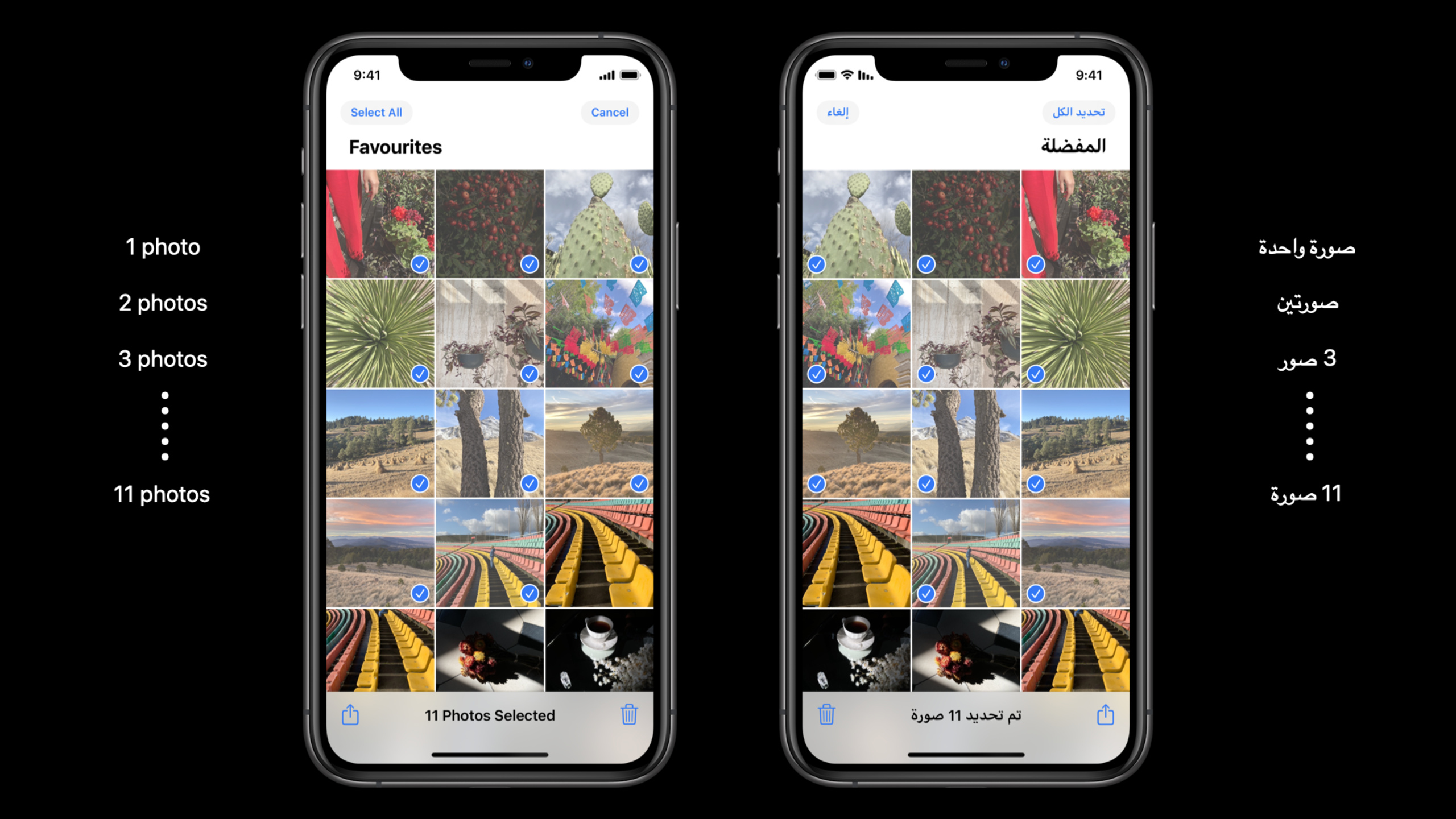
(13:24) Formatter covers common data types, and the business’s own sentences still need to be localized. You can write as usual in SwiftUIText, and then use stringsdict to provide the plurality rules corresponding to the key.
var body: some View {
    Text("\(photosCount) Photos Selected")
}
Key points:
photosCountAfter entering the localized string, stringsdict determines odd, even, minority, other, etc. branches.- transcript Compare in English and Arabic: 1, 2, 3 to 10, 11 and above trigger different grammatical forms.
- The code is only written once. When adding a new language, the translation and pluralization rules are mainly supplemented.
Core Takeaways
-
Multi-regional weather card: What to do: Unify the modeling of temperature, wind speed and air pressure as
Measurement. Why it’s worth doing: The data source can continue to use the metric system, and the interface displays appropriate units according to the user’s region. How to start: First replace the handwritten unit string of the display layer withMeasurementFormatter。 -
Health or Exercise Duration Summary: What to do: Submit copy like “Trained for 2 hours and 26 minutes this week” and “Completed training yesterday” to the Date Formatter. Why it’s worth doing: Duration, interval, and relative time have different orders and word forms in different languages. How to get started: Duration
DateComponentsFormatter, for date rangeDateIntervalFormatter, use relative dateRelativeDateTimeFormatter。 -
Contact profile picture: What to do: Display the initials when there is no profile picture, and fall back to the icon if it is too long. Why it’s worth doing: Name order, nicknames, abbreviation rules, and Chinese, Japanese, and Korean name display are not suitable for hard coding. How to start: Use
PersonNameComponentsFormattergenerate.abbreviatedStyle, and then protected by the number of characters and actual layout size. -
Filter Natural Language Summary: What to do: Display lists like “English, Spanish, and French” on the settings page or search results page. Why it’s worth doing: List connectors vary with language and element order, and handwritten connectors are error-prone. How to start: retain the array structure and call it in the display layer
ListFormatter.localizedString(byJoining:)。 -
Photo Select Plural Copy: What to do: Make “1 Photo Selected”, “2 Photos Selected” and Arabic even numbers, minority and other forms localized resources. Why it’s worth doing: Plural rules aren’t a simple switch between singular and plural. How to get started: SwiftUI Continue
Text("\(photosCount) Photos Selected"), configure stringsdict for the corresponding key.
Related Sessions
- Build localization-friendly layouts using Xcode — Continuing work on translation lengths, right-to-left languages, and Xcode localization layout previews.
- Swift packages: Resources and localization — Learn to put localized strings, stringsdict, and resources into Swift packages.
- Build location-aware enterprise apps — Combined with enterprise scenarios to see how location, regional formats, and global employee experience fall into real apps.
Comments
GitHub Issues · utterances