
Highlight
Apple adds xHE-AAC, FLAC and Apple Lossless support to HLS in 2020 OS releases, and requires authors to use correct CODECS, DRC metadata, SCORE and multi-channel AAC ladder to improve low-bandwidth and high-fidelity audio playback.
Core Content
It used to be easy for HLS audio to get stuck at two extremes. Low-bandwidth networks require more traffic-saving encoding, otherwise playback will pause; high-fidelity content requires lossless audio and multi-channel output, otherwise users cannot hear the details preserved during content production. Just putting a few AAC variants in the master playlist will no longer cover these scenarios.
The first set of changes given in this session are the three new HLS audio codecs in the 2020 OS releases: xHE-AAC, FLAC and Apple Lossless. xHE-AAC targets low to medium bitrates, with Apple recommending a minimum of 24 kbps; FLAC and Apple Lossless target lossless audio, and AVPlayer supports up to eight channels, but the bitrate will expand from close to 1 Mbps to several Mbps at high multi-channel specifications.
These changes push the problem back to the authoring stage. You have to write it correctly in the playlistCODECS, with loudness and Dynamic Range Control (DRC, dynamic range control) metadata for xHE-AAC, useSCORELet the player prioritize the more appropriate variant, and also put multi-channel AAC before multi-channel lossless audio. Otherwise, devices that support the new codec will not get good sound quality, and devices with insufficient bandwidth will not have a smooth degradation path.
This is not something that can be solved with a switch on the player side. The combination of server-side encoding, fragmented MP4 containers, common encryption, channel layout, and master playlist all affect which audio stream AVPlayer finally selects.
Detailed Content
1. Use xHE-AAC to supplement the 24 kbps low bitrate variant
(01:33, 05:16, 07 :16, 09:01)xHE-AAC Also called USAC, for speech and general-purpose audio. Apple explicitly gives the codec stringmp4a.40.42, and it is recommended that it cover the 24 kbps range. The example in the speech is to add a new xHE-AAC 24 kbps variant in addition to the existing HE-AAC 48 kbps and AAC-LC 64 kbps.
The following is a placeholder mapping reconstructed based on the transcript. It is not an Apple original playlist fragment and only retains the codec string and code rate relationship supported by the speech.
xHE-AAC -> CODECS: mp4a.40.42 -> 24 kbps variant
HE-AAC  -> CODECS: mp4a.40.5  -> 48 kbps variant
AAC-LC  -> CODECS: mp4a.40.2  -> 64 kbps variant
Key points:
mp4a.40.42Must be used for xHE-AAC variantCODECSproperties, because xHE-AAC does not have the backward decoding capabilities of earlier codecs in the AAC family. -mp4a.40.5For HE-AAC, the recommended lower limit given in the speech is 48 kbps. -mp4a.40.2Corresponding to AAC-LC, the speech used 64 kbps as an example of an existing variant, and reviewed the recommendation that AAC-LC can be as low as 96 kbps.- The purpose of 24 kbps xHE-AAC is to leave a playable route for low-throughput networks and devices with limited network paths, such as the Apple Watch.
- AVPlayer’s HLS support for xHE-AAC is limited to mono and stereo, encapsulation to fragmented MP4, and encryption to common encryption.
2. Use DRC metadata and SCORE to control volume and selection order
(05:44, 10:28) Apple has always recommended including loudness and DRC metadata in HLS audio. xHE-AAC makes this even more important: CMAF requires xHE-AAC to include these metadata, and ANSI/CTA-2075 also recommends inclusion. DRC allows the system to continuously adjust signal levels, reducing the difference between loud and quiet passages.
Under the same bit rate budget, xHE-AAC may be more suitable for playback than AAC-LC. In order for AVPlayer to prefer it on devices that support xHE-AAC, session mentions can be used on the stream tagSCORE. transcript only supports the following selection relationship and does not give specific scores or URIs.
xHE-AAC: 94 kbps, CODECS mp4a.40.42, SCORE higher than AAC-LC
AAC-LC:  96 kbps, CODECS mp4a.40.2,  SCORE lower than xHE-AAC
Key points:
- Comparison of xHE-AAC and AAC-LC in 94 kbps and 96 kbps corresponding speeches.
-
SCOREIs a floating point number on the HLS variant; the player uses the higher score to determine priority after filtering out playable variants. - The bitrate of xHE-AAC is lower than AAC-LC, but higher
SCOREWill let AVPlayer that supports it prefer this variant. - Devices that do not support xHE-AAC can still fall back to the AAC-LC variant.
- DRC metadata is part of the encoding output and cannot be completed solely by the playlist attribute.
3. Deliver lossless audio with FLAC and Apple Lossless
(11:44, [12:03](https://developer.apple.com/vi deos/play/wwdc2020/10158/?time=723),12:54) 2020 OS releases also add FLAC and Apple Lossless to HLS. FLAC’s codec string is case-specificfLaC, Apple Lossless isalac. AVPlayer supports all channel configurations of both, up to eight channels, the encapsulation is also limited to fragmented MP4, and the encryption is limited to common encryption.
The following is the lossless audio fact table supported by transcript, which is not a complete playlist entry.
FLAC codec string: fLaC
Apple Lossless codec string: alac
Stereo lossless at 16-bit / 48 kHz: average data rate close to 1 Mbps
Key points:
fLaCThe capitalization should be maintained in this form, and the speech is specifically reminded that it may seem strange but it is true. -alacMeans Apple Lossless.- The average bit rate of 16-bit, 48 kHz stereo lossless is close to 1 Mbps, which is much higher than common AAC audio variants.
- A lossless codec cannot be configured with a fixed target bit rate like a lossy codec; it will consume the required amount of data based on audio fidelity.
- Apple recommends including these high bitrate variants only if the user has sufficient bandwidth and truly expects high-fidelity audio.
4. Multi-channel lossless must be preceded by multi-channel AAC
(13:28, [16:00](https://developer.apple.com/vid eos/play/wwdc2020/10158/?time=960), 17:44) FLAC and Apple Lossless supports 5.1 and 7.1. The channel layout of the two codecs is different: Apple Lossless has the center channel in front, then left and right; FLAC has left and right in front, then center. If the channels are in the wrong order, the sound will come out of the wrong speakers.
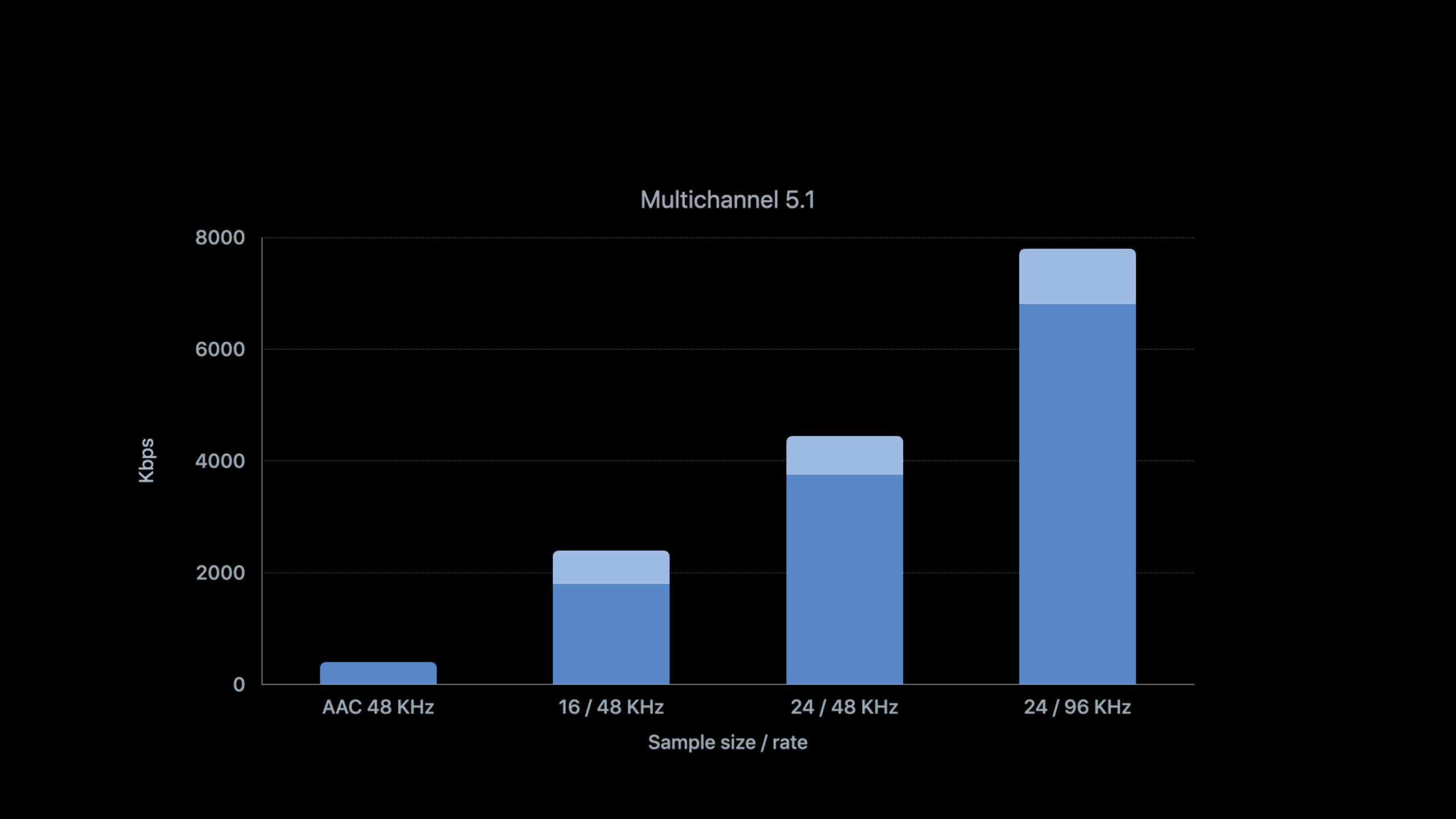
The bit rate of multi-channel lossless increases rapidly. The comparison given in the speech is: multi-channel AAC-LC is about 400 kbps, while 16-bit, 48 kHz multi-channel lossless has exceeded 2 Mbps; 24-bit, 96 kHz, six channels can reach 8 Mbps. Apple’s suggestion is to add multi-channel AAC to the master playlist so that the player can gradually expand from lower bitrates to multi-channel lossless.
The following is the placeholder structure supported by transcript, non-original playlist: media tags need to declare the number of channels, and the playlist needs to retain the ladder of stereo AAC, multi-channel AAC and multi-channel lossless at the same time.GROUP-ID、NAME、URI、AUDIOAnd the specific variant path needs to be named by the actual service, the transcript does not give a literal value.
media tag: declares channel count
stereo AAC fallback: required for backwards compatibility
multichannel AAC-LC ladder: about 400 kbps
multichannel lossless ladder: over 2 Mbps at 16-bit / 48 kHz
high-end six-channel lossless: up to about 8 Mbps at 24-bit / 96 kHz
Key points:
- The media tag declares the number of channels so that multi-channel devices can completely decode all channels.
- Multi-channel AAC ladder allows bandwidth-challenged users to remain on the multi-channel route.
- Multi-channel lossless ladder is suitable for scenarios where the bandwidth and output device meet the conditions.
- Stereo AAC is still here to stay as Apple requires playlists to include stereo AAC as a backwards compatibility route.
- If multi-channel AAC is omitted, devices that support multi-channel output may only have one lossless variant of more than 2 Mbps available, and playback will stall when the user’s bandwidth cannot support it.
Core Takeaways
1. Reduce internet speed for podcasts and audiobooks
What: Added 24 kbps xHE-AAC audio-only variant for each program.
Why it’s worth doing: The session explicitly states that xHE-AAC is suitable for speech reproduction and can be used for data rates as low as 24 kbps.
How to start: Use fragmented MP4 to output mono or stereo xHE-AAC, writeCODECS="mp4a.40.42", retain AAC-LC or HE-AAC fallback, and add loudness and DRC metadata during the encoding stage.
2. Prepare a separate audio ladder for Apple Watch
What to do: Add xHE-AAC to the watch-side HLS manifest while retaining AAC-LC, HE-AAC, or HE-AAC v2.
Why it’s worth doing: The session uses Apple Watch as an example of a data rate constricted device. The related session also recommends using xHE-AAC for watchOS 7 audio streams.
How to get started: Put xHE-AAC variants from 24 kbps to 160 kbps into the watch-accessible manifest; retain AAC fallback for older devices; test variant selection and stall behavior with real Apple Watch network conditions.
3. Provide lossless HLS for high-fidelity subscription files
What to do: Add FLAC or Apple Lossless variants to music, performance recordings, or course audio.
Why it’s worth doing: Session provides the HLS support range of FLAC and Apple Lossless, which is suitable for users who clearly expect high-quality services with sufficient bandwidth.
How to start: First do stereo lossless, usefLaCoralaccodec string, encapsulated as fragmented MP4; evaluate the average bit rate and peak bit rate before going online, because lossless cannot set a fixed target bit rate.
4. Create a multi-channel audio ladder for home theater scenes
What it does: Provides simultaneous multi-channel AAC and multi-channel lossless for 5.1 or 7.1 content.
Why it’s worth it: Apple explicitly recommends using multichannel AAC as an adaptive ladder to high bitrate multichannel lossless.
How to start: Arrange the channel order according to the codec requirements, giveEXT-X-MEDIAwriteCHANNELS, retain the stereo AAC fallback, and then verify which variant will be selected by devices that support multi-channel output and devices that only support stereo.
5. Put playlist checking into the publishing process
What to do: Check every audio encoding before publishingCODECS、CHANNELS、SCORE, DRC metadata and container limits.
Why it’s worth doing: The core risks of this session all come from authoring: incorrectly written codec string, missing DRC, and missing channel ladder will prevent AVPlayer from selecting the audio stream as expected.
How to start: Scan the master playlist in CI and confirm that xHE-AAC is usedmp4a.40.42, FLAC usesfLaC, used by Apple Losslessalac; Then use the HLS authoring tool to verify the fragmented MP4, common encryption and audio group combination.
Related Sessions
- Improve stream authoring with HLS Tools — Continue to see how HLS Tools organizes audio groups, CODECS, SCORE, and master playlist.
- What’s new in streaming audio for Apple Watch — Learn how watchOS 7 improves watch-side audio streaming with xHE-AAC and FairPlay.
- Author fragmented MPEG-4 content with AVAssetWriter — Learn how to generate fragmented MPEG-4 segments required for HLS.
- Discover how to download and play HLS offline — Understand how AVFoundation downloads and plays HLS audio and video content offline from the playback end.
Comments
GitHub Issues · utterances