
Highlight
Create ML introduces asynchronous training, checkpoint, and Combine publisher APIs in macOS Big Sur, allowing developers to observe training metrics, pause and resume long-term training, and export models from intermediate checkpoints in Swift.
Core Content
Training machine learning models is often stuck waiting. Previously, when calling the model constructor in Create ML, the code would wait until the training was completed before returning the model. When encountering object detection (object detection) training that takes several hours, if the loss (loss value) is still declining after reaching the maximum iteration (number of iterations), the developer can only reset the training times to a larger number and start from scratch. (02:54)
macOS Big Sur’s Create ML framework breaks down the training process into observable, interruptible, and recoverable componentsMLJob. Developer calls newtrainmethod to start asynchronous training, and then passresult、progressandcheckpointsThree publishers handle the final model, training metrics, and intermediate checkpoints.cancel()You can stop training, the samesessionDirectoryProgress will be restored during the next training session. (04:46)
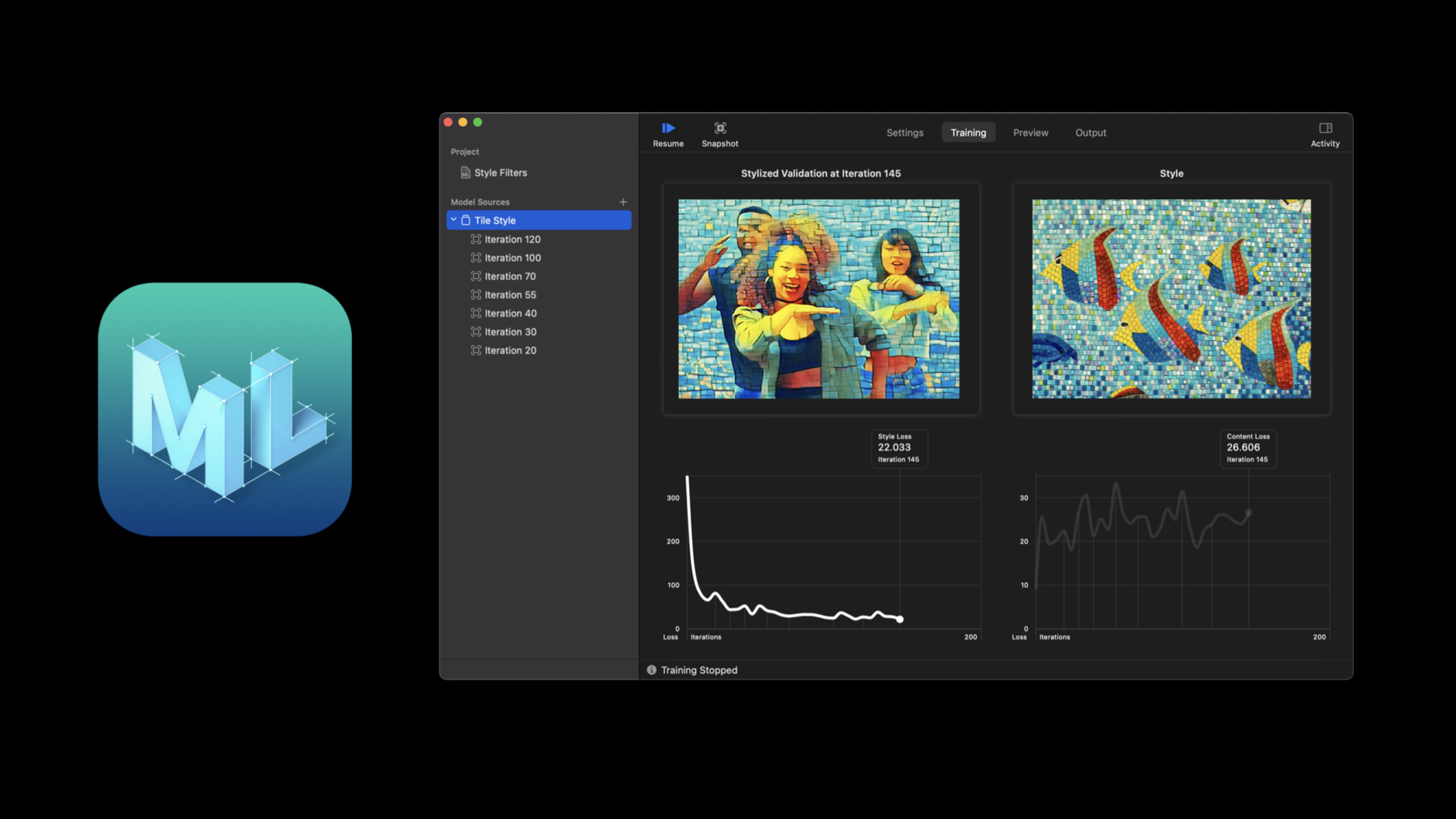
The value of this API is very intuitive in Style Transfer. The quality of style transfer is subject to subjective judgment, and built-in evaluation indicators may not necessarily decide for you when to stop. Session takes out the stylized validation image from the checkpoint and puts it into the Playground Live View using SwiftUI. Training continues, and developers can already see the real effects of the model every few epochs. (16:02)
Detailed Content
Use sessionParameters to define training sessions
(04:58) New training entrance receivedMLTrainingSessionParameters. It puts where the training session is saved, how often progress is reported, how often checkpoints are saved, and the maximum number of training rounds, all in the same parameter object.
// Session parameters can be provided to `train` method.
let sessionParameters = MLTrainingSessionParameters(
    sessionDirectory: sessionDirectory,
    reportInterval: 10,
    checkpointInterval: 100,
    iterations: 1000
)

let job = try MLStyleTransfer.train(trainingData: dataSource,
                                    parameters: trainingParameters,
                                    sessionParameters: sessionParameters)
Key points:
sessionDirectoryIt is the placement position of the training state. When the directory exists, Create ML will use it to restore existing sessions. -reportIntervalControl the frequency of progress reports. The smaller the interval, the denser the feedback, which may also bring additional overhead. -checkpointIntervalControl checkpoint saving frequency. It determines how granular you can review the training process. -iterationsis the target number of iterations for this round of training. subsequent callstrainYou can increase this number to allow training to continue moving forward. -trainreturnMLJob, training changes from synchronous waiting to asynchronous tasks.
Use Combine to retrieve results and progress
(06:21)MLJobofresultThe publisher returns the model at the end of training and an error on failure. Session uses CombinesinkReceive completion status and model values.
// Register a sink to receive the resulting model.
job.result.sink { result in
    // Handle errors
}
receiveValue: { model in
    // Use model
}
.store(in: &subscriptions)
Key points:
resultThe completion closure is responsible for handling success or failure status. -receiveValueclosure gets the final trained model. -.store(in: &subscriptions)Keep the subscription, otherwise the subscription may be released before the asynchronous training is completed.
(07:07) TrainingprogressStill from FoundationProgress. Create ML offersMLProgressHelper type (auxiliary type), used to read model-related indicators such as loss and accuracy.
// Observing progress details
job.progress.publisher(for: \.fractionCompleted)
    .sink { [weak job] fractionCompleted in
        guard let job = job, let progress = MLProgress(progress: job.progress) else {
            return
        }
        print("Progress: \(fractionCompleted)")
        print("Iteration: \(progress.itemCount) of \(progress.totalItemCount ?? 0)")
        print("Accuracy: \(progress.metrics[.accuracy] ?? 0.0)")
    }
    .store(in: &subscriptions)
Key points:
publisher(for: \.fractionCompleted)Listening FoundationProgresscompletion ratio. -[weak job]Avoid subscription closures to hold training tasks long-term. -MLProgress(progress:)The initialization may fail when a new session is just created or when the phase is switched, so the code returns early. -itemCountIn the training phase, it represents the current iteration, and in the feature extraction phase, it represents the processed file or record. -progress.metrics[.accuracy]Read task-related indicators. Different training tasks may provide accuracy, loss, or validation set metrics.
Pause and resume long training
(12:04) To stop training, just callcancel(). When resuming training, call the same model type againtrain, and pass in the samesessionDirectory。
job.cancel()

let resumedJob = try MLStyleTransfer.train(
    trainingData: dataSource,
    parameters: trainingParameters,
    sessionParameters: sessionParameters)

resumedJob.progress
    .publisher(for: \.fractionCompleted)
    .sink { completed in
        _ = completed

        guard let progress = MLProgress(progress: resumedJob.progress) else { return }
        if let styleLoss = progress.metrics[.styleLoss] { _ = styleLoss }
        if let contentLoss = progress.metrics[.contentLoss] { _ = contentLoss }
    }
    .store(in: &subscriptions)

resumedJob.result.sink { result in
    print(result)
}
receiveValue: { model in
    try? model.write(to: sessionDirectory)
}
.store(in: &subscriptions)
Key points:
cancel()Let developers proactively stop training before reaching a fixed iteration. -sessionParametersThe directory inside determines the recovery location. To start a new training, delete the old directory or change the path.- after recovery
resumedJobProgress and result publishers are still provided. -styleLossandcontentLossFrom the Style Transfer task, it shows that metrics will change with the model type. -model.write(to:)Write the completed model to the session directory to facilitate subsequent inspection or deployment.
Observe and export models from checkpoint
(14:26) Asynchronous training will automatically generate checkpoints.checkpointsThe publisher gives developers an entry point to process new checkpoints. They can record custom indicators, generate models, or stop training according to their own rules.
// Register for receiving checkpoints.
job.checkpoints.sink { checkpoint in
    // Process checkpoint
}
.store(in: &subscriptions)
Key points:
- The checkpoint will be saved to the session folder.
- publisher is triggered when a new checkpoint is generated.
- Both feature extraction checkpoint and training checkpoint may appear, and subsequent processing must distinguish phases.
(14:50) Only training checkpoint can directly generate models. Session first checks the phase in the code, and then converts the checkpoint intoMLActivityClassifier。
// Generate a model from a checkpoint
guard checkpoint.phase == .training else {
    // Not a training checkpoint, can't create model yet.
    return
}

let model = try MLActivityClassifier(checkpoint: checkpoint)
try model.write(to: url)
Key points:
checkpoint.phase == .trainingIt is a necessary check before exporting the model. -MLActivityClassifier(checkpoint:)Create a model from some intermediate training state. -model.write(to:)Intermediate models can be saved for comparison or early trial use.- The transcript clearly mentions that training checkpoint can be used for action classification, object detection, Style Transfer and activity classification.
Manage historical session and checkpoint space
(15:40)MLTrainingSessionIs a collection of checkpoint and metadata. Developers can restore a session and view the creation time, current phase, iteration, and historical metrics.
let session = MLObjectDetector.restoreTrainingSession(sessionParameters: sessionParameters)

let losses = session.checkpoints.compactMap { $0.metrics[.loss] as? Double }
Key points:
restoreTrainingSessionUse the same groupsessionParametersRetrieve training session. -session.checkpointsAllows you to analyze the entire training history offline. -metrics[.loss]It can be used to draw a loss curve to determine whether training needs to be extended.
(15:48) Checkpoint will occupy disk. Create ML allows conditional deletion of checkpoints that are no longer needed.
let session = MLObjectDetector.restoreTrainingSession(sessionParameters: sessionParameters)

// Save space by removing some checkpoints
session.removeCheckpoints { $0.iteration < 500 }
Key points:
removeCheckpointsReceives a judgment closure. -$0.iteration < 500Older checkpoints will be deleted.- Keep key nodes and delete early nodes to make a trade-off between traceability and disk usage.
Visualize training results in the playground
(16:24) Style Transfer checkpoint will carrystylizedImageURL. Session convert it toNSImage, and then use SwiftUI to create a Playground Live View.
job.checkpoints
    .compactMap { $0.metrics[.stylizedImageURL] as? URL }
    .receive(on: DispatchQueue.main)
    .map { NSImage(byReferencing: $0) }
    .sink { image in
        let _ = image

        let view = VStack {
            Image(nsImage: image)
                .resizable()
                .aspectRatio(contentMode: .fit)
            Image(nsImage: style)
                .resizable()
                .aspectRatio(contentMode: .fit)
            Image(nsImage: validation)
                .resizable()
                .aspectRatio(contentMode: .fit)
        }.frame(maxHeight: 1400)

        PlaygroundSupport.PlaygroundPage.current.setLiveView(view)
    }
    .store(in: &subscriptions)
Key points:
.compactMapOnly keepstylizedImageURLcheckpoint. -.receive(on: DispatchQueue.main)Switch UI updates back to the main thread. -VStackAt the same time, the current stylization results, style image (style image) and validation image (validation image) are displayed. -setLiveViewMake the training process happen directly in the Xcode Playground.
Core Takeaways
Training Progress Panel
What to do: Add a real-time progress panel to the internal model training tool that displays fraction completed, iteration, loss, accuracy, and validation set metrics.
Why it’s worth doing: Session showsMLJob.progressandMLProgress, training indicators can be read during training, and there is no need to wait for the final model to be generated before judging quality.
How to start: In callingtrainSubscribe laterjob.progress.publisher(for: \.fractionCompleted),useMLProgress(progress:)readmetrics, and then write the data to logs, charts or SwiftUI interfaces.
Resumable long training missions
What it does: Add the ability to pause, resume, and extend training to object detection, Style Transfer, or activity classification training.
Why it’s worth doing: The transcript mentions that object detection training can take up to five hours. If loss is still decreasing, reusesessionDirectoryCan continue existing training progress.
How to start: putsessionDirectoryPin it to an experimental directory and createMLTrainingSessionParameters, called when stoppingjob.cancel(), call it again using the same directory when restoringtrain。
checkpoint model comparison library
What to do: Export the key checkpoints during the training process into multiple candidate models, and let the team compare the actual effects of the intermediate versions.
Why it’s worth doing: Create ML automatically saves the training checkpoint and allows passingMLActivityClassifier(checkpoint:)This type of initializer generates models.
How to get started: Subscribejob.checkpoints, check firstcheckpoint.phase == .training, then create the model from checkpoint and write it to the directory with iteration number.
Training history cleaning tool
What to do: Write a script to scan the session directory, retain key iterations, and delete early or worthless checkpoints.
Why it’s worth doing: Training checkpoints will be saved continuously, and long-term experiments will consume disk.MLTrainingSessionProvides APIs to restore sessions and delete checkpoints.
How to start: CallrestoreTrainingSession(sessionParameters:), readsession.checkpointsloss or iteration in , then useremoveCheckpointsClean up old checkpoints.
Playground Visual Experiment Bench
What to do: Put the checkpoint image of Style Transfer into the Playground Live View in real time, and compare the style image, the original verification image and the current output.
Why it’s worth doing: The quality of style transfer is subject to subjective judgment, and the session demonstration passesstylizedImageURLDirectly observe intermediate effects.
How to start: Get from checkpoint metrics.stylizedImageURL, converted intoNSImage, using SwiftUI on the main threadVStackShow three pictures.
Related Sessions
- Build Image and Video Style Transfer models in Create ML — Explains how to use Create ML to train style transfer models. This demonstration uses it to display training progress and checkpoint visualization.
- Build an Action Classifier with Create ML — Shows the Create ML action classification training process, which can be used with the training session, checkpoint and progress monitoring of this site.
- Use model deployment and security with Core ML — Introduces how to deploy, update, and encrypt the Core ML model after training, and connect the model training and release links.
- Get models on device using Core ML Converters — Supplement the process of converting models from training frameworks such as TensorFlow and PyTorch to Core ML.
Comments
GitHub Issues · utterances