
Highlight
Core ML Tools unifies TensorFlow 1, TensorFlow 2 and PyTorch model transformations at WWDC 2020
ct.convert, and use MIL to process dynamic shape, optimize pass and composite op, and convert the model output by the training framework into a model that can be deployed to Apple devices.mlmodel。
Core Content
When many teams train models, the starting point of the model is not on the Apple platform. The vision model might come from TensorFlow 2’s Keras API, the recommendation model might come from PyTorch, and the speech model might still be TensorFlow 1’s frozen graph. In the past, to bring these models to Core ML, developers had to remember multiple conversion paths: TensorFlow takestfcoreml, PyTorch first exports ONNX and then hands it to ONNX Core ML.
The trouble with this link is that the intermediate format becomes a new point of failure. A new feature of PyTorch may not be covered by the ONNX exporter, and the ONNX standard may be out of sync with the evolution of the framework. Session made it clear at 04:22 that the new PyTorch converter in 2020 removes this extra layer of dependency, fromtorch_script_modelYou can enter Core ML in one step.
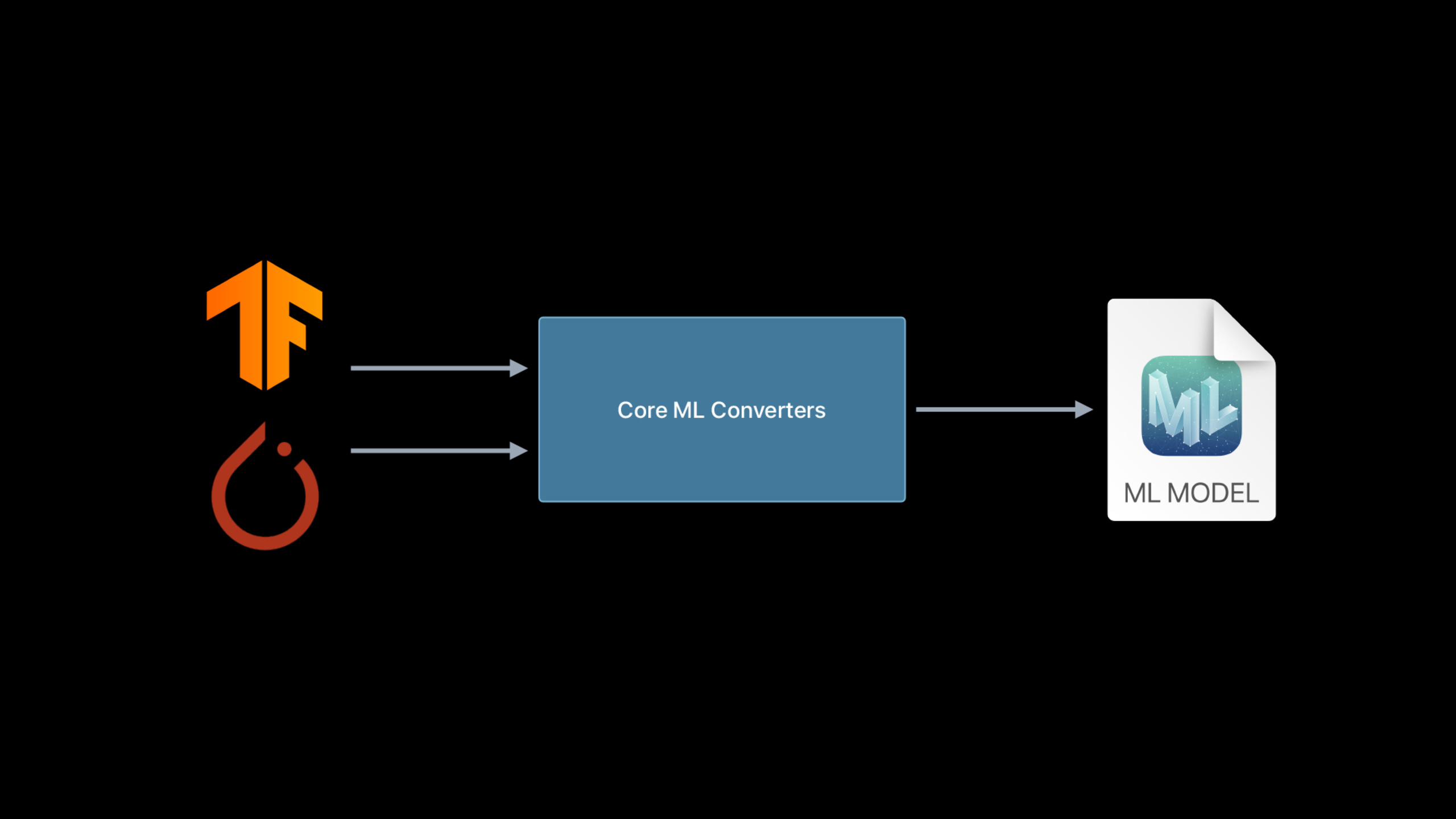
Apple’s change is to consolidate the conversion entry into Core ML Toolsct.convert. The same API can receive TensorFlow 1, TensorFlow 2 or PyTorch models. The converter will first convert the representations of different frameworks into Model Intermediate Language (MIL, model intermediate language), and then use public optimization and Core ML backends.
This session did not stop at the API renaming. It uses three examples to illustrate what the transformer can handle: MobileNet shows shortest path TensorFlow 2 and PyTorch transformation; DeepSpeech shows how dynamic shape affects speech models; T5 shows encountering TensorFlowEinsumWhen this type of unsupported op exists, how can we use MIL composite op to rewrite it into a matrix multiplication supported by Core ML.
Detailed Content
Unified TensorFlow and PyTorch conversion entrance
(02:56) The changes to TensorFlow transformations are straightforward. In the past, additional installation was requiredtfcoreml, now the TensorFlow converter has been integrated into Core ML Tools. Session also explained that TensorFlow 2’s support extends from convolutional models to dynamic models such as LSTM and transformer.
import coremltools as ct
import tensorflow as tf

tf_model = tf.keras.applications.MobileNet()
mlmodel = ct.convert(tf_model)
Key points:
coremltoolsis the only conversion package that needs to be called directly. -tf.keras.applications.MobileNet()Returns a TensorFlow 2 model object. -ct.convert(tf_model)It will automatically identify the model type, input shape and output, and then complete the conversion through MIL.
(07:41) The entrance to PyTorch also becomes the samect.convert. The difference is that the TorchScript model usually does not have a complete input shape. The example usesct.TensorTypePassed explicitly to converter.
import coremltools as ct
import torch
import torchvision

torch_model = torchvision.models.mobilenet_v2()

torch_model.eval()
example_input = torch.rand(1, 3, 256, 256)
traced_model = torch.jit.trace(torch_model, example_input)

mlmodel = ct.convert(
    traced_model,
    inputs=[ct.TensorType(shape=example_input.shape)]
)
Key points:
torch_model.eval()Switch the model to inference mode to prevent training state behavior from entering the traced model. -torch.jit.traceGenerate a TorchScript representation using a sample input. -ct.TensorType(shape=example_input.shape)Supplement the input tensor shape to the Core ML converter.- the same
ct.convertServing TensorFlow and PyTorch at the same time reduces the cost of recording APIs by framework.
Organize the model interface into a form that the app can understand
(09:23) After the PyTorch example conversion is completed, the input to the Core ML model is calledinput.1, the output is called1648. These names come from the source model tensors and are not clear enough in the app. For Sessionrename_featureChange the interface name to a name that the business can understand.
spec = mlmodel.get_spec()
ct.utils.rename_feature(spec, "input.1", "myInputName")
ct.utils.rename_feature(spec, "1648", "myOutputName")
mlmodel = ct.models.MLModel(spec)
Key points:
get_spec()Pull out the protobuf spec of the Core ML model. -rename_featureModify input and output feature names. -ct.models.MLModel(spec)Reconstruct the model object with the modified spec.
(10:37) The MobileNet example of TensorFlow 1 also shows another type of interface organization: when the model actually processes the image, it can be used during conversionImageTypeTo describe input preprocessing, useClassifierConfigGenerate a classifier model and write the author, authorization and description into.mlmodel。
import coremltools as ct
import tensorflow as tf

mlmodel = ct.convert("mobilenet_frozen_graph.pb",
                    inputs=[ct.ImageType(bias=[-1,-1,-1], scale=1/127.0)],
                    classifier_config=ct.ClassifierConfig("labels.txt"))

mlmodel.short_description = 'An image classifier'
mlmodel.license = 'Apache 2.0'
mlmodel.author = "Original Paper: A. Howard, M. Zhu, B. Chen, D. Kalenichenko, W. Wang, " \
                 "T. Weyand, M. Andreetto, H. Adam"

mlmodel.save("mobilenet.mlmodel")
Key points:
ImageTypeTell the converter that the input is an image, and declare bias and scale preprocessing. -ClassifierConfig("labels.txt")Bring category labels into the Core ML classifier interface. -short_description、licenseandauthorwill become model metadata. -save("mobilenet.mlmodel")The output can be placed into a Core ML model file in Xcode.
Processing dynamic shape models such as DeepSpeech
(15:45) The input to the DeepSpeech example comes from speech preprocessing. The 12 seconds of audio is converted into 636 sequences, each sequence is 19 wide and contains 26 MFCC coefficients. The static TensorFlow graph can only process 16 sequences at a time. The App or notebook needs to cut the input into multiple chunks and maintain the LSTM state.
outputs = ["logits", "new_state_c", "new_state_h"]
mlmodel = ct.convert(tf_model, outputs=outputs)

input_dict["previous_state_c"] = np.zeros([1, 2048]).astype(np.float32)
input_dict["previous_state_h"] = np.zeros([1, 2048]).astype(np.float32)

while (start + step) < max_time_steps:
    input_dict["input_node"] = mfccs[:, start:(start + step), :, :]
    preds = mlmodel.predict(input_dict)
    input_dict["previous_state_c"] = preds["new_state_c"]
    input_dict["previous_state_h"] = preds["new_state_h"]
Key points:
outputsExplicitly tell the converter to keep the logits and the two state outputs of the LSTM. -previous_state_candprevious_state_hInitialized to zero as the initial state of the first audio segment.- every time
predictOnly 16 sequences are processed and the new state is written back to the input dictionary. - This method can run through the static model, but the caller needs to manage the segmentation and state.
(19:23) After the same DeepSpeech model re-exports the dynamic graph, the Core ML model can accept arbitrary sequence lengths. Session also adds a reverse capability: if you start from a dynamic TensorFlow graph, you can also passinputsPass in a fixed shape and let type and value inference remove unnecessary dynamic operations.
import coremltools as ct

input = ct.TensorType(name="input_node", shape=(1, 16, 19, 26))
model = ct.convert(tf_model, outputs=outputs, inputs=[input])
Key points:
name="input_node"Align input node names in the TensorFlow graph. -shape=(1, 16, 19, 26)Narrow dynamic input to a fixed window.- The converter will propagate shape information and remove redundant operations such as dynamic reshape and get shape.
- Static models are generally better for performance, and dynamic models are suitable for scenarios where the input length naturally changes.
Handle unsupported ops with MIL Builder and composite ops
(24:28) T5 example encounters TensorFlow while convertingEinsumunsupported op. Session gives two options: use Core ML custom layer and configure Swift implementation in App; or split this op into existing MIL ops and keep it as composite op.mlmodelin the file. The second option was chosen for the demonstration.
from coremltools.converters.mil import Builder as mb

@mb.program(input_specs=[mb.TensorSpec(shape=(1, 100, 100, 3))])
def prog(x):
    x = mb.relu(x=x)
    x = mb.transpose(x=x, perm=[0, 3, 1, 2])
    x = mb.reduce_mean(x=x, axes=[2, 3], keep_dims=False)
    x = mb.log(x=x)
    return x
Key points:
BuilderIt is the Python build entry point for MIL. -TensorSpecDeclare the input shape, the default type will be inferred asFloat32。mb.relu、mb.transpose、mb.reduce_meanandmb.logStep by step form a MIL program.- MIL builder will do type and shape inference immediately, making it easy to check the output of each step.
(28:20) Used by T5EinsumThe form isbnqd,bnkd->bnqk. Session recognizes it as a batched matrix multiplication that transposes the second input, so you can register a TensorFlow op conversion function withmb.matmulExpress.
from coremltools.converters.mil import Builder as mb
from coremltools.converters.mil import register_tf_op

@register_tf_op
def Einsum(context, node):
    assert node.attr['equation'] == 'bnqd,bnkd->bnqk'

    a = context[node.inputs[0]]
    b = context[node.inputs[1]]

    x = mb.matmul(x=a, y=b, transpose_x=False, transpose_y=True, name=node.name)

    context.add(node.name, x)
Key points:
register_tf_opRegister this function with the TensorFlow frontend. -assertLimit the processing to only those that actually appear in T5EinsumParametric form. -context[node.inputs[0]]andcontext[node.inputs[1]]Get the two input tensors of the source graph. -mb.matmul(..., transpose_y=True)Express this using matrix multiplication already available in MILEinsum。context.addConnect the converted MIL value back to the original node name, and the subsequent conversion process continues.
Core Takeaways
1. Turn the research model into an App prototype that can be run offline
- What to do: Convert the team’s existing TensorFlow 2 or PyTorch image model into
.mlmodel, first make an offline recognition prototype. - Why it’s worth doing: The MobileNet example of this session shows that both the Keras model and the TorchScript model can pass
ct.convertEnter Core ML. - How to start: Use it in notebook first
ct.convertConvert model and reusemlmodel.save("model.mlmodel")Export, and finally drag it into Xcode to observe the input and output interfaces.
2. Prepare Core ML model for variable length audio feature
- What to do: Implement a local voice command recognition or short audio transcription, and send the audio features into Core ML.
- Why it’s worth doing: The DeepSpeech example shows two Core ML outputs, fixed shape and dynamic shape, suitable for comparing latency, throughput, and call complexity.
- How to start: First verify with the fixed window model
outputs=["logits", "new_state_c", "new_state_h"]State transfer, and then try to export the dynamic TensorFlow graph to let the model receive the complete feature sequence.
3. Add a composite op to the model that failed to convert
- What to do: When encountering an unsupported op, first determine whether it can be split into existing MIL ops, and then add a minimum conversion function.
- Why it’s worth doing: T5’s
EinsumThe example does not write Swift custom layer, but usesmb.matmulStay within the Core ML model file. - How to start: Find the op name and parameters from the error trace, use
register_tf_opRegister a function with the same name and use it in the functionBuilderCombined MIL op.
4. Establish a delivery pipeline after model conversion
- What to do: Break model training, conversion, interface naming, Xcode preview and deployment into a repeatable process.
- Why it’s worth doing: Session also shows
rename_feature, model metadata,ImageTypeand classifier config, which all affect the app-side calling experience. - How to start: Fixed input and output names in the conversion script, write
short_description、licenseandauthor, and hand the converted model to the Core ML deployment process to continue publishing.
Related Sessions
- Use model deployment and security with Core ML — Explains Core ML model deployment, cloud updates, model encryption and Xcode preview, which is the next step to enter the production environment after the conversion is completed.
- Control training in Create ML with Swift — Shows how to use Swift to control Create ML training, checkpoint and progress monitoring, which is suitable for connecting with the training process before model conversion.
- Build an Action Classifier with Create ML — Use Create ML to train an action classification Core ML model, providing specific cases from data preparation to exporting the model.
- Explore the Action & Vision app — Combines Create ML, Core ML and Vision into a complete app to show the workflow after the model enters the application scenario.
- Build customized ML models with the Metal Performance Shaders Graph — Introduces how MPS Graph uses tensor calculation graphs to build customized ML models, which is suitable for understanding the GPU acceleration path under Core ML.
Comments
GitHub Issues · utterances