
Highlight
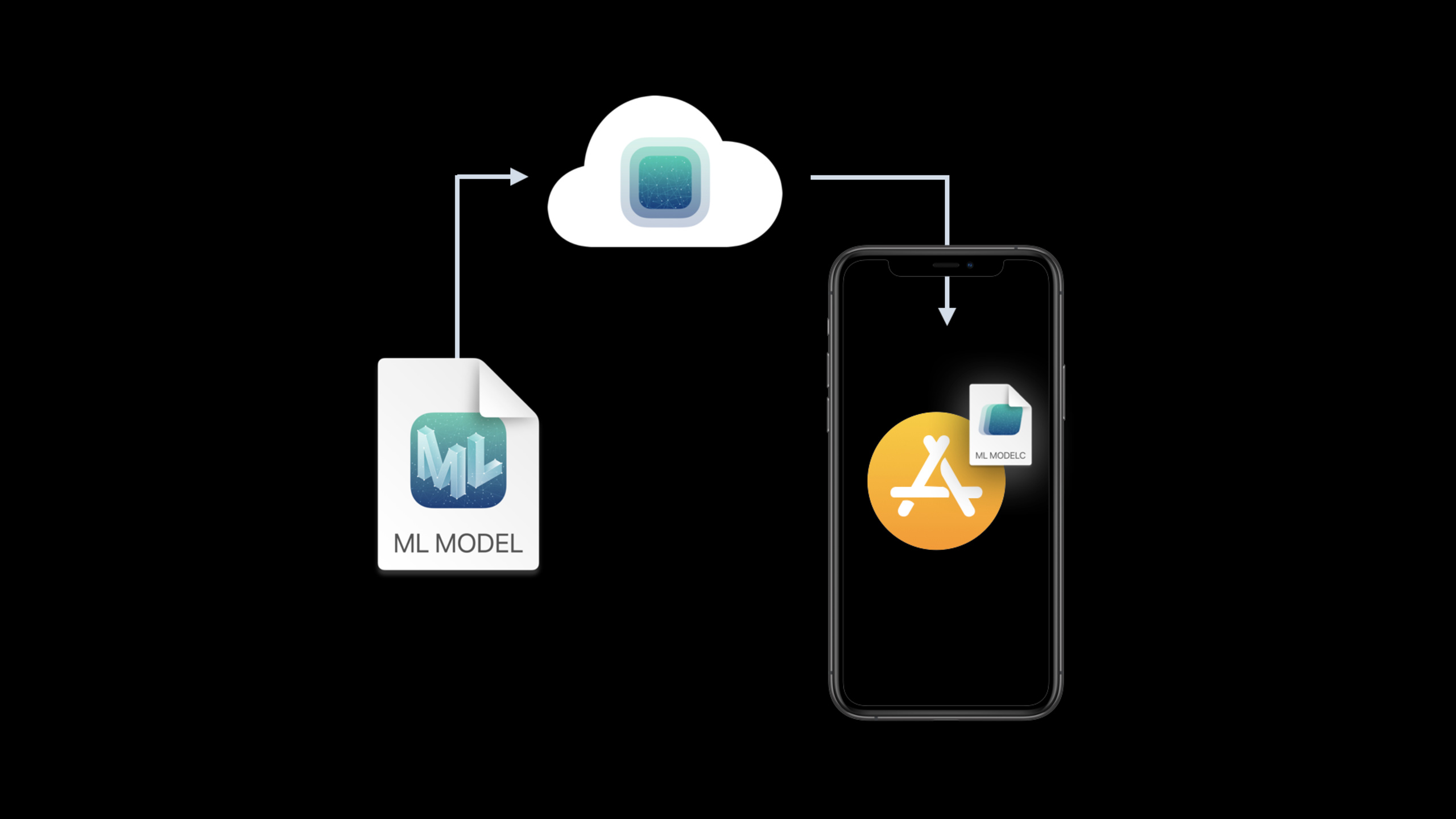
Core ML introduced a model deployment (Model Deployment) mechanism in 2020, allowing developers to deliver ML models on demand through the cloud, without the need to compile the model into the application binary. Session details how to deploy infrastructure using Apple-provided models to
MLModelHosted in the cloud, updates are retrieved by the device periodically or in the background at times chosen by the system, and the new model is available the next time the app is launched.
Core Content
The most direct way to integrate Core ML in the past was to.mlmodelDrag it into Xcode, let Xcode compile it into a format that can run on the device, and then submit it to the App Store together with the app. This method is stable and ensures that users will have models available immediately after installation. The problem occurred after the model iteration speed became faster: the team retrained the model, just to make the recognition results more accurate, but still had to wait for the next app update. (00:44)
It is this release link that Model Deployment handles. Developers put models into the Model Deployment dashboard managed by Apple cloud, and the device will periodically retrieve available updates. App code only needs to access the model collection through the new Core ML API, and the system takes care of background downloading, caching, and subsequent update registration. (01:29)
This demo uses a flower recognition app to illustrate the process. Available in AppFlowerClassifierandFlowerStylizerTwo models. In the demonstration, dahlia and hibiscus were successfully recognized, but rose failed because it was not among the three training categories of the old model. The retrained classifier was released through the dashboard. After the next device synchronization, the same App can recognize rose without changing a line of code. (04:00)
The deployment was only the first half. The second half discusses the safety of the model itself. Xcode 2020 can generate.mlmodelkey, use it to encrypt compiled Core ML models at build time, or to encrypt uploaded content when creating a model archive. The normal model is still used at runtime, with Core ML responsible for retrieving the key and decrypting it in memory; the compiled model in the file system remains encrypted. (16:08)
Finally, Xcode’s ability to view and experiment with Core ML models has been enhanced. The model panel will display the system version, class labels, and some neural network details; the interactive model preview can directly test the model before writing code; Playgrounds also has an automatic generation interface for the Core ML model, which facilitates quick verification of input and output. (22:28)
Detailed Content
Use MLModelCollection to access the cloud model
(04:34) The first step to access Model Deployment is to let the App passMLModelCollectionAccess the deployed model collection in the dashboard. The collection name in the demo is"FlowerModels", use the model name in the collection"FlowerClassifier"Find the downloaded compiled model URL.
private func classifyFlower(in image: CGImage) {
    // Check for a loaded model
    if let model = flowerClassifier {
        classify(image, using: model)
        return
    }

    MLModelCollection.beginAccessing(identifier: "FlowerModels") { [self] result in
        var modelURL: URL?
        switch result {
        case .success(let collection):
            modelURL = collection.entries["FlowerClassifier"]?.modelURL
        case .failure(let error):
            handleModelCollectionFailure(for: error)
        }

        let result = loadFlowerClassifier(from: modelURL)

        switch result {
        case .success(let model):
            classify(image, using: model)
        case .failure(let error):
            handleModelLoadFailure(for: error)
        }
    }
}

func loadFlowerClassifier(from modelURL: URL?) -> Result<FlowerClassifier, Error> {
    if let modelURL = modelURL {
        return Result { try FlowerClassifier(contentsOf: modelURL) }
    } else {
        return Result { try FlowerClassifier(configuration: .init()) }
    }
}
Key points:
flowerClassifierIt is a local cache and can be directly reused when the model has been loaded to avoid reloading each time it is classified. -MLModelCollection.beginAccessing(identifier:)A background download is triggered on the first access to the collection, and subsequent model updates are registered. -collection.entries["FlowerClassifier"]?.modelURLPoints to the compiled model that the system places in the App container.- There is no direct interrupt function on failure, but it is handed over to
loadFlowerClassifier(from:)Use the in-bundle model to find out. -FlowerClassifier(contentsOf:)Load the cloud-delivered model;FlowerClassifier(configuration:)Load the model packaged with the app.
Create model collection and deployment in dashboard
(08:15) After the code is ready, the model itself needs to be created in Xcode. Model archive. Xcode generated in the demoFlowerClassifier.mlarchive, then open the Model Deployment dashboard via the button.
The basic structure of the dashboard has two layers. The first level is model collection, such as"FlowerModels", it putsFlowerClassifierandFlowerStylizerSuch models belonging to the same function are put together. The second layer is deployment, such as the one in the demonstration"Global Deployment", which determines which set of model archives will be sent to which devices.
(11:23) When updating the model, the developer creates a new deployment, uploads the retrained classifier and the still used stylizer. Devices don’t sync immediately; the system downloads them in the background at an appropriate time and makes the new model available the next time the app is launched.
Key points:
- model archive provided by Xcode from
.mlmodelCome prepared. - model collection is suitable for grouping by app functionality, such as models required for flower recognition and stylization.
- The models in the collection will be released together, which is suitable for model combinations that need to maintain consistent versions.
- The App still needs to retain the in-bundle model or error handling path, because the first download may encounter failure situations such as no network.
Use targeted deployments to control device populations
(12:18) As the app grows, the same feature may require different models by device population. The example in the demonstration is that the camera angle and lighting environment when shooting flowers on the iPad are different from those on the iPhone, so the team trained an iPad-specific classifier.
The dashboard supports setting targeting rules in deployment. The demo selection condition is device class, and the iPad-specific model is sent to iPad; the default model continues to be used by other devices. No additional selection logic is required on the App side, the device will pull the corresponding model according to the rules.
Key points:
- Targeted deployments are used to reduce the inefficiency of “putting all models into the App and choosing them yourself at runtime”.
- The default model covers all devices that do not match the rules, and the dedicated model is only issued to devices that match the conditions.
- This capability works with collections to still maintain atomic publishing of a set of models.
Encrypted deployment models and built-in models
(16:31) Core ML encrypts the compiled model instead of the original.mlmodel. Xcode generates.mlmodelkey, this key is associated with the development team account; members of the same team must use the same key to build or archive the model. For models published through the dashboard, when creating a model archive Xcode will select.mlmodelkey, generate an encrypted archive and then upload it.
(20:03) For models packaged in App bundles, you can add the Core ML compiler flag to the model in Compile Sources of Build Phases:
--encrypt "$SRCROOT/HelloFlowers/Models/FlowerStylizer.mlmodelkey"Key points:
--encryptTells the Core ML compiler to encrypt the model at build time.- The parameter value points to the Xcode generated
.mlmodelkeydocument. - The encrypted compiled model will be packaged with the App and remains encrypted during transmission and static storage on the device.
Use the asynchronous load method to load the encryption model
(20:50) The encryption model requires a network when it is loaded for the first time, because the system needs to safely retrieve the decryption key. Core ML therefore introduces asyncloadmethod; demonstrationFlowerStylizer.loadreturnResult, and then return to the main thread to apply the stylized effect after success.
func stylizeImage() {
    // If we already loaded the model, apply the effect
    if let model = flowerStylizer {
        applyStyledEffect(using: model)
        return
    }

    // Otherwise load and apply
    FlowerStylizer.load { [self] result in

        switch result {

        case .success(let model):
            flowerStylizer = model
            DispatchQueue.main.async {
                applyStyledEffect(using: model)
            }

        case .failure(let error):
            handleFailure(for: error)

        }
    }
}

func handleFailure(for error: Error) {
    switch error {
    case MLModelError.modelKeyFetch:
        handleNetworkFailure()

    default:
        handleModelLoadError(error)
    }
}
Key points:
flowerStylizerIf it already exists, reuse it directly to avoid repeated loading and repeated key retrieval. -FlowerStylizer.loadIt is an asynchronous entry, suitable for handling network dependencies when loading for the first time.- The successful branch caches the model and updates the UI effect on the main thread.
-
MLModelError.modelKeyFetchSpecifically covering the situation where key retrieval fails, the App should prompt the user to connect to the Internet or try again later. - After the key is retrieved, it is safely saved by the system. Subsequent loading of the same model does not require a network connection.
Preview and experiment with Core ML models in Xcode
(22:34) The last set of updates in this session all occurred in Xcode. The model file view displays supported OS versions, class labels, and some network details. The interactive model preview supports image segmentation, pose detection, depth estimation, and Create ML trainable multi-class models. Playgrounds can also drag in Core ML models and get the same automatically generated Swift interface as Xcode projects.
Key points:
- Testing the model locally before deploying reduces the risk of publishing a bad model to user devices.
- Preview is suitable for quickly checking model input and output before writing integration code.
- Playgrounds are suitable for sharing model demos with colleagues or verifying behavior on small samples.
Core Takeaways
1. Do model hot update for recognition apps
What to do: Extract classification models such as flowers, products, and defect detection from the App bundle to Model Deployment.
Why it’s worth doing: The rose recognition failure in the session demonstration can be fixed by retraining and publishing the classifier, and neither the App code nor the App Store version needs to be changed.
How to start: Keep a basic model packaged with the App; use it in the codeMLModelCollection.beginAccessing(identifier:)Get the cloud model; fall back to the model in the bundle if it fails.
2. Publish group models for the same function
What to do: Put multiple models required by a feature into the same model collection, such as classifiers, stylizers or post-processing models.
Why it’s worth doing: The collection in the demo willFlowerClassifierandFlowerStylizerManage them together to avoid model version mismatch on functional dependencies.
How to start: Name the collection according to function; upload the corresponding archive for each model name in the dashboard; App obtains it through the model name of the collection entrymodelURL。
3. Deliver special models according to device groups
What to do: Train a dedicated model for a population of iPads, iPhones, or other targetable devices, and publish only to matching devices.
Why it’s worth doing: The iPad camera angle and light in the session are different. A dedicated classifier can solve the accuracy problem when the same model covers all devices.
How to start: Train the default model first, then train the target device model; add a targeting rule in the deployment of the dashboard; let the app continue to access the model through the same collection.
4. Protect commercially sensitive models
What to do: Enable Xcode model encryption for Core ML models that contain private data training results or business strategies.
Why it’s worth doing: The encrypted compiled model remains encrypted in transit and at rest on the device, and is only decrypted in memory by Core ML at runtime.
How to get started: Create in Xcode.mlmodelkey; Generate an encrypted model archive when deploying the model; add the built-in model to Compile Sources--encryptcompiler flag and migrate to asynchronousload。
Related Sessions
- Get models on device using Core ML Converters — Talking about how to convert TensorFlow, PyTorch and other models to Core ML, which is the preparation before deploying this model.
- Control training in Create ML with Swift — Talk about using Swift to control training and checkpoint, suitable for teams that need to frequently retrain and release models.
- Build Image and Video Style Transfer models in Create ML — Talk about how to train this example
FlowerStylizerThis type of style transfer model. - Build an Action Classifier with Create ML — Shows the training process of the action classification model, which can be used as a relevant case of “training the model and then deploying it to the App”.
Comments
GitHub Issues · utterances