
Highlight
CareKit 2020 update gives this open source health management framework access to SwiftUI task cards, watchOS support, HealthKit driver tasks, FHIR mapping and remote synchronization API, so developers can synchronize care plans, health data, clinical records and iPhone/Apple Watch status into the same application structure.
Core Content
When making a health management app, the interface and data are easily separated. What users see is daily stretching, medication, questionnaires, symptom records, and charts; behind the scenes, developers have to maintain task schedules, completion status, HealthKit data, clinical system records, and handle synchronization between iPhone and Apple Watch. CareKit’s goal is to break down these care scenarios into reusable UIs, data models, and synchronization layers.
This session first gives the module boundaries of CareKit:CareKitStoreProvides data model and Core Data persistence layer in the health field,CareKitUIProvides static views showing tasks, charts, and contacts,CareKitConnect the UI and the store so that data changes in the store are automatically reflected on the interface. (00:31)
The change in 2020 is to continue to expand these boundaries outward. The UI layer adds SwiftUI versions of task cards and information cards; the synchronization view can automatically map tasks in the store to interfaces; CareKit, CareKitUI and CareKitStore can all be built into watchOS; the store layer adds HealthKit passthrough, FHIR coder and remote synchronization protocol. The result is that developers don’t have to separate health data, care tasks, and cross-device status into three siled processes.
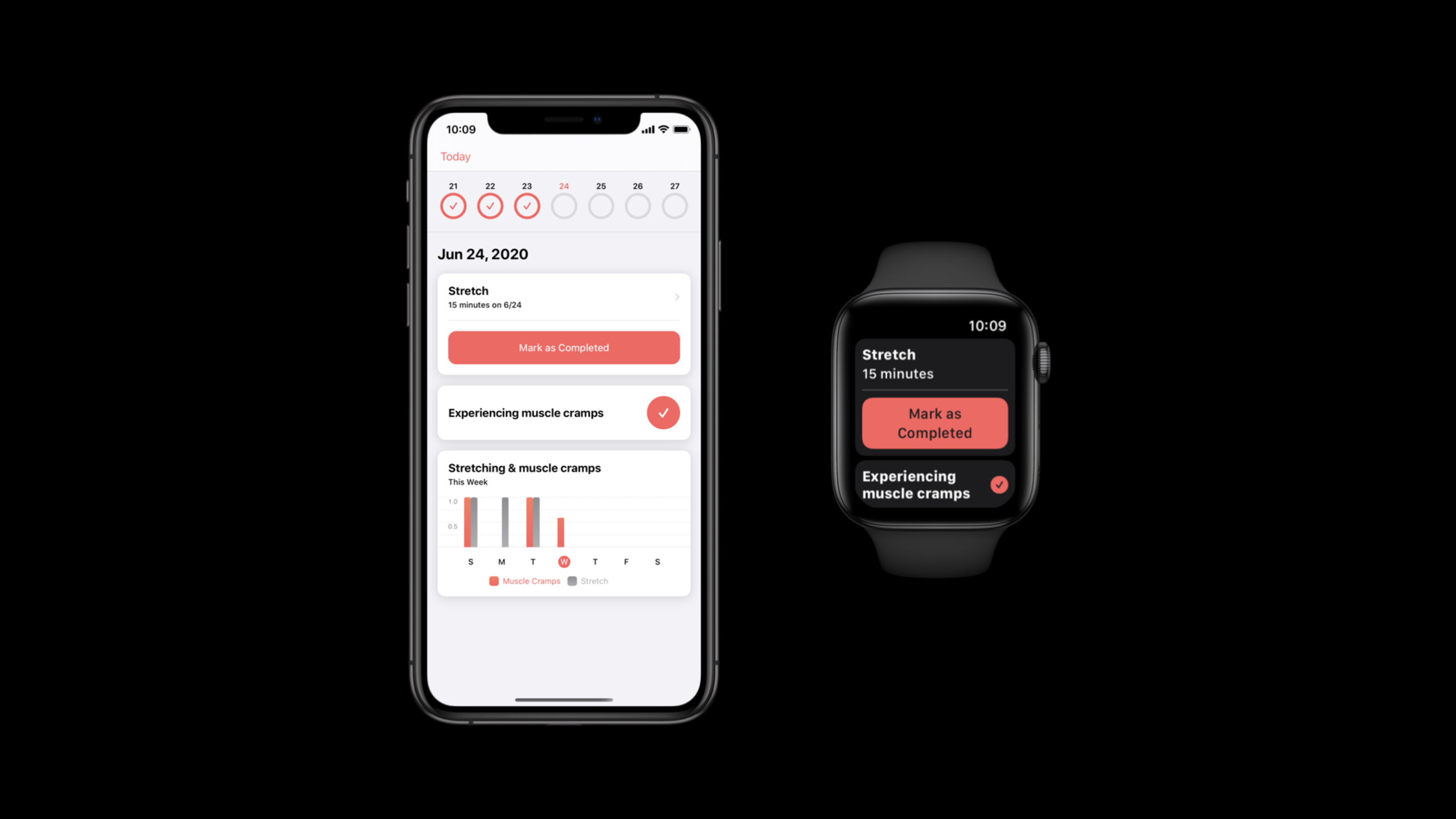
Session’s demonstration is very specific: In the same nursing app, the user records muscle cramps on the iPhone and completes stretching tasks on the Apple Watch. The iPhone’s task cards, addiction rings, and charts will be updated simultaneously. CareKit is responsible for the application structure here, not just a few default cards.
Detailed Content
CareKitUI adds SwiftUI task card
(02:23)SimpleTaskViewThere is already a UIKit API, and in 2020 a new SwiftUI API was added. Minimal usage requires only title, detail, and completion status.
import CareKitUI
import SwiftUI

struct MySimpleTaskView: View {

    var body: some View {
        SimpleTaskView(
            title: Text("Stretches"),
            detail: Text("15 minutes"),
            isComplete: false)
    }
}
Key points:
CareKitUIWhat is provided is a static view, suitable for displaying prepared task data. -titleanddetailtake overText, so you can continue to use SwiftUI’s view modifier. -isCompleteControl the completion status of task cards, suitable for previews, static feeds, or custom data sources.
(03:42) This card is not a closed component. Developers can inject custom headers and append content in any direction. Used in speechesHeaderViewand an accent bar to transform the default header, and useCardViewWrap task cards, dividers, and captions to turn a simple completion card into an explained care task.
(05:08) The same batch of UI updates also includesLabeledValueTaskView、NumericProgressTaskView、OCKFeaturedContentView、OCKDetailViewandLinkView. These views cover heart rate values, exercise goal progress, health content recommendations, HTML detail pages, and internal and external link entrances. They are all common card forms in nursing app feeds.
Synchronous view maps store data to SwiftUI
(08:56) Static views solve the display problem, and synchronous views solve the data change problem.CareKit.SimpleTaskViewtake overtaskID、OCKEventQueryandOCKSynchronizedStoreManager, then locate the day’s tasks from the store and automatically update the UI.
// Synchronized Task View

import CareKit
import CareKitUI
import SwiftUI

struct MySynchronizedTaskView: View {

    let storeManager: OCKSynchronizedStoreManager

    var body: some View {
        CareKit.SimpleTaskView(
            taskID: "stretch",
            eventQuery: OCKEventQuery(for: Date()),
            storeManager: storeManager)

    }
}
Key points:
taskIDIs a stable identifier of the task in the store that the view relies on to find the care task. -OCKEventQuery(for: Date())Convergence the query scope to events on a certain day. -OCKSynchronizedStoreManagerMonitor store changes and drive the interface to refresh after the task completion status changes.
(09:26) If the default mapping is not enough, the initializer also provides closure. In closure, you can access controller, task data and view model, and then create them yourselfCareKitUI.SimpleTaskView. The lecture uses this portal to transform a CareKit task into a ResearchKit survey portal, which pops up when the user clicks on the task card.ResearchKitSurvey()。
HealthKit drives tasks into the CareKit store
(12:52) CareKit used to mainly rely onOCKStore. New in 2020OCKHealthKitPassthroughStore, which uses HealthKit as the source of truth, and then integrates it with the Core Data versionOCKStorehanging togetherOCKStoreCoordinatorsuperior. When reading data, the coordinator aggregates internal stores; when writing data, it only writes to one store at a time to keep transaction boundaries clear.
// Setting up the Store

import CareKit
import CareKitStore

let coreDataStore = OCKStore(name: "core-data-store")
let healthKitPassthroughStore = OCKHealthKitPassthroughStore(name: "hk-passthrough—store")

let coordinator = OCKStoreCoordinator()
coordinator.attach(store: coreDataStore)
coordinator.attach(eventStore: healthKitPassthroughStore)

let storeManager = OCKSynchronizedStoreManager(wrapping: coordinator)
Key points:
OCKStoreStill responsible for CareKit’s own data model and persistence. -OCKHealthKitPassthroughStoreLet HealthKit data participate in CareKit queries as an event store. -OCKStoreCoordinatorBy wrapping the two stores together, the external usage is similar to a single store.- Still using it in the end
OCKSynchronizedStoreManagerProvided to synchronized views.
(14:15) An example of a HealthKit-driven task is a 30-minute exercise goal at 8 a.m. every day. Mission passedOCKHealthKitLinkageConnect to.appleExerciseTime, type is cumulative, unit is minute. Once the exercise minutes goal is reached in HealthKit, CareKit tasks can be completed automatically.
// Adding HealthKit Linked Tasks to the Store

let schedule = OCKSchedule.dailyAtTime(
    hour: 8,
    minutes: 0,
    start: Date(),
    end: nil,
    text: nil,
    duration: .allDay,
    targetValues: [OCKOutcomeValue(30.0, units: "Minutes")])

let link = OCKHealthKitLinkage(
    quantityIdentifier: .appleExerciseTime,
    quantityType: .cumulative,
    unit: .minute())

let steps = OCKHealthKitTask(
    id: "exerciseMinutes",
    title: "Exercise Minutes",
    carePlanUUID: nil,
    schedule: schedule,
    healthKitLinkage: link)

storeManager.store.addAnyTask(steps)
Key points:
OCKSchedule.dailyAtTimeDefine when nursing tasks occur and target values. -targetValuesinOCKOutcomeValue(30.0, units: "Minutes")Will be used by the task view to display the goal. -OCKHealthKitLinkageBind the CareKit task to the HealthKit quantity. -OCKHealthKitTaskAfter entering the store, you can useNumericProgressTaskViewDemonstrate progress and goals.
FHIR coder is responsible for clinical data mapping
(15:23) Many systems in the health industry use FHIR to exchange data. CareKit 2020 adds FHIR compatibility and maps FHIR releases through the new open source framework FHIRModels. The speech clearly mentioned that CareKit supports DSTU2 and R4, and provides a coder to convert between CareKit entities and FHIR data.
// Encoding and Decoding FHIR Data

import CareKitStore
import CareKitFHIR

let coder = OCKR4PatientCoder()

// CareKit entity to FHIR data
let patient = OCKPatient(...)
let json = try! coder.encode(patient)

// FHIR data to CareKit entity
let data: Data = //...
let resourceData = OCKFHIRResourceData<R4, JSON>(data: data)
let patient: OCKPatient = try! coder.decode(resourceData)
Key points:
CareKitFHIRIs the Swift Package Manager package that contains coder. -OCKR4PatientCoderResponsible for Patient resources andOCKPatientconversion. -OCKFHIRResourceData<R4, JSON>Mark FHIR release and encoding format at the type layer to avoid giving the wrong version of data to the coder.- This capability is suitable for bringing FHIR data from clinical systems or HealthKit clinical records into nursing apps.
(17:49) FHIR and CareKit models do not always correspond one-to-one. Session uses patient name as an example: if the default mapping will lose fields, developers can provide closure and decide how to write the CareKit name into FHIR.HumanName。
// Customizing the Data Mapping

// Encoding process
coder.setFHIRName = { name, fhirPatient in // ModelsR4.Patient

    let humanName = HumanName()
    humanName.family = name.familyName.map { FHIRPrimitive(FHIRString($0)) }
    humanName.given = name.givenName.map { [FHIRPrimitive(FHIRString($0))] }

    fhirPatient.name = [humanName]
}
Key points:
setFHIRNamePatient object exposing CareKit name and FHIRModels. -HumanName.familyandHumanName.givenIt needs to be encapsulated according to the primitive type of FHIRModes.- The purpose of custom mapping is to prevent clinical data from losing semantics when CareKit and FHIR are traveling back and forth.
Remote sync coverage server and Apple Watch
(19:16) CareKit has added a remote synchronization API to solve the problem of “how to synchronize data in CareKit App to the server.” The entrance on the App side isOCKStore: Pass in remote during initialization to enable remote synchronization; callsynchronizeWill trigger synchronization between local store and remote store. The server or cloud provider needs to implementOCKRemoteSynchronizable, handles delegates, auto-sync switches, fetch changes, push revisions, and conflict resolution strategies.
(25:54) The speech then uses the same remote sync API to synchronize iPhone and Apple Watch. The key class isOCKWatchConnectivityPeer. It adheres to the remote sync protocol, allowing iPhone and Apple Watch to treat each other as remote stores.
private lazy var remote = OCKWatchConnectivityPeer()Key points:
OCKWatchConnectivityPeeris the WatchConnectivity remote provided by CareKit.- watchOS side passes it to
OCKStore, the store has an entrance to synchronize with the paired iPhone. - The sync protocol abstraction is not tied to a server, so the same set of concepts can be used for inter-device synchronization.
(26:33) WatchConnectivity’s session delegate is still owned by the developer. CareKit requires developers to forward the message to the remote when receiving the message, and then send the reply generated by CareKit back to the iPhone.
class SessionDelegate: NSObject, WCSessionDelegate {

    let remote: OCKWatchConnectivityPeer
    let store: OCKStore

    init(remote: OCKWatchConnectivityPeer, store: OCKStore) {
        self.remote = remote
        self.store = store
    }

    func session(
        _ session: WCSession,
        activationDidCompleteWith activationState: WCSessionActivationState,
        error: Error?) {

        print("New session state: \(activationState)")
    }

    func session(
        _ session: WCSession,
        didReceiveMessage message: [String: Any],
        replyHandler: @escaping ([String: Any]) -> Void) {

        print("Received message from peer!")
    }
}
Key points:
activationDidCompleteWithIt is a suitable location for the first synchronization. The speech will be called here later.store.synchronize。didReceiveMessageIt is the entry point for CareKit messages to enter the watchOS app.- Use of real forwarding logic
remote.reply(to:store:)Generate reply and then call WatchConnectivityreplyHandler. - After this cooperation is completed, the stretching task is completed on the Apple Watch, and the views subscribed to the same store on the iPhone will be updated simultaneously.
Core Takeaways
- Make a postoperative recovery task feed
- What to do: Make daily stretching, ice, medication, and pain logs into CareKit task cards.
- Why it’s worth doing:
SimpleTaskView、InstructionsTaskViewandNumericProgressTaskViewTask descriptions, completion buttons, and goal progress have been covered. - How to start: Use first
OCKStoreSave tasks and outcomes for reuseOCKSynchronizedStoreManagerDrive the SwiftUI task list for the day.
- Why it’s worth doing:
- Make an exercise goal automatically completed by HealthKit
- What to do: Allow users to set a daily exercise goal of 30 minutes, and automatically complete CareKit tasks after reaching HealthKit’s exercise minutes.
- Why is it worth doing: in session
OCKHealthKitTaskIt is this model where HealthKit data becomes the basis for task completion. - How to get started: Create
OCKHealthKitPassthroughStore,passOCKHealthKitLinkage(quantityIdentifier: .appleExerciseTime, quantityType: .cumulative, unit: .minute())Bind tasks.
- Why is it worth doing: in session
- Make a questionnaire-triggered nursing process
- What to do: After the user clicks on the CareKit task card, open the ResearchKit questionnaire to record symptoms or side effects.
- Why is it worth doing: The closure of the synchronized view can customize the mapping of task data to the UI, and the speech example pops up directly
ResearchKitSurvey(). - How to start: Use
CareKit.SimpleTaskViewThe custom initializer readscontroller.viewModel, switch in action@Stateand render the survey.
- Why is it worth doing: The closure of the synchronized view can customize the mapping of task data to the UI, and the speech example pops up directly
- Make a care task synchronized between iPhone and Apple Watch
- What to do: iPhone displays the complete care plan and chart, Apple Watch displays only the two most important task cards of the day.
- Why it’s worth it: CareKit 2020 supports watchOS and provides
OCKWatchConnectivityPeerReuse remote synchronization API. - How to get started: Create in watchOS extension
OCKStore(name:remote:),accomplishWCSessionDelegate, hand over the received message toremote.reply(to:store:)。
- Why it’s worth it: CareKit 2020 supports watchOS and provides
- Make a care plan after importing clinical records
- What to do: Convert the FHIR patient or medication order returned by the medical institution into a CareKit entity, which is used to generate follow-up care tasks.
- Why it’s worth it: CareKitFHIR and FHIRModels allow CareKit to handle FHIR releases such as DSTU2 and R4.
- How to start: Select coder based on data version, for example
OCKR4PatientCoder, use when necessarysetFHIRNameThis type of closure corrects the field mapping.
Related Sessions
- What’s new in ResearchKit — ResearchKit’s onboarding, survey, and active task are updated to complement the data collection side of the ResearchKit survey presented in CareKit.
- What’s new in HealthKit — HealthKit adds ECG, symptom and mobility data in iOS 14 and watchOS 7, explaining the source of health data accessed by CareKit.
- Synchronize health data with HealthKit — Provides an in-depth explanation of HealthKit data versions, anchored queries and cross-device synchronization, supplementing CareKit remote synchronization scenarios.
- Handling FHIR without getting burned — Introducing how FHIRModes handles FHIR data in HealthKit or clinical systems is a prerequisite for understanding the CareKit FHIR coder.
Comments
GitHub Issues · utterances