
Highlight
iOS 14 passed
PKStroke、PKStrokePath、PKStrokePointandPKInkOpenPKDrawingWith internal data, developers can inspect, interpolate, identify, crop, and programmatically construct PencilKit drawings by stroke.
Core Content
Before iOS 14, many apps connected to PencilKit in a very straightforward way: put aPKCanvasView, let the system take care of Apple Pencil’s low-latency drawing, and thenPKDrawingSave it. This process is suitable for whiteboarding, annotating, and drafting. The problem lies in the next step: when the App wants to know what the user has drawn, wants to play back by stroke, wants to split a section of handwriting into characters, and wants to modify the drawing based on the recognition results,PKDrawingThe structure is not transparent enough.
This session uses a calligraphy practice app to illustrate the value of new abilities. The app first splits a group of lowercase letters into PencilKit drawings of single letters, and then synthesizes a calligraphy practice template according to user input; during practice, the red dot moves along the trajectory of the next stroke. When the user writes close to the template, it turns green, and if the writing is off, it starts again. This process uses three things at the same time: programmatic construction of drawings, stroke animation along time, and similarity matching between user strokes and templates.
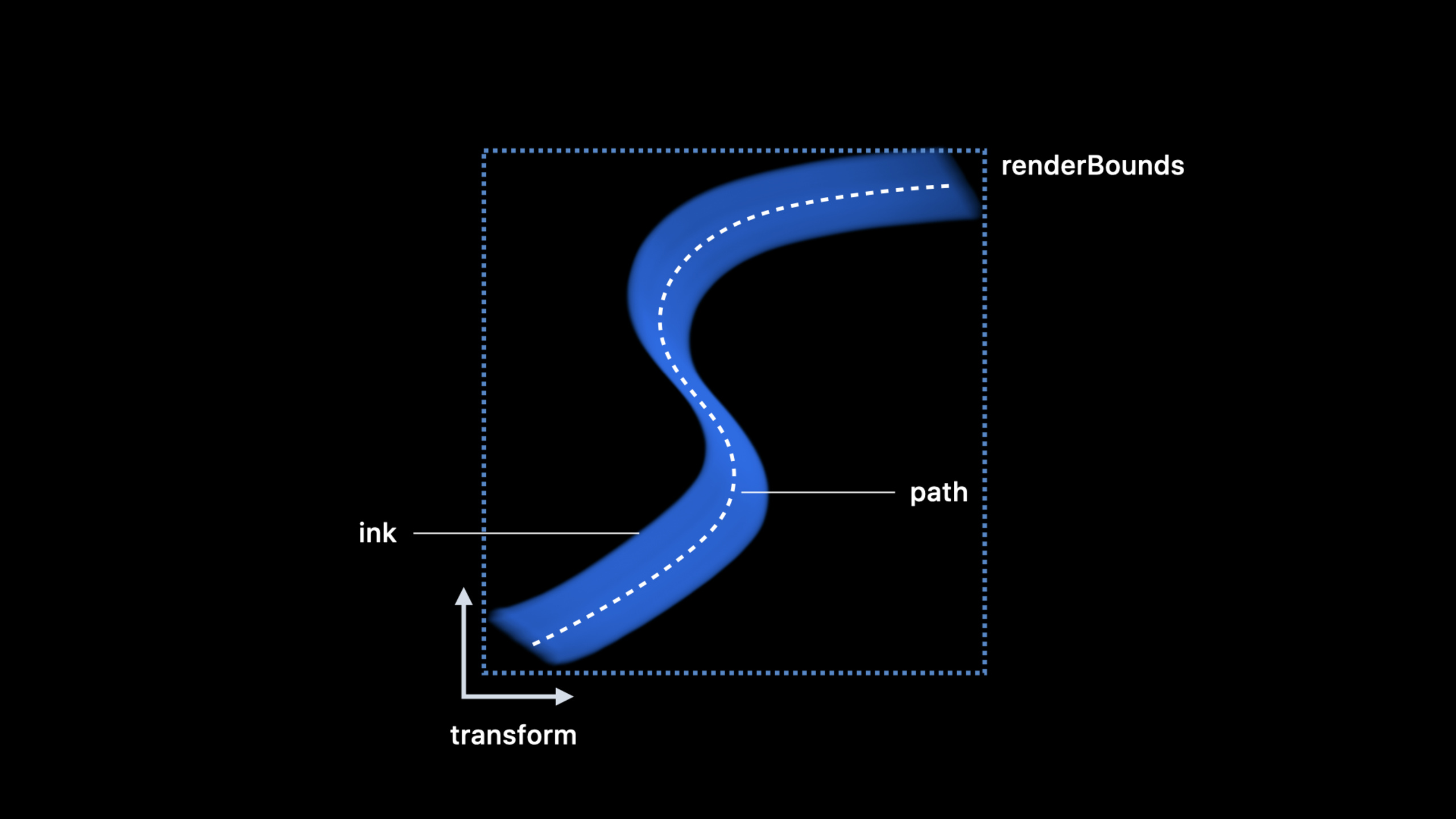
iOS 14PKDrawingUnpacked into strokes, inks, paths and points. Each stroke represents a line drawn by the user, and the order retains the user’s writing process; the path of the stroke is a set of cubic uniform B-spline control points; the point records the position, size, angle, transparency, pressure, inclination and time offset; the mask describes the visible range after the pixel eraser is cropped.
This takes PencilKit from a canvas control into the data layer. Developers can remove the stroke from the drawing, sample the path by distance or time, and process the visible fragment after erasure, usingPKDrawingThe rendering capabilities generate images, and you can also combine new drawings from existing strokes.
Detailed Content
fromPKDrawing.strokesTake out new drawing
(03:37) The speech first showed a flower drawing. After taking it apart, eachPKStrokeThey all correspond to a line drawn by the user, and the order is the drawing order. The calligraphy practice demo takes advantage of this and cuts a drawing containing lowercase letters into multiple letters, and then uses these letters to synthesize a template.
import PencilKit

func letterDrawing(from alphabetDrawing: PKDrawing,
                   strokes range: Range<Int>) -> PKDrawing {
    let selectedStrokes = alphabetDrawing.strokes[range]
    return PKDrawing(strokes: selectedStrokes)
}
Key points:
alphabetDrawing.strokesis composed of drawingPKStrokearray. -Range<Int>Corresponds to the stroke interval occupied by a certain letter in the material drawing. -PKDrawing(strokes:)receive a groupPKStroke, you can directly construct a new drawing.- This is consistent with the process of “first taking strokes, then slicing by letters, and finally creating a new drawing for each letter” in transcript.
stroke consists of path, ink, transform and mask
(04:57)PKStrokeAt its core is path. path determines the shape, ink determines the color and brush type, transform determines the position and direction, and mask describes the area cropped by the pixel eraser.renderBoundsThe effects of path, ink, transform and mask will be taken into account, making it suitable for hit detection or partial refresh.
import UIKit
import PencilKit

func strokeSummary(_ stroke: PKStroke) -> (ink: PKInk,
                                           bounds: CGRect,
                                           hasMask: Bool) {
    return (
        ink: stroke.ink,
        bounds: stroke.renderBounds,
        hasMask: stroke.mask != nil
    )
}
Key points:
stroke.inkProvides the ink used by this line. -stroke.renderBoundsIs the rendered bounding rectangle, including the effects of stroke width, transform and mask. -stroke.maskOnly exists when the stroke is clipped by mask.- The control points of path are not read here because the control points themselves are not on the actual curve.
Read the real curve using interpolation points
(06:11)PKStrokePathis a cubic uniform B-spline. Path stores control points. Directly traversing the control points will result in a set of points that are not on the stroke curve. To get the points on the curve, you need to useinterpolatedPoints(in:by:), stride can be set by distance, time or parameter step size.
import UIKit
import PencilKit

func sampleLocations(from stroke: PKStroke,
                     every distance: CGFloat = 50) -> [CGPoint] {
    return stroke.path
        .interpolatedPoints(by: .distance(distance))
        .map(\.location)
}
Key points:
stroke.pathyesPKStrokePath, which describes the stroke’s B-spline path. -.distance(distance)Indicates sampling according to the number of points in the drawing coordinate system. -interpolatedPointsWhat is returned is on the curvePKStrokePoint。locationIt is the position data commonly used in subsequent drawing, identification or debugging.
Advance path animation by time
(08:54) The parameter value is a floating point number, so it can take the position between control points such as 2.4 and 4.8. The speech uses this ability to explain the red dot animation of the calligraphy app: each frame takes the time difference from the previous frame to the current frame, and then advances the current parameter value along the path by the same time, and the red dot will move at the original writing speed.
import UIKit
import PencilKit

func nextMarkerPoint(on stroke: PKStroke,
                     currentValue: CGFloat,
                     deltaTime: TimeInterval) -> (value: CGFloat, location: CGPoint) {
    let nextValue = stroke.path.parametricValue(currentValue,
                                                offsetBy: .time(deltaTime))
    let point = stroke.path.interpolatedPoint(at: nextValue)

    return (value: nextValue, location: point.location)
}
Key points:
parametricValue(_:offsetBy:)Advances a position on a path based on time, distance, or parameter steps. -.time(deltaTime)Uses real frame intervals, suitable for animation loops. -interpolatedPoint(at:)Use new parameter values to get thePKStrokePoint.- Returns the new parameter value, and the next frame continues to advance from here.
Process strokes that have been clipped by the eraser
(11:54) The pixel eraser will mask the stroke. The mask may dig holes or divide a stroke into multiple segments. The path itself has no mask information, so sampling the entire path will include the erased parts. When dealing with this type of stroke, you should usemaskedPathRangesLimit the visible range.
import UIKit
import PencilKit

func visibleLocationsInMaskedStroke(_ stroke: PKStroke,
                                    every distance: CGFloat = 12) -> [CGPoint] {
    return stroke.maskedPathRanges.flatMap { range in
        stroke.path
            .interpolatedPoints(in: range, by: .distance(distance))
            .map(\.location)
    }
}
Key points:
maskedPathRangesyesClosedRange<CGFloat>Array, range using the parameter value of path.- Each range represents a segment of the path that is still visible after mask clipping.
- The range may be 0, indicating that the remaining visible fragments do not intersect the path spline.
- The recognition algorithm should be based on sampling these visible intervals to avoid counting erased handwriting into the result.
There are two entrances for identification and rendering.
(14:09) The speech divided recognition into two directions. Spline-based recognition can be usedmaskedPathRanges, interpolation points, time, pressure and other information; image-based recognition usesPKDrawingThe rendering API generates images.
import UIKit
import PencilKit

func renderedImage(from drawing: PKDrawing, scale: CGFloat) -> UIImage {
    return drawing.image(from: drawing.bounds, scale: scale)
}
Key points:
drawing.boundsis the rectangle containing the contents of the drawing. -image(from:scale:)The specified area will be rendered intoUIImage.- This path is suitable for image recognition or thumbnail generation.
- If you want to compare stroke shapes, you should give priority to stroke path and point data, because time, pressure and mask information are retained there.
Core Takeaways
1. Calligraphy rating app
What it does: Save standard letters or Chinese characters as PencilKit drawings, and compare the stroke paths in real time as the user writes.
Why it’s worth doing: The session demo has shown the complete link of template synthesis, red dot animation and similarity scoring.
How to start: Use firstPKDrawing.strokesCut the material glyphs into characters and then usePKDrawing(strokes:)Assemble the template; after the user writes, useinterpolatedPoints(in:by:)Sampling templates and user strokes, comparing path distance and time information.
2. Note playback and teaching annotation
What to do: Play back each stroke in a mathematical derivation, sketch explanation, or score annotation at the user’s original writing speed.
Why it’s worth doing:PKStrokePoint.timeOffsetandparametricValue(_:offsetBy:)The writing rhythm can be preserved, and there is no need to guess the speed of each path during playback.
How to start: Save the parameter value of the current stroke, used in each frame.time(deltaTime)push forward, use againinterpolatedPoint(at:)Updates the cursor or highlight position.
3. Recognition after smart eraser
What: After a user erases part of a note, the recognition algorithm only processes the remaining visible handwriting.
Why it’s worth doing: The session clearly states that the pixel eraser will generate a mask, and reading the complete path directly will include the erased path.
How to start: Traverse the stroke with maskmaskedPathRanges, only sample interpolated values within these ranges; skip this stroke when range is empty.
4. Thumbnails and index of handwritten content
What it does: Generate thumbnails for handwritten pages, and feed stroke sampling results into your own recognition or search index.
Why is it worth doing: session provides two recognition entrances: image recognition usePKDrawingRendering results, spline recognition using stroke, point, time and pressure.
How to start: Usedrawing.image(from:scale:)Generate page preview; when more fine-grained search is required, sample by strokelocation、forceandtimeOffset, handing the results over to the recognition process.
Related Sessions
- What’s new in PencilKit — iOS 14 PencilKit updates the entrance, covering the PKCanvasView, PKToolPicker, drawingPolicy and stroke access entrances.
- Meet Scribble for iPad — Explain how Scribble integrates Apple Pencil handwriting input into standard and custom text controls.
- Introducing PencilKit — An introductory PencilKit session at WWDC19, introducing PKCanvasView, PKToolPicker, and adding low-latency Apple Pencil drawing to your app.
Comments
GitHub Issues · utterances