
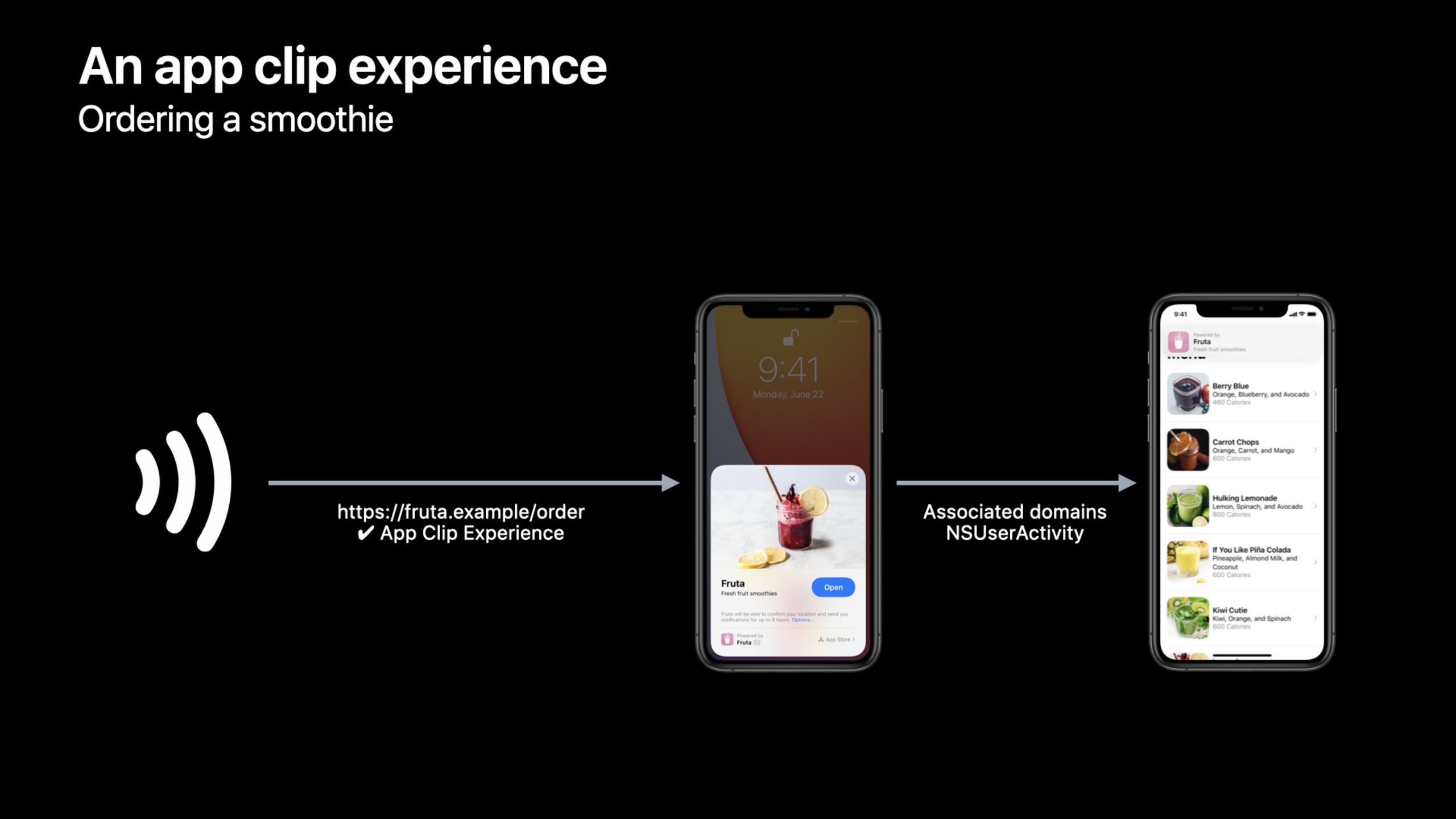
Highlight
App Clips are launched through a registered URL, developers need to add it in the apple-app-site-association file
appclipsAssociate and add to App Clip targetappclips:associated domain and handled in SwiftUI or UIKitNSUserActivityTypeBrowsingWebto bring the user to the corresponding task.
Core Content
A guy is standing in front of a smoothie stand and just wants to order a drink. She tapped the NFC tag, and the App Clip card appeared at the bottom of the screen. After clicking Open, she went directly to the order page, and finally completed the purchase with Apple Pay. There’s no waiting to install a full app, or searching for menus from the home page. Encoded in the trigger point is a URL. The system uses this URL to find the registered App Clip experience, and then passes the URL throughNSUserActivityLeave it to App Clip. (00:49)
This session deals with link links. App Clip target alone is not enough. The website, App Clip, App Store Connect, and Safari pages all need to be aligned with the same URL system. The website uses the apple-app-site-association file to declare which App Clips can handle domain names; the App Clip target uses associated domains entitlement to acceptappclips:Domain; code readingNSUserActivityTypeBrowsingWebURL in the app; App Store Connect determines the cards users see; Smart App Banner connects Safari pages to the same experience. (03:38)
URL design is the make or break point. App Store Connect’s advanced App Clip experience uses the most specific prefix matching, so a car rental store can just sign uphttps://bikesrental.example/rent, so that vehicle links with different query strings fall on the same card; chain coffee shops can also register a general store prefix, and then separately register a more specific URL for the Cupertino flagship store. (11:20)
Detailed Content
Establish an association between the website and App Clip
(05:04) App Clip To render content for a website URL, the system must first verify the relationship between the website and App Clip. The method is in the server root directory.well-knownPlace the apple-app-site-association file in the directory and add it to the root dictionaryappclipsentry.
{
    "appclips": {
        "apps": [ "ABCDE12345.example.fruta.Clip" ]
    }
}
Key points:
appclipsis a new entry in the apple-app-site-association root dictionary and can be combined withwebcredentials、applinksWait for existing entries to coexist. -appsThe array contains the App Clip app identifier, in the exampleABCDE12345.example.fruta.ClipRepresents the team ID plus the App Clip bundle identifier.- On the Xcode side, you also need to add Associated Domains capability to the App Clip target and fill in the
appclips:your-website-domain。
Handle launch URL in SwiftUI App life cycle
(06:17) After configuring the associated domains, App Clip needs to read the web browsing activity passed in by the system. SwiftUI app life cycle can be done directly inWindowGrouphanging on the root viewonContinueUserActivity。
import SwiftUI

@main
struct AppClip: App {
    var body: some Scene {
        WindowGroup {
           ContentView()
              .onContinueUserActivity(NSUserActivityTypeBrowsingWeb) { userActivity in
                  guard let incomingURL = userActivity.webpageURL,
                        let components = NSURLComponents(url: incomingURL,
                            resolvingAgainstBaseURL: true)
                  else {
                      return
                  }

                  // Direct to the linked content in your app clip.
              }
        }
    }
}
Key points:
NSUserActivityTypeBrowsingWebLimit this to only handle launches from web page URLs. -userActivity.webpageURLIt is the complete URL that triggers the App Clip. Real business usually takes the task parameters from the path or query string. -NSURLComponentsAllow the code to parse the URL, such as reading it in the demosmoothie=BerryBlueThen switch the data source to the corresponding drink.- After the user upgrades to the full App, the same link will open the full App, so the full App must also have corresponding Universal Links processing logic.
Handle the same thing in the UIKit scene life cycle
(06:54) If App Clip uses UIKit scene-based life cycle, the entrance isUISceneDelegate. The logic is the same as SwiftUI: confirm the activity type, get the URL, and then direct the user to the link content.
// Handle NSUserActivity in UISceneDelegate.

class SceneDelegate: UIResponder, UIWindowSceneDelegate {

    func scene(_ scene: UIScene, continue userActivity: NSUserActivity)
    {
        // Get URL components from the incoming user activity
        guard userActivity.activityType == NSUserActivityTypeBrowsingWeb,
            let incomingURL = userActivity.webpageURL,
            let components = NSURLComponents(url: incomingURL,
                resolvingAgainstBaseURL: true)
        else {
            return
        }

        // Direct to the linked content in your app clip.
    }

}
Key points:
scene(_:continue:)Is scene-based App receivingNSUserActivityentrance. -activityTypeChecking can block activities that are not started by web pages. -incomingURLAfter successful parsing, you should not stop at the homepage, but directly open the menu, reservation, rental or payment page corresponding to the URL.
Configure default and advanced App Clip experiences
(08:32) After submitting the build containing the App and App Clip, the App Clip configuration area will appear in App Store Connect. Default experience uses card images, subtitles and action verbs. Safari Smart App Banner, Messages link bubble and default App Clip card all use this set of metadata.
(09:17) If App Clip is to be launched from NFC, QR code, Maps, Siri nearby suggestions, etc., advanced App Clip experience must be configured. Each advanced experience is bound to a URL, which can set independent images, titles, subtitles, action verbs, or associate physical locations.
(11:20) URL matching uses the most specific prefix match. Registering a short prefix can cover a large number of similar links, and registering a more specific URL can change a card for a special store or special task. Even if the registration URL is only used as a prefix, the App Clip must be able to handle launches that are exactly equal to the registration URL, since Maps and Siri nearby suggestions may be opened directly with this URL.
Let the Safari page open the App Clip
(14:35) Safari Smart App Banner accesses App Clip through HTML meta tag. The webpage will remainapp-id, and add the App Clip bundle identifier; in this way, iOS 14 can display the App Clip entry, and the old system can still fall back to the App Store link of the complete App.
<meta name="apple-itunes-app"
    content="app-clip-bundle-id=com.example.fruta.Clip,
    app-id=123456789">
Key points:
name="apple-itunes-app"Inherit the meta tag name of Smart App Banner. -app-clip-bundle-idPointer to the bundle identifier of the App Clip. -app-idContinue to point to the complete App, serving old systems and complete App download scenarios.- Safari will verify the domain association of the website and App Clip before displaying the banner.
Use Xcode and TestFlight to cover the real entry point
(07:16) The development stage can be set in the environment variables of Xcode scheme_XCAppClipURL. When running App Clip, the system will pass in this test URL to facilitate verification of URL resolution and page jump.
(21:19) After submitting to App Store Connect, test invocation points can be added to the App Clip area of TestFlight. Testers do not need real NFC tags or QR codes, and can open different experiences according to the configured title and URL.
Core Takeaways
Scan the QR code to place an order in the store App Clip
- What to do: Generate table tag QR code or NFC tag for restaurants, coffee shops, and beverage stalls, and open it to directly enter the ordering page of the current store.
- Why is it worth doing: The Fruta demo of session proves that URL can carry specific task parameters, and App Clip can directly select the corresponding product or store after reading it.
- How to start: Register the store URL prefix, configure advanced experience in App Store Connect, and configure it in SwiftUI
onContinueUserActivityParse the query item and set the current menu state.
Equipment rental entrance
- What to do: Attach a unique URL to bicycles, power banks, lockers and other equipment, and scan the code to enter the rental or unlocking page of the corresponding equipment.
- Why it’s worth doing: prefix match allows only the lease prefix to be registered, allowing different device IDs to be distinguished through query strings, eliminating the maintenance cost of registering experience for each device.
- How to start: Put the device ID into the URL query string, use it with App Clip
NSURLComponentsParsing the parameters, the backend returns status and executable actions by device ID.
Layered cards for chain stores
- What to do: Most stores use the same App Clip card, and flagship stores or event stores use customized images and subtitles.
- Why it’s worth doing: advanced experience uses the most specific prefix match, so universal prefixes and special URLs can coexist.
- How to start: Register first
https://brand.example/store/This kind of general prefix is then used to register more specific URLs for key stores, and configure different metadata in App Store Connect.
Access App Clip from website page
- What: Display the Safari Smart App Banner on web pages that can be completed faster by App Clip, such as making reservations, quick purchases, and queuing to get an order.
- Why it’s worth it: Smart App Banner can convert web page visits into App Clips to open while retaining the integrity of the entire App.
app-idFallback. - How to start: Join on the web
apple-itunes-appmeta tag, fill inapp-clip-bundle-idand full appapp-id, and then confirm that the AASA files and associated domains have been deployed.
TestFlight Experience Matrix
- What to do: Establish test call points for each type of entrance before going online, covering the default experience, NFC/QR experience, special store experience and Safari banner experience.
- Why is it worth doing: The session mentioned that TestFlight can add App Clip invocation points, and testers can verify the App Clip cards and jumps corresponding to different URLs.
- How to start: Write each key URL into TestFlight’s App Clip test entrance, and require testers to record card metadata, opening results, and landing page parameters.
Related Sessions
- Explore App Clips — First, understand the positioning, trigger entry and relationship of App Clips to the complete App as a whole.
- Streamline your App Clip — Continue to optimize App Clip’s task focus, transaction flow, notifications, location confirmation, and upgrade paths.
- Design great App Clips — Design App Clip cards, processes, and tips for downloading the full app.
- What’s new in App Store Connect — Learn about configuring App Clip experiences and TestFlight testing in App Store Connect.
- What’s new in Universal Links — Complete the link base for Universal Links, associated domains, and AASA files.
Comments
GitHub Issues · utterances