
Highlight
Apple has enhanced enterprise identity management in iOS 14, iPadOS 14, and macOS Big Sur with an SSO extension, a built-in Kerberos extension, Managed Apple ID federation, and SCIM synchronization, allowing organizations to use existing directory credentials to connect devices, apps, and Apple services.
Core Content
Identity issues in the enterprise often start with a simple scenario: an employee gets a Mac or iPad and first logs into the device, then logs into internal websites, native apps, file servers, printing services, and Apple services. Each entrance may be connected to different systems, some in the cloud and some on the company intranet. IT teams need to reduce login friction while retaining audit, policy, and revocation capabilities.
The core answer of this session is to put identity capabilities into the system layer. Apple first differentiates between local accounts, network accounts and mobile accounts on macOS. It is recommended to use local accounts as much as possible for 1:1 deployment, and then use built-in Kerberos extension, SSO extension or MDM vendor tools to connect to directory resources. In this way, logging into the Mac itself does not have to rely on the real-time status of the directory server, and you can still obtain a Kerberos ticket or use single sign-on when accessing corporate resources.
The second line is the login between the App and the website. The SSO extension has already appeared in iOS 13, iPadOS 13, and macOS Catalina. The 2020 update focuses on the details encountered in enterprise deployment: user channel configuration, per-app VPN, associated domains, caller App information, cleanup callback when configuring removal, and status prompts and management options for the built-in Kerberos extension.
The third line is Apple services. Apple clearly distinguishes between SSO extension and Managed Apple ID federation authentication: non-Apple apps and websites obtain login experience through the identity provider’s SSO extension; Apple apps and Apple services use Managed Apple ID, and then federation is established by Apple Business Manager or Apple School Manager and Azure Active Directory. SCIM synchronizes account creation, data updates and deletions into automated processes.
Detailed Content
Device login starts with the account type
(01:37) Session first puts the corporate identity back into the device login scenario. Shared iPad relies on Managed Apple ID, while Mac has local account, network account and mobile account. Apple’s recommendations for 1:1 Mac deployments are straightforward: Prioritize local accounts because user logging and password management are done in native macOS directory services, and you don’t have to wait for a directory server to log in.
(03:23) This does not require organizations to give up directory services. For Macs that have traditionally been tied to Active Directory, Apple recommends considering using the built-in Kerberos extension, other SSO extensions, or the capabilities provided by an MDM vendor to connect to directory resources. The Kerberos extension can obtain the TGT, which is used to access file servers and printers, and helps keep local passwords synchronized with directory passwords.
(04:20) Some capabilities still require the Mac to be bound to Active Directory, such as traversing Active Directory DFS, or issuing AD Certificate payload through MDM to obtain the machine certificate. The boundary here is: the machine can bind directories for these needs, but users should still try to use local accounts for daily login.
Enterprise deployment updates for SSO extension
(06:57) The SSO extension lets Safari, WebKit, and native apps call the extension to interact with the organization’s identity provider. In 2020, Apple added user channel configuration. Shared iPad and macOS can deliver SSO extension settings on a per-user basis; user channel settings will take precedence over system-level settings, and it is suitable to put parameters such as user names into each user’s own configuration.
(09:03) Per-app VPN changes solve the problem of intranet identity providers. Associated domains can cooperate with per-app VPN to obtain site association file, and SSO redirect extension can send login requests to the intranet IdP. The new excluded domains list allows trusted cloud IdP traffic to go directly out of the public network, avoiding all loops back to the company intranet.
(12:24) MDM management entitlement for Associated domains has also become easier to use.com.apple.developer.associated-domains.mdm-managedBecoming a public entitlement in 2020 will no longer require Developer Technical Support approval. Having a different identity provider for each tenant host name reduces the stress of enumerating all customer domains before publishing the app.
Caller App information
(13:31) The SSO extension can now get information about the App that calls it. The fields given by the official Code tab are:
var localizedCallerDisplayName: String

var callerTeamIdentifier: String

var isCallerManaged: Bool
Key points:
localizedCallerDisplayNameGive the extension a localized caller name; the login screen does not have to display only the bundle identifier. -callerTeamIdentifierLet the extension identify the development team to which the caller belongs, which is suitable for corporate trust judgment. -isCallerManagedFlags whether the calling app is managed, so extensions can limit the scope of credential usage.
This set of information corresponds to the Calling App Name, Calling App Team Identifier and Is-Caller-Managed flag in transcript. Apple has two purposes: to improve the prompt text that users see and to help extend security decisions based on team identifier and managed status.
Clean up status when configuration is removed
(14:00) The original standard operations of the SSO extension include login, refresh and logout. A configuration removal operation was added in 2020. When the MDM profile that configures the SSO extension is deleted from the device, the system will call this operation to give the extension a short window to clean up the state.
// existing operations
static let operationLogin: ASAuthorization.OpenIDOperation
static let operationRefresh: ASAuthorization.OpenIDOperation
static let operationLogout: ASAuthorization.OpenIDOperation

//new this year
static let configurationRemoved: ASAuthorizationProviderAuthorizationOperation
Key points:
operationLogin、operationRefreshandoperationLogoutIt is an existing regular life cycle operation. -configurationRemovedIt is a new operation in 2020, and the trigger point is that the management configuration is removed.- transcript Explicitly listed cleanup tasks include logging out, cleaning files or Keychain items, revoking tokens, and performing other finishing actions required by the extension.
- Using this capability requires extensions built with iOS 14 or macOS Big Sur SDK.
Built-in Kerberos extension manageability
(15:28) The built-in Kerberos extension also gets a set of administrative updates. The macOS menu bar icon will display the status more accurately: display the complete status when credentials, network connections, DNS, and unexpired Kerberos tickets are all normal; prompt the user with specific questions when conditions are missing. Administrators can also customize the identity label and help text so that the login window uses a familiar title within the organization.
(16:47) The Kerberos extension will now trigger per-app VPN for authentication-only requests on iOS, iPadOS, and macOS, no longer requiring additional network requests to first bring up the VPN. macOS’s app-to-per-app VPN also covers Kerberos. App-SSO-Agent and Kerberos-Menu-Extra need to be added to the payload during configuration.
Managed Apple ID, Federated Authentication and SCIM
(18:54) A Managed Apple ID is an Apple user account that is owned and managed by an organization. It’s used to personalize devices, access Apple apps and Apple services, and is the basis for User Enrollment and Shared iPad. For enterprise identity systems, the key capability is federated authentication.
(20:03) Federated authentication connects Apple Business Manager or Apple School Manager to Microsoft Azure Active Directory. The required Managed Apple ID is automatically created the first time a user signs in to an Apple service with a federated identity. At the protocol level, the device is redirected by Apple to Azure AD, Azure AD returns a signed SAML response, and Apple verifies the signature and allows access to the service.
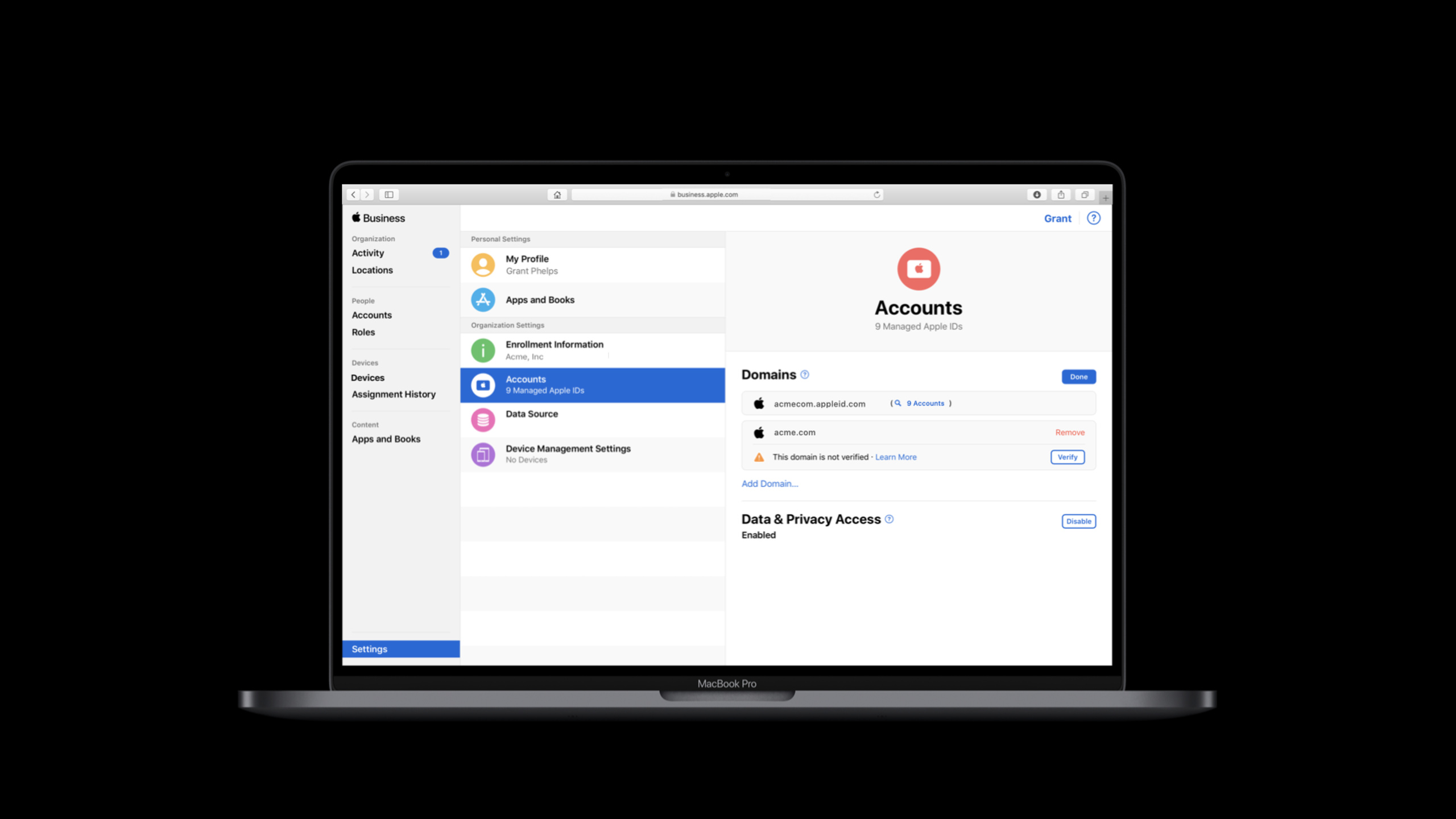
(23:16) Configuring federation is done by domain name. The administrator first verifies the domain name in Apple Business Manager or Apple School Manager using DNS TXT record. Then use the Azure AD administrator identity to authorize the Apple Business Manager integration, and then use the user under the domain name for test login. Apple will also scan for user name conflicts, and conflicting users will need to use other domain names; unprocessed user names will be updated by Apple to a temporary domain after 60 days.
(28:04) In the context of this 2020 session, Apple also announced that SCIM integration will enter Apple Business Manager and Apple School Manager. SCIM is used to synchronize account creation, data modification and deletion in Azure AD to Apple. During provisioning, Apple Business Manager generates a SCIM token and tenant URL, which the administrator populates into the Apple Business Manager enterprise application provisioning settings in Azure AD.
Core Takeaways
-
Do a set of managed App login audits: Record in the enterprise SSO extension
localizedCallerDisplayName、callerTeamIdentifierandisCallerManaged. Why it’s worth it: New in 2020, caller information helps differentiate managed apps from unmanaged apps. How to start: First, connect these three fields to the log and policy judgment in the extension, and only allow the specified team identifier or managed App to access enterprise credentials. -
Design an SSO cleanup process for offboarding and equipment handover: Exploit
configurationRemovedClean up keychain, tokens and local files on MDM profile removal. Why it’s worth doing: The transcript clearly states that this operation is used to configure the short window ending after removal. How to start: Organize the existing logout/revoke token logic into reusable functions, and thenconfigurationRemovedCall the same set of cleanup paths. -
Optimize per-app VPN routing for hybrid cloud identity services: Access the intranet IdP through per-app VPN and add the trusted cloud IdP to the excluded domains list. Why it’s worth doing: The SSO extension inherits the per-app VPN settings of the host App. If all traffic is routed back to the intranet, the geographical and load balancing advantages of the cloud IdP will be lost. How to start: First list the intranet domain name and public network IdP domain name in the login link, and then configure associated domains, direct downloads and excluded domain names in the MDM payload.
-
Integrate the life cycle of Managed Apple IDs into directory changes: use federated authentication to handle logins, and use SCIM to synchronize account creation, data updates and deletions. Why it’s worth doing: Session lists resignation and removal of rights, department or name changes, and granting service permissions in advance as account life cycle issues. How to start: First complete the domain name TXT verification and Azure AD authorization, then generate the SCIM token and tenant URL in Apple Business Manager, and put them into the provisioning configuration of Azure AD.
Related Sessions
- Deploy Apple devices using zero-touch — Talk about how Apple administrators deploy devices remotely, connected with the enrollment customization, Managed Apple ID and MDM configuration of this session.
- What’s new in managing Apple devices — A summary of device management capabilities in 2020, suitable as companion content for understanding the boundaries of SSO, per-app VPN, and Managed Apple ID configurations.
- Discover AppleSeed for IT and Managed Software Updates — A testing and managed update process for IT administrators, which belongs to the same device lifecycle management as enterprise identity management.
- Build scalable enterprise app suites — Talk about the structure, sharing capabilities and production configuration of enterprise app suites, which can be planned together with the enterprise app login strategy of SSO extension.
Comments
GitHub Issues · utterances