
Highlight
App Clips are often thought of as a way for users to quickly experience the functionality of your app. But Session 10118 reveals another important use for App Clips: as a ready-to-use service for your enterprise customers as a platform company.
Core Content
Many platform-based apps originally serve as portals for offline merchants. Restaurant directories, membership points, parking payments, and reservation services all fall into this category. The problem in the past was that the discovery path of the platform was often locked within the complete app. Users had to install the app before they could find a store’s menu, points, or reservation page.
Small merchants often don’t have the energy to maintain their own iOS apps. White label service providers will encounter another trouble: each customer wants to retain the brand sense, but one App per customer will continue to increase development, review and maintenance costs. The path given in Session 10118 is to converge the App Clip experience of multiple merchants into one App Clip binary, and then create an independent Advanced App Clip Experience for each merchant in App Store Connect.
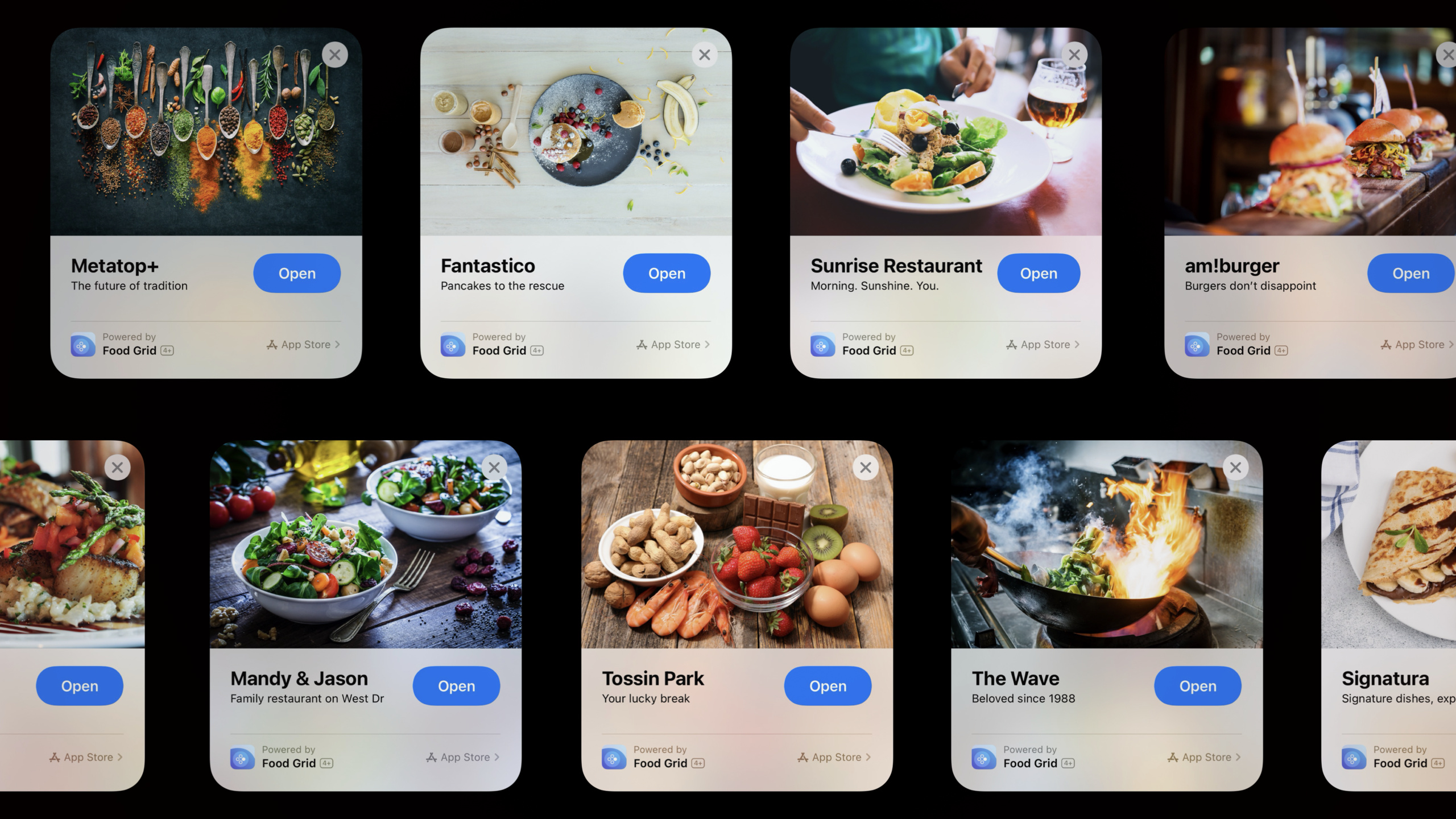
From a user perspective, Fantastico restaurant, Mandy and Jason store, and Reward+ points entrance are like different App Clips. They can have different experience URLs, card titles, header images, action buttons, and icons. From an engineering perspective, these experiences share a binary, relying on URL, notification routing, and current session state to enter the correct merchant page.
This turns App Clips from a “trial entry point to a complete app” into a platform capability. Your App is responsible for the catalog, transaction and account system; each merchant gets its own NFC, QR code, App Clip Code, location suggestions or Safari entrance; users can complete a short task without installing the entire App.
Detailed Content
What products are suitable for multi-merchant App Clip?
(00:41) Apple first gave three judgment criteria. First, your app aggregates many merchants and users discover them through the directory. Second, the small merchants you serve do not have their own apps. Third, you make many white label apps in a certain industry and hope to merge them into one maintainable app.
What these scenarios have in common is: there are many business entrances, the core processes are similar, and the brands need to be separated. Restaurant directories like Food Grid can create experiences for each restaurant; points services like Reward+ allow customers to scan offline codes to receive benefits; white label app manufacturers can combine template apps into a set of codes.
One App Clip binary
├── https://foodgrid.example/fantastico
├── https://foodgrid.example/mandy-and-jason
└── https://foodgrid.example/metatop
Key points:
foodgrid.example/fantasticoNotification routing example from transcript, representing a merchant’s experience URL prefix.- Each URL corresponds to an Advanced App Clip Experience, which is used by the system to determine which merchant experience to launch.
- There is only one binary, but there can be many brand entrances.
Prepare the complete App first
(04:43) The implementation steps start with the complete App. Your complete app needs to be able to handle each merchant first: directory browsing, search, category display, business data, and merchant pages all need to exist. White label apps are suitable for merging multiple templates into one main app.
(05:55) The full app should also support Universal Links. App Clip link processing will beNSUserActivityThe clearer the deep link model in the complete App is entered into the App Clip, the easier it will be to keep the routing of the App Clip consistent.
func route(_ userActivity: NSUserActivity) {
    guard userActivity.activityType == NSUserActivityTypeBrowsingWeb,
          let incomingURL = userActivity.webpageURL
    else {
        return
    }

    openBusinessExperience(for: incomingURL)
}
Key points:
NSUserActivityTypeBrowsingWebCorresponds to the browsing web type invocation mentioned in the transcript. -webpageURLis the experience URL that App Clip uses to identify the merchant and the specific task. -openBusinessExperienceRepresenting your own routing layer, specific pages must come from existing business data.
Create App Clip target and connect to the entrance
(06:23) After preparing the complete App, create a new App Clip target in Xcode and selectively put the code, resources and framework dependencies required in the main App. Session clearly emphasizes that App Clip is considered part of the main App, and a large amount of code can be reused.
(06:48) The ingress connection consists of three things: configuring associated domains, processingNSUserActivity, and then go to the Advanced section of App Store Connect to configure the App Clip card. This allows users to enter specific merchant experiences from NFC tags, QR codes or App Clip Codes.
Minimum checklist for preparing the entry point
1. App Clip target: include only the code and resources needed for the immediate task
2. Associated domains: let the experience URL match the App Clip
3. NSUserActivity: parse the merchant and task from the URL
4. Advanced App Clip Experience: configure the card and review items for each merchant
Key points:
- target is responsible for “can run”.
- associated domains are responsible for “the system can find it”.
-
NSUserActivityResponsible for “where to go after launch”. - Advanced App Clip Experience is responsible for “how each merchant is displayed and reviewed.”
Notifications must be routed to the correct merchant
(07:45) The first special issue with multi-merchant App Clips is notifications. Notifications are sent to the App bundle, not to a specific App Clip experience. iOS needs additional information to determine whether the notification belongs to Fantastico or Mandy and Jason.
(08:19) The method is to fill in the notification contenttargetContentIdentifier, the value is a URL describing the content of the notification. iOS will do longest prefix matching; if the field prefix isfoodgrid.example/fantastico, the system routes the notification to Fantastico’s App Clip experience.
let content = UNMutableNotificationContent()
content.title = "Fantastico"
content.body = "Your order is ready."
content.targetContentIdentifier = "https://foodgrid.example/fantastico"
Key points:
targetContentIdentifierIt is the key field of this route.- The URL prefix must correspond to the experience URL configured in App Store Connect.
- Multi-merchant experience cannot handle notifications only by bundle, otherwise the system cannot know which merchant the notification belongs to.
Do not reopen the session on the same URL
(08:48) The second special issue is session state. Each App Clip invocation will bring a browsing web typeNSUserActivity. If the user is ordering food in Fantastico, switches to Messages and then opens Fantastico from the App Library, the system will pass in the same URL again.
(09:51) If your code sees the URL and pushes a new page, the user’s shopping cart will be lost. The correct way to handle it is to first compare whether the new URL corresponds to the current in-flight session; only when switching to a different merchant or a different task, save the current state and enter a new session.
func continueExperience(with incomingURL: URL) {
    if currentSession.matches(incomingURL) {
        restoreCurrentScreen()
        return
    }

    saveCurrentSession()
    startSession(for: incomingURL)
}
Key points:
matchesThe judgment comes from your business routing, such as merchant ID, table number, order ID.- Same experience URL should not clear the current page stack.
- It is necessary to save the state before entering different merchant experiences, because App Clips does not support multiple windows.
Each merchant must have its own App Clip card
(11:20) After you submit the main app and embedded app clips, create an Advanced App Clip Experience for each merchant in App Store Connect. The process includes specifying the experience URL, selecting “promote a different business, service or brand powered by your app”, and then submitting it for review.
(12:40) App Clip card is the entrance that users see for the first time. Each merchant can independently configure header image, display title, subtitle, location association and action. Session specifically reminds that title and subtitle should represent the merchant, not the platform App.
experienceURL: "https://foodgrid.example/fantastico"
presentation: "promote a different business, service, or brand"
card:
  headerImage: "Fantastico.png"
  displayTitle: "Fantastico"
  subtitle: "Order Food"
  action: "Open (Order Food)"
Key points:
- This is the configuration manifest, not the App Store Connect API payload.
- The header image will appear on the App Clip card and loading screen. It is recommended to upload high-quality PNG or JPG.
- Actions come from predefined lists, such as Open, View, and Play; when binding physical locations, there will be more actions in the Maps context.
The icon has three meanings
(15:25) The last part is the icon. Session distinguishes between app icon, app clip icon and app experience clip icon. The app icon represents the complete App and will appear in the ownership information and App Banner at the bottom of the App Clip card.
(15:52) The app clip icon appears when the system refers to this App Clip in general, such as multitasking switcher, Notifications and Settings. iOS automatically applies App Clip border processing based on your app icon, so you still have to provide a square, opaque icon.
(16:37) app clip experience icon represents the specific merchant experience. It is always associated with a URL, and when clicked, the App Clip will be launched with the experience URL. For merchants with physical locations, this icon will match the Maps Point of Interest icon; merchants can also upload icons in Maps Connect.
app icon                  -> ownership of the full app
app clip icon             -> this App Clip binary
app clip experience icon  -> a specific merchant experience and its URL
Key points:
- The brand sense of multi-merchant App Clip mainly comes from card metadata and experience icon.
- When there is no business icon, iOS will fall back to common category icons such as theater, shopping, dining, parking, etc.
- The binding of icons and URLs makes users feel like they are opening an App Clip from a certain merchant.
Core Takeaways
1. Scan the QR code to order food at multiple stores
- What to do: Generate an independent App Clip Code for each restaurant, and the user will directly enter the restaurant menu or table number page after scanning the code.
- Why it’s worth it: Session’s Food Grid example is a restaurant directory platform; the Advanced App Clip Experience lets each restaurant keep its own card, header image, and title.
- How to start: First put the restaurant ID, store ID, and table number into the experience URL, and then use
NSUserActivity.webpageURLEnter the corresponding menu page.
2. Offline points collection entrance
- What to do: Let merchants put NFC tags, QR codes or App Clip Codes on offline materials, and customers will scan the codes to enter promotional codes or receive points.
- Why it’s worth it: The Reward+ example shows that small businesses can use the platform to provide app-like experiences without developing their own apps.
- How to start: Configure experience URL for each merchant, and map the URL prefix to merchant rights rules on the backend.
3. White label App converges into a platform App
- What to do: Combine multiple similar white label apps into a complete app and an App Clip binary, and each customer retains an independent brand entrance.
- Why it’s worth doing: Session clearly lists “merging multiple template apps into a single app” as an applicable scenario, and maintenance costs will be significantly reduced.
- How to start: First move the customer differences to the configuration layer, and then let App Clip load the customer brand, function switches and business data according to the URL.
4. Multi-merchant notification center
- What to do: Notifications such as orders, reservations, and queuing calls are all provided with the merchant experience URL, so that the system can assign the notifications to the correct App Clip experience.
- Why it’s worth doing: Notifications are only sent to the App bundle,
targetContentIdentifierOnly then can we help iOS do the longest prefix matching. - How to get started: Write the merchant URL prefix into the notification content, making sure it is aligned with the experience URL in App Store Connect.
5. App Clip state recovery
- What: Preserve shopping carts, appointment drafts, or fill-in progress when users repeatedly open the same merchant App Clip.
- Why it’s worth doing: The Fantastico example of Session shows that reopening the page directly after receiving the same URL will lose the previous in-flight session.
- How to start: Save current merchant and task ID in routing layer; new
NSUserActivityWhen it arrives, first determine whether it matches the current session.
Related Sessions
- Explore App Clips — First establish the basic model of App Clips and understand the relationship between App Clips and complete Apps.
- Configure and link your App Clips — Complete associated domains,
NSUserActivity, Smart App Banner and testing process. - Streamline your App Clip — Dive into deal compression, short notice, location confirmation, and migration from App Clip to full app.
- Design great App Clips — Approach App Clip flow, notification copy, and timing to lead to full app downloads from a design perspective.
Comments
GitHub Issues · utterances