
Highlight
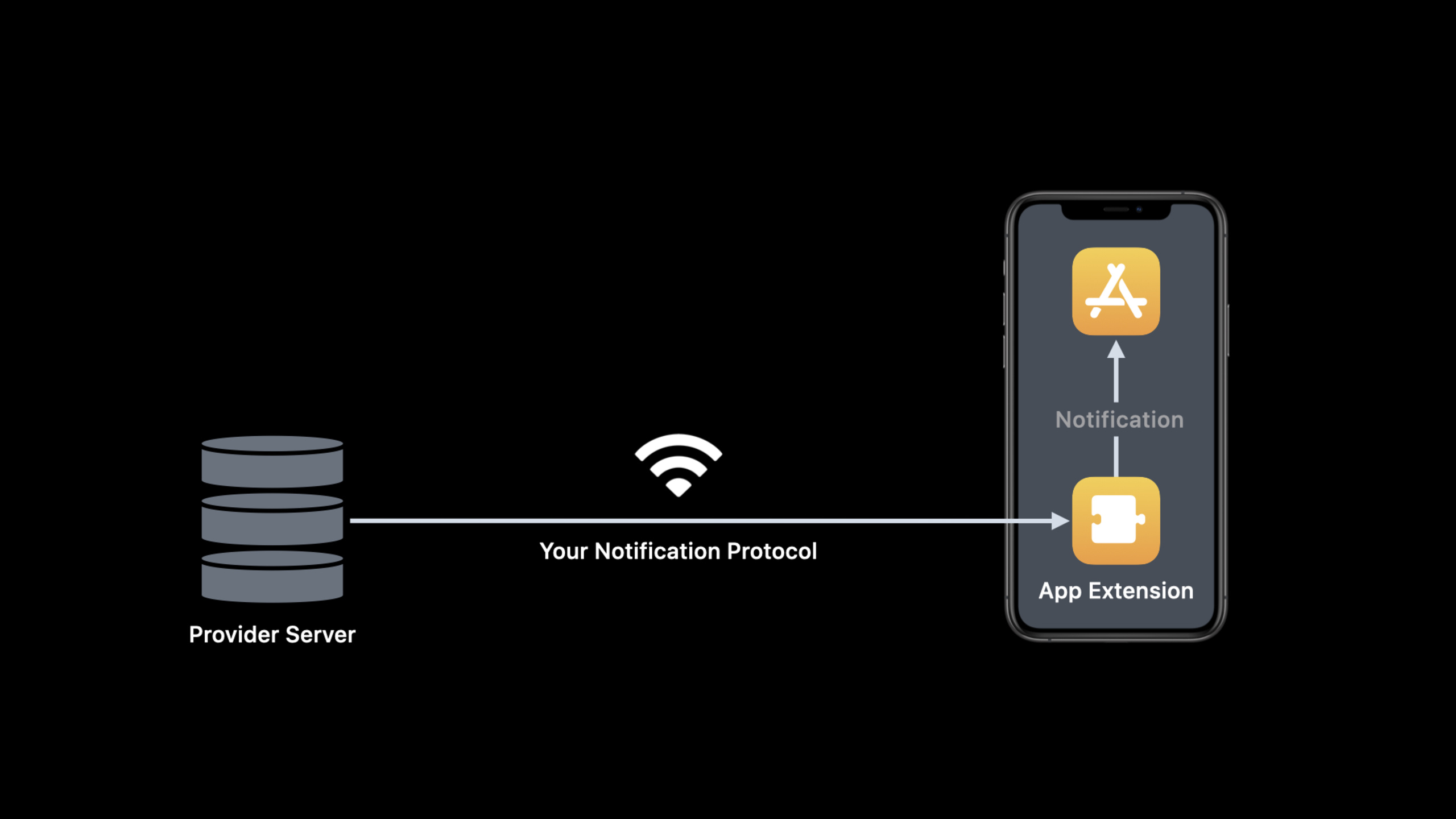
Local Push Connectivity in iOS 14 allows App Extension to directly connect to the local provider server on the specified Wi-Fi network, so that environments without APNs or Internet connections can still receive text notifications and VoIP calls.
Core Content
Push notifications usually rely on Apple Push Notification service (APNs). The Provider server sends the payload to APNs, which then sends it to the target device; the App receives it through PushKit or UserNotifications. This model saves power and is suitable for most networking scenarios.
The problem occurs in networks that APNs cannot reach. The examples given in the verbatim are cruise ships, airlines, camping sites and hospitals: these places may not have Internet or have limited Internet connections, but messages in the app, calls, and on-site collaboration still need to arrive in a timely manner. Continuing to poll the local server will waste power and make it difficult to provide users with a stable call experience.
Local Push Connectivity in iOS 14 changes this link to direct communication within the LAN. The App declares which Wi-Fi SSIDs need to be enabled for local push; after the device joins these Wi-Fis, the system starts the App Extension; the Extension is responsible for connecting to the local provider server and receiving notifications according to the developer’s own protocol. After the device leaves these Wi-Fi, the system stops Extension.
This capability does not replace APNs. Apple clearly recommends in the session that normal push continues to use PushKit or UserNotifications. Local Push Connectivity targets a small set of scenarios where notifications are critical to the user and the network environment does not allow access to APNs. To adopt it, you need to apply for NEAppPushProvider entitlement, and both the containing app and App Extension must have this entitlement.
The demo SimplePush App is placed on a cruise ship. Jane and John’s devices have no internet and are only connected to the “Cruise Ship Wi-Fi”. When Jane sends a text message, John’s device receives a local notification; when Jane initiates a voice call, John’s device displays the system incoming call interface. This demonstration corresponds to the two exits of Local Push: user-visible notifications go through local notifications, and incoming VoIP calls are reported to the system by the Extension, and then handed over to the containing app and CallKit.
Detailed Content
1. Create local push configuration in containing app
(10:07)NEAppPushManagerUsed by the containing app. It saves the configuration of Local Push Connectivity, including the target Wi-Fi, Extension bundle identifier, custom configuration passed to the Extension, and enablement status.
import NetworkExtension

let manager = NEAppPushManager()
manager.matchSSIDs = [ "Cruise Ship Wi-Fi", "Cruise Ship Staff Wi-Fi" ]
manager.providerBundleIdentifier = "com.myexample.SimplePush.Provider"
manager.providerConfiguration = [ "host": "cruiseship.example.com" ]
manager.isEnabled = true

manager.saveToPreferences { (error) in
    if let error = error {
        // Handle error
        return
    }
    // Report success
}
Key points:
import NetworkExtensionIntroduce the framework where Local Push Connectivity is located. -NEAppPushManager()Create a configuration object, and the containing app is responsible for saving and managing it. -matchSSIDsSpecify Wi-Fi networks that enable local push and the extension will only be launched when the device joins these networks. -providerBundleIdentifierpoint to implementationNEAppPushProviderApp Extension. -providerConfigurationPass configuration data such as host to Extension, used in the session examplecruiseship.example.com。isEnabled = trueIndicates that this configuration will be enabled after saving. -saveToPreferencesWrite the configuration into the system preferences; the system will enable Local Push Connectivity only after the save is successful and the configuration is enabled.
2. Manage connection life cycle in App Extension
(11:11) App Extension implementationNEAppPushProvidersubclass. Called by the system when a device joins a matching Wi-Fistart, called when the device leaves these Wi-Fistop. Extension establishes and disconnects local provider server connections in these two entries.
// Manage App Extension life cycle and report VoIP call

class SimplePushProvider: NEAppPushProvider {

    override func start(completionHandler: @escaping (Error?) -> Void) {
        // Connect to your provider server
        completionHandler(nil)
    }

    override func stop(with reason: NEProviderStopReason,
                                   completionHandler: @escaping () -> Void) {
        // Disconnect your provider server
        completionHandler()
    }

    func handleIncomingVoIPCall(callInfo: [AnyHashable : Any]) {
        reportIncomingCall(userInfo: callInfo)
    }
}
Key points:
SimplePushProviderinheritNEAppPushProvider, corresponding to the provider Extension in the previous configuration. -start(completionHandler:)It is the Extension startup entry, suitable for establishing a connection to the provider server. -completionHandler(nil)Tells the system that the startup process is complete. -stop(with:completionHandler:)It is the Extension stop entry, suitable for disconnecting the server and cleaning up the status. -handleIncomingVoIPCallThis is where the sample app handles the VoIP payload itself. -reportIncomingCall(userInfo:)Report the incoming call information to the system, which then wakes up the containing app and delivers user info.
The protocol layer of Local Push is defined by the App and provider server themselves. The verbatim draft only states that the Extension should communicate directly with the server on the local Wi-Fi network, and does not specify the payload format. When writing implementation, protocol parsing, reconnection strategy and error reporting should be placed inside Extension; user-oriented reminders should be handed over to system notifications or CallKit.
3. Receive VoIP call information in containing app
(11:57) When the Extension reports an incoming VoIP call, the system wakes up the containing app. Load the saved data when the app startsNEAppPushManager, and set for each managerNEAppPushDelegate, in order to receivedidReceiveIncomingCallWithUserInfocallback.
class AppDelegate: UIResponder, UIApplicationDelegate, NEAppPushDelegate {
    func application(_ application: UIApplication,
                     didFinishLaunchingWithOptions launchOptions:
                     [UIApplication.LaunchOptionsKey: Any]?) -> Bool {
        NEAppPushManager.loadAllFromPreferences { (managers, error) in
            // Handle non-nil error
            for manager in managers {
                manager.delegate = self
            }
        }
        return true
    }

    func appPushManager(_ manager: NEAppPushManager,
                didReceiveIncomingCallWithUserInfo userInfo: [AnyHashable: Any] = [:]) {
        // Report incoming call to CallKit and let it display call UI
    }
}
Key points:
AppDelegatecomply with at the same timeUIApplicationDelegateandNEAppPushDelegate。loadAllFromPreferencesRead the Local Push configuration saved in the system. -manager.delegate = selfConnect the callback back to the containing app. -didReceiveIncomingCallWithUserInfoDeliver user info reported by the Extension on the main queue.- CallKit should be used in the callback to report incoming calls and display the system incoming call UI.
- The verbatim also reminds: To receive incoming call info, the containing app must enable Voice over IP background mode in Xcode capabilities.
4. User-visible notifications and VoIP notifications go through different exits
(05:07) After the Extension receives a user-visible text message, it should use the UserNotifications framework to create a local notification. It can display alerts, play sounds, update badges, and allow users to enter the app just like receiving ordinary push notifications.
User-facing notification path:
provider server -> NEAppPushProvider extension -> UserNotifications local notification

VoIP notification path:
provider server -> NEAppPushProvider extension -> reportIncomingCall(userInfo:) -> containing app -> CallKit
Key points:
- User-facing notifications such as text messages use local notifications to gain user attention.
- VoIP notification carries incoming call information, Extension passes
reportIncomingCall(userInfo:)Report to the system. - The system is responsible for waking up the containing app and handing over the call info
NEAppPushDelegate. - The containing app then displays the incoming call UI through CallKit, keeping the experience consistent with the system phone call.
Core Takeaways
1. Offline messaging system in ships, parks or hospitals
What it does: Provide instant messaging and alerts to venues that only have access to local Wi-Fi.
Why it’s worth doing: This is exactly the target scenario for sessions. When APNs is unreachable, the device can still passNEAppPushProviderConnect to the local provider server.
How to start: First apply for NEAppPushProvider entitlement; use it in containing appNEAppPushManager.matchSSIDsLimited location Wi-Fi; Extension uses UserNotifications to send local notification after receiving the text payload.
2. LAN VoIP call entrance
What to do: Let users on the same restricted network initiate voice calls to each other and use the system incoming call UI.
Why it’s worth doing: A verbatim demonstration of SimplePush displaying the incoming call UI on a cruise ship Wi-Fi without internet.
How to start: Extension is called after receiving the VoIP payloadreportIncomingCall(userInfo:);containing app implementationNEAppPushDelegate; After receiving the callback, hand the incoming call to CallKit and enable Voice over IP background mode.
3. Local service configuration page for fixed SSID
What to do: Save the server host and the Wi-Fi name that allows Local Push to be enabled in the App settings page.
Why it’s worth doing: The session example puts the provider server host and SSID in the SimplePush settings. Only after the configuration is clear will the system know when to start the Extension.
How to start: Write the SSID selected by the user or issued by the administratormatchSSIDs;Put server host intoproviderConfiguration;Check when savingsaveToPreferenceserror and give a recoverable prompt.
4. Downgrade strategy for APNs and Local Push
What to do: Continue to use APNs when connected to the Internet, and enable local push after entering the designated restricted Wi-Fi.
Why it’s worth doing: Apple recommends that most notifications still use PushKit or UserNotifications; Local Push only serves scenarios where APNs is unreachable and notifications are necessary.
How to start: Keep the normal remote push logic in the APNs link; useNEAppPushManagerOnly declare the SSID that needs to be pushed locally; carry enough message types in the Extension protocol so that text notifications and VoIP calls go through local notification and CallKit respectively.
Related Sessions
- The Push Notifications primer — Explaining APNs, alert notification, background notification and client callbacks is the basis for understanding the trade-offs of Local Push.
- Support local network privacy in your app — Introducing iOS 14 local network permissions and Bonjour scenarios to supplement the privacy background of communications under designated Wi-Fi networks.
- Boost performance and security with modern networking — Sort out URLSession, Network.framework, TLS 1.3 and modern network protocols, suitable for continuing to check the basics of server-side connection.
- Enable encrypted DNS — Demonstrates how NetworkExtension and Network.framework protect DNS queries as an extension of restricted network security configurations.
Comments
GitHub Issues · utterances