
Highlight
Apple demonstrates how to use
setUpWithError, launch arguments,waitForExistence,XCTUnwrap,XCTContext.runActivity, attachments, andXCTSkipto turn UI test failures into issues that can be quickly located in the result bundle.
Core Content
When many teams write tests, the first goal is to see green passes.Kelly Keenan changed the angle at the beginning: The truly valuable moment of testing is when it discovers product problems in CI, and the developer only has a result bundle in his hand.The test is written once and failure will be checked many times, so the test code should prepare context for failure in advance.
This session focuses on UI test and integration test, and splits a test into setup, actions, assertions, and tear down.Each step serves the same goal: When it fails, let the report directly explain what happened, where it happened, and why it deserves investigation.setUpWithErrorResponsible for clarifying the initial state, launch arguments allow the App to enter the entrance to be tested, and test method names and domain helpers make actions semantic.
The assertion part is at the heart of diagnostic quality.a nakedXCTAssertEqualIt can only tell you that the values are different, and the contextual assertion message will tell you which smoothie has missing ingredients.When encountering asynchronous UI, it is recommended to use sessionwaitForExistence(timeout:), allowing the test to poll the target element within a controllable time instead of using a fixedsleepSlows down all results.
The design of shared test code is also critical.session explicitly recommends that shared code throw an error instead of asserting directly.In this way, the same helper can be reused by positive testing, negative testing and error pop-up testing.CooperateXCTContext.runActivityandXCTAttachment, the result bundle will leave readable steps, elements debugDescription, files or logs, so that failures on CI do not have to wait for local recurrence before locating them.
Detailed Content
1. Use setup to fix the starting point of each test
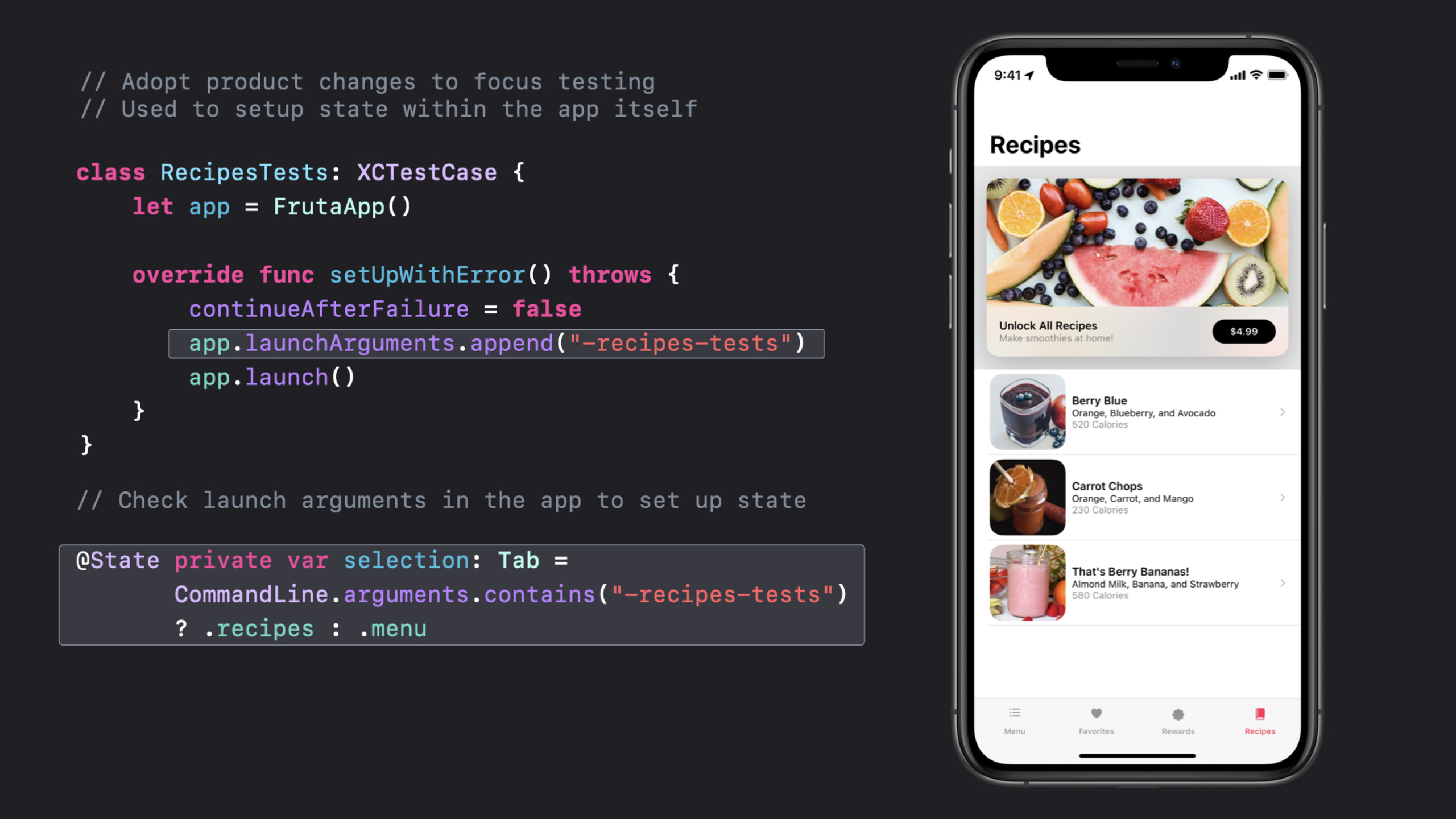
(01:58) Introduced in Xcode 11.4setUpWithError()Errors can be thrown.session Use it to set the initial state before each test, close the continuation, pass in the launch argument, and start the app.
class RecipesTests: XCTestCase {
    let app = FrutaApp()

    override func setUpWithError() throws {
        continueAfterFailure = false
        app.launchArguments.append("-recipes-tests")
        app.launch()
    }
}

@State private var selection: Tab =
       CommandLine.arguments.contains("-recipes-tests")
       ? .recipes : .menu
Key points:
setUpWithError()Allows the setup phase to pass errors to XCTest instead of letting the test continue running in an unknown state.continueAfterFailure = falseStop the test at the first problem to reduce noise in the result bundle.app.launchArguments.append("-recipes-tests")Pass the test intent to the App.- App side reading
CommandLine.argumentsThen go directly to the Recipes tab and avoid the Menu tab that has nothing to do with this goal.
2. Center the testing actions around a clear goal
(04:12) The session’s example test does only one thing: selects the Berry Blue recipe, and then validates the ingredients list.Method names, actions, and assertions all focus on the same goal.
func testIngredientsListAccuracy() throws {
    // Select Berry Blue recipe
    let recipe = try
        app.smoothieList().selectRecipe
                           (smoothie: .berryBlue)

    // Verify ingredients list
    try recipe.verify(ingredients:
        SmoothieType.berryBlue.ingredients)
}
Key points:
testIngredientsListAccuracyWrite the test goal directly, and you don’t have to guess what the test is verifying in the report.- The test action can only select the recipe, and the scope of troubleshooting when it fails is very small.
verify(ingredients:)Put assertion details into helpers and test methods retain business semantics.
(04:56) UI labels change frequently, and session recommends concentrating strings into enum.Spelling or copywriting changes only require one change.
public enum SmoothieType : String {
    case berryBlue = "Berry Blue"
    case carrotChops = "Carrot Chops"
    case berryBananas = "That's Berry Bananas!"

    var ingredients : [String] {
        switch self {
        case .berryBlue:
            return ["Orange", "Blueberry", "Avocado"]
        case .carrotChops:
            return ["Orange", "Carrot", "Mango"]
        case .berryBananas:
            return ["Almond Milk", "Banana", "Strawberry"]
        }
    }
}
Key points:
rawValueSave labels visible on the UI.ingredientsBy putting expected data in the same type, tests don’t have to scatter hard-coded arrays everywhere.- When the UI copy is changed, failures will be concentrated in enum instead of scattered among multiple tests.
3. Use domain model to encapsulate UI hierarchy
(05:25) Multiple tests will enter the smoothie list, and then select a recipe.session extracts this path intoFrutaApp、SmoothieListandRecipeWait for the test object and let the test code express actions like the App domain language.
let recipe = try app.smoothieList().selectRecipe(smoothie: .berryBlue)

public class FrutaApp : XCUIApplication {
   public func smoothieList() throws -> SmoothieList {
        let element = tables["Smoothie List"]
        if !element.waitForExistence(timeout: 5) {
            throw FrutaError.elementDoesNotExist("Smoothie List table")
        }
        return SmoothieList(app: self, element: element)
    }
}

public class SmoothieList : FrutaUIElement {
    public func selectRecipe(smoothie: SmoothieType) throws -> Recipe {
       element.buttons[smoothie.rawValue].tap()
       return try app.recipe()
   }
}
Key points:
app.smoothieList()The underlying query is included in the helper, and the test method does not directly operate the table query details.waitForExistence(timeout: 5)Give asynchronous UI a definite waiting window.- not found
"Smoothie List"When a contextual error is thrown, the result bundle will point to the actual missing element. selectRecipe(smoothie:)returnRecipe, allowing subsequent assertions to continue along the App’s UI hierarchy.
4. Leave context for assertions, optional and asynchronous waits
(08:17) Assert that messages are intended for humans and automated systems.session recommends that messages be specific, but not stuffed with timestamps or unique file paths, as these will prevent automated systems from grouping similar failures together.
XCTAssertEqual(
    count,
    expectedCount,
    "\(SmoothieType.berryBlue.rawValue) smoothie is expected to have \(expectedCount) ingredients: \(expectedIngredients), however, there were \(count) found."
)
Key points:
countandexpectedCountIt is a numerical value that the machine can compare.- The message is supplemented with the smoothie name and expected ingredients, so humans reading the report can understand the business implications.
- Messages are not added with local paths or timestamps, so similar failures are easier to aggregate.
(09:21) Asynchronous UI should not rely onsleep.The example waits for the Ingredients View to appear after clicking the recipe, and throws a clear error after timeout.
public func selectRecipe(smoothie: SmoothieType) throws -> Recipe {
    element.buttons[smoothie.rawValue].tap()
    return try app.recipe()
}

public func recipe() throws -> Recipe {
    let element = scrollViews["Ingredients View"]
    if !element.waitForExistence(timeout: 5) {
        throw FrutaError.elementDoesNotExist(
                        "Ingredients View scroll view")
    }
    return Recipe(app: self, element: element)
}
Key points:
tap()Trigger interface changes.waitForExistence(timeout: 5)Poll the target element, and the test will continue early if the element appears early.- Timeout path throws
"Ingredients View scroll view", better positioning than continuing to fail after a fixed wait.
(10:56) Optional direct force removal will cause the test to crash, and only signal will be left in the CI report.session lists Swift unpacking methods and specifically mentionsXCTUnwrapThe message provided by the developer will be written into the result bundle.
if let favs = favorites { }
guard let favs = favorites else { /* throw an error */ }
let favs = favorites ?? []
let favs = try XCTUnwrap(favorites, "favorites is nil, so there is nothing to count")
Key points:
if letSuitable for using unwrapped values only locally.guard letSuitable for throwing an error you define when nil is used.?? []Suitable for scenarios where nil has a reasonable default value.XCTUnwrapWill throw XCTest recordable failure on nil, retaining custom description.
5. Throw errors from shared code and write troubleshooting materials into result bundle
(12:19) Shared testing code will be reused by many tests.Some tests happen to verify negative paths, so session suggests that the helper throw an error instead of asserting directly.
public func verify(ingredients: [String]) throws {
    try XCTContext.runActivity(named: "Verifying \(ingredients) exists in the Recipe screen.") { verifyingRecipe in
        for ingredient in ingredients {
            if !element.switches[ingredient].waitForExistence(timeout: 5) {
                let attachment = XCTAttachment(string: element.debugDescription)
                verifyingRecipe.add(attachment)
                throw RecipeError.ingredientDoesNotExist(ingredient)
            }
        }
    }
}

public enum RecipeError : Error, CustomStringConvertible {
    case ingredientDoesNotExist(String)

    public var description : String {
        switch self {
        case .ingredientDoesNotExist(let ingredient):
            return "\(ingredient) does not exist in the Ingredients View."
        }
    }
}
Key points:
XCTContext.runActivityCreate a readable step in the result bundle.- The activity name writes out the currently validated ingredients, retaining the action context on failure.
XCTAttachment(string: element.debugDescription)Save UI element state with failure.RecipeErroraccomplishCustomStringConvertible, the error description can directly explain the missing ingredient.
(14:50) Some tests should not be run at this time.For sessionXCTSkipThe family API retains test presence while reporting skip reasons.
let debuggingTests = false

func testSelectSmoothie() throws {
    try XCTSkipUnless(debuggingTests == true, "This test is not yet implemented.")
}
Key points:
XCTSkipUnlessSkip the test if the conditions are not met.- A message will appear in the result bundle and the team will know why the test did not run.
- Skipping the state is easier to track than commenting out the test, and you can return to the same test later to continue implementation or repair.
Core Takeaways
-
Add startup status switch for UI test: What to do: Add a dedicated launch argument to the key UI test to let the app directly enter the tab, page or mock state under test.Why it’s worth doing: The session’s Recipes example reduces irrelevant Menu tab failures and allows the result bundle to focus on this test goal.How to start: Append in test target
app.launchArguments, read in the App startup pathCommandLine.argumentsAnd switch the initial tab. -
Encapsulate common UI paths into test domain models: What to do: Create for apps, list pages, detail pages and pop-up windows
XCUIApplication/XCUIElementhelper.Why it’s worth doing: When multiple tests share the same UI path, add them togetherwaitForExistenceand error descriptions can reduce flaky failure.How to start: Start with the most frequently failed list selection path, wrap the underlying query in something likeapp.smoothieList().selectRecipe(...)method. -
Add human readable clues to CI failure reports: What to do: Add business messages to core assertions and use them in the UI helper
XCTContext.runActivityandXCTAttachment.Why it’s worth doing: There is usually only result bundle on CI, and session emphasizes that testing should actively collect the data needed to troubleshoot product failures.How to start: First add activity name to the UI failure that is most difficult to reproduce, and then addelement.debugDescription, log or file as attachment. -
use
waitForExistenceReplace fixed wait: What to do: Put the UI test insleepChange to wait for elements with timeout.Why it’s worth doing: Fixed waits can slow down the success path and can cause asynchronous failures without target element context.How to start: Encapsulate the first key element after page jump and network loading into a helper, and wait and throw specific errors in the helper. -
Establish explicit rules for skipping tests: What to do: Use
XCTSkip、XCTSkipIforXCTSkipUnlessDocument platform limitations, unimplemented tests, and tests that are temporarily unfixable.Why it’s worth doing: Test reports will show skipped status and won’t hide unrun tests in comments or compilation conditions.How to start: First replace the commented out placeholder cases in the test suite, and write the reason and recovery conditions for each skip.
Related Sessions
- Triage test failures with XCTIssue — Use XCTIssue to convert test failures into structured records for easy diagnosis in CI and result bundles.
- Handle interruptions and alerts in UI tests — Use UI interruption handlers and permission status management to handle system pop-ups in UI tests.
- Get your test results faster — Shorten test feedback cycles with test plans, timeouts, execution time allowances, and parallelization.
- XCTSkip your tests — Use XCTSkip, XCTSkipIf, and XCTSkipUnless to explicitly record in reports which tests were conditionally skipped.
- Eliminate animation hits with XCTest — Use Performance XCTest to measure scrolling and animation hits, capturing user-perceivable performance regressions.
Comments
GitHub Issues · utterances