
Highlight
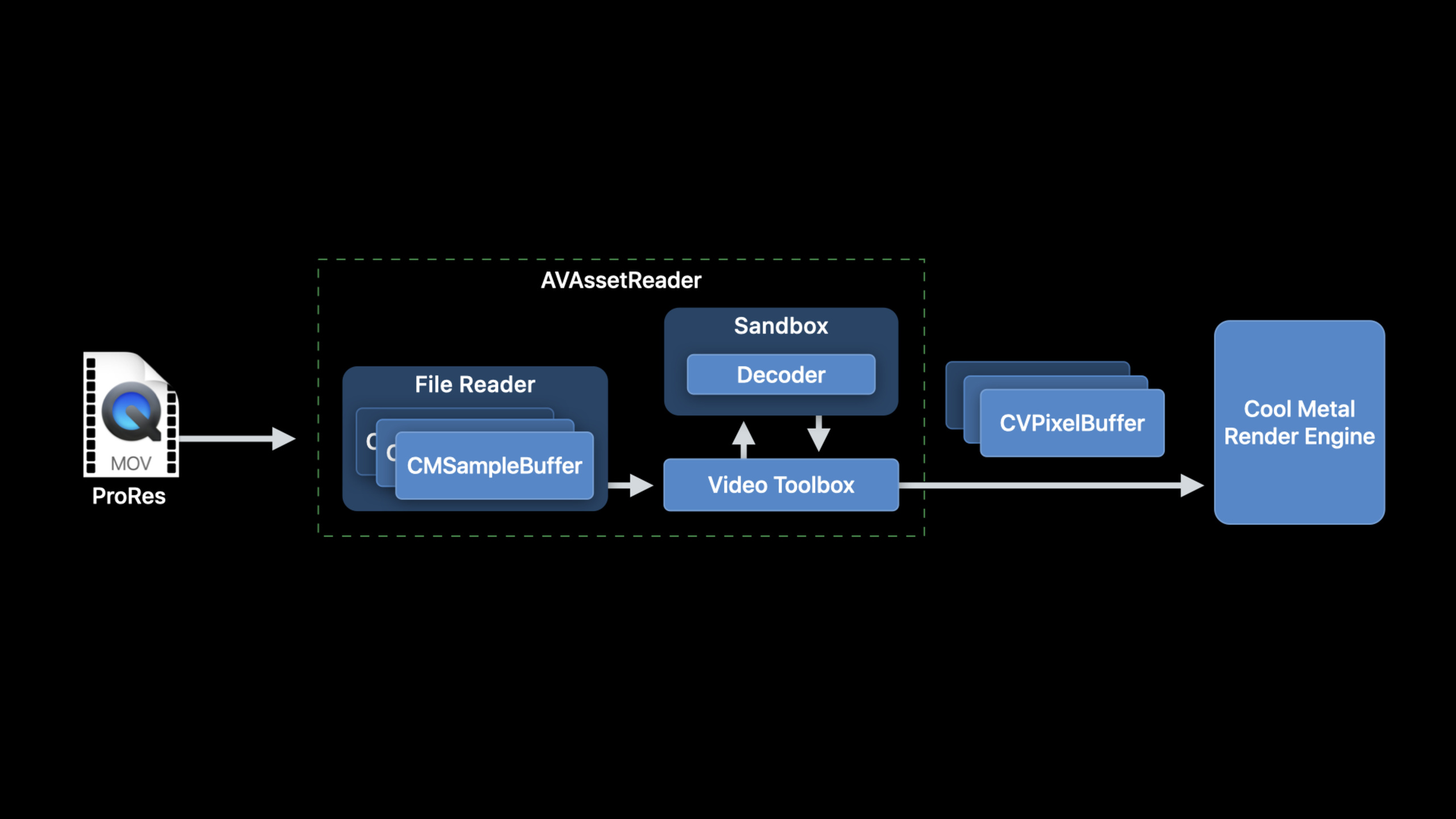
Apple demonstrated the ProRes decoding pipeline of the Mac video app: AVAssetReader can automatically enable hardware decoding and Afterburner, and hand the decoded CVPixelBuffer to Metal in native pixel format; when self-managed decoding is needed, developers can use CMSampleBuffer, VTDecompressionSession and CVMetalTextureCache to control the same path.
Core Content
The problem with many professional video apps is not “whether it can be decoded”, but whether it can efficiently send frames to its own renderer after decoding.ProRes files come from editing, color correction or post-production processes. A common goal on the App side is to read them out, decode them into frames, and then hand them over to Metal for preview, filtering, compositing or pre-export checking.One more format conversion and one more memory copy in the middle will all turn into bandwidth and delay.
This session divides the path into two levels.The first level is to let AVFoundation take over:AVAssetReaderRead the source file, prepare samples suitable for passing to the decoder across processes, call VideoToolbox to decode, and return the specified formatCVPixelBuffer.The current system will use available hardware decoders by default, including Afterburner.
The second level is for developers to drive VideoToolbox themselves.This option is suitable for apps with existing file readers, network sample sources, or applications that need to control hardware decoding strategies.The price is that you have to construct it correctlyCMSampleBuffer,createVTDecompressionSession, handle the asynchronous callback, and thenCVPixelBufferSafely bound to Metal texture.
The last paragraph is where performance can easily go wrong.decoder outputCVPixelBufferusually fromCVPixelBufferPool, bottom layerIOSurfacewill be reused.If the surface is recycled by the pool before the Metal command is executed, incorrect data may be read on the screen.session gives two paths: manual managementIOSurfaceuse count, or take precedenceCVMetalTextureCache。
Detailed Content
1. Use AVAssetReader to take the default efficient path
(07:41) If the input is a local ProRes movie file,AVAssetReaderis the shortest path.it starts fromAVAssetCreate a reader and passAVAssetReaderTrackOutputSpecify the output format.
// Constructing an AVAssetReader

// Create an AVAsset with an URL pointing at a local asset
AVAsset *sourceMovieAsset = [AVAsset assetWithURL:sourceMovieURL];

// Create an AVAssetReader for the asset
AVAssetReader *assetReader = [AVAssetReader assetReaderWithAsset:sourceMovieAsset
                                                           error:&error];
Key points:
AVAssetRepresents the source video file, and the scene in the session is the local ProRes movie file.AVAssetReaderResponsible for reading samples from the asset and letting AVFoundation handle the subsequent decoding link.- The system will automatically use the hardware decoder when available, and Afterburner is also in the default hardware decoding path.
(07:58) When reading decoded output, the key is to request a pixel format close to the decoder’s native format for track output.ProRes 4444 recommends 16-bit 4:4:4:4 YCbCr with alpha, which is Y416.
// Configuring AVAssetReaderTrackOutput

// Copy the array of video tracks from the source movie
NSArray<AVAssetTrack*>  *tracks = [sourceMovieAsset tracksWithMediaType:AVMediaTypeVideo];

// Get the first video track
AVAssetTrack *track = [sourceMovieVideoTracks objectAtIndex:0];

// Create the asset reader track output for this video track, requesting ‘y416’ output
NSDictionary *outputSettings = @{ (id)kCVPixelBufferPixelFormatTypeKey :
                                  @(kCVPixelFormatType_4444AYpCbCr16) };

AVAssetReaderTrackOutput* assetReaderTrackOutput
= [AVAssetReaderTrackOutput assetReaderTrackOutputWithTrack:track
                                             outputSettings:outputSettings];

// Set the property to instruct the track output to return the samples
// without copying them
assetReaderTrackOutput.alwaysCopiesSampleData = NO;

// Connect the the AVAssetReaderTrackOutput to the AVAssetReader
[assetReader addOutput:assetReaderTrackOutput];
Key points:
tracksWithMediaType:AVMediaTypeVideoTake out the video track, select the first video track in the example.kCVPixelBufferPixelFormatTypeKeySpecify outputCVPixelBufferpixel format.kCVPixelFormatType_4444AYpCbCr16Corresponds to Y416, suitable for native decoder output of ProRes 4444.alwaysCopiesSampleData = NOAllows returning samples to avoid extra copies, but these sample buffers may be held elsewhere and cannot be modified.- AVAssetReader converts the buffer if the requested format is not native to the decoder; session explicitly recommends avoiding such copying.
(08:57) After starting to read, the loop callcopyNextSampleBuffer.When configured as decoded output, fromCMSampleBufferWhat is taken out isCVImageBufferRef。
// Running AVAssetReader

BOOL success = [assetReader startReading];

if (success) {
   CMSampleBufferRef sampleBuffer = NULL;

   // output is a AVAssetReaderOutput
   while ((sampleBuffer = [output copyNextSampleBuffer]))
   {
       CVImageBufferRef imageBuffer = CMSampleBufferGetImageBuffer(sampleBuffer);

       if (imageBuffer)
       {
          // Use the image buffer here
          // if imageBuffer is NULL, this is likely a marker sampleBuffer
       }
    }
}
Key points:
startReadingStart reader.copyNextSampleBufferReturn sample buffer in order.CMSampleBufferGetImageBufferWhen there is a value, it means that this is the decoded image frame.- The empty image buffer may be a marker sample buffer, used to carry timed attachments in the media pipeline.
2. Get compressed samples to VideoToolbox
(11:40) Some apps cannot hand over all the work to AVAssetReader.For example, you have your own file reading logic, network data sources, or you need to directly control VideoToolbox.At this time, you can let AVAssetReader only read the compressed data, andoutputSettingsset tonil。
AVAssetReaderTrackOutput* assetReaderTrackOutput
= [AVAssetReaderTrackOutput assetReaderTrackOutputWithTrack:track
                                             outputSettings:nil];
Key points:
outputSettings:nilIndicates that decoded pixel buffer is not requested, but compressed sample is taken.- This path still retains the track-level semantics of AVAssetReader and can handle edits and frame dependencies.
- The compressed samples generated by AVAssetReader are optimized for cross-process RPC sent to VideoToolbox.
(12:24) Another path isAVSampleBufferGenerator.it passesAVSampleCursorControls read position, closer to media-level access.Session reminder, it does not understand edits and frame dependencies. ProRes scenes are more straightforward, and content with inter-frame dependencies such as HEVC or H.264 needs to be more careful.
AVSampleCursor* cursor = [assetTrack makeSampleCursorAtFirstSampleInDecodeOrder];

AVSampleBufferRequest* request = [[AVSampleBufferRequest alloc] initWithStartCursor:cursor];

request.direction = AVSampleBufferRequestDirectionForward;
request.preferredMinSampleCount = 1;
request.maxSampleCount = 1;

AVSampleBufferGenerator* generator
= [[AVSampleBufferGenerator alloc] initWithAsset:srcAsset timebase:nil];

BOOL notDone = YES;

while(notDone)
{
   CMSampleBufferRef sampleBuffer = [generator createSampleBufferForRequest:request];

   // do your thing with the sampleBuffer

   [cursor stepInDecodeOrderByCount:1];
}
Key points:
makeSampleCursorAtFirstSampleInDecodeOrderCreate a cursor from the first sample in decode order.AVSampleBufferRequestDescribe how many samples will be taken this time and the reading direction.timebase:nilLet the example use synchronous requests; session recommends that performance-sensitive paths provide a timebase and use asynchronous requests.- every time
createSampleBufferForRequestAfter that, usestepInDecodeOrderByCount:1Go forward one sample.
(13:40) If the sample comes from your own file format or network, you need to create it yourselfCMSampleBuffer.The components areCMBlockBuffer、CMVideoFormatDescriptionandCMSampleTimingInfo。
CMBlockBufferCreateWithMemoryBlock(kCFAllocatorDefault, sampleData, sizeof(sampleData),
                                   kCFAllocatorMalloc, NULL, 0, sizeof(sampleData), 0,
                                   &blockBuffer);

CMVideoFormatDescriptionCreate(kCFAllocatorDefault, kCMVideoCodecType_AppleProRes4444, 1920,
                               1080, extensionsDictionary, &formatDescription);

CMSampleTimingInfo timingInfo;

timingInfo.duration = CMTimeMake(10, 600);
timingInfo.presentationTimeStamp = CMTimeMake(frameNumber * 10, 600);

CMSampleBufferCreateReady(kCFAllocatorDefault, blockBuffer, formatDescription, 1, 1,
                          &timingInfo, 1, &sampleSize, &sampleBuffer);
Key points:
CMBlockBufferCreateWithMemoryBlockPack compressed sample data into Core Media block buffer.CMVideoFormatDescriptionCreateDescribe codec, size and extension information; session specifically mentions putting color tags in the extensions dictionary.CMSampleTimingInfoWrite duration and presentation timestamp to sample.- Self-build
CMSampleBufferAVFoundation’s optimizations for sandbox RPC are not automatically obtained.
3. Decode with VTDecompressionSession
(17:47) After getting a compressed CMSampleBuffer, you can create VTDecompressionSession. It contains a decoder and output CVPixelBufferPool; when the requested format does not match, it also uses VTPixelTransferSession for conversion.
// VTDecompressionSession Creation

CMFormatDescriptionRef formatDesc = CMSampleBufferGetFormatDescription(sampleBuffer);

CFDictionaryRef pixelBufferAttributes = (__bridge CFDictionaryRef)@{
    (id)kCVPixelBufferPixelFormatTypeKey :
    @(kCVPixelFormatType_4444AYpCbCr16) };

VTDecompressionSessionRef decompressionSession;

OSStatus err = VTDecompressionSessionCreate(kCFAllocatorDefault,
                                            formatDesc,
                                            NULL,
                                            pixelBufferAttributes,
                                            NULL,
                                            &decompressionSession);
Key points:
CMSampleBufferGetFormatDescriptionThe retrieved format description must match the samples subsequently sent to the session.pixelBufferAttributesDescribe output requirements, which can include size, pixel format, or high-level requirements such as Core Animation compatible.- The third parameter is
videoDecoderSpecification;Example passNULL, meaning to use VideoToolbox’s default decoder selection. - When you need to force hardware decoding, you can set it through the decoder specification
RequireHardwareAcceleratedVideoDecoder;To disable hardware decoding, setEnableHardwareAcceleratedVideoDecoderis false. - When professional video workflow requires access to a dedicated decoder, it will be called once when the App starts
VTRegisterProfessionalVideoWorkflowVideoDecoders。
(18:30) session recommends calling DecodeFrame to enable asynchronous decoding.The block-based API returns status, decoded image buffer, presentation timestamp and duration in the output block.
// Running a VTDecompressionSession

uint32_t inFlags = kVTDecodeFrame_EnableAsynchronousDecompression;

VTDecompressionOutputHandler  outputHandler
 = ^(OSStatus status,
     VTDecodeInfoFlags infoFlags,
     CVImageBufferRef imageBuffer,
     CMTime presentationTimeStamp,
     CMTime presentationDurationVTDecodeInfoFlags)
 {
     // Handle decoder output in this block
     // Status reports any decoder errors
     // imageBuffer contains the decoded frame if there were no errors
 };

VTDecodeInfoFlags outFlags;

OSStatus err = VTDecompressionSessionDecodeFrameWithOutputHandler(decompressionSession,
                                                   sampleBuffer, inFlags,
                                                   &outFlags, outputHandler);
Key points:
kVTDecodeFrame_EnableAsynchronousDecompressionTurn on asynchronous decoding, suitable for performance-sensitive video pipelines.VTDecompressionSessionDecodeFrameWithOutputHandlerReceive the compressed sample buffer and return the result through the output handler.statusReports decoding errors; when there are no errors,imageBufferContains decoded frames.- The decoder output is returned serially; do not do time-consuming work in the output block, otherwise it will create back pressure for subsequent frames.
4. Pass CVPixelBuffer safely to Metal
(20:54)CVPixelBufferusually composed ofCVPixelBufferPooldistribute.After the buffer is released, the underlyingIOSurfaceIt will be returned to the pool for reuse.When binding it directly to a Metal texture, ensure that the surface will not be recycled during Metal use.
// CVPixelBuffer to Metal texture: IOSurface

IOSurfaceRef surface = CVPixelBufferGetIOSurface(imageBuffer);

id <MTLTexture> metalTexture = [metalDevice newTextureWithDescriptor:descriptor
                                                           iosurface:surface
                                                               plane:0];

// Mark the IOSurface as in-use so that it won’t be recycled by the CVPixelBufferPool
IOSurfaceIncrementUseCount(surface);

// Set up command buffer completion handler to decrement IOSurface use count again
[cmdBuffer addCompletedHandler:^(id<MTLCommandBuffer> buffer) {
     IOSurfaceDecrementUseCount(surface);
 }];
Key points:
CVPixelBufferGetIOSurfaceRemove the IOSurface behind the pixel buffer.newTextureWithDescriptor:iosurface:plane:Let Metal use this memory directly.IOSurfaceIncrementUseCountPrevent the surface from being used before the GPU is used upCVPixelBufferPoolRecycle.- Called after command buffer is completed
IOSurfaceDecrementUseCount, returns the surface to the pool.
(21:42) A simpler approach is to useCVMetalTextureCache.it putsCVPixelBufferarriveMTLTextureThe binding is managed by Core Video, which can also reduce the cost of repeated binding when the pool reuses IOSurface.
// Create a CVMetalTextureCacheRef

CVMetalTextureCacheRef metalTextureCache = NULL;

id <MTLDevice> metalDevice = MTLCreateSystemDefaultDevice();

CVMetalTextureCacheCreate(kCFAllocatorDefault, NULL, metalDevice, NULL, &metalTextureCache);

// Create a CVMetalTextureRef using metalTextureCache and our pixelBuffer
CVMetalTextureCacheCreateTextureFromImage(kCFAllocatorDefault,
                                          metalTextureCache,
                                          pixelBuffer,
                                          NULL,
                                          pixelFormat,
                                          CVPixelBufferGetWidth(pixelBuffer),
                                          CVPixelBufferGetHeight(pixelBuffer),
                                          0,
                                          &cvTexture);

id <MTLTexture>  texture = CVMetalTextureGetTexture(cvTexture);
// Be sure to release the cvTexture object when the Metal command buffer completes!
Key points:
CVMetalTextureCacheCreateNeed to bind targetMTLDevice。CVMetalTextureCacheCreateTextureFromImagefromCVPixelBuffercreateCVMetalTextureRef。CVMetalTextureGetTextureTake out what is actually used by MetalMTLTexture。CVMetalTextureRefAlso wait for the Metal command buffer to complete before releasing it.
Core Takeaways
-
Make ProRes Timeline Previewer: Use
AVAssetReaderRead the ProRes file, request Y416 or v216 directly, and pass it to the existing Metal renderer for preview.This avoids extra pixel format conversion and automatically uses available hardware decoders. -
Make a custom network sample decoder: When the video sample comes from the network or a private container, package the sample data into
CMBlockBufferandCMSampleBuffer, then feedVTDecompressionSession.At the beginning, make sure the format description, timestamp and color tags are correct, and then optimize asynchronous decoding. -
Make decoding performance diagnostic switch: used in the development version
RequireHardwareAcceleratedVideoDecoderCheck whether hardware decoding is available before usingEnableHardwareAcceleratedVideoDecoderTurn off the hard solution and do a control test.This allows “decoder selection” and “renderer performance” to be checked separately. -
Make Metal frame life cycle encapsulation:
CVMetalTextureCache, command buffer completion handler and texture release are encapsulated into a small object.The caller only getsMTLTexture, no need to hand-write IOSurface use count management everywhere. -
Make ProRes 4444 alpha compositing tool: AVAssetReader request
kCVPixelFormatType_4444AYpCbCr16, sending ProRes 4444 frames with alpha into the Metal compositor, suitable for professional video workflows such as titles, special effects clips, and preview before color correction.
Related Sessions
- Edit and play back HDR video with AVFoundation — Supplement HDR, Core Image filter and custom compositor on the video editing and playback side of AVFoundation.
- Export HDR media in your app with AVFoundation — Explains AVAssetExportSession, AVAssetWriter and ProRes preset on the export side, which is complementary to the decoding path of this article.
- Optimize the Core Image pipeline for your video app — Continuing the discussion of memory, queue and rendering performance after video frames enter Core Image and Metal.
- Build Metal-based Core Image kernels with Xcode — Shows how to write Metal Shading Language into Core Image kernel for decoded video effects processing.
Comments
GitHub Issues · utterances