
Highlight
The Shortcuts App for iOS 14 will be based on the Intent, User Activity and
INVoiceShortcutCenterSuggestions: display common actions in automated suggestions, Gallery and Editor, allowing users to turn daily tasks into shortcuts with just a few clicks.
Core Content
Users are willing to automate a task, usually because the task is recurring.Opening your reading list when you go to the bookstore, practicing language in the evening, and playing your favorite playlist on the way to get off work are all hidden in different apps.If users want to configure their own shortcuts, they need to know which app provides which action, and they need to manually find the appropriate trigger conditions.
iOS 14 expands Shortcuts’ automated suggestions.The system not only recommends fixed daily processes, but also determines whether an action is suitable to be run at a certain time, location or device connection condition based on the user activity, system Intent and custom Intent donated by the App.An example of Duolingo in Session is that after you practice French frequently at night, the system recommends that you practice automatically at 9 o’clock every working day.
What the developer has to do is very specific: donate interaction when the user completes the real operation and let the system learn; useINVoiceShortcutCenterProvide a clear set of shortcut suggestions; mark intents that need to be visible for a long time as configurable.In this way, the action will enter three entrances: automated suggestions, Shortcuts Gallery and Shortcuts Editor.
Automated suggestions come from real use
The speech emphasized that automated suggestions only require a donation.The user orders a soup, plays an album, and starts a training session in the App, and the App donates this interaction to the system.The system then associates the actions with the user’s daily patterns, such as evening, commuting, arriving at the gym, or connecting AirPods.
Gallery and Editor need to actively organize their entrances
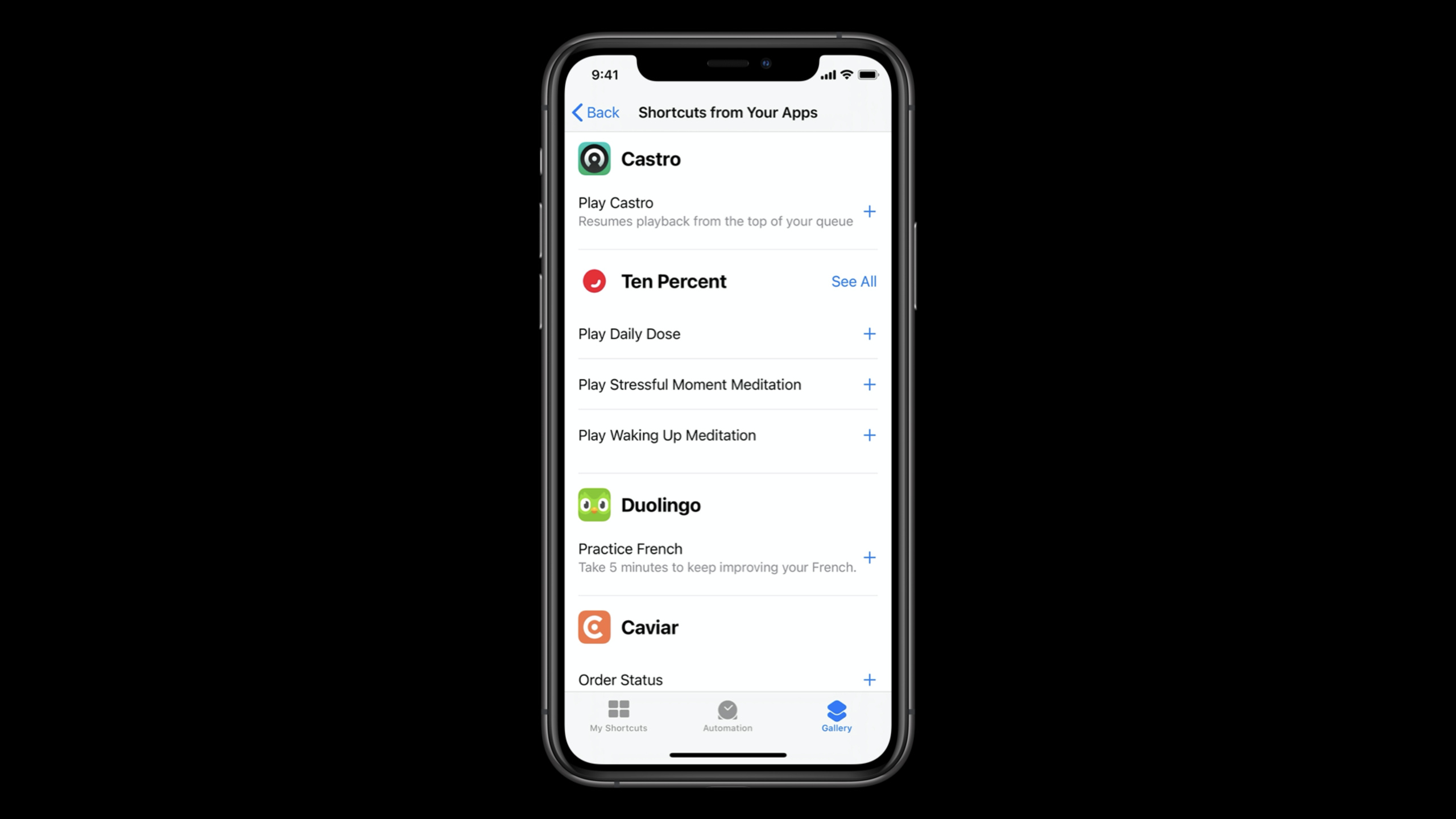
“Shortcuts from Your Apps” in Shortcuts Gallery does not rely entirely on system guessing.App can passINVoiceShortcutCenterSet up suggestions to allow some high-value actions to appear stably.Actions in Editor come from a wider range of sources: donation,INVoiceShortcutCenterSuggestions, configurable intents, and a few system intents may appear.
Daily Routines makes room for vertical apps
Daily Routines are special automated suggestions introduced in iOS 13, and iOS 14 continues to put them in commuting and fitness routines.Media App Adopt and DonateINPlayMediaIntentAfter that, you may enter the Going to Work, Going Home and At the Gym processes; the fitness app usesINStartWorkoutIntentAfter that, you may enter the At the Gym process.
Detailed Content
1. Donate interaction to let the system learn automated suggestions (02:06)
The core input for automated suggestions is donation.Verbatim manuscript uses soup delivery App as an example: After the user places an order, the App initializesPlaceOrderIntent, set the soup parameter toINObject, set images for soup and delivery location parameters, and then useINInteractionwrap and calldonate。
There are no official code snippets for this session. The following only organizes the calling sequence clearly mentioned in the verbatim draft into the smallest Swift form:
let intent = PlaceOrderIntent()
let soup = order.soup

intent.soup = INObject(identifier: soup.identifier, display: soup.name)
intent.setImage(soupImage, forParameterNamed: "soup")
intent.setImage(deliveryLocationImage, forParameterNamed: "deliveryLocation")

let interaction = INInteraction(intent: intent, response: nil)
interaction.donate(completion: nil)
Key points:
PlaceOrderIntentIt is a custom Intent defined by the App itself, used to represent a soup ordering action.intent.soupuseINObjectIndicates the parameter value so that Shortcuts can display the soup selected by the user in the suggestion and editing interface.setImageCorresponds to the steps in the presentation of setting images for the soup and delivery location parameters, with the goal of making the suggestions more legible.INInteractionPackage a specific operation into an event that the system can learn.donateIt is the key call to trigger learning; the speech clearly stated that the system only requires developers to make a donation to generate automated suggestions.
2. Let the action enter Daily Routines (04:13)
Daily Routines are more structured automated suggestions.Shortcuts uses a step-by-step process to help users build Going to Work, Going Home, and At the Gym automations.Apps need to use the corresponding system Intent and donate when users actually use it to have the opportunity to enter these processes.
let playbackInteraction = INInteraction(intent: playMediaIntent, response: nil)
playbackInteraction.donate(completion: nil)

let workoutInteraction = INInteraction(intent: startWorkoutIntent, response: nil)
workoutInteraction.donate(completion: nil)
Key points:
playMediaIntentCorresponding to the roll call of the speechINPlayMediaIntent, suitable for music, podcasts, and audiobook apps.startWorkoutIntentCorresponding to the roll call of the speechINStartWorkoutIntent, suitable for fitness apps.- The example does not expand the initialization parameters of the two Intents because this session only talks about adoption and donation, not the complete configuration of media or workout Intents.
- Shortcuts will associate user behavior with routines such as commuting and fitness, and then put the actions into corresponding steps.
3. UseINVoiceShortcutCenterSet up Gallery suggestions (06:44)
“Shortcuts from Your Apps” in the Gallery come from two sources: shortcut suggestions explicitly set by the App, and smart suggestions based on donation.Explicit settings are suitable for actions you want users to see as soon as they open Shortcuts, such as checking order status or opening a favorites list.
let orderStatusShortcut = INShortcut(intent: orderStatusIntent)
let topSoupsShortcut = INShortcut(userActivity: topSoupsUserActivity)

INVoiceShortcutCenter.shared.setShortcutSuggestions([
    orderStatusShortcut,
    topSoupsShortcut,
])
Key points:
INShortcut(intent:)Wrap an Intent into a recommended shortcut action.INShortcut(userActivity:)Let based onNSUserActivityActions can also be entered into the suggestion list.setShortcutSuggestionsIt is an API for developers to actively organize Gallery entrances.- Gallery will still show smart suggestions based on what the user has done recently, so explicit suggestions and donation should be done together.
4. Make the action appear stably in the Shortcuts Editor (07:50)
Editor is where users build their own shortcuts.The speech breaks down Editor’s sources into several categories: recent donation orINVoiceShortcutCenterSuggested actions, actions that support key parameters, intents marked configurable, and a few system intents.
Shortcuts Editor visibility:
- Donate actions during regular app usage.
- Set shortcut suggestions with INVoiceShortcutCenter.
- Mark important intents as configurable.
- System intents SendPayment, RequestPayment, and RequestRide can appear directly.
Key points:
- donation allows Editor to display recent or frequently performed actions by users.
INVoiceShortcutCenterSuitable for fixed recommendation of a set of high-value actions.- configurable intent can appear in Editor even without donation or suggestion.
- Actions that support key parameters will be displayed with parameter option lines, such as “Run Five Miles” and “Study French” in the Streaks example.
Core Takeaways
- What to do: Donate the corresponding Intent every time the user completes a high-frequency task.Why it’s worth doing: iOS 14’s automated suggestions will learn user habits based on donation, so that actions have a chance to appear at the right time, place, or device connection conditions.How to start: First pick a stable and successful action, such as placing an order, playing, checking in, or starting training, and create it in the success callback
INInteractionand calldonate。 - What: Maintain a set of official recommended actions for the Shortcuts Gallery.Why it’s worth doing: Gallery is not a purely passive entrance.
INVoiceShortcutCenterAllows you to put your most valuable actions directly into “Shortcuts from Your Apps”.How to start: Pick 2-4 actions that new users can understand, and useINShortcutWrap Intent or user activity and then callsetShortcutSuggestions。 - What to do: Make actions that need to be visible for a long time into configurable intents.Why it’s worth doing: The Editor will display the configurable intent even if the user has not yet triggered a donation in the app.How to start: Check the Intent Definition File, mark the actions suitable for manual combination by the user as configurable, and organize the display order of key parameters.
- What to do: Media App proactively connects to Daily Routines.Why it’s worth it: Going to Work, Going Home, and At the Gym flows all include Play Media steps, allowing users to add playback content to multi-step automation in just a few clicks.How to get started: Adopt
INPlayMediaIntent, a donation interaction after the user plays music, podcasts, or audiobooks. - What it does: The fitness app makes starting workouts into Shortcuts.Why it’s worth doing: At the Gym routine will guide users to configure fitness-related actions.
INStartWorkoutIntentis a clear entry point into the process.How to start: Use the system workout intent to express the training action, donate after the training starts successfully, and confirm that the parameter name and image are readable in Shortcuts.
Related Sessions
- What’s new in SiriKit and Shortcuts — Overview of changes to SiriKit, Shortcuts, automated suggestions, and system entry in iOS 14.
- Empower your intents — In-depth explanation of Intent processing, parameter experience, image subtitles and custom intent maintenance.
- Integrate your app with Wind Down — Describes how to expose app actions suitable for bedtime routines as Wind Down shortcuts.
- Design for intelligence: Make friends with “The System” — Use the three steps of define, learn, and execute to explain intents, donations, and system predictions.
- Create quick interactions with Shortcuts on watchOS — Describes the operation, complication entry and intent routing of Shortcuts on Apple Watch.
Comments
GitHub Issues · utterances