
Highlight
This session uses SiriKit Media’s high-frequency playback requests,
INMediaSearchdebugging, Siri vocabulary and Now Playing commands to explain how audio apps can make voice playback a reliable daily entry point.
Core Content
When an audio app is connected to Siri, the most dangerous failure scenario is simple: the first time the user says “play your app”, nothing is played. Danny Mandel directly put the playback success rate as the highest priority at the beginning, because the trust threshold of voice interaction is higher than that of traditional interfaces; after the first failure, users are likely to not try again. (00:37)
The second quality issue is startup speed. CarPlay is specifically named in the verbatim manuscript: Siri is more strict about timeouts when people are operating hands-free in the car. If the app does not start playing quickly enough, the system will end the process. Investment in Siri engineering for media apps should first focus on stable playback stack and low-latency startup. (01:07)
The core judgment of this session comes from the real traffic distribution. More than half of SiriKit Media requests are general playbacks, such as “play your app”; about 30% only give the name of the media; about 5% are compound searches with artists; and about 5% are playlist queries. By doing these four types of requests well, you can cover more than 90% of SiriKit Media traffic at that time. (02:31)
The rest of the quality comes from whether Siri can understand you. The generic model already understands music genres, media types, sequencing, and release dates, but it doesn’t know about the user’s own playlists, nor does it know about shows or playlists that are unique to your app. INVocabulary and the global vocabulary plist are responsible for synchronizing these names to Siri; MPRemoteCommandCenter and MPNowPlayingInfoCenter allow Siri’s playback control and “what is playing” questions to go through the same Now Playing infrastructure. (08:23)
Detailed Content
Use INMediaSearch to cover high-frequency playback requests
(05:46) The most critical entry in Intent Handler is resolveMediaItems(for:with:). Siri will parse the user’s words into INPlayMediaIntent, and the media query conditions are placed on intent.mediaSearch. Generic play may not have mediaSearch; “play music” will only take mediaType; “play Special Disaster Team” will only take mediaName; “play Maybe Sometime by Special Disaster Team” will take both title and artist; “play my WWDC playlist” will take mediaType to playlist and mediaName to WWDC.
func resolveMediaItems(for intent: INPlayMediaIntent, with completion: @escaping ([INPlayMediaMediaItemResolutionResult]) -> Void) {
    let mediaSearch = intent.mediaSearch
    resolveMediaItems(for: mediaSearch) { optionalMediaItems in
        guard let mediaItems = optionalMediaItems else {
            return
        }
        completion(INPlayMediaMediaItemResolutionResult.successes(with: mediaItems))
    }
}
Key points:
intent.mediaSearchis a structured query provided by Siri to the App. When debugging, first check which fields have values.- The second
resolveMediaItems(for:)in the example is the App’s own search logic, responsible for mappingINMediaSearchto real media items. - Empty
mediaSearchcannot be treated as a failure directly. The session clearly states that generalized playback accounts for the highest proportion, and the App should prepare a default playback strategy. - Returning
INPlayMediaMediaItemResolutionResult.successes(with:)means that this parsing has obtained playable candidates, and the next step is to enter the playback process.
Fix personal content recognition using user vocabulary
(10:01) Siri’s natural language model will recognize common music concepts, but the user’s own playlist names are easily misunderstood. The example in the session is ”70s punk classics”: the default model may identify 70s as the release year and punk classics as the media name. After synchronizing the playlist name to the user’s vocabulary, Siri will hand it to the App as the playlist title.
let vocabulary = INVocabulary.shared()
let playlistNames = NSOrderedSet(objects: "70s punk classics")
vocabulary.setVocabularyStrings(playlistNames, of: .mediaPlaylistTitle)
Key points:
INVocabulary.shared()Gets the user vocabulary entry of the current App.- The order of the
NSOrderedSetmakes sense, and Siri will prioritize the terms that come first. .mediaPlaylistTitletells Siri that these strings belong to the media playlist title.- User glossaries are suitable for personal content, such as user-created playlists, and can also be used to favor the names of the user’s artists or subscribed podcasts.
- Word list synchronization to Siri service may be affected by network and battery conditions, and the real app needs to allow time for synchronization.
Use a global vocabulary to describe the App directory
(11:28) The global vocabulary is for App directory entities that will be seen by all users. It is a static plist distributed with the app, and does not need to list popular music or common podcasts; the session makes it clear that these common entities are usually already in Siri’s model. You only need to list names that are unique to your app and that are easily misunderstood by the model.
<?xml version="1.0" encoding="UTF-8"?>
<!DOCTYPE plist PUBLIC "-//Apple//DTD PLIST 1.0//EN" "http://www.apple.com/DTDs/PropertyList-1.0.dtd">
<plist version="1.0">
<dict>
	<key>ParameterVocabularies</key>
	<array>
		<dict>
			<key>ParameterNames</key>
			<array>
				<string>INPlayMediaIntent.playlistTitle</string>
			</array>
			<key>ParameterVocabulary</key>
			<array>
				<dict>
					<key>VocabularyItemSynonyms</key>
					<array>
						<dict>
							<key>VocabularyItemPhrase</key>
							<string>70s punk anthems</string>
						</dict>
					</array>
					<key>VocabularyItemIdentifier</key>
					<string>70s punk anthems</string>
				</dict>
			</array>
		</dict>
	</array>
</dict>
</plist>
Key points:
ParameterNamespoints toINPlayMediaIntent.playlistTitle, indicating that these terms are to affect the playlist title field.VocabularyItemIdentifieris the value that the App will receive fromINMediaSearch.mediaName.VocabularyItemPhraseis a phrase that Siri uses to match what the user says.- Global vocabulary is suitable for playlists, programs, or other media entities that are fixed in the App directory.
- The naming methods of the user vocabulary and the global vocabulary are different, but they will ultimately help Siri fill the corresponding fields of the media intent.
Connect Siri playback controls to Now Playing
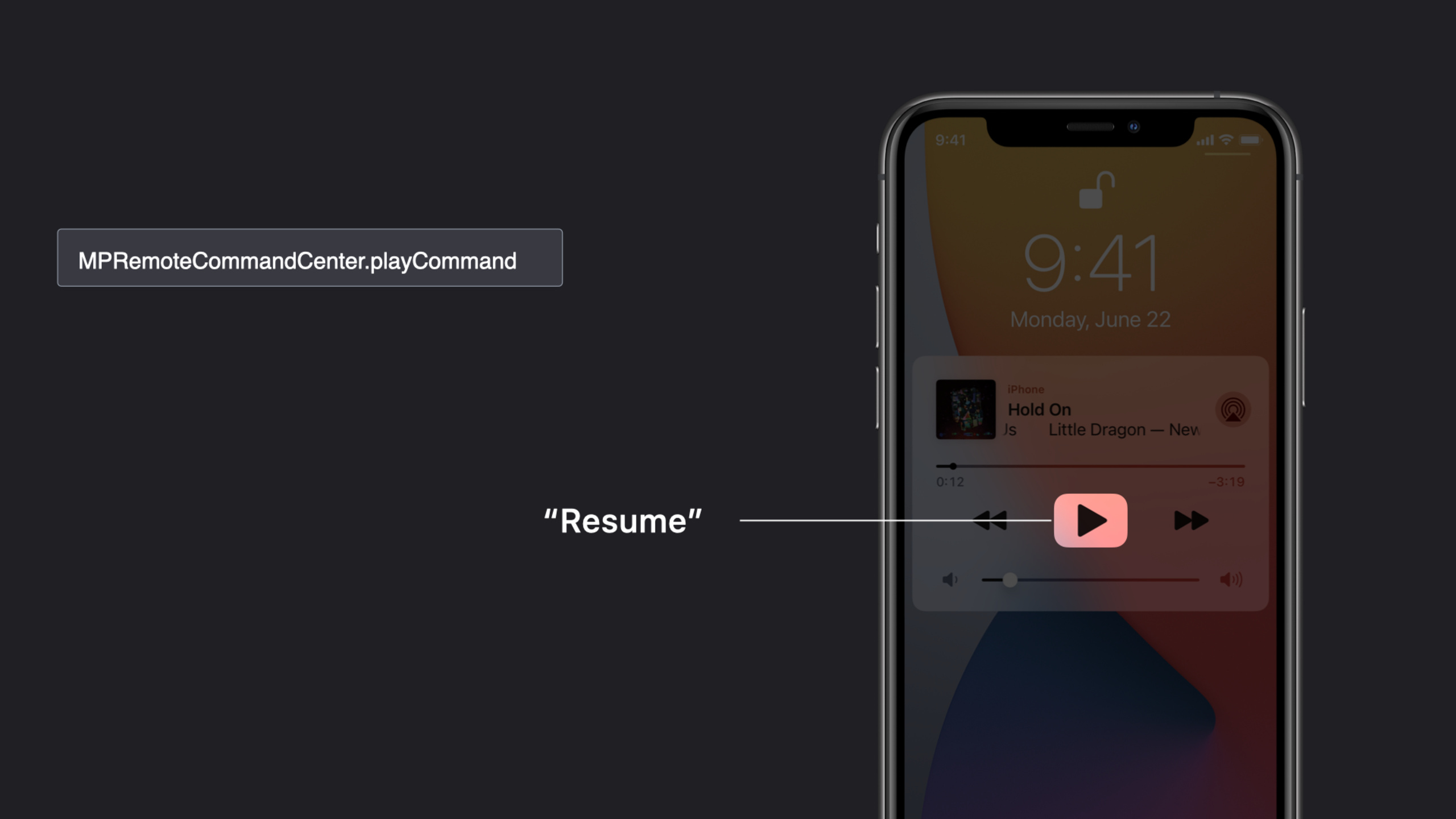
(16:29) Now Playing control is implemented by MPRemoteCommandCenter. After Siri hears commands such as “pause”, “resume”, “next track”, and “previous track”, it will route them to the same set of command handlers. This design enables voice control, Control Center button, and CarPlay Now Playing screen sharing.
Key APIs:
MPRemoteCommandCenter.pauseCommandhandles pauses.MPRemoteCommandCenter.playCommandhandles resuming playback.previousTrackCommandandnextTrackCommandhandle the previous and next tracks.skipForwardCommandandskipBackwardCommandwill put the jump duration specified by the user into theintervalattribute of command.changeRepeatModeandchangeShuffleModeonly handle the open or closed state; if you want to start playing in random or repeat mode, the session requiresINPlayMediaIntent.
(20:11) Siri relies on MPNowPlayingInfoCenter when answering questions such as “What song is this?” At least MPMediaItemPropertyTitle, MPMediaItemPropertyArtist and MPMediaItemPropertyAlbumTitle must be filled in, otherwise Siri will not have enough context to answer what is being played.
Error handling must also follow system semantics. When a command handler is not installed, Siri will give an error dialog; you can disable the command if it is temporarily not supported; and return a failure result if it fails abnormally. This is more stable than customizing a set of speech errors in the app.
Core Takeaways
-
What to do: Make a playback request QA matrix for SiriKit Media. Why it’s worth doing: The four types of high-frequency requests given by session cover more than 90% of the current traffic. Testing these scenarios first is more effective than spreading all fields evenly. How to start: At the
resolveMediaItems(for:with:)break point of the Intent Handler, test the four utterances of generalized playback, media name only, media name plus artist, and playlist one by one, and record which fields onINMediaSearchare filled. -
What it does: Sync
INVocabularyfor user-created playlists. Why it’s worth doing: The user’s own name is most likely to be mistakenly split by the natural language model. Names such as ”70s punk classics” will be split into era, genre and media names. How to start: UpdateINVocabulary.shared()after playlist creation, renaming and deletion, usingNSOrderedSetto put the most commonly used or important names first, and set the type to.mediaPlaylistTitle. -
What to do: Write the app’s unique public directory into the global vocabulary plist. Why it’s worth doing: The global vocabulary allows Siri to understand the program, playlist or channel names shared by all users after installing the app. It is especially suitable for branded, abbreviated, and easily worded names. How to start: List the media entities that are fixed in the App directory and are easily misjudged by Siri. Only configure
ParameterVocabulariesfor these entities. Do not stuff common music genres or popular artists into the plist. -
What: Use the Now Playing command as part of a Siri test. Why it’s worth doing: Siri’s pause, resume, next track, and skip forward will be directly routed to
MPRemoteCommandCenter. The bug here will affect voice, control center, and CarPlay at the same time. How to get started: Use the same test script to check the command handler, disabled status, failed status, and skip interval, and then useMPNowPlayingInfoCenterto verify that Siri can answer title, artist, and album questions. -
What: Prompts the user for available Siri playback methods within the app. Why it’s worth doing: At the end of the verbatim, it is mentioned that Siri engagement can be increased up to ten times after users know that Siri functionality exists. The voice portal is hidden outside the interface, and the education itself is part of the functional quality. How to start: Display specific sentence patterns, such as “Ask Siri to play your WWDC playlist in ControlAudio” on the playback page, song list page or first-time connection to the car scene, and keep the copywriting consistent with your intent support range.
Related Sessions
- Expand your SiriKit Media Intents to more platforms — Continue to talk about SiriKit Media playback access and alternative results on HomePod, Apple TV and other platforms.
- What’s new in SiriKit and Shortcuts — Overview of the 2020 compact Siri UI, conversation design, and action organization updates for SiriKit and Shortcuts.
- Evaluate and optimize voice interaction for your app — Evaluating the quality of voice interaction from a design perspective is suitable as the upstream methodology of the QA matrix in this article.
- Empower your intents — Talk about intent processing, in-app intent handling, and rich conversational rendering to complement the SiriKit experience beyond media intents.
- Decipher and deal with common Siri errors — In-depth Siri error semantics, suitable for reading after the failure status and command disabling strategy of this article.
Comments
GitHub Issues · utterances