
Highlight
watchOS 7 allows an App to provide multiple Complications and allows some Graphic templates to use SwiftUI views, while the watch face content is still driven by ClockKit timeline, family and template.
Core Content
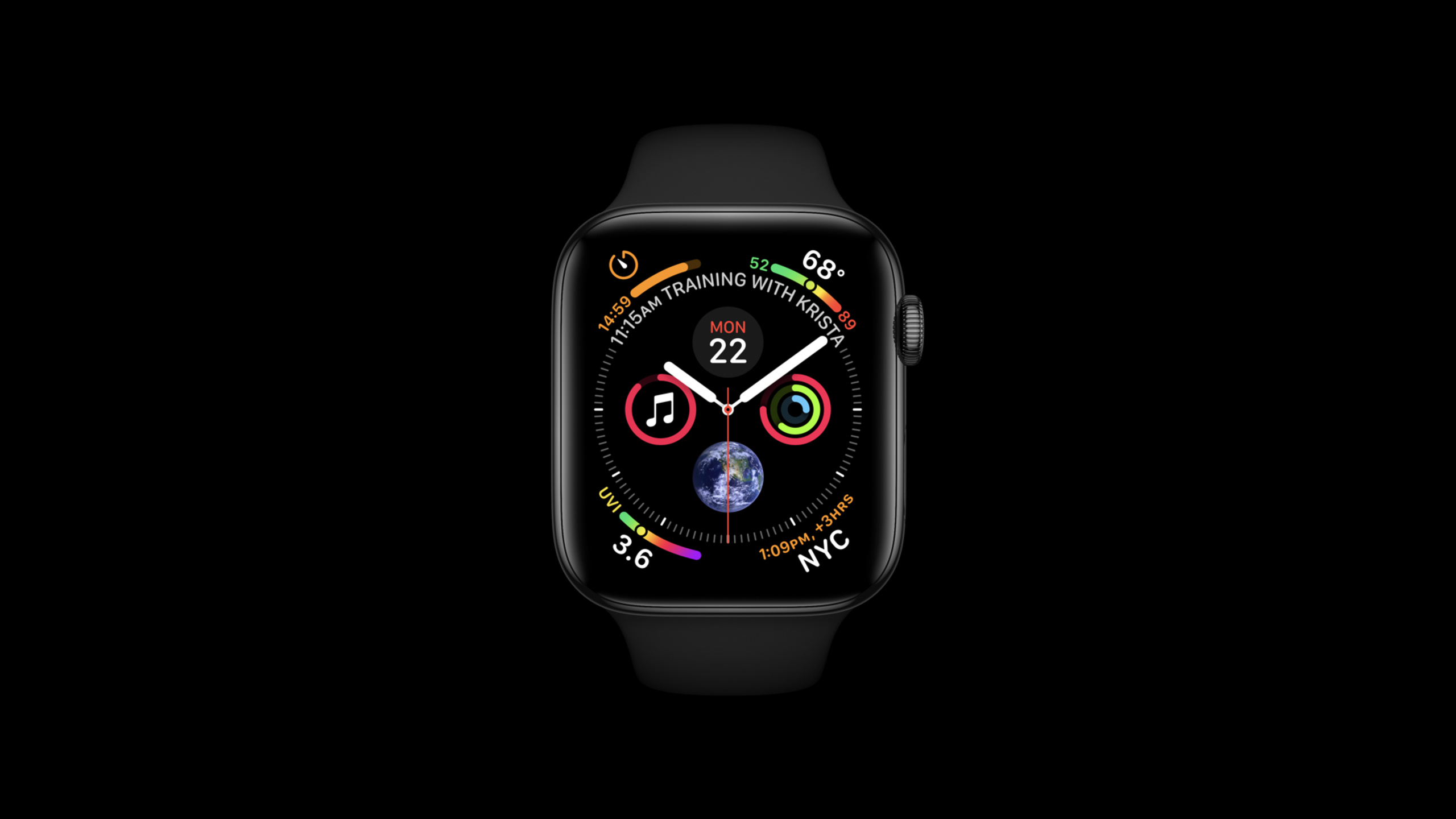
Apple Watch apps can’t just wait for users to click on them. The dial is where users look most often, and Complication puts the latest status of the App there: the next boat, current score, countdown, and today’s progress can all appear when you raise your wrist (00:23).
What ClockKit does is to first ask the App to hand over a timeline. Each entry has an effective time and a template; the system automatically switches entries according to time, without the need for the app to be running all the time. Session explains this model using a whale watching trip: the trip originally has a start and end time, but the Complication entry is only bound to one time and can appear in advance of the actual start time, giving users time to catch the boat (01:33).
This session also put two changes in watchOS 7 into the same link: the Graphic Extra Large family was added to the Extra Large watch face; one App can provide multiple Complications. In the Whale Watch example, the same App Sighting information from different observation stations, portals to record new sightings, and overall seasonal data are also provided (03:05, 11:47).
SwiftUI is not here to replace all of ClockKit. The talk says: There are SwiftUI view alternatives for complication templates using CLKFullColorImageProvider. Developers still need to provide timeline, select family, and return template, but they can put SwiftUI view in some Graphic templates (11:15).
Detailed Content
Use timeline to hand over current and future state
(04:54) CLKComplicationDataSource has only one required method: getCurrentTimelineEntry(for:withHandler:). It answers “What should the dial show now”.
// CLKComplicationDataSource - Required
class ComplicationController: NSObject, CLKComplicationDataSource {

    func getCurrentTimelineEntry(
        for complication: CLKComplication,
        withHandler handler: @escaping (CLKComplicationTimelineEntry?) -> Void)
    {
        // Call the handler with the current timeline entry
        handler(createTimelineEntry(forComplication: complication, date: Date()))
    }
}
Key points:
ComplicationControllerconforms toCLKComplicationDataSourcethrough which ClockKit will request content.complicationrepresents a specific instance on the dial, which will be used later to distinguish family and identifier.handlerreceives aCLKComplicationTimelineEntry?, the entry contains the effective time and template.createTimelineEntry(forComplication:date:)is the App’s own encapsulation, which converts the current time into an entry that can be displayed on the dial.
(05:16) If the App can provide future data in advance, timeline end date and after-date entries must also be implemented. ClockKit will request in batches according to limit, and entries exceeding the limit will be discarded.
// CLKComplicationDataSource - Timeline Support
extension ComplicationController {

    func getTimelineEndDate(
        for complication: CLKComplication,
        withHandler handler: @escaping (Date?) -> Void)
    {
        handler(timeline(for: complication)?.endDate)
    }

    func getTimelineEntries(
        for complication: CLKComplication,
        after date: Date,
        limit: Int,
        withHandler handler: @escaping ([CLKComplicationTimelineEntry]?) -> Void)
    {
       handler(timeline(for: complication)?.entries(after: date, limit: limit))
    }
}
Key points:
getTimelineEndDatetells the system how long this timeline can cover.getTimelineEntriescontinues to provide data after the last entry existing in the system.dateis the last timeline entry time that the system has.limitis the maximum number required by the system this time. The App should not insert more entries at one time.
When the data is completely invalid, call CLKComplicationServer’s reloadTimeline(for:). If the existing entry is still valid, but the app can provide more future entries, call extendTimeline(for:). The system only tracks the Complications currently on the user’s dial. These instances are obtained from activeComplications or data source method parameters. Do not create CLKComplication objects yourself (06:00).
Use provider to fit into a very small space
(07:47) The space for Complication is very small, and the same paragraph of text must appear in different families and templates. ClockKit uses data providers to express data, and then handles the display in different layouts for developers.
let longDate: Date = DateComponents(year: 2020, month: 9, day: 23).date ?? Date()
let units: NSCalendar.Unit = [.weekday, .month, .day]
let textProvider = CLKDateTextProvider(date: longDate, units: units)
Key points:
longDateis the date to be displayed.unitsspecifies the longest case where you want to display weekday, month, and day.CLKDateTextProviderprogressively downgrades from full date to shorter text based on space.
(08:49) Relative time uses CLKRelativeDateTextProvider. The example given in the speech is a timer style, which will automatically update with the current time and can be accurate to the second, without requiring the App to refresh the string.
let timerStart: Date = …
let units: NSCalendar.Unit = [.hour, .minute, .second]
let textProvider = CLKRelativeDateTextProvider(date: timerStart, style: .timer, units: units)
Key points:
timerStartis the target time for relative time calculations.style: .timerallows the provider to be displayed as a timer.unitscontrols the display of hours, minutes, and seconds.- Automatic update time is handled by ClockKit, suitable for countdown and remaining time.
The same paragraph also mentions CLKTimeTextProvider, CLKTimeIntervalTextProvider, CLKSimpleTextProvider, CLKImageProvider, CLKFullColorImageProvider, CLKTimeIntervalGaugeProvider. The common goal of these providers is to allow content to display in different watch face colors and family, different space sizes can still be correctly compressed and colored by the system (09:01, 10:42).
Use descriptor to declare multiple Complications
(12:07) watchOS 7 adds multiple complication support. The relevant methods are getComplicationDescriptors(withHandler:) and handleSharedComplicationDescriptors(_:). CLKComplicationDescriptor contains a unique identifier, the displayName of the editing interface display, supported families, and optionally userInfo or userActivity.
// CLKComplicationDataSource - Multiple Complication Support
extension ComplicationController {
    var descriptors : [CLKComplicationDescriptor] = []
    var dataDict = Dictionary<AnyHashable, Any>()

    for station in data.stations {
        dataDict = [“name": station.name, “shortName": station.shortName]
        descriptors.append(
            CLKComplicationDescriptor(
                identifier: station.name,
                displayName: station.name,
                supportedFamilies: CLKComplicationFamily.allCases,
                userInfo: dataDict))
    }

    descriptors.append(
        CLKComplicationDescriptor(
            identifier: "LogSighting",
            displayName: "Log Sighting",
            supportedFamilies: CLKComplicationFamily.allCases))

    descriptors.append(
        CLKComplicationDescriptor(
            identifier: "SeasonData",
            displayName: "Season Data",
            supportedFamilies: [.graphicRectangular]))

    // Call the handler with the currently supported complication descriptors
    handler(descriptors)
}
Key points:
- Each station becomes a descriptor, identifier and displayName use the station name.
userInfobrings business data such asnameandshortNameto the subsequent template creation stage.LogSightingis a Complication for quickly logging new sightings, supported by all families.SeasonDataonly supports.graphicRectangularas overall seasonal data requires a larger canvas.- When the descriptor list changes, call
reloadComplicationDescriptors()and the system will re-request the support list.
If a Complication that is no longer supported by an App is still on the user’s watch face, the system will continue to request its timeline entries. Session requires developers to continue to provide useful content as much as possible. Another thing that must be dealt with is CLKDefaultComplicationIdentifier: when old versions of Complication and shared watch faces lose associated data, the system may use this identifier Request content (14:17, 15:59).
Return template by family and identifier
(17:33) createTimelineEntry first creates the template, and then packages the template and date into CLKComplicationTimelineEntry.
func createTimelineEntry(
    forComplication complication: CLKComplication,
    date: Date) -> CLKComplicationTimelineEntry?
{
    guard let template = createTemplate(forComplication: complication, date: date) else {
        return nil
    }
    return CLKComplicationTimelineEntry(date: date, complicationTemplate: template)
}
Key points:
createTemplatedetermines the specific display style.- When template creation fails,
nilis returned and no invalid entry is given to the system. - On success,
datedetermines when the entry starts to be displayed. complicationTemplatecarries the visual content that is ultimately given to the watch face.
(17:44) The Whale Watch example branches by (complication.family, complication.identifier). SeasonData returns the SwiftUI chart in Graphic Rectangular; LogSighting returns pictures and text in Graphic Circular; other observation stations return different templates according to family; when it cannot be processed, it returns to the default template.
func createTemplate(
    forComplication complication: CLKComplication,
    date: Date) -> CLKComplicationTemplate?
{
    var station: Station? = nil
    if let stationName = complication.userInfo?["name"] as? String {
        station = data.stations.first(where: { $0.name == stationName })
    }

    let image = UIImage(named: "Spout-small")!
    let spoutFullColorImageProvider = CLKFullColorImageProvider(fullColorImage: image)
    let logSightingTextProvider = CLKSimpleTextProvider(
        text: "Log Sighting",
        shortText: "Log")

    let defaultTemplate: (CLKComplicationFamily) -> CLKComplicationTemplate = { family -> CLKComplicationTemplate in
      // Return a default complication template for the given family
    }

    switch (complication.family, complication.identifier) {

    case (.graphicRectangular, "SeasonData"):
        return CLKComplicationTemplateGraphicRectangularFullView(
            ChartView(
                seriesData: data.last7DaysSightings,
                seriesColor: .turquoise)

    case (.graphicCircular, "LogSighting"):
        return CLKComplicationTemplateGraphicCircularStackImage(
            line1ImageProvider: spoutFullColorImageProvider,
            line2TextProvider: logSightingTextProvider)

    case (.graphicCircular, _):
        guard let station = station else { return defaultTemplate(.graphicCircular) }
        return CLKComplicationTemplateGraphicCircularView(
            SightingTypeView(station: station))

    case (.graphicCorner, _):
        guard let station = station else { return defaultTemplate(.graphicCorner) }
        return CLKComplicationTemplateGraphicCornerTextImage(
            textProvider: station.timeAndShortLocTextProvider,
            imageProvider: station.whaleActivityFullColorProvider)

    case (.graphicExtraLarge, _):
        guard let station = station else { return defaultTemplate(.graphicExtraLarge) }
        return CLKComplicationTemplateGraphicExtraLargeCircularStackText(
            line1TextProvider: station.timeAndLocationTextProvider,
            line2TextProvider: station.shortLocationTextProvider)

    default:
        return defaultTemplate(complication.family)
    }
}
Key points:
complication.userInfo?["name"]reads the station name brought by descriptor.CLKFullColorImageProviderfor full color images from Graphic family.CLKSimpleTextProviderprovides both long and short text toLogSighting.switchlooks at family and identifier at the same time to avoid using the same identifier in the wrong template in different families.- default template handles unknown cases, including default Complication identifier.
Core Takeaways
1. Make a “Next Action” dial entry
- What to do: Put the next meeting, the next bus, the next medication, or the next tide on the watch face and have the entry appear earlier than the actual start time.
- Why it’s worth doing: The session’s whale watching timeline explains that the Complication entry does not have to wait for the event to start before it is displayed, and users can prepare time in advance.
- How to start: Convert business events into
CLKComplicationTimelineEntry, and usegetTimelineEntries(after:limit:withHandler:)to provide future entries.
2. Separate multiple data dimensions for the same App
- What to do: A sports app provides three Complications of “current heart rate”, “today’s progress” and “start recording” at the same time.
- Why it’s worth doing: watchOS 7 allows a single App to declare multiple
CLKComplicationDescriptor, and the Whale Watch example also separates observation stations, recording entries, and seasonal data. - How to start: Assign an identifier to each dimension in
getComplicationDescriptors(withHandler:), and useuserInfoto carry the data required for subsequent rendering.
3. Use provider to adapt the same content to multiple families
- What to do: The same countdown displays the full time on the large dial, and automatically shortens it in the small corner marker.
- Why it’s worth doing:
CLKDateTextProviderandCLKRelativeDateTextProviderwill select appropriate text based on space and reduce handwriting layout branches. - How to start: First encapsulate text, pictures, and gauge into ClockKit provider, and then hand the provider to the corresponding template.
4. Prepare fallback for shared watch faces and old users
- What to do: When a user enters from an old version of Complication or a shared watch face, the app icon, popular data, or original default information is still displayed.
- Why it’s worth doing: The session is explicitly required to support
CLKDefaultComplicationIdentifier, otherwise users may see broken Complication on the watch face. - How to start: Create a logical
defaultbranch in template to return a recognizable default template. Do not directly return empty content.
5. Use SwiftUI where canvas is needed most
- What to do: Make a small chart for the rectangular Graphic family, such as the last 7 days of records, trends or completion.
- Why it’s worth doing: The session example uses
CLKComplicationTemplateGraphicRectangularFullViewin the.graphicRectangularbranch ofSeasonDatato host the SwiftUI chart. - How to start: First define a descriptor that only supports
.graphicRectangular, and then return the corresponding SwiftUI template in the(family, identifier)branch.
Related Sessions
- Build complications in SwiftUI — Continue to talk about SwiftUI view, preview and visual design in Graphic Complication.
- Keep your complications up to date — Supplement timeline refresh, background refresh, URLSession and push update strategies.
- Meet Watch Face Sharing — Talk about how to share watch faces containing App Complication to users from apps or web pages.
- Create quick interactions with Shortcuts on watchOS — Talk about the links that trigger quick actions and App intents from Complication on watchOS.
Comments
GitHub Issues · utterances