
Highlight
iOS 14 adds Section Snapshot and Reordering Handlers to Diffable Data Source, allowing UICollectionView to combine hierarchical data by section, automatically handle outline expansion and collapse, and submit the order dragged by the user back to the application data source.
Core Content
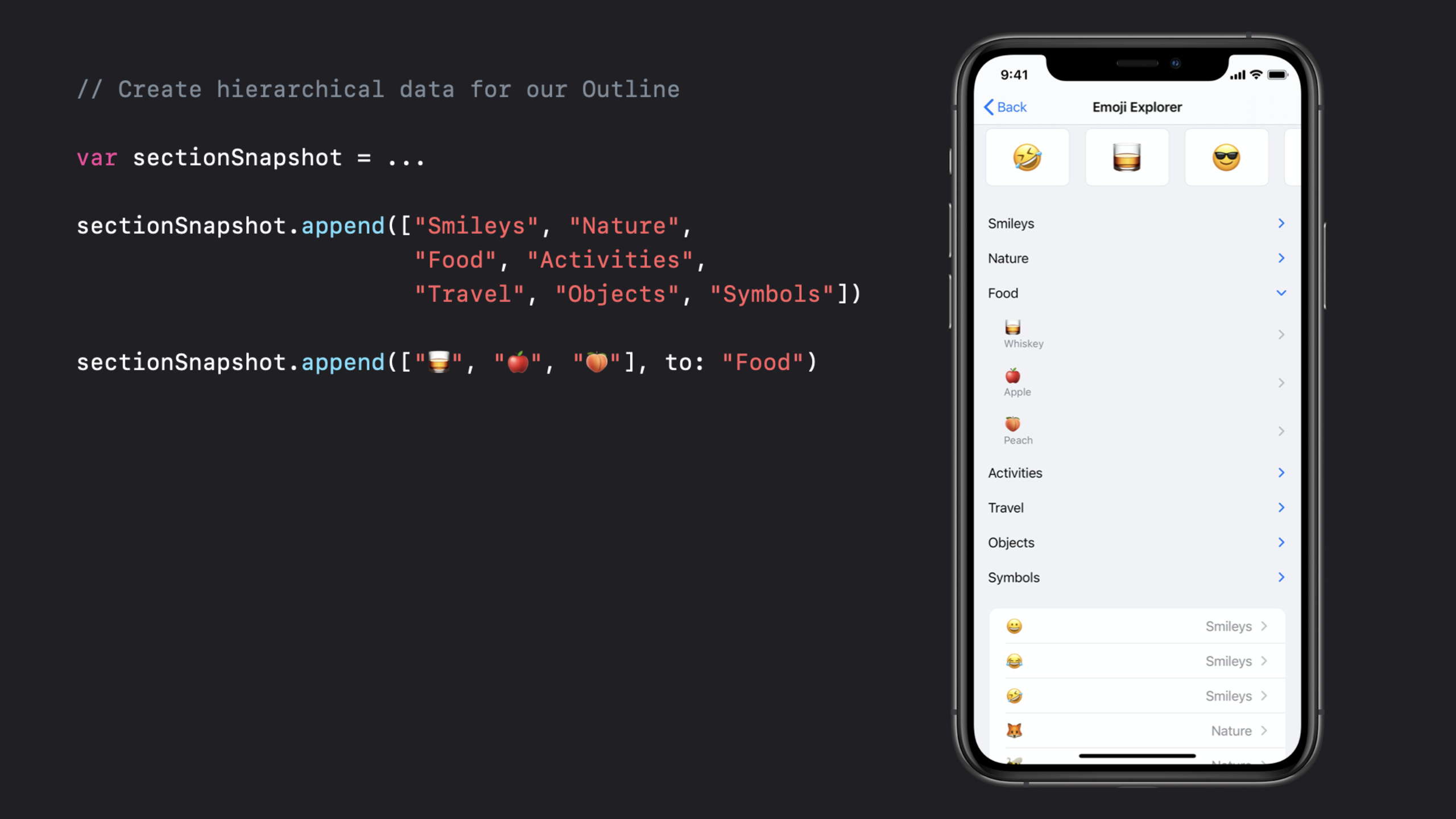
Diffable Data Source solves an old problem when updating collection views and table views in iOS 13: developers first describe the current UI state, and then let the framework calculate the difference and animation. This model works well for flat lists, but pages like Emoji Explorer are more complex. It also has a horizontally scrolling emoji grid, an expandable outline area, and a list area that looks like a table view.
iOS 14 splits the update granularity into sections. Section Snapshot represents the content of a single UICollectionView section, and the data source can be combined from multiple section snapshots. Horizontal grids, outlines, and list sections can each maintain their own content and then put them into the same collection view.
Hierarchical data is the focus of this talk. Section Snapshot’s append(_:to:) uses the optional parent parameter to establish a parent-child relationship, and expand(_:) and collapse(_:) manage the expansion state. With the new outline disclosure accessory, when the user clicks on or collapses the item, the framework will update the section snapshot and re-apply it to the data source.
Another new addition is drag sorting. Diffable Data Source already represents UI state with unique item identifiers, and iOS 14 continues to provide reorderingHandlers and transactions. After the user drags, the application gets the snapshot before and after the change, CollectionDifference and the transaction of each section, and then writes the new sequence back to its own backing store.
Detailed Content
Use Section Snapshot to represent a section
(03:24) NSDiffableDataSourceSectionSnapshot only genericizes the item identifier, not the section identifier. It doesn’t care which section it belongs to, it only describes a group of items and the hierarchical relationship between them.
public struct NSDiffableDataSourceSectionSnapshot<ItemIdentifierType> where ItemIdentifierType : Hashable {
    public init()
    public mutating func append(_ items: [ItemIdentifierType], to parent: ItemIdentifierType? = nil)
    public mutating func expand(_ items: [ItemIdentifierType])
    public mutating func collapse(_ items: [ItemIdentifierType])
    public func isExpanded(_ item: ItemIdentifierType) -> Bool
    public func parent(of child: ItemIdentifierType) -> ItemIdentifierType?
    public var rootItems: [ItemIdentifierType] { get }
    public var visibleItems: [ItemIdentifierType] { get }
}
Key points:
ItemIdentifierTypemust conform toHashablebecause diffable data sources rely on unique item identifiers.append(_:to:)When parent is not passed, the item is placed at the root level.expand(_:)andcollapse(_:)modify the expansion state of section snapshot.visibleItemsonly returns items that are visible in the current expanded state, suitable for debugging outline display results.
Arrange sections first, then fill in the content of each section
(04:43) Ordinary snapshot is responsible for the section order, and section snapshot is responsible for the content of each section. The speech uses three sections: recent, top, and suggested to demonstrate this division of labor.
func update(animated: Bool=true) {

   // Add our sections in a specific order
   let sections: [Section] = [.recent, .top, .suggested]
   var snapshot = NSDiffableDataSourceSnapshot<Section, Item>()
   snapshot.appendSections(sections)
   dataSource.apply(snapshot, animatingDifferences: animated)

   // update each section's data via section snapshots in the existing position
   for section in sections {
      let sectionItems = items(for: section)
      var sectionSnapshot = NSDiffableDataSourceSectionSnapshot<Item>()
      sectionSnapshot.append(sectionItems)
      dataSource.apply(sectionSnapshot, to: section, animatingDifferences:animated)
   }
}
Key points:
NSDiffableDataSourceSnapshot<Section, Item>is still used to determine the overall order of sections.- Each
sectioncreates its ownNSDiffableDataSourceSectionSnapshot<Item>. dataSource.apply(sectionSnapshot, to: section, ...)applies partial content to the specified section.- This writing method prevents multiple sections from interfering with each other, and is suitable for a page with grid, outline and list at the same time.
Establish the parent-child relationship of outline
(05:18) Hierarchical data is established through the same append API. First append the root node, and then append the child nodes to the specified parent.
// Create hierarchical data for our Outline

var sectionSnapshot = ...

sectionSnapshot.append(["Smileys", "Nature",
                        "Food", "Activities",
                        "Travel", "Objects", "Symbols"])

sectionSnapshot.append(["🥃", "🍎", "🍑"], to: "Food")
Key points:
- The first section
appendhas no parent, so these strings are root nodes. - The second paragraph
appendspecifiesto: "Food", and the three emoji become the child nodes ofFood. - Transcript is explicitly stated so that a section snapshot describing application-level data can be obtained.
(06:01) When you need to process the children of a parent separately, you can take the child snapshot from the section snapshot.
let childSnapshot = sectionSnapshot.snapshot(for: parent, includingParent: false)Key points:
snapshot(for:includingParent:)takes only part of the hierarchy below the specified parent.includingParent: falsemeans the parent itself is not included in the result.- This API is suitable for only refreshing or checking the partial data of the outline.
Control expansion, collapse and lazy loading
(06:11) The expansion state is also the state of section snapshot. After modification, you need to apply it to the data source again before the interface will be updated.
struct NSDiffableDataSourceSectionSnapshot<Item: Hashable> {
   func expand(_ items: [Item])
   func collapse(_ items: [Item])
   func isExpanded(_ item: Item) -> Bool
}
Key points:
expand(_:)sets the expanded state of the specified item.collapse(_:)sets the collapsed state of the specified item.isExpanded(_:)is used to determine whether the current item has been expanded.- Verbatim reminder: If you only mutate section snapshot and do not apply to Diffable Data Source, the changes will not be displayed on the interface.
(07:21) After the user clicks the outline disclosure accessory, the framework will update the section snapshot. When you need to intercept, observe or lazy load, use sectionSnapshotHandlers.
extension UICollectionViewDiffableDataSource {

  struct SectionSnapshotHandlers<Item> {
    var shouldExpandItem: ((Item) -> Bool)?
    var willExpandItem: ((Item) -> Void)?

    var shouldCollapseItem: ((Item) -> Bool)?
    var willCollapseItem: ((Item) -> Void)?

    var snapshotForExpandingParent: ((Item, NSDiffableDataSourceSectionSnapshot<Item>) -> NSDiffableDataSourceSectionSnapshot<Item>)?
  }

  var sectionSnapshotHandlers: SectionSnapshotHandlers<Item>

}
Key points:
shouldExpandItemandshouldCollapseItemdetermine whether the user operation is allowed to continue.willExpandItemandwillCollapseItemare suitable for recording state changes.snapshotForExpandingParentreturns a new section snapshot when the parent is about to expand, suitable for loading expensive children on demand.- The example given by transcript is to make a parent never collapse, and to only load expensive content when needed.
Use transaction to submit drag and drop sorting
(08:52) The reordering entry of Diffable Data Source is reorderingHandlers. The talk explicitly says that enabling reordering requires both canReorderItem and didReorder to be provided.
extension UICollectionViewDiffableDataSource {

  struct ReorderingHandlers {
    var canReorderItem: ((Item) -> Bool)?
    var willReorder: ((NSDiffableDataSourceTransaction<Section, Item>) -> Void)?
    var didReorder: ((NSDiffableDataSourceTransaction<Section, Item>) -> Void)?
  }

  var reorderingHandlers: ReorderingHandlers
}
Key points:
canReorderItemis called when the user tries to start dragging, and dragging is allowed only whentrueis returned.didReorderis called after dragging is completed to write the new order back to the application’s data source.- transcript explains that the framework can automatically submit reordering changes at the interface layer based on unique item identifiers, but the application still needs to update the backing store.
(09:45) NSDiffableDataSourceTransaction provides before-change, after-change and difference information. Applications can use this information to derive new sequences.
struct NSDiffableDataSourceTransaction<Section, Item> {
   var initialSnapshot: NSDiffableDataSourceSnapshot<Section, Item> { get }
   var finalSnapshot: NSDiffableDataSourceSnapshot<Section, Item> { get }
   var difference: CollectionDifference<Item> { get }
   var sectionTransactions: [NSDiffableDataSourceSectionTransaction<Section, Item>] { get }
}

struct NSDiffableDataSourceSectionTransaction<Section, Item> {
   var sectionIdentifier: Section { get }
   var initialSnapshot: NSDiffableDataSourceSectionSnapshot<Item> { get }
   var finalSnapshot: NSDiffableDataSourceSectionSnapshot<Item> { get }
   var difference: CollectionDifference<Item> { get }
}
Key points:
initialSnapshotis the state of the data source before update.finalSnapshotis the updated data source state.differenceis the Swift standard library’sCollectionDifference.sectionTransactionsprovides local changes for each affected section.- transcript Note that if the applied source of truth is
Array,CollectionDifferencecan be applied directly to this array.
Core Takeaways
-
Make an expandable category browser: Put folders, bookmark categories or product categories into outline. Why it’s worth doing: The session clearly shows that the section snapshot can express the parent-child hierarchy, and the expanded state is driven by the outline disclosure accessory. How to start: Use
append(rootItems)to put the root node, then useappend(children, to: parent)to create child nodes, and finally apply the section snapshot to the corresponding section. -
Split the complex homepage into multiple independent sections: for example, maintain a section snapshot for recently used, popular items, and recommended content. Why it’s worth doing: The Emoji Explorer in the speech consists of three distinct section snapshots, each snapshot represents the content of a single section. How to start: First use
NSDiffableDataSourceSnapshotappend section sequence, then loop to create and applyNSDiffableDataSourceSectionSnapshotfor each section. -
On-demand loading for outline: Only load child content when the user expands the parent node. Why it’s worth doing:
snapshotForExpandingParentspecializes in serving expensive content and can reduce the amount of content in the initial section snapshot. How to start: SetdataSource.sectionSnapshotHandlers.snapshotForExpandingParentand return the updated section snapshot based on the parent and current child snapshot in the closure. -
Save the order after user dragging: Allow the list to support user reordering, and write the results back to the model array. Why it’s worth doing: The transcript explains that the interface layer can automatically submit reordering changes, but the application’s backing store is the final source of truth. How to start: Provide both
canReorderItemanddidReorder, readNSDiffableDataSourceTransaction.differenceorfinalSnapshotindidReorder, and then update the local array.
Related Sessions
- Advances in UICollectionView — Continue to look at collection view updates in iOS 14, including section snapshots, lists, cell registration, and modern configuration methods.
- Lists in UICollectionView — Talk about how lists and sidebars are built on UICollectionView and compositional layout, which are suitable for implementing the outline data of this session.
- Modern cell configuration — Complete the content/background configuration of collection view and table view cells to configure cells in lists and outlines.
- Stacks, Grids, and Outlines in SwiftUI — Looking at hierarchical data, outline, and list display from the perspective of SwiftUI, you can read it against the section snapshot of UIKit.
Comments
GitHub Issues · utterances