
Highlight
Apple provides a
.ci.metalbuild workflow for Core Image kernels: Xcode uses-fcikerneland-cikernelat build time to produce.ci.metallib, which the app loads at runtime withCIColorKerneland applies toCIImage—reducing runtime compilation and gaining Metal syntax checking.
Core Content
When writing custom Core Image filters, developers care about two things: whether filters can enter Core Image’s automatic tiling and concatenation pipeline, and whether shader syntax errors surface early in development. This session’s answer is to write CIKernel in Metal Shading Language and let Xcode complete Core Image-specific compilation and linking during the app build.
The path breaks into five steps. Add .ci.metal and .ci.air build rules to the target; put kernels in source files ending with .ci.metal; write Metal functions following Core Image function signatures; finally load .ci.metallib in Swift and generate a new CIImage through CIColorKernel.apply.
The demo is an HDR zebra stripe filter. It reads an input pixel and destination coordinates, drawing red zebra stripes in HDR regions above SDR white point. The example is small but covers the full chain: .ci.metal source, Metal types provided by Core Image, runtime loading, and outputImage on a CIFilter subclass.
Detailed Content
1. Add .ci.metal to the Xcode build first (01:20)
Core Image Metal code cannot use ordinary Metal compute or graphics shader compilation. The session recommends adding two custom build rules to the target.
- The first matches
.ci.metalfiles, invokes the Metal compiler with-fcikernel, and produces.ci.air. - The second matches
.ci.airfiles, invokes the Metal linker with-cikernel, and puts the product in app resources with a.ci.metallibsuffix. - When creating new source files, the filename must end with
.ci.metalso the first build rule matches.
Key points:
-fcikerneland-cikernelcome from the transcript build steps—not default Metal shader parameters.- After compilation results enter app resources, Swift can find them with
Bundle.main.url(forResource:withExtension:). - This moves kernel compilation from runtime to build time while keeping Xcode syntax highlighting and build-time syntax checking.
2. Write Core Image kernels in .ci.metal files (03:08)
The example kernel comes from an HDR video scenario. It receives an input pixel, a time parameter, and destination coordinates, outputting red pixels in highlight regions.
// MyKernels.ci.metal
#include <CoreImage/CoreImage.h> // includes CIKernelMetalLib.h
using namespace metal;

extern "C" float4 HDRZebra(coreimage::sample_t s, float time, coreimage::destination dest)
{
    float diagLine = dest.coord().x + dest.coord().y;
    float zebra = fract(diagLine / 20.0 + time * 2.0);
    if ((zebra > 0.5) && (s.r > 1 || s.g > 1 || s.b > 1))
        return float4(2.0, 0.0, 0.0, 1.0);
    return s;
}
Key points:
#include <CoreImage/CoreImage.h>brings in ordinary Metal classes and Core Image kernel types.extern "C"is a Core Image kernel function declaration requirement.coreimage::sample_trepresents one pixel from the input image; the transcript states it is a linear, premultiplied-alpha RGBAfloat4usable for SDR or HDR images.coreimage::destinationprovides destination pixel coordinates; the example usesdest.coord().x + dest.coord().yfor diagonal stripes.- The condition
s.r > 1 || s.g > 1 || s.b > 1corresponds to HDR pixels above normal SDR white 1.
3. Load .ci.metallib with CIColorKernel (04:58)
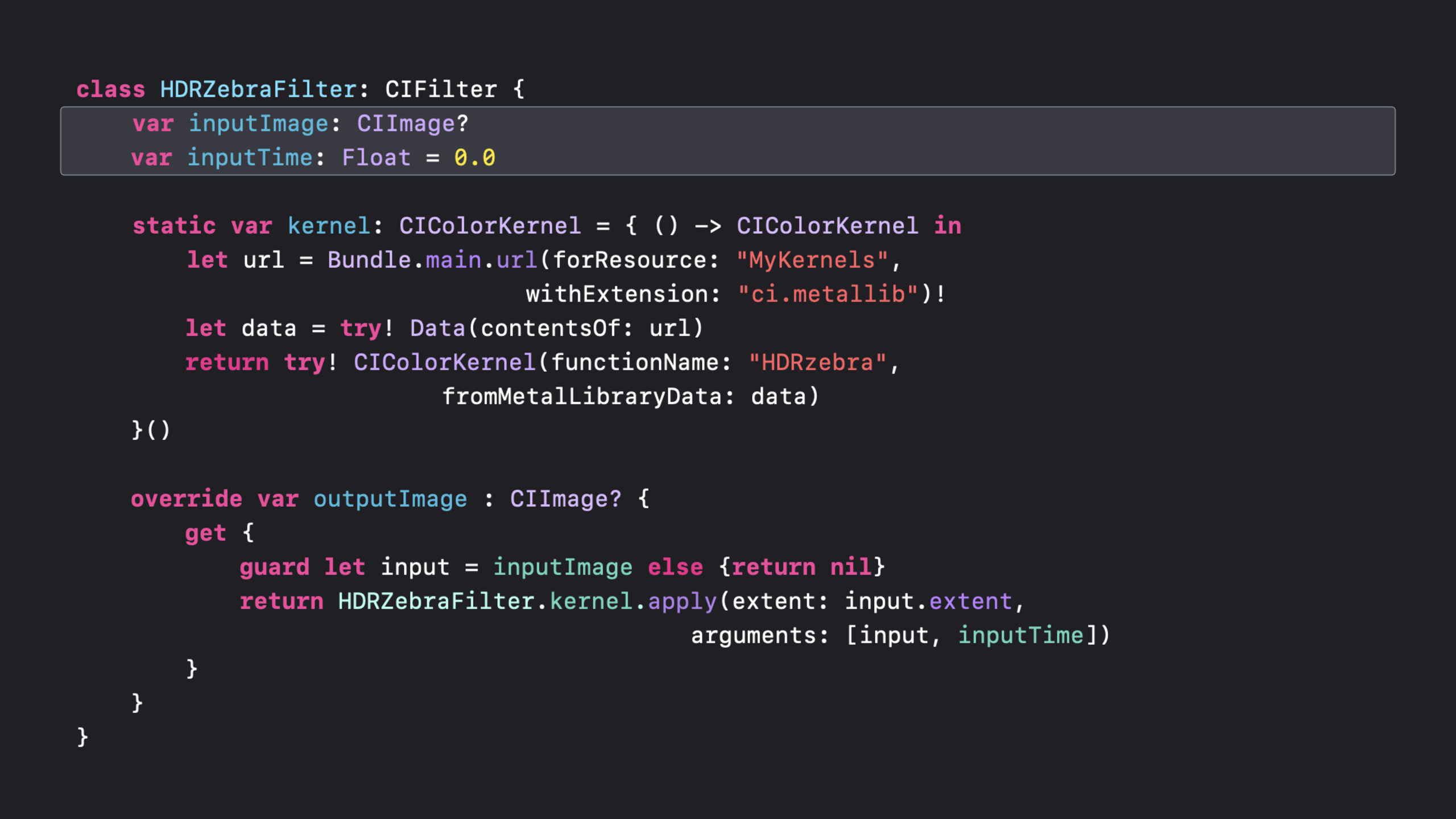
After Metal kernels compile into resources, the Swift side typically wraps them in a CIFilter subclass. The session recommends putting the CIKernel object in a static property so metallib reading and initialization happen only once.
class HDRZebraFilter: CIFilter {
    var inputImage: CIImage?
    var inputTime: Float = 0.0

    static var kernel: CIColorKernel = { () -> CIColorKernel in
        let url = Bundle.main.url(forResource: "MyKernels",
                                  withExtension: "ci.metallib")!
        let data = try! Data(contentsOf: url)
        return try! CIColorKernel(functionName: "HDRzebra",
                                  fromMetalLibraryData: data)
    }()

    override var outputImage: CIImage? {
        get {
            guard let input = inputImage else { return nil }
            return HDRZebraFilter.kernel.apply(extent: input.extent,
                                               arguments: [input, inputTime])
        }
    }
}
Key points:
Bundle.main.url(forResource: "MyKernels", withExtension: "ci.metallib")corresponds to the resource file from the build rules.Data(contentsOf:)reads metallib binary data.CIColorKernel(functionName:fromMetalLibraryData:)retrieves the specified kernel from the Metal library.- The static property loads and initializes only on first use, avoiding per-frame resource reads.
outputImagechecksinputImagefirst, then usesapply(extent:arguments:)to create a newCIImagerecipe.
4. Remember what this path is good for (00:20)
The session’s opening benefits are specific. Metal-based Core Image kernels still use CIKernel automatic tiling and concatenation; compilation moves to app build time, reducing runtime compilation overhead; the Metal version also accesses high-performance capabilities like gather reads, group writes, and half-float math.
Developer experience is more direct too. .ci.metal is written in Xcode with syntax highlighting at input and syntax checking at build. For filters that need constant visual tweaking, earlier error exposure means lower iteration cost.
Core Takeaways
-
What to do: Add an overexposure zebra overlay to HDR video preview. Why it’s worth doing: The session’s
HDRZebrakernel already shows how to detect pixels above SDR white 1 and mark regions with red stripes. How to start: Put the example inMyKernels.ci.metal, then haveHDRZebraFilteracceptinputImageand animation time parameters. -
What to do: Migrate custom filters in a photo editing app to
.ci.metal. Why it’s worth doing: Build time runs Core Image-specific Metal compilation and linking, exposing syntax errors during build. How to start: Add.ci.metaland.ci.airbuild rules to the target, declare filter functions asextern "C", and load withCIColorKernelfrom.ci.metallib. -
What to do: Add real-time speed control to filter preview. Why it’s worth doing: The example’s
inputTimepasses to the kernel as a parameter;apply(extent:arguments:)supports passing the input image and time value together to generate a newCIImage. How to start: KeepinputTimeon theCIFiltersubclass, update it with a slider or playback clock, and pass[input, inputTime]in theargumentsarray. -
What to do: Establish a “build failure stops the line” shader validation flow for video tools. Why it’s worth doing: The session explicitly puts Metal kernel syntax checking at build time—suitable for blocking errors early in CI or local builds. How to start: Name all Core Image Metal sources
.ci.metal, ensure target build rules generate.ci.metallib, and have the app load only build artifacts at launch.
Related Sessions
- Optimize the Core Image pipeline for your video app — Covers
CIContextreuse, Metal command queues, and video filter pipelines—good to read before this session. - Discover Core Image debugging techniques — Supplements Core Image graph generation and interpretation for rendering, color, and performance issues after custom kernel integration.
- Edit and play back HDR video with AVFoundation — Expands HDR video editing and playback, including creating
AVMutableVideoCompositionwith Core Image filters. - Export HDR media in your app with AVFoundation — Continues HDR content export—suitable for extending Core Image filters from preview to output workflow.
- Build GPU binaries with Metal — Deep dive on Metal shader compilation, GPU binaries, binary archives, and dynamic libraries—background for build-time compilation.
Comments
GitHub Issues · utterances