
Highlight
Apple demonstrated Core Data batch insert block variants, batch update/delete, fetch trimming, and ObjectID notifications to reduce memory and time cost for large imports, queries, and responding to persistent store changes.
Core Content
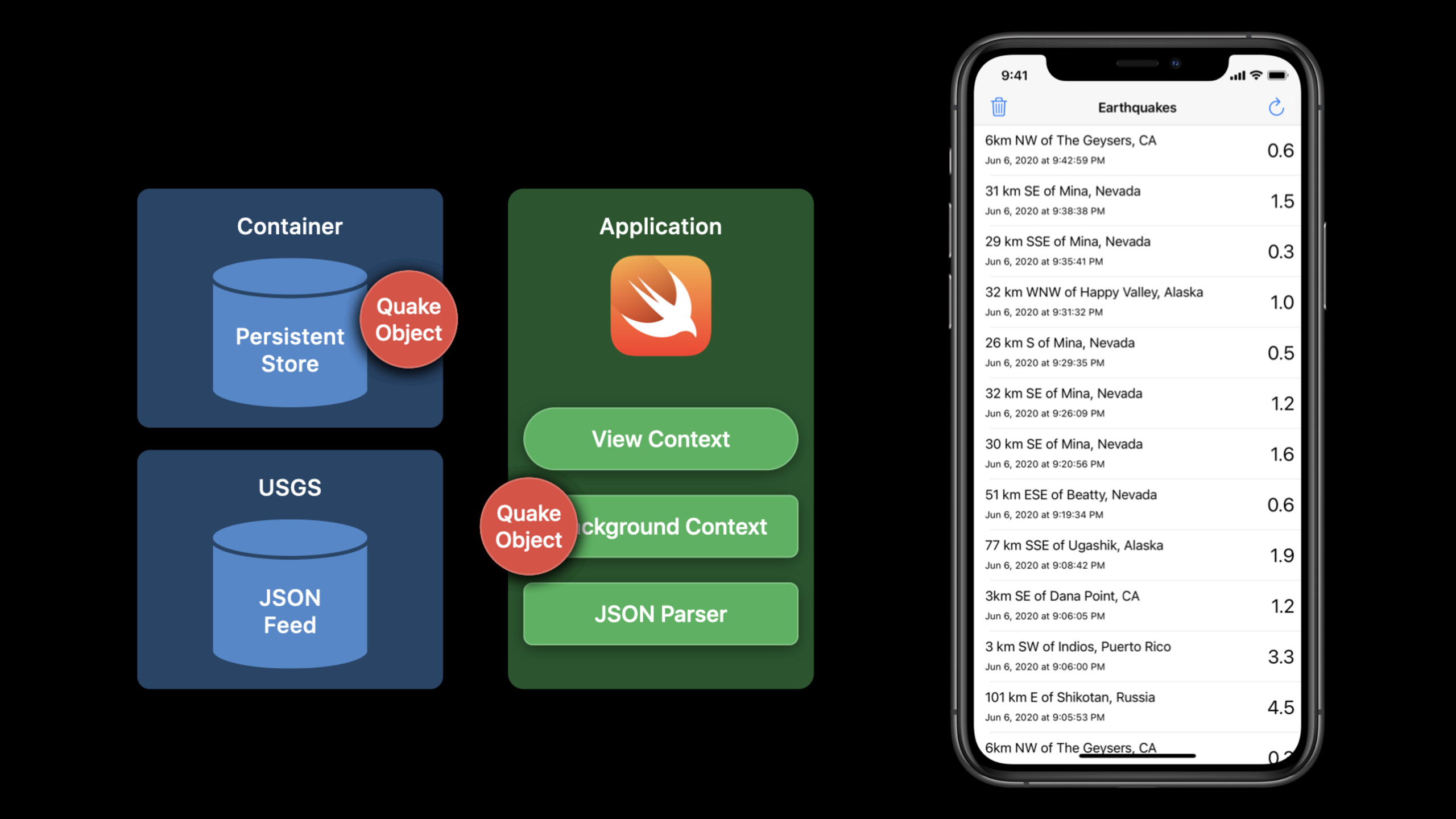
Many Core Data apps share the same opening: the network delivers a large JSON payload, a background context turns it into managed objects, saves to the local store, and the view context merges changes to refresh the UI. The Earthquakes sample works this way, reading USGS feed data. At scale the background context creates or fetches many objects that are discarded soon after save. (00:32)
This session moves that heavy work onto lighter Core Data paths. Batch operations handle insert, update, and delete with less managed object overhead. They do not emit ordinary save notifications or trigger accessors and callbacks, so Apple pairs persistent history: record batch work first, then drive notifications and partial refreshes from history. (01:16)
The second half covers fetch and notifications. When a list shows only a dozen rows, hydrating every object is unnecessary; cross-thread work should not pass managed objects directly. Core Data offers batch size, propertiesToFetch, relationship prefetch, ObjectID results, dictionary results, and count results. When the store grows or another app or share extension modifies it, ObjectID notifications, remote change notifications, and persistent history tell the app what changed and where. (08:25, 13:06)
Detailed Content
Enable persistent history for batch operations (01:43)
Batch operations skip the normal save path, so they produce no save notification; they also never instantiate managed objects, so accessors and callbacks do not run. The session’s remedy is persistent history so batch insert/update/delete are recorded and you can later find changes the current UI cares about.
storeDesc.setOption(true as NSNumber, forKey: NSPersistentHistoryTrackingKey)Key points:
storeDescis a persistent store description.NSPersistentHistoryTrackingKeyrecords batch insert/update/delete in persistent history.- This answers “what happened in the store,” not automatic managed object accessor logic.
- Filter persistent history by ObjectID or time range if the UI only cares about certain objects.
Lower import peaks with NSBatchInsertRequest (02:15)
NSBatchInsertRequest originally accepted an array of dictionaries. iOS 14 adds a handler form where Core Data repeatedly asks your block for the next dictionary or managed object. The transcript says this lowers peak memory during import and reduces object allocation.
//NSBatchInsertRequest.h

@available(iOS 13.0, *)
open class NSBatchInsertRequest : NSPersistentStoreRequest {
    open var resultType: NSBatchInsertRequestResultType

    public convenience init(entityName: String, objects dictionaries: [[String : Any]])
    public convenience init(entity: NSEntityDescription, objects dictionaries: [[String : Any]])

    @available(iOS 14.0, *)
    open var dictionaryHandler: ((inout Dictionary<String, Any>) -> Void)?
    open var managedObjectHandler: ((inout NSManagedObject) -> Void)?

    public convenience init(entity: NSEntityDescription, dictionaryHandler handler: @escaping (inout Dictionary<String, Any>) -> Void)
    public convenience init(entity: NSEntityDescription, managedObjectHandler handler: @escaping (inout NSManagedObject) -> Void)
}
Key points:
- Dictionary array initializers suit input already shaped as
[[String: Any]]. dictionaryHandlerandmanagedObjectHandlerare iOS 14 entry points.- Handlers let Core Data pull the next row on demand instead of building a full array first.
resultTypecontrols the return value; pick it based on post-insert merge needs.
The Earthquakes sample first shows a regular save: create a managed object per quake, fill values, then save().
//Earthquakes Sample - Regular Save

   for quakeData in quakesBatch {
        guard let quake = NSEntityDescription.insertNewObject(forEntityName: "Quake", into: taskContext) as? Quake else { ... }
        do {
            try quake.update(with: quakeData)
        } catch QuakeError.missingData {
            ...
            taskContext.delete(quake)
        }
        ...
    }
    do {
        try taskContext.save()
    } catch { ... }
Key points:
- The loop creates many
Quakemanaged objects. - Each object runs property updates and error handling.
- One final
save()merges a large change set. - Session measurements: this path took over a minute for a large import with ~30 MB idle memory.
The same data using block batch insert:
//Earthquakes Sample - Batch Insert with a block

var batchInsert = NSBatchInsertRequest(entityName: "Quake", dictionaryHandler: {
    (dictionary) in
        if (blockCount == batchSize) {
            return true
        } else {
            dictionary = quakesBatch[blockCount]
            blockCount += 1
        }
    })
    var insertResult : NSBatchInsertResult
    do {
        insertResult = try taskContext.execute(batchInsert) as! NSBatchInsertResult
        ...
    }
Key points:
dictionaryHandlerfills one quake dictionary per call.- Return
truewhen finished so Core Data stops asking for more rows. taskContext.execute(batchInsert)runs the persistent store request directly.- Session measurements: dictionary-array batch insert finished in 13 seconds; block ingestion in 11 seconds.
UPSERT with unique constraints and merge policy (04:33)
The Earthquakes feed returns the last 30 days each time—mostly existing quakes with a few new or updated rows. The sample sets unique constraint on quake code and merge policy on the context executing batch insert; conflicts update the existing row instead of delete-then-insert.
let moc = NSManagedObjectContext(concurrencyType:
                           NSManagedObjectContextConcurrencyType.privateQueueConcurrencyType)

moc.mergePolicy = NSMergeByPropertyObjectTrumpMergePolicy

insertResult = try moc.execute(insertRequest)
Key points:
- Unique constraint lives in the Core Data model; the example uses quake
code. NSMergeByPropertyObjectTrumpMergePolicylets the incoming object’s properties win on conflict.- Merge policy must be set on the context that executes the batch insert request.
- This matches SQL UPSERT: insert on conflict updates specified properties.
Avoid pulling full objects with batch update/delete (06:10)
To mark matching quakes validated, fetching every object, changing properties, and saving pulls many unneeded objects into memory. NSBatchUpdateRequest updates properties for objects matching a predicate directly.
//Earthquakes Sample - Batch Update

let updateRequest = NSBatchUpdateRequest(entityName: "Quake")
updateRequest.propertiesToUpdate = ["validated" : true]
updateRequest.predicate = NSPredicate("%K > 2.5", "magnitude")

var updateResult : NSBatchUpdateResult
do {
    updateResult = try taskContext.execute(updateRequest) as! NSBatchUpdateResult
    ...
}
Key points:
NSBatchUpdateRequest(entityName:)targets the entity.propertiesToUpdatelists fields and values to change.predicatelimits scope; the example updates quakes withmagnitude > 2.5.executereturnsNSBatchUpdateResultwithout instantiating each managed object.
Deletion also fits the batch path. The example deletes quakes older than 30 days and sets fetchLimit on batch delete to avoid holding the store write lock too long.
// Batch Delete without and with a Fetch Limit

   DispatchQueue.global(qos: .background).async {
       moc.performAndWait { () -> Void in
          do {
              let expirationDate = Date.init().addingTimeInterval(-30*24*3600)

              let request = NSFetchRequest<Quake>(entityName: "Quake")
              request.predicate = NSPredicate(format:"creationDate < %@", expirationDate)

              let batchDelete = NSBatchDeleteRequest(fetchRequest: request)
              batchDelete.fetchLimit = 1000
              moc.execute(batchDelete)
           }
       }
   }
Key points:
- Cleanup runs on a background queue; Core Data work still enters
moc.performAndWait. creationDate < expirationDateis the delete condition.NSBatchDeleteRequest(fetchRequest:)reuses the fetch request scope.fetchLimit = 1000bounds each delete batch to reduce long write locks.
Trim fetches to view needs (08:25)
Default fetch results are managed objects—good for full object graphs and fetched results controller updates. When a list shows few rows, set batch size so Core Data hydrates the first batch and loads more on scroll. Session measurements dropped Earthquakes list idle memory from ~17 MB to ~12 MB with the same data.
Another trim is properties and relationships. When the UI needs only some fields, set propertiesToFetch. When a relationship is likely accessed, prefetch its key path to avoid per-relationship faults. For cross-thread handoff, ObjectID results beat managed objects; read-only aggregates suit dictionary results.
//Fetch average magnitude of each place

let magnitudeExp = NSExpression(forKeyPath: "magnitude")
let avgExp = NSExpression(forFunction: "avg:", arguments: [magnitudeExp])

let avgDesc = NSExpressionDescription()
avgDesc.expression = avgExp
avgDesc.name = "average magnitude"
avgDesc.expressionResultType = .floatAttributeType

let fetch = NSFetchRequest<NSFetchRequestResult>(entityName: "Quake")
fetch.propertiesToFetch = [avgDesc, "place"]
fetch.propertiesToGroupBy = ["place"]
fetch.resultType = .dictionaryResultType
Key points:
NSExpression(forKeyPath: "magnitude")selects the property to aggregate.NSExpression(forFunction: "avg:", arguments:)defines the average.NSExpressionDescriptionnames the aggregate and declares result type.propertiesToFetchincludes aggregate and grouping fields.propertiesToGroupBy = ["place"]groups by location.dictionaryResultTypereturns lightweight read-only rows for stats or cross-thread use.
Respond to store changes with ObjectID notifications and remote change (13:16)
iOS 14 adds Swift-friendly notification names on NSManagedObjectContext plus ObjectID variants. ObjectID notifications are the lightweight counterpart to managed object save notifications, backed by persistent history transactions.
//NSManagedObjectContext.h

@available(iOS 14.0, *)
extension NSManagedObjectContext {
    public static let willSaveObjectsNotification: Notification.Name
    public static let didSaveObjectsNotification: Notification.Name
    public static let didChangeObjectsNotification: Notification.Name

    public static let didSaveObjectIDsNotification: Notification.Name
    public static let didMergeChangesObjectIDsNotification: Notification.Name
}
Key points:
willSaveObjectsNotification,didSaveObjectsNotification, anddidChangeObjectsNotificationare modernized Swift names.didSaveObjectIDsNotificationanddidMergeChangesObjectIDsNotificationpass ObjectIDs instead of full managed objects in notifications.- Use these when UI or background work only needs to know which objects changed.
- The session also lists new
NotificationKeyentries for inserted, updated, deleted objects and ObjectID variants.
When a share extension, second app, or Photos extension modifies the same store, apps used to poll persistent history on foreground. Remote change notifications fire when any Core Data client modifies the store.
storeDesc.setOption(true as NSNumber, forKey: NSPersistentStoreRemoteChangeNotificationPostOptionKey)
storeDesc.setOption(true as NSNumber, forKey: NSPersistentHistoryTrackingKey)
Key points:
NSPersistentStoreRemoteChangeNotificationPostOptionKeyenables remote change notifications.NSPersistentHistoryTrackingKeylets notificationuserInfocarry a persistent history token.- Use the token to read persistent history and convert to ObjectID-level changes.
- This covers in-process and external Core Data clients more directly than foreground polling.
Persistent history itself should be trimmed. The session ends with a history request filtered by ObjectID.
let changeDesc = NSPersistentHistoryChange.entityDescription(with: moc)
let request = NSFetchRequest<NSFetchRequestResult>()

//Set fetch request entity and predicate
request.entity = changeDesc
request.predicate =
    NSPredicate(format: "%K = %@",changeDesc?.attributesByName["changedObjectID"], objectID)

//Set up history request with distantPast and set fetch request
let historyReq = NSPersistentHistoryChangeRequest.fetchHistory(after: Date.distantPast)
historyReq.fetchRequest = request

let results = try moc.execute(historyReq)
Key points:
NSPersistentHistoryChange.entityDescription(with:)gets the history change entity description.- The fetch predicate targets
changedObjectID. fetchHistory(after:)sets the history query start.historyReq.fetchRequest = requestapplies ordinary fetch filters to the history request.- Execution returns only changes for the given ObjectID after the chosen time.
Core Takeaways
-
What to do: Switch background import in news, weather, or market apps to batch insert. Why it’s worth it: In the Earthquakes sample regular save of many objects took over a minute; batch insert dropped the same import to seconds. How to start: Shape input as entity property dictionaries; for large sources use
NSBatchInsertRequest(entityName:dictionaryHandler:)and enable persistent history on the store. -
What to do: Design repeating feeds as UPSERT. Why it’s worth it: The 30-day earthquake feed is mostly old data; unique
codeplus merge policy updates existing rows without delete-then-insert. How to start: Set a unique constraint on the business key in the Core Data model andNSMergeByPropertyObjectTrumpMergePolicyon the batch insert context. -
What to do: Add batch delete with fetch limit to periodic cleanup. Why it’s worth it: Expired-object cleanup takes the store write lock; unbounded matches can block users a long time. How to start: Write expiration conditions in
NSFetchRequest, createNSBatchDeleteRequest, setfetchLimitby data volume, and run in batches. -
What to do: Trim fetches for large lists. Why it’s worth it: Batch size cut Earthquakes list idle memory from ~17 MB to ~12 MB in the session. How to start: Confirm first-screen fields, set batch size and
propertiesToFetch; prefetch relationships the cell always touches. -
What to do: Replace foreground polling with remote change notifications. Why it’s worth it: When extensions or another app modify the same store, notifications plus persistent history tokens pinpoint changes. How to start: Enable
NSPersistentStoreRemoteChangeNotificationPostOptionKeyandNSPersistentHistoryTrackingKey, then query history by ObjectID or time range on notification.
Related Sessions
- Sync a Core Data store with the CloudKit public database — Continue with Core Data store sync to the CloudKit public database.
- Data Essentials in SwiftUI — How SwiftUI updates views around a source of truth and data model.
- Advances in diffable data sources — Turn Core Data changes into stable diff updates for collection and table views.
- Advances in UICollectionView — Modern collection view lists, outlines, and cell configuration for fetch results.
- Diagnose performance issues with the Xcode Organizer — Production aggregated metrics for disk writes, scroll hitches, and performance regressions.
Comments
GitHub Issues · utterances