
Highlight
Metal function pointers, introduced in 2020, let GPU code dynamically call different functions at runtime through a function table instead of hard-coding call relationships at compile time.
Core Content
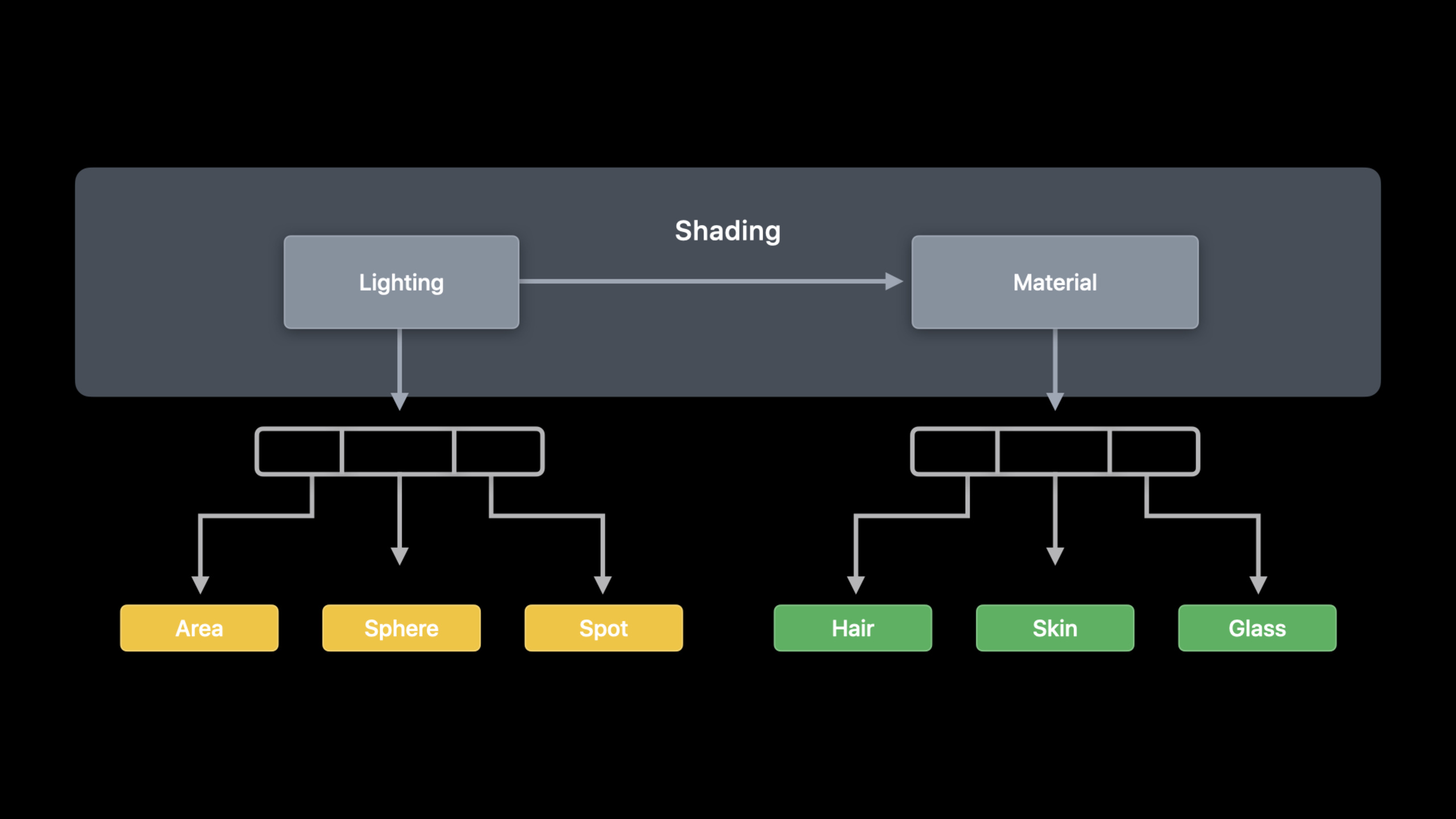
Shading in ray tracing grows quickly. A simple path tracer generates rays, intersects geometry, then computes color from the hit material and lights. Multiple light and material types turn the logic inside shade into a fixed chain of calls—each new material type forces shader and pipeline reorganization.
Metal’s 2020 function pointer API separates that concern. Mark lighting and material functions as visible functions, attach them to the pipeline through Metal API, and the GPU receives a visible function table from which shaders fetch function pointers by index and call them.
This session is not only new shader syntax. It places function pointers in a full engineering flow: which functions compile into one pipeline, which precompile as binary functions, which load incrementally later, how to pass tables to the GPU, and performance limits around recursion and SIMD divergence.
Detailed Content
03:09 Start from fixed shading calls
The session uses a simplified path tracer to show where the problem lives. After intersection the kernel finds a material and calls shade for lighting and material work.
float3 shade(...);

[[kernel]] void rtKernel(...
                         device Material *materials,
                         constant Light &light)
{
    // ...

    device Material &material = materials[intersection.geometry_id];
    float3 result = shade(ray, triangleIntersectionData, material, light);

    // ...
}
Key points:
intersection.geometry_idlocates the hit material.shadeis where lighting and material logic meet.- As light and material types grow, a fixed
shadecall accumulates branches.
Inside shade, lighting and material are separate stages.
float3 shade(...)
{
    Lighting lighting = LightingFromLight(light, triangleIntersectionData);

    return CalculateLightingForMaterial(material, lighting, triangleIntersectionData);
}
Key points:
LightingFromLightcomputes lighting from the light type.CalculateLightingForMaterialapplies lighting according to material type.- Both stages are natural split points for visible functions.
04:59 Expose GPU functions with [[visible]]
Metal Shading Language adds the [[visible]] qualifier. Like vertex, fragment, and kernel, it marks functions the Metal API can reference.
[[visible]]
Lighting Area(Light light, TriangleIntersectionData triangleIntersectionData)
{
    Lighting result;

    // Clever math code ...

    return result;
}
Key points:
[[visible]]makes lighting functions likeAreainto Metal function objects the CPU can reference.- Visible functions can live in another Metal file or library per the transcript.
- Add these function objects when creating the pipeline; the GPU calls them through function pointers.
05:30 Single compilation: copy visible functions into the pipeline
Single compilation puts all possibly called visible functions in MTLLinkedFunctions.functions, then creates compute pipeline state.
// Single compilation configuration
let linkedFunctions = MTLLinkedFunctions()
linkedFunctions.functions = [area, spot, sphere, hair, glass, skin]
computeDescriptor.linkedFunctions = linkedFunctions

// Pipeline creation
let pipeline = try device.makeComputePipelineState(descriptor: computeDescriptor,
                                                   options: [],
                                                   reflection: nil)
Key points:
linkedFunctions.functionslists visible functions the pipeline may call.- The pipeline contains the kernel plus specialized copies of those functions.
- The transcript compares this to link-time optimization: best runtime performance, larger pipeline and slower creation.
07:43 Separate compilation: precompile functions as binary functions
Separate compilation keeps functions as independent GPU binaries shareable across pipelines. Entry point is MTLFunctionDescriptor.
// Create by function descriptor:
let functionDescriptor = MTLFunctionDescriptor()
functionDescriptor.name = "Area"
// More configuration goes here
let areaBinaryFunction = try library.makeFunction(descriptor: functionDescriptor)
Key points:
MTLFunctionDescriptorattaches configuration to function creation.- After setting
name,library.makeFunction(descriptor:)returns the Metal function object. - The descriptor’s value appears in the next step: binary pre-compilation.
// Create and compile by function descriptor:
let functionDescriptor = MTLFunctionDescriptor()
functionDescriptor.name = "Area"
functionDescriptor.options = MTLFunctionOptions.compileToBinary
let areaBinaryFunction = try library.makeFunction(descriptor: functionDescriptor)
Key points:
MTLFunctionOptions.compileToBinaryasks Metal to precompile the function to a binary.- Binary functions can be referenced at pipeline creation, reducing copy-into-pipeline cost.
- The session notes runtime call overhead for this mode.
Precompiled functions attach through linkedFunctions.binaryFunctions.
// Specify binary functions on compute pipeline descriptor
let linkedFunctions = MTLLinkedFunctions()
linkedFunctions.functions = [spot, sphere, hair, glass, skin]
linkedFunctions.binaryFunctions = [areaBinaryFunction]
computeDescriptor.linkedFunctions = linkedFunctions

// Pipeline creation
let pipeline = try device.makeComputePipelineState(descriptor: computeDescriptor,
                                                   options: [],
                                                   reflection: nil)
Key points:
- Functions in
functionsparticipate in specialization. - Functions in
binaryFunctionsuse precompiled binaries. - Mix both to trade pipeline size, creation time, and runtime performance.
11:04 Incremental compilation: add functions to an existing pipeline
Games and dynamic loading often need new materials. The session uses a Wood material to show adding a binary function to an existing pipeline.
// Create initial pipeline with option
computeDescriptor.supportAddingBinaryFunctions = true

// Create and compile by function descriptor
let functionDescriptor = MTLFunctionDescriptor()
functionDescriptor.name = "Wood"
functionDescriptor.options = MTLFunctionOptions.compileToBinary
let wood = try library.makeFunction(descriptor: functionDescriptor)

// Create new pipeline from existing pipeline
let newPipeline =
   try pipeline.makeComputePipelineStateWithAdditionalBinaryFunctions(functions: [wood])
Key points:
- Set
supportAddingBinaryFunctions = truebefore creating the initial pipeline. - New functions still use
MTLFunctionDescriptorandcompileToBinary. - The new pipeline derives from the existing one and only attaches the new binary function.
12:22 Visible function table: pass function pointers to the GPU
The visible function table is how the GPU receives function pointers. Declare pointer types in the shader and pass the table as a kernel parameter or through an argument buffer.
// Helper using declaration in Metal
using LightingFunction = Lighting(Light, TriangleIntersectionData);
using MaterialFunction = float3(Material, Lighting, TriangleIntersectionData);

// Specify tables as kernel parameters
visible_function_table<LightingFunction> lightingFunctions [[buffer(1)]],
visible_function_table<MaterialFunction> materialFunctions [[buffer(2)]],

// Access via index
LightingFunction *lightingFunction = lightingFunctions[light.index];
Lighting lighting = lightingFunction(light, triangleIntersection);
return materialFunctions[material.index](material, lighting, triangleIntersection);
Key points:
visible_function_table<LightingFunction>andvisible_function_table<MaterialFunction>hold lighting and material functions.- The shader picks functions with
light.indexandmaterial.index. - Store the pointer in a variable or call directly from the table.
On the CPU, allocate a table from pipeline state and insert function handles at indices.
// Initialize descriptor
let vftDescriptor = MTLVisibleFunctionTableDescriptor()
vftDescriptor.functionCount = 3
let lightingFunctionTable = pipeline.makeVisibleFunctionTable(descriptor: vftDescriptor)!

// Find and set functions by handle
let functionHandle = pipeline.functionHandle(function: spot)!
lightingFunctionTable.setFunction(functionHandle, index:0)

// Find and set functions by handle
computeCommandEncoder.setVisibleFunctionTable(lightingFunctionTable, bufferIndex:1)
argumentEncoder.setVisibleFunctionTable(lightingFunctionTable, index:1)
Key points:
MTLVisibleFunctionTableDescriptor.functionCountsets table capacity.pipeline.functionHandle(function:)yields handles for the table.- Bind to
computeCommandEncoderor an argument buffer; with argument encoders calluseResourceper the transcript.
14:23 Function groups: tell the compiler who each call site may call
Function groups give the compiler more information. Mark call sites with a group in the shader; declare each group’s candidates in MTLLinkedFunctions.groups on the CPU.
// Add function groups to our shading function
float3 shade(...)
{
    LightingFunction *lightingFunction = lightingFunctions[light.index];
    [[function_groups("lighting")]] Lighting lighting = lightingFunction(light,
triangleIntersection);

    MaterialFunction *materialFunction = materialFunctions[material.index];
    [[function_groups("material")]] float3 result = materialFunction(material, lighting, triangleIntersection);
    return result;
}
Key points:
[[function_groups("lighting")]]marks the lighting call site.[[function_groups("material")]]marks the material call site.- With that information the compiler can optimize pipeline generation per call site.
// Function Group configuration
let linkedFunctions = MTLLinkedFunctions()
linkedFunctions.functions = [area, spot, sphere, hair, glass, skin]
linkedFunctions.groups = ["lighting" : [area, spot, sphere ],
                          "material" : [hair, glass, skin ] ]
computeDescriptor.linkedFunctions = linkedFunctions
Key points:
groupsmaps group names to functions that call site may invoke.- The lighting group contains only
area,spot, andsphere. - The material group contains only
hair,glass, andskin.
15:25 Recursion and SIMD divergence limits
Function pointers also enable recursion. The session’s recursive path tracer example has material functions emit new rays, intersect, shade, and recurse. maxCallStackDepth on the compute pipeline descriptor expresses call depth; default is 1 for typical visible and intersection functions—set it explicitly if the chain goes deeper.
The final limit is divergence. SIMD groups work best when all threads run the same instruction. With function pointers, threads in one SIMD group may point at different functions and the hardware may execute them serially. The session’s mitigation: write parameters, thread index, and function index to threadgroup memory, sort by function index, invoke in sorted order, write results back, and let each thread read its own result—reducing divergence cost for complex functions.
Core Takeaways
1. Hot-swappable material function library
What to do: Split material BRDFs into visible functions and select by material index at runtime through a function table.
Why it’s worth it: The session shows separable lighting and material stages; growing material types need not inflate one shade.
How to start: Mark one material function [[visible]], attach with MTLLinkedFunctions.functions, call from visible_function_table<MaterialFunction> using material.index.
2. Shader incremental loading for streaming assets
What to do: When new game assets load, compile new material functions as binary functions and derive a new pipeline from the existing one.
Why it’s worth it: Dynamic environments—especially games streaming assets and shaders—often gain new functions at runtime.
How to start: Set computeDescriptor.supportAddingBinaryFunctions = true before the initial pipeline; when a new material appears use MTLFunctionDescriptor, compileToBinary, and makeComputePipelineStateWithAdditionalBinaryFunctions(functions:).
3. Configurable lighting/material previewer
What to do: Build a dev tool where artists or graphics engineers switch light and material combinations and see the same scene update live.
Why it’s worth it: Separate visible function tables for lighting and materials let the shader combine calls by index.
How to start: Create lightingFunctions and materialFunctions tables; CPU uses setFunction(_:index:); UI changes update indices or table entries only.
4. Recursive path tracer call stack experiment
What to do: In a small path tracer compare iterative versus recursive bounce costs.
Why it’s worth it: Visible function call chains may need deeper stacks; ray tracing can be rewritten iteratively to reduce stack usage.
How to start: Run single-layer visible calls with default maxCallStackDepth, then increase recursion depth and log pipeline config and frame time.
5. Function pointer divergence diagnostic view
What to do: Record function index distribution per threadgroup to spot material or light combinations that scatter calls within a SIMD group.
Why it’s worth it: Function pointers can cause thread-level divergence; sorting can improve coherence for complex functions.
How to start: In an experimental kernel write parameters, thread index, and function index to threadgroup memory, sort by function index before calling, compare timings with and without sorting.
Related Sessions
- Discover ray tracing with Metal — This session explains function pointers through ray tracing shading; start there for acceleration structures, intersection, and compute kernels.
- Build GPU binaries with Metal — Shader compilation, GPU binaries, binary archives, and dynamic libraries adjacent to binary function tradeoffs here.
- Debug GPU-side errors in Metal — Xcode 12 GPU-side error reporting when function tables, argument buffers, or GPU bindings fail.
- Optimize Metal apps and games with GPU counters — GPU counters for runtime overhead and divergence bottlenecks discussed at the end of this session.
- Harness Apple GPUs with Metal — Apple GPU and Metal workload background to judge function pointer cost boundaries.
Comments
GitHub Issues · utterances