
Highlight
At WWDC20, AVAssetWriter gained the ability to output HLS fragmented MPEG-4 data directly. Apps receive initialization segments and separable media segments through a delegate, then write segment files and playlists themselves.
Core Content
In an HLS production pipeline, encoding is only the first step. Video samples may come from on-demand files or a live camera; after encoding to HEVC, AAC, and similar formats, they must be cut into media segments clients can request incrementally, with playlists to match.
Historically a separate segmenter handled this. AVAssetWriter excelled at writing media samples into a chosen container; this WWDC20 session pushes it into the HLS segmenter role: the writer is no longer bound to one output URL but returns fragmented MPEG-4 data during writing.
The boundary is clear. AVAssetWriter outputs fragmented MP4 data that meets HLS or CMAF constraints; the app organizes received data into initialization segments, media segments, single- or multi-file layouts, and uses AVAssetSegmentReport to create media playlists and I-frame playlists.
The final focus is segmentation quality. Passthrough, encode mode, custom segmentation, audio sample dependencies, and AAC priming all affect segment boundaries and timestamps. Writing files is only the start—you still validate segment files and playlists against HLS requirements.
Detailed Content
1. Create AVAssetWriter without a bound output URL
(05:36) The first change in this session is initializing AVAssetWriter with a content type. The speaker explicitly says there is no output URL because the writer does not write one file—it outputs data.
// Instantiate asset writer
let assetWriter = AVAssetWriter(contentType: UTType(AVFileType.mp4.rawValue)!)

// Add inputs
let videoInput = AVAssetWriterInput(mediaType: .video, outputSettings: compressionSettings)

assetWriter.add(videoInput)
Key points:
contentTypeuses an MP4 family type because fragmented MP4 still belongs to the MP4 family.AVAssetWriterInputreceives media samples;compressionSettingsmeans the writer encodes samples while writing.- If
outputSettingsisnil, the writer enters passthrough mode and writes received samples as-is. - After
assetWriter.add(videoInput), you still follow the usual start writing and append sample flow.
2. Enable fMP4 output with HLS profile and segment interval
(06:28) Configuration must set output file type profile, target segment interval, initial segment start time, and delegate. The speaker adds that HLS target segment duration must be whole seconds, so the example uses 6 seconds.
assetWriter.outputFileTypeProfile = .mpeg4AppleHLS

assetWriter.preferredOutputSegmentInterval = CMTime(seconds: 6.0, preferredTimescale: 1)

assetWriter.initialSegmentStartTime = myInitialSegmentStartTime

assetWriter.delegate = myDelegateObject
Key points:
.mpeg4AppleHLSmakes the writer output fragmented MP4 for the Apple HLS profile.preferredOutputSegmentIntervalis the target interval; actual boundaries are also constrained by sync samples.initialSegmentStartTimeis the interval origin; later audio priming handling requires it to move with the time offset.delegateis how the app receives segment data; writing files and playlists depends on it.
3. Delegate callbacks distinguish initialization and media segments
(08:00, 08:37) AVAssetWriter returns Data through the delegate and tags it with AVAssetSegmentType. The second delegate method also returns AVAssetSegmentReport for playlist and I-frame playlist generation.
optional func assetWriter(_ writer: AVAssetWriter, didOutputSegmentData segmentData: Data, segmentType: AVAssetSegmentType)


optional func assetWriter(_ writer: AVAssetWriter, didOutputSegmentData segmentData: Data, segmentType: AVAssetSegmentType, segmentReport: AVAssetSegmentReport?)
public enum AVAssetSegmentType : Int {
case initialization = 1
case separable = 2
}Key points:
segmentDatais fragmented media data from the writer.initializationcontains the file type box and movie box and can serve as an HLS initialization segment.separablecontains movie fragment boxes and media data boxes and can be written as a media segment.- AVAssetWriter does not write playlists; the app creates them from received segments and
AVAssetSegmentReport.
4. Passthrough and encode modes have different boundaries
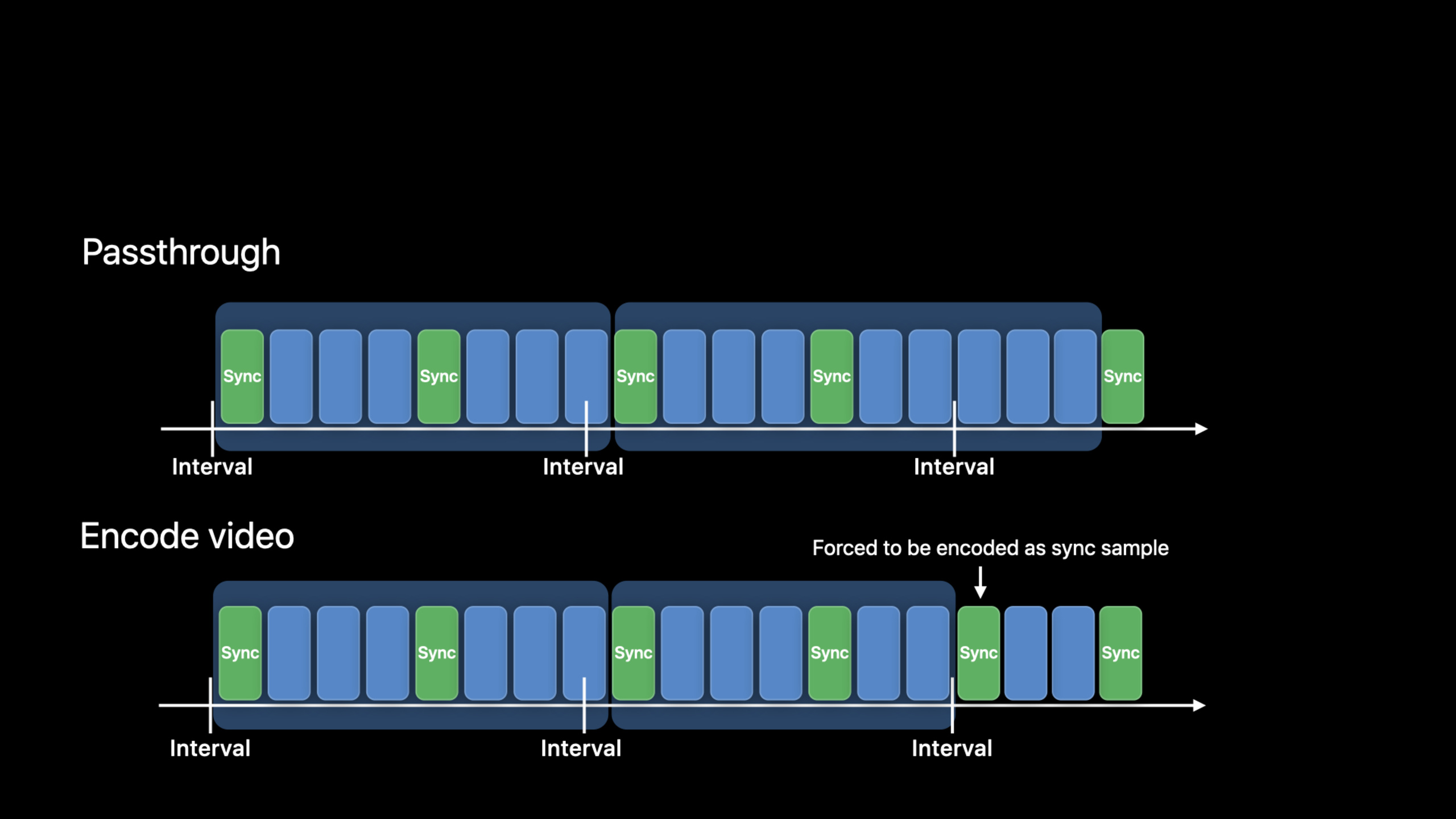
(10:53) Passthrough mode does not encode samples. The speaker says the writer outputs media data after reaching or exceeding the target interval, waiting until before the next sync sample, because CMAF requires each segment to start on a sync sample and Apple HLS prefers that structure.
let videoInput = AVAssetWriterInput(mediaType: .video, outputSettings: nil)Key points:
outputSettings: nilmeans passthrough; the writer writes samples as received.- Passthrough mode allows only one
AVAssetWriterInput. - If the sync sample is far past the target interval, actual segment duration can be much longer than configured—possibly unsuitable for HLS.
- Encode mode can force a sync sample when video samples reach the target interval so output stays closer to the configured interval.
- For multiple bitrates, languages, or separate audio/video, use multiple AVAssetWriter instances organized with a master playlist.
5. Custom segmentation applies only to passthrough
(13:45) To cut a segment before the target interval, set preferredOutputSegmentInterval to .indefinite and call flushSegment yourself. The speaker stresses this works only in passthrough, not with encode mode.
// Set properties
assetWriter.outputFileTypeProfile = .mpeg4AppleHLS

assetWriter.preferredOutputSegmentInterval = .indefinite

assetWriter.delegate = myDelegateObject

// Passthrough
let videoInput = AVAssetWriterInput(mediaType: .video, outputSettings: nil)
Key points:
.indefinitemeans the writer does not auto-segment on a fixed interval.- Custom segmentation does not need
initialSegmentStartTimebecause there is no fixed interval. flushSegmentoutputs all samples appended since the last call.flushSegmentmust be called before a sync sample so the next fragmented media data starts on a sync sample.- If audio and video both have sample dependencies, even alignment is harder; consider separate streams.
6. Check audio dependencies before handling priming offset
(15:17) AVAssetTrack gained a property to check whether an audio track has sample dependencies, such as USAC audio. This affects passthrough, custom segmentation, and whether audio and video belong in one muxed stream.
extension AVAssetTrack {
       /* indicates whether this audio track has dependencies (e.g. kAudioFormatMPEGD_USAC) */
    open var hasAudioSampleDependencies: Bool { get }
}
Key points:
hasAudioSampleDependenciestells the app before packaging whether audio samples depend on neighbors.- Dependent audio must also obey the rule that segments start on sync samples.
- When both audio and video have dependencies, cut points in a single muxed stream are harder to stabilize; separate streams are easier to control.
(16:16) AAC encoding adds priming before the first real audio sample. Common AAC priming is 2,112 audio samples—about 48 ms at 44,100 Hz. CMAF compensates with an edit list box; the Apple HLS profile avoids edit lists for old player compatibility and instead moves the audio media baseMediaDecodeTime backward by the priming length.
There is a limit: baseMediaDecodeTime is unsigned and cannot be before 0. The session’s approach shifts audio and video samples backward by the same offset, then compensates audio decode time forward for priming. initialSegmentStartTime must use the same offset. A few seconds is usually enough; Apple’s Media File Segmenter uses a 10-second offset.
Core Takeaways
1. VOD to fMP4 HLS transcoder
What to do: Transcode local movie files into fMP4 segment files and HLS playlists.
Why it’s worth it: The on-demand flow in the session reads samples from a source movie with AVAssetReader and feeds AVAssetWriter to output fragmented MP4 segment data.
How to start: Create the writer with AVAssetWriter(contentType:), set .mpeg4AppleHLS and a 6-second preferredOutputSegmentInterval, write initialization and separable data to files in the delegate, then build playlists from AVAssetSegmentReport.
2. Live capture to HLS distribution
What to do: Package camera and microphone samples into HLS segments in real time.
Why it’s worth it: The transcript lists AVCaptureVideoDataOutput and AVCaptureAudioDataOutput as live inputs; AVAssetWriter can consume that sample data.
How to start: Append samples from capture outputs to writer inputs; use encode mode for video so the writer generates sync samples near the target interval; write or upload segments as the delegate receives them.
3. Custom slices at business markers
What to do: Cut segments before lesson chapters, game rounds, or ad breaks.
Why it’s worth it: The session provides .indefinite plus flushSegment for cases where fixed intervals are inaccurate.
How to start: Use this path only in passthrough; set preferredOutputSegmentInterval to .indefinite; call flushSegment before the target sync sample; use separate streams if audio and video dependencies are complex.
4. Multi-bitrate and multi-language HLS outputter
What to do: Generate HLS variants with different bitrates, languages, or separate audio/video for the same content.
Why it’s worth it: The session explains delivering multiple video/audio streams through a master playlist with multiple AVAssetWriter instances.
How to start: Create one writer per variant with HLS profile, segment interval, and delegate; combine variant streams and audio renditions in playlists; apply the same priming offset to samples and initialSegmentStartTime when using the Apple HLS profile.
5. HLS packaging quality checker
What to do: Automatically validate generated segment files and playlists.
Why it’s worth it: The session closes by stressing HLS requirements and recommendations; Apple suggests validating segment files and playlists written with AVAssetWriter.
How to start: After the delegate writes a batch of segments, keep the output directory and run HLS validation tools on playlists, duration, segment boundaries, and compatibility; feed failures back into packaging configuration.
Related Sessions
- Improve stream authoring with HLS Tools — HLS authoring tools, low-latency test streams, audio codecs, and master playlist workflow.
- What’s new in Low-Latency HLS — Low-Latency HLS protocol extensions to push HLS delay under two seconds.
- Deliver a better HLS audio experience — HLS audio codecs, bandwidth-limited networks, and authoring specification context.
- Export HDR media in your app with AVFoundation — Compare AVAssetExportSession and AVAssetWriter media export paths in AVFoundation.
- Discover how to download and play HLS offline — Playback-side AVFoundation APIs for downloading, persisting, and playing HLS offline.
Comments
GitHub Issues · utterances