
Highlight
Apple brought Automatic Assessment Configuration to the Mac and unified iPhone, iPad, Mac, and Catalyst controlled exam mode with the same AEAssessmentSession API.
Core Content
Digital exam apps fear two things most. First, after an exam starts students can switch to other apps, open a dictionary, use predictive text, or see notifications. Second, school devices are not always fully MDM-managed, making it hard for developers to maintain reliable flows for personal and school devices. Early iPad autonomous single app mode depended on MDM; later Apple lowered the deployment bar with entitlement-driven Automatic Assessment Configuration (AAC). (00:28)
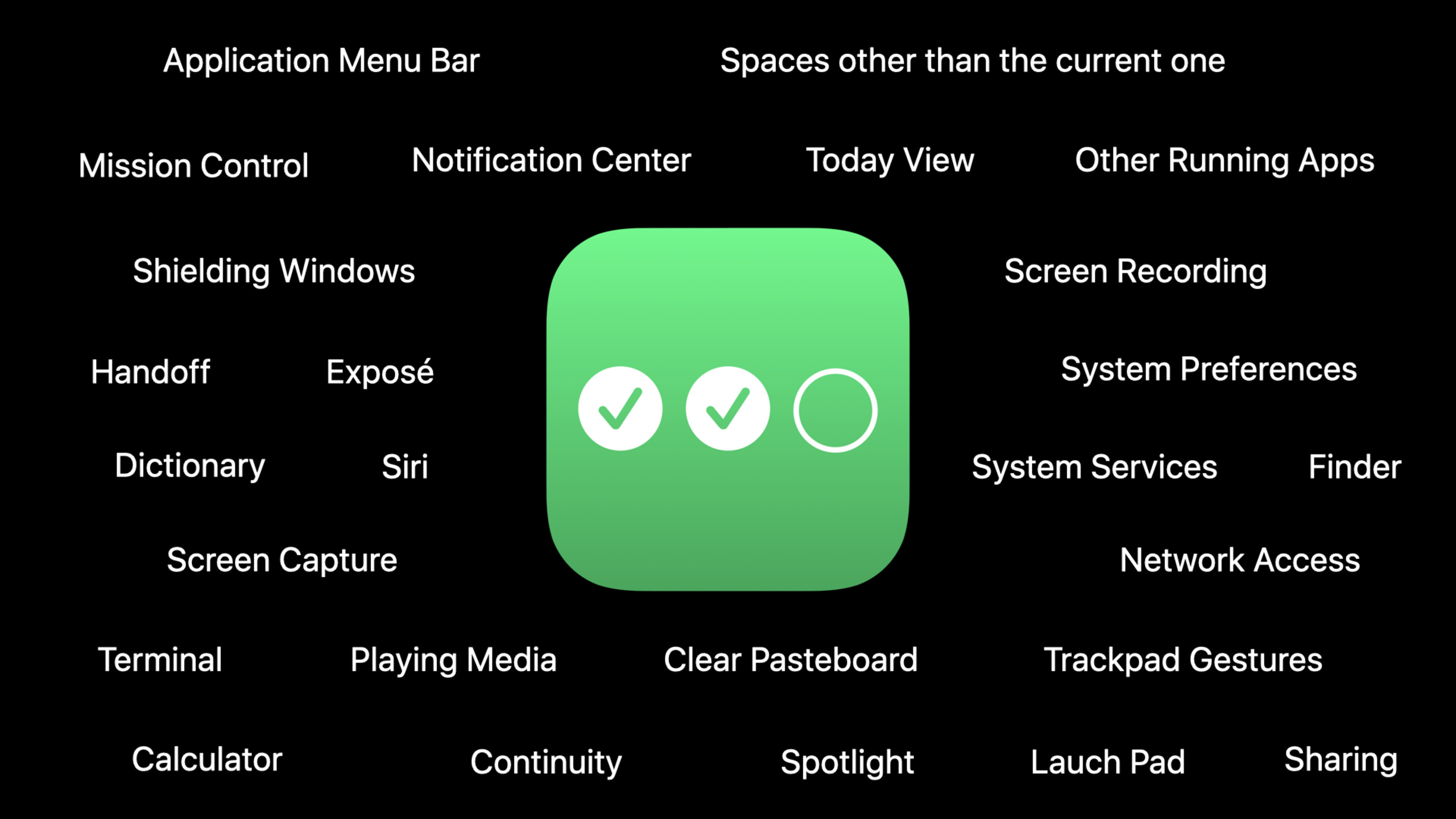
The 2020 change brings Mac into the same model. In assessment mode on Mac, only the exam app is shown; Dock, Mission Control, and Notification Center are unavailable; screen recording and screenshots are blocked; other app windows are hidden and other processes lose network access; media playback pauses and the clipboard is cleared at session start and end. Developers do not wrap these system restrictions themselves—they request assessment mode at the right time. (01:14)
The AAC lifecycle is clear: the app decides when to restrict the device, creates configuration and session, calls begin(), and shows exam content after the system finishes restricting. At exam end it calls end() and shows results or confirmation after the system restores. Entering and exiting can take time, so the talk repeatedly stresses transition UI during both phases so students do not think the app is frozen. (02:14)
iOS and iPadOS also move to the new AAC framework. AEAssessmentConfiguration defaults to the strictest settings, but from iOS 14 you can enable dictation, predictive keyboard, spell check, and other system services as the exam requires. A math exam might allow spell check; a language exam might allow continuous path keyboard based on input needs. This configuration object grows with system capabilities so developers can balance exam fairness and student accessibility in one session model. (10:12)
Detailed Content
Starting and ending AEAssessmentSession
(03:52) The core AAC objects are AEAssessmentConfiguration and AEAssessmentSession. Configuration defines the exam experience; the session handles enter, exit, and delegate lifecycle events.
import AutomaticAssessmentConfiguration

class AssessmentManager: NSObject {
    private var assessmentSession: AEAssessmentSession?

    func beginAssessmentMode() {
        let config = AEAssessmentConfiguration() // Configure AAC behavior

        let session = AEAssessmentSession(configuration: config) // Construct your session

        session.delegate = self // Receive lifecycle events via delegation

        assessmentSession = session // Retain the session

        // Present assessment mode bringup transition UI
        // ...

        session.begin()
    }

    func endAssessmentMode() {
        guard let session = assessmentSession else {
            return
        }

        // Present assessment mode teardown transition UI
        // ...

        session.end()
    }
}

extension AssessmentManager: AEAssessmentSessionDelegate {

    func assessmentSessionDidBegin(_ session: AEAssessmentSession) {
        // Stop showing assessment mode bringup transition UI
        // ...

        // Present sensitive testing content
        // ...
    }

    func assessmentSession(_ session: AEAssessmentSession, failedToBeginWithError error: Error) {
        // Stop showing assessment mode bringup transition UI
        // ...

        // Present some kind of error UI
        // ...

        // Release your reference to the AEAssessmentSession
        assessmentSession = nil
    }

    func assessmentSessionDidEnd(_ session: AEAssessmentSession) {
        //  Stop showing assessment mode teardown transition UI
        // ...

        // Present your post-test UI
        // (maybe a result, a confirmation, or just the initial view)
        // ...

        // Release your reference to the AEAssessmentSession
        assessmentSession = nil
    }

    func assessmentSession(_ session: AEAssessmentSession, wasInterruptedWithError error: Error) {
        // Hide all sensitive UI
        // ...

        // Present some kind of error UI
        // ...

        session.end()
    }
}
Key points:
import AutomaticAssessmentConfigurationbrings in the new AAC framework.AEAssessmentConfiguration()creates exam configuration; the transcript says the default is strictest.AEAssessmentSession(configuration:)creates a session from configuration.session.delegate = selflets the manager receive begin, failure, end, and interrupt callbacks.assessmentSession = sessionmust retain the session; releasing too early ends assessment mode.session.begin()only requests entering assessment mode; show exam content afterassessmentSessionDidBegin(_:).session.end()requests exiting assessment mode; show results or the initial screen afterassessmentSessionDidEnd(_:).
Handling begin failure and runtime interruption
(03:03) AAC has two critical failure points. When entering mode, system services may fail to be restricted, or the app may lack the entitlement. During the exam a service may stop honoring assessment mode. The system does not tear down assessment mode on runtime interrupt—it notifies the app to stop the exam.
func assessmentSession(_ session: AEAssessmentSession, failedToBeginWithError error: Error)

func assessmentSession(_ session: AEAssessmentSession, wasInterruptedWithError error: Error)
Key points:
failedToBeginWithErrormeans assessment mode did not start; the session is invalid and references should be cleared.wasInterruptedWithErrormeans the exam was running but security guarantees were broken.- After interruption, hide sensitive exam content first, then save progress or clean up state.
- After cleanup, call
session.end()to release remaining system services.
Isolating AAC as a swappable dependency
(07:02) The talk recommends separating business logic that decides to enter assessment mode from the system side effects of calling AAC. The reason is direct: AAC limits which Mac apps can receive input. If you hit a breakpoint in Xcode during debugging, the exam app waits at the breakpoint and Xcode cannot receive input, freezing the development machine.
protocol AssessmentManaging {
    func beginAssessmentMode()
    func endAssessmentMode()
}
Key points:
- The transcript explicitly recommends protocol-oriented programming to bound assessment mode.
- Production implementation can wrap a real
AEAssessmentSession. - Test implementation can only record calls or load test expectations.
- With business logic depending on
AssessmentManaging, unit tests do not actually lock the development machine. - If debugging freezes Xcode and the exam app, restarting the Mac stops assessment mode and system services restore after reboot.
Reusing the same model on iOS, iPadOS, and Catalyst
(10:12) The new AAC framework also covers iOS and iPadOS and replaces the previous UIKit assessment mode API. Configuration can enable dictation, predictive keyboard, spell check, and other system services for different exam types and student needs. Catalyst apps gain full assessment mode support from iOS 14 and macOS Big Sur.
let config = AEAssessmentConfiguration()
let session = AEAssessmentSession(configuration: config)
Key points:
AEAssessmentConfigurationis an extensible configuration value describing which system capabilities the exam allows.- The same
AEAssessmentSessionAPI is exposed on iOS, iPadOS, and macOS. - Catalyst apps trigger the correct assessment mode for their platform.
- The transcript does not give specific property names for dictation, predictive keyboard, or spell check; consult Automatic Assessment Configuration documentation when integrating.
Core Takeaways
1. Cross-platform exam session manager
What to do: Consolidate exam start, end, failure, and interrupt handling for iPhone, iPad, Mac, and Catalyst into one AssessmentManager.
Why it’s worth it: This session’s focus is one AEAssessmentSession API across platforms so exam apps do not maintain a separate lock flow for Mac.
How to start: Create a default strict configuration with AEAssessmentConfiguration, then wire begin(), end(), and the four delegate callbacks into your existing exam state machine.
2. Transition UI before the exam starts
What to do: After the student taps start, show an “entering assessment mode” transition screen and load questions only after assessmentSessionDidBegin(_:).
Why it’s worth it: AAC adjusts system services and entry can take time; showing questions early exposes sensitive content before full restriction.
How to start: Hang the question view after the DidBegin callback and failure UI after failedToBeginWithError.
3. Safe cleanup after interruption
What to do: Build a dedicated interrupt path: hide questions, save progress, notify the user, call end() to exit assessment mode.
Why it’s worth it: On runtime interrupt the system only notifies the app; it does not tear down assessment mode—the app must stop the exam and release system services.
How to start: In wasInterruptedWithError, switch to a non-sensitive screen first, then run local save and exit.
4. Testable AAC adapter layer
What to do: Define an AssessmentManaging protocol, use a real AAC implementation in production and a test implementation for unit tests and local debugging.
Why it’s worth it: Mac assessment mode limits input; breakpoint debugging can leave Xcode unable to continue; a protocol boundary keeps business logic off direct system lock side effects.
How to start: Change existing exam flow dependencies to the protocol type and inject a fake manager that only records begin/end in the test target.
Related Sessions
- What’s new in education — Explains how assessment, ClassKit, and classroom tools fit in the education platform.
- What’s new in ClassKit — For exam and homework apps continuing with learning activities, metadata, and progress reporting.
- Discover AppleSeed for IT and Managed Software Updates — Schools and enterprises testing system versions and managing software update cadence before deploying exam devices.
- Leverage enterprise identity and authentication — Organizational identity, Apple School Manager, and single sign-on affect how students sign into exam apps.
Comments
GitHub Issues · utterances