
Highlight
Apple 在 iOS 27 中为蓝牙配件带来了**信道测距(Channel Sounding)**能力,通过 Nearby Interaction 和 Core Bluetooth API 让配件能精确报告距离和方向。
核心内容
以前找配件这件事很尴尬。
蓝牙配件连接后,你知道它在附近,但不知道具体在哪里。是沙发缝里?还是隔壁房间?用户只能靠”咦,怎么连不上”来猜测配件位置。
方案一直有:用信号强度(RSSI)估算距离。但 RSSI 受环境干扰太大——隔堵墙、换个角度、旁边有微波炉,读数都会跳。而且 RSSI 完全给不出方向。
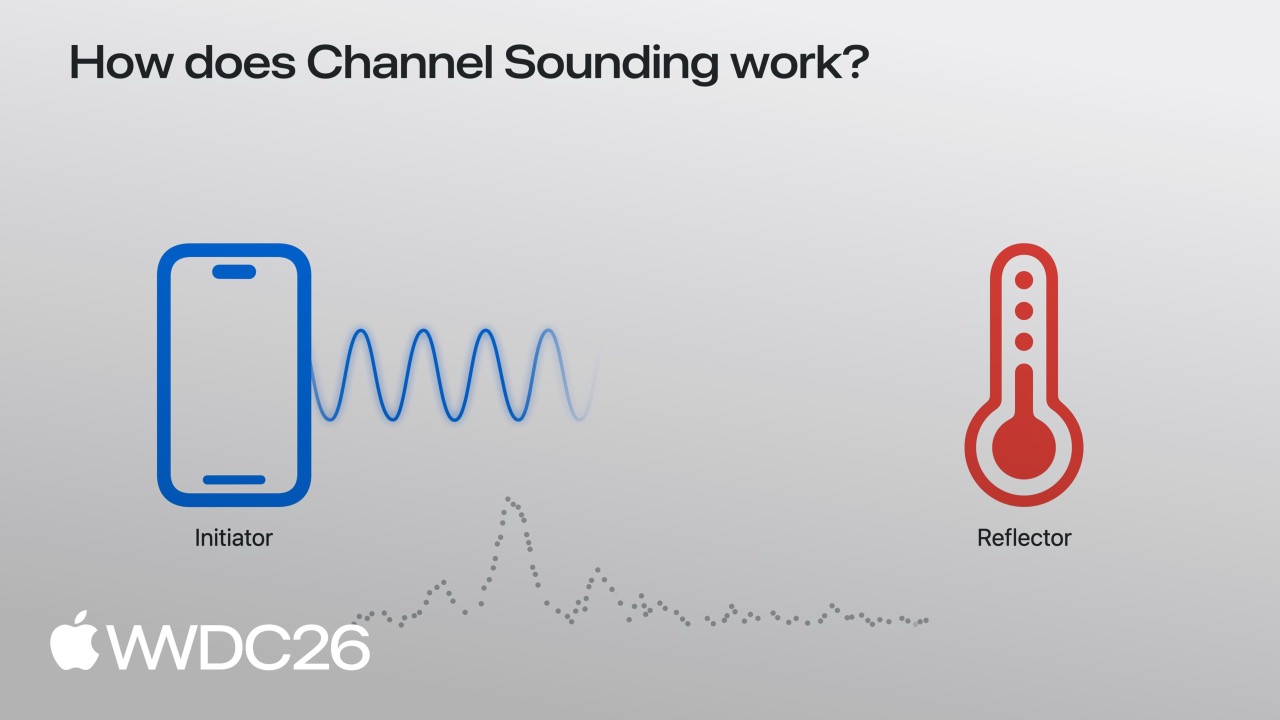
Apple 的解决方案是 Bluetooth Channel Sounding。这是蓝牙 5.1 标准引入的技术,让两个设备通过双向测距算出精确距离,精度可达厘米级。
iOS 27 把这个能力开放给开发者:
- Core Bluetooth 新增 API,能直接和配件进行信道测距,获取距离数据
- Nearby Interaction 现支持蓝牙信道测距,能同时获取距离和方向
- 配件需要固件更新支持,Apple 提供了完整的配件端实现指南
有了这些,用户的配件找起来就简单多了:打开 App,地图上精确显示配件在哪,离你多远,朝哪个方向走。
详细内容
Core Bluetooth 信道测距
([03:43](https://developer.apple.com/videos/play/wwdc2026/369/?time=223))
Core Bluetooth 在 iOS 27 中新增了信道测距支持。使用前先检查设备是否支持:
import CoreBluetooth

func isChannelSoundingSupported() -> Bool {
    guard centralManager.state == .poweredOn else { return false }
    if #available(iOS 27.0, *) {
        // 检查当前设备是否支持蓝牙信道测距
        return CBCentralManager.supportsFeatures(.channelSounding)
    }
    return false
}关键点:
- 需要设备处于
.poweredOn状态 supportsFeatures(.channelSounding)返回true才支持
启动测距会话:
func startChannelSounding(_ peripheral: CBPeripheral) {
    guard peripheral.isConnected else { return }
    if #available(iOS 27.0, *) {
        // 第一步:创建会话配置,指定本机为发起方
        let config = CBChannelSoundingSessionConfiguration(role: .initiator)

        // 第二步:启动信道测距会话
        peripheral.startChannelSoundingSession(config)
    }
}关键点:
role: .initiator表示手机是测距发起方,配件是响应方- 只有已连接的 peripheral 才能启动测距
- 配件必须支持信道测距功能
接收测距结果:
([04:09](https://developer.apple.com/videos/play/wwdc2026/369/?time=249))
func peripheral(_ peripheral: CBPeripheral,
                didReceive results: CBChannelSoundingProcedureResults?,
                error: Error?) {
    guard let results = results else { return }

    let distance = results.distance
    // 使用距离数据
}关键点:
distance返回精确距离值,单位通常是厘米- 结果通过
CBPeripheralDelegate回调 - 需处理
error情况
取消会话:
func cancelChannelSounding(_ peripheral: CBPeripheral) {
    guard peripheral.isConnected else { return }
    if #available(iOS 27.0, *) {
        peripheral.cancelChannelSoundingSession(config)
    }
}

func peripheral(_ peripheral: CBPeripheral,
                didCompleteChannelSoundingSession error: Error?) {
    // 会话结束
}关键点:
- 主动取消或配件断开都会触发完成回调
- 节省电量,用完即停
Nearby Interaction 集成
([04:41](https://developer.apple.com/videos/play/wwdc2026/369/?time=281))
Nearby Interaction 现在也能用蓝牙信道测距了,而且能获取方向信息。
先检查设备能力:
import NearbyInteraction

func startChannelSoundingThroughNearbyInteraction(_ peripheral: CBPeripheral) {
    if #available(iOS 27.0, *) {
        // 第一步:检查设备是否支持蓝牙信道测距
        guard NISession.deviceCapabilities.supportsBluetoothChannelSounding else { return }

        // 第二步:创建配件配置
        let config = NINearbyAccessoryConfiguration(
            bluetoothChannelSoundingIdentifier: peripheral.identifier,
            previousChannelSoundingIdentifier: nil)

        // 第三步:启用相机辅助以支持方向
        if NISession.deviceCapabilities.supportsCameraAssistance {
            config.isCameraAssistanceEnabled = true
        }
    }
}关键点:
bluetoothChannelSoundingIdentifier使用配件的 UUIDpreviousChannelSoundingIdentifier可复用上次会话加速连接- 启用相机辅助可获得方向数据(需要用户授权)
运行会话:
([05:19](https://developer.apple.com/videos/play/wwdc2026/369/?time=319))
func runChannelSoundingThroughNearbyInteraction(_ config: NINearbyAccessoryConfiguration) {
    let session = NISession()
    session.delegate = self
    session.run(config)
}
接收更新:
func session(_ session: NISession, didUpdate nearbyObjects: [NINearbyObjects]) {
    guard let object = nearbyObjects.first else { return }

    if let distance = object.distance {
        // 使用距离数据
    }

    if let direction = object.horizontalAngle {
        // 使用方向数据
    }
}关键点:
distance是精确距离horizontalAngle给出水平方向角度- 数据持续更新,可做实时追踪
优化方向输出:
func updateAccessoryMotionState(_ isMoving: Bool) {
    let motionState = isMoving ? .moving : .stationary
    session.updateMotionState(motionState, forObjectWithToken: object.discoveryToken)
}关键点:
- 告诉 Nearby Interaction 配件是静止还是移动
- 静止时方向计算更准确
- 有配件运动传感器时可传入实时状态
功耗优化
信道测距会消耗电量,Apple 建议按需使用:
- 只在需要时启动会话
- 获取到足够数据后立即取消
- 避免后台持续测距
- 根据使用场景调整更新频率
配件端要求
配件需要固件更新支持信道测距:
- 实现 Bluetooth 5.1 或更高版本
- 支持 Channel Sounding 特性
- 配件作为响应方(Responder)角色
- 参考 Apple 提供的配件实现指南
核心启发
-
精准找物 App:不只是”在附近”,而是”在沙发左侧 30 厘米处”。给钥匙、钱包、耳机做精确定位,走过去就能拿到。
-
智能配件触发:当用户走到配件附近特定距离时自动触发功能——靠近灯时自动打开,走近门锁时解锁提示。
-
室内导航辅助:在商场或机场里,通过附近固定蓝牙信标的距离和方向,做粗略室内定位,帮助用户找店或登机口。
-
游戏配件定位:体感游戏配件的精确位置追踪,知道玩家手柄在哪,离屏幕多远,朝哪个方向。
-
AR 配件可视化:结合相机,让用户在 AR 视界中”看到”隐藏的配件——眼镜掉沙发缝里,屏幕上直接标出来。
关联 Session
- 341 - Center Stage — 相机相关的空间感知技术
- 223 - Live Activities — 配件状态可显示在动态岛和锁屏
- 277 - WidgetKit — 配件距离可做成小组件实时显示
- 297 - Visual Intelligence — 相机辅助视觉识别与定位结合
- 310 - Shortcuts — 配件距离可触发自动化捷径
评论
GitHub Issues · utterances