
Highlight
macOS 27 新增 fm 命令行工具和 Foundation Models Python SDK,让开发者能在终端和 Python 环境中直接调用 Apple 设备端模型和云端模型,无需 API 密钥,可用于自动化脚本和模型评估。
核心内容
在 WWDC25,Apple 推出了 Foundation Models Framework(基础模型框架),让 Swift 开发者能在 app 中调用设备端的 Apple Foundation Model。这个框架支持引导生成(Guided Generation)来输出结构化数据,也支持工具调用(Tool Calling)让模型与 app 上下文交互。
macOS 27 和 iOS 27 为框架带来了新特性:支持在提示中传入图片、访问服务端模型(让 app 能用同样的 Swift API 调用任何大语言模型)。
但直到今年,这些模型只能从 Swift 代码中调用。对于机器学习工程师和数据科学家来说,Python 是更常用的工作语言。而且,有时候只想快速测试一个提示词,不想为此打开 Xcode 重新编译项目。
Apple 今年推出了两个新方案:fm 命令行工具和 Foundation Models Python SDK。
fm 命令行工具随 macOS 27 预装,可以直接在终端里测试提示词,或把它写入自动化脚本。Python SDK 则让开发者能在 Python 代码中调用设备端模型,同时支持框架的核心功能——工具调用和引导生成。Python 拥有丰富的机器学习和数据科学开发生态,用 Python SDK 可以编写评估流水线,用这些工具量化模型输出的质量。
详细内容
fm 命令行工具 (03:23)
fm 命令行工具从 macOS 27 开始预装在 Mac 上。打开终端,输入 fm 就能看到可用命令:
respond:向模型发送提示,返回响应chat:启动交互式对话界面schema:创建输出结构定义
$ fm respond "Provide a basic regex in Swift to parse an email address"
# Here is a basic regex to parse an email address in Swift: [...]关键点:fm respond 直接输出模型的响应,适合脚本中使用。
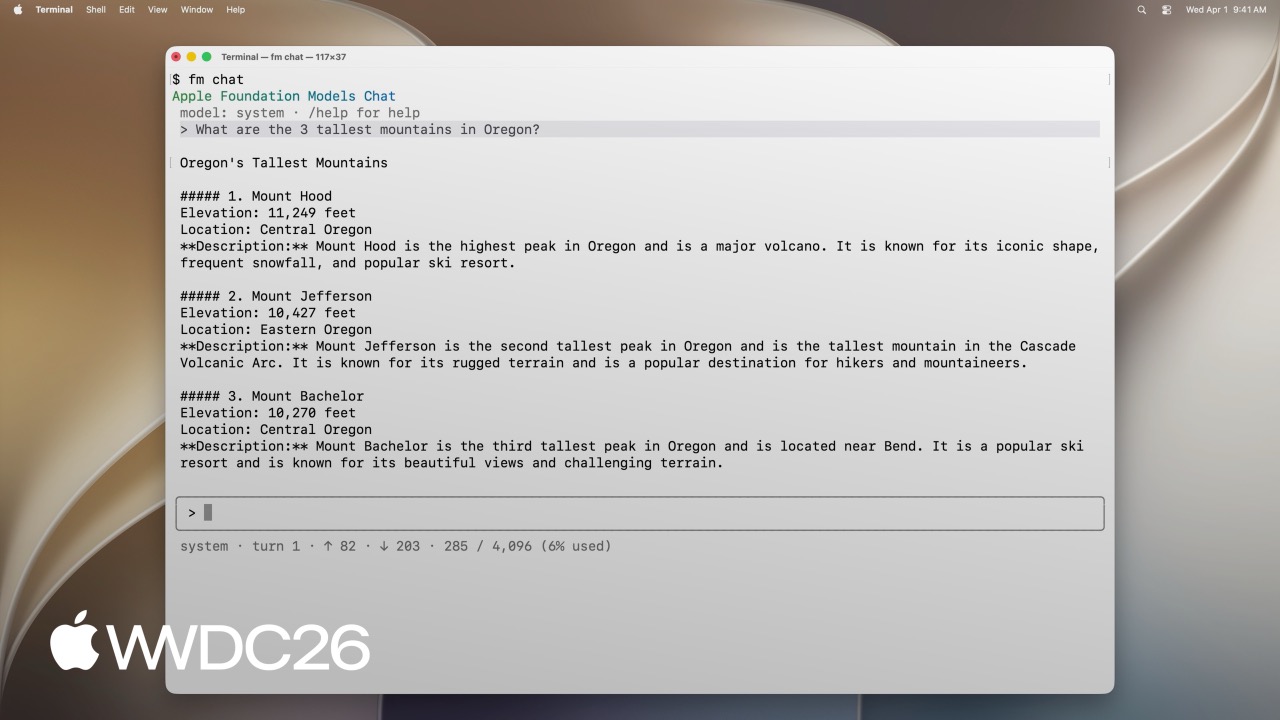
交互式对话
fm chat 提供了一个类似 ChatGPT 的终端对话界面:
$ fm chat
> [用户输入第一个问题]
> [模型回答]
> [用户输入追问]
> [模型回答]
对话界面内置了一些命令:
/model:切换到 Private Cloud Compute 模型/save:保存当前对话以便稍后恢复
关键点:fm chat 适合探索新想法时快速测试提示词,不需要重新编译项目。
结构化输出
fm 支持用 schema 定义输出结构:
$ fm schema object --name AppsIdentified --string app_names --array > schema.json

$ fm respond "What apps are the user actively using in this screenshot?" \
    --image Screenshot.png --model pcc --schema schema.json
# {"app_names": ["Messages", "Mail", "Calendar"]}关键点:
fm schema object创建 JSON schema 定义--image传入图片进行视觉理解--model pcc使用 Private Cloud Compute 的大模型--schema约束输出格式为 JSON
文件分类自动化脚本 (05:58)
演讲展示了一个实用场景:整理项目文件夹中的草稿文件和最终文件。
# 创建 schema 定义输出结构
fm schema object --name "TriagedFileList" \
    --string 'final_files' --array \
    --string 'draft_files' --array > /tmp/schema.json

# 用模型分类文件列表
output=$(fm respond \
    --instructions "I just completed a project, and I need help triaging the latest version of the files from the previous versions. I will give you a list of files. Return a list of the latest files (i.e., all files that, you can infer from their name in the list, are the latest versions), and then return separately a list of all draft files (i.e., all files that weren't considered final)." \
    "This is the list of all files:\n\n${files_list}" \
    --schema /tmp/schema.json
)

# 移动最终文件到备份目录
echo "${output}" | jq -r '.final_files[]' | while read -r file; do
    cp "${DIRECTORY_TO_TRIAGE}/${file}" "${FINAL_FILES_STORAGE_DIRECTORY}"
done

# 移动草稿文件到归档目录
echo "${output}" | jq -r '.draft_files[]' | while read -r file; do
    mv "${DIRECTORY_TO_TRIAGE}/${file}" "${DRAFT_FILES_STORAGE_DIRECTORY}"
done关键点:
--instructions设置系统提示,告诉模型任务背景- 传入文件列表让模型分析
- 用
jq解析 JSON 输出并执行文件操作 - 脚本可以重复使用,即使文件命名不规范也能处理
Foundation Models Python SDK (08:52)
Python SDK 让开发者能在 Python 代码中调用 Apple Foundation Models。安装要求:
- Python 3.10 或更高版本
- Apple Silicon Mac
- 已安装 Xcode
pip install apple_fm_sdk基础用法 (09:57)
Python SDK 的 API 与 Swift 版本高度相似:
import apple_fm_sdk as fm

INSTRUCTIONS = "You're an AI assistant for Cupertino Mart, a grocery store with in-app ordering."

async def answer_question(prompt: str) -> str:
    session = fm.LanguageModelSession(instructions=INSTRUCTIONS)
return await session.respond(prompt)关键点:
LanguageModelSession创建模型会话instructions参数设置系统提示respond()是异步方法,传入用户提示
工具调用 (10:21)
与 Swift 版本一样,Python SDK 支持工具调用:
class GetPastOrdersTool(fm.Tool):
    name = "get_past_orders"
    description = "Retrieves information about this user's past orders."

    @fm.generable("Past orders query parameter")
    class Arguments:
        number_orders: str = fm.guide("How many of the last orders to retrieve")

    @property
    def arguments_schema(self) -> fm.GenerationSchema:
        return self.Arguments.generation_schema()

    async def call(self, args: fm.GeneratedContent) -> str:
        number_orders = args.value(int, for_property="number_orders")
return await Orders.load_last_orders(user_id=user_id, amount=number_orders)关键点:
- 继承
fm.Tool定义工具 @fm.generable装饰器标记参数结构fm.guide()为每个参数添加描述arguments_schema属性返回参数的 schemacall()方法在模型调用工具时执行
引导生成 (10:35)
引导生成让模型输出结构化的 Python 对象:
@fm.generable("Suggested items")
class ItemsSuggestion:
    item_names: list[str] = fm.guide("Names of the suggested items")

INSTRUCTIONS = "You're an AI assistant tasked with returning potential grocery items that the user might be interested in."

async def generate_suggested_cart_items(user_input: Optional[str]) -> ItemsSuggestion:
    session = fm.LanguageModelSession(instructions=INSTRUCTIONS, tools=load_tools())
    prompt = """Using the tools to load the user's previous orders, \
              return a list of items the user has already ordered \
              and that they might be interested in again \
              as they're getting ready to place a new grocery order."""
    if user_input is not None:
        prompt += f"\nAccount for the following request from the user: {user_input}"
return await session.respond(prompt, generating=ItemsSuggestion)关键点:
@fm.generable装饰器定义输出结构fm.guide()为每个字段添加描述respond()的generating参数指定输出类型- 返回值是类型安全的 Python 对象
Python 评估流水线 (10:59)
Python SDK 的一个主要优势是能与 Python 生态深度集成。演讲展示了如何用 Jupyter Notebook 构建一个完整的评估流水线。
场景:为杂货电商 app 开发”智能补货”功能,基于用户历史订单预测他们想买的商品。需要评估不同提示词的效果。
评估流程:
- 用大模型生成评估数据(输入和期望输出)
- 用不同提示词实现多个版本
- 在评估数据集上运行每个版本,收集输出
- 用评判模型对每个输出打分
- 用 Pandas 存储数据,Matplotlib 可视化结果
演讲展示了三种提示词策略的对比:
- 极简提示:只给出基本指令
- 详细提示:详细描述任务
- 综合提示:列出完整规则
评估发现:
- 详细提示容易达到模型上下文窗口上限,导致错误率高
- 极简和详细提示倾向于推荐过多商品
- 综合提示会遗漏更多预期商品
- 极简提示产生更多幻觉商品
关键点:Python 的机器学习生态(Pandas、Matplotlib 等)可以与 Foundation Models SDK 无缝集成,快速迭代提示词并量化效果。
核心启发
1. 构建本地文件分类助手
做什么:用 fm CLI 编写脚本,自动整理下载文件夹。定义 schema 输出分类结果,结合 find 和 mv 命令实现自动归档。
为什么值得做:下载文件夹堆积是普遍痛点,手动整理耗时且容易遗漏。fm CLI 无需 API 密钥,随 macOS 27 预装,写个 shell 脚本就能实现智能分类,比训练专门的分类模型简单得多。
怎么开始:用 fm schema object 定义输出结构(如 final_files 和 draft_files 两个数组),然后用 fm respond --schema 传入文件列表让模型分类,最后用 jq 解析 JSON 输出执行文件操作。入口:fm schema object + fm respond --schema
2. 开发 CLI 副驾驶
做什么:用 Python SDK 构建一个命令行助手,能理解自然语言指令并执行对应的 shell 命令。
为什么值得做:开发者经常记不起复杂的命令参数,用自然语言描述意图比查文档快。通过工具调用限制模型只能调用预定义的安全命令集,避免误操作。
怎么开始:用 Python SDK 的 fm.Tool 基类定义允许执行的命令,继承 fm.generable 定义参数结构,创建 LanguageModelSession 时传入 tools 列表。入口:fm.Tool + fm.generable + LanguageModelSession(tools=...)
3. 创建提示词评估工作台
做什么:用 Jupyter Notebook + Python SDK 搭建提示词实验室,为 AI 功能设计多个提示词版本,用自动化评估找到最优方案。
为什么值得做:提示词调优是个反复试错的过程,没有量化评估就只能凭感觉。Python 生态的 Pandas、Matplotlib 与 Foundation Models SDK 结合,可以快速对比不同提示词策略的效果差异。
怎么开始:安装 apple_fm_sdk,在 Jupyter Notebook 中定义多个提示词版本,用同一组测试数据运行,收集输出后用评判模型打分,最后用 Pandas 汇总、Matplotlib 可视化。入口:pip install apple_fm_sdk + fm.LanguageModelSession
4. 构建图像分析流水线
做什么:用 fm 的图像理解能力,批量处理截图并提取结构化信息。比如从产品原型图中提取 UI 组件清单。
为什么值得做:手动审查大量设计稿或截图很枯燥,容易遗漏细节。fm CLI 支持 --image 参数传入图片,配合 --schema 约束输出格式,可以把非结构化的图像信息转成可处理的数据。
怎么开始:用 fm schema object 定义期望提取的字段(如组件类型、位置、文案),然后用 fm respond --image Screenshot.png --schema schema.json 批量处理截图,输出结构化 JSON。入口:fm respond --image + --schema
5. 开发数据清洗工具
做什么:用 Python SDK 编写脚本,让模型识别和修复数据集中的异常值。定义 schema 输出清洗后的数据和修改日志。
为什么值得做:数据清洗占据数据科学家大量时间,很多异常模式(如格式不一致、明显错误的值)用规则很难全覆盖。模型可以理解上下文,识别”地址字段里出现了电话号码”这类语义层面的异常。
怎么开始:用 @fm.generable 定义清洗结果的输出结构(包含清洗后的数据和修改日志两个字段),读取数据集后分批传给模型处理,汇总结果导出。入口:@fm.generable + session.respond(prompt, generating=CleanResult)
关联 Session
- Core AI — Foundation Models 框架的核心 API 介绍
- Core AI integration — 在 Swift 应用中集成 Foundation Models
- Core AI optimization — 优化模型性能和成本
- Evaluations — 用 Xcode 的 Evaluations 框架测试 AI 功能
- Robust evaluations — 构建可靠的评估体系
评论
GitHub Issues · utterances