
Highlight
watchOS 26 把 Controls、可配置 widget 和 RelevanceKit 三件套带上 Apple Watch,让 iPhone 上的功能不需要写 Watch app 也能在手腕上触发。
核心内容
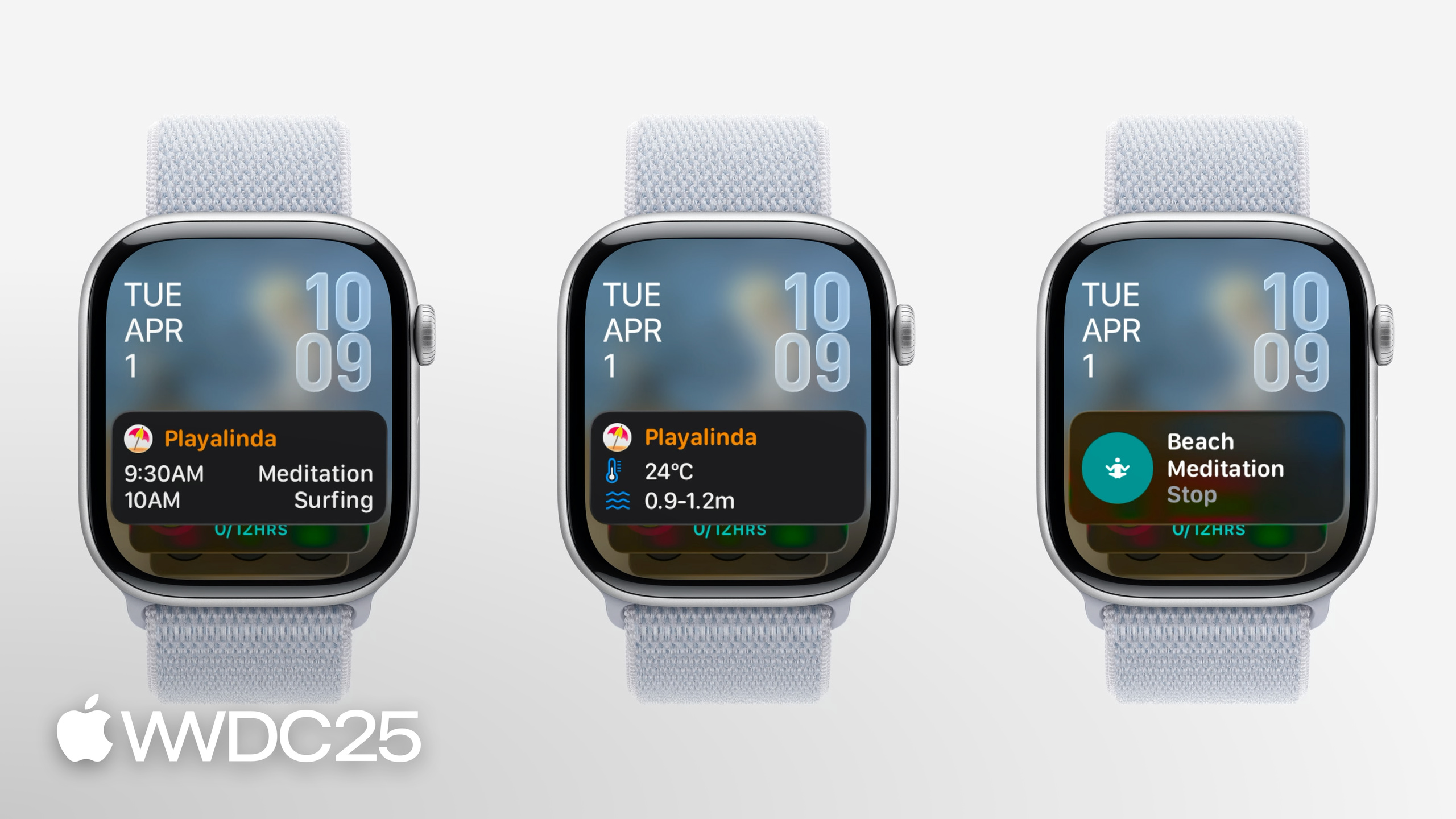
watchOS 上原本有个老问题:用户的手腕上有一个 Smart Stack,但开发者能塞进去的东西很有限。Timeline widget 一次只能显示一条时间线上的内容,遇到「9 点的冥想和 10 点的三个海滩活动」这种场景,三件事挤在一张卡里只会被截断。Controls 这个 iOS 16 起就存在的快捷操作能力,在 Apple Watch 上一直缺席。结果是开发者要么花成本做一个独立的 Watch app,要么放弃手腕这块表面积。
watchOS 26 的回应分三层。第一层是把 iOS 上的 Controls 直接带到 Apple Watch:用户可以把 iPhone app 的 control 放进 Watch 的 Control Center、Smart Stack 或 Action Button,点一下,动作在 iPhone 上执行,不需要你额外写 Watch 端代码(讲者 Anne 在 04:44 明确这一点)。第二层是 widget 和 control 都可以在 Watch 上配置,与 iOS 用同一套 AppIntent 流程。第三层是新框架 RelevanceKit 与 Relevant Widget:你声明「在海滩这类 POI 出现时」「在某个事件时间点附近」widget 才相关,系统会在 Smart Stack 里同时建议多张卡片,每张对应一个事件,彻底绕开 Timeline widget 的单时间线限制。
底层还有一个重要变更:Apple Watch Series 9 与 Ultra 2 在 watchOS 26 上正式切到 arm64。Xcode 14 起就支持,模拟器一直是 arm64,所以大部分 app 用 Standard Architectures 就能直接编出来;要小心的只有 Float/Int 转换和指针数学这类底层代码。
详细内容
让旧的 Timeline widget 在 watchOS 26 上变可配置(06:53)
// In the AppIntentTimelineProvider
func recommendations() -> [AppIntentRecommendation<BeachConfigurationIntent>] {
  if #available(watchOS 26, *) {
    // Return an empty array to allow configuration of the widget in watchOS 12+
    return []
  } else {
    // Return array of recommendations for preconfigured widgets before watchOS 12
    return recommendedBeaches
  }
}
关键点:
recommendations()是AppIntentTimelineProvider上的方法,watchOS 26 之前必须返回一组预配置项,用户没法自己改参数。- watchOS 26 起,返回空数组
[]就告诉系统「这个 widget 由用户在表盘或 Smart Stack 里自行配置」,后续用户编辑 widget 时会进入 AppIntent 配置页。 - 加
if #available(watchOS 26, *)分支可以让同一份代码兼容旧系统,避免老用户看到一个不可配置的 widget。
让 Control 也支持配置(07:46)
struct ConfigurableMeditationControl: ControlWidget {
  var body: some ControlWidgetConfiguration {
    AppIntentControlConfiguration(
      kind: WidgetKinds.configurableMeditationControl,
      provider: Provider()
    ) { value in
      // Provide the control's content
    }
    .displayName("Ocean Meditation")
    .description("Meditation with optional ocean sounds.")
    .promptsForUserConfiguration()
  }
}
关键点:
AppIntentControlConfiguration与 iOS 上完全同名,Watch 端不需要换 API。provider要符合AppIntentControlValueProvider,提供previewValue(configuration:)与currentValue(configuration:),前者用于「添加 control」面板上的预览,后者是真正的运行时取值。.promptsForUserConfiguration()让系统在用户首次添加这个 control 时弹出配置 UI,比如让用户选「冥想时是否播放海浪声」。
用 RelevanceKit 给 widget 标 POI 类别(10:53)
func relevance() async -> WidgetRelevance<Void> {
  guard let context = RelevantContext.location(category: .beach) else {
    return WidgetRelevance<Void>([])
  }
  return WidgetRelevance([WidgetRelevanceAttribute(context: context)])
}
关键点:
RelevantContext.location(category:)接受一个 MapKit POI 类别,传入不支持的类别时返回 nil,要先guard守住。- 返回的
WidgetRelevance里塞WidgetRelevanceAttribute(context:),告诉系统「用户出现在这类地点时,请把这个 widget 推到 Smart Stack 顶端」。 - 类别覆盖了 grocery store、cafe、beach 等,不需要自己写 GeoFence。
Relevant Widget:一次给 Smart Stack 多张卡(14:37)
struct BeachEventRelevanceProvider: RelevanceEntriesProvider {
  let store: BeachEventStore

  func relevance() async -> WidgetRelevance<BeachEventConfigurationIntent> {
    // Associate configuration intents with RelevantContexts
    let attributes = events.map { event in
      WidgetRelevanceAttribute(
        configuration: BeachEventConfigurationIntent(event: event),
        context: .date(interval: event.date, kind: .default)
      )
    }

    return WidgetRelevance(attributes)
  }
}
关键点:
RelevanceEntriesProvider是替代AppIntentTimelineProvider的新协议,专门用于 Relevant Widget。relevance()把每个BeachEventConfigurationIntent配置和它对应的RelevantContext(这里是事件发生的时间区间)打包成WidgetRelevanceAttribute。- 同一时间多个 attribute 命中时,系统会在 Smart Stack 里同时建议多张卡片,每个事件一张,绕开 Timeline widget 单卡截断的问题(参见 12:48 三事件挤一张卡的对比演示)。
用 RelevanceConfiguration 装配 widget 并避免重复显示(17:31)
struct BeachEventWidget: Widget {
  private let model = BeachEventStore.shared

  var body: some WidgetConfiguration {
    RelevanceConfiguration
      kind: "BeachWidget
      provider: BeachEventRelevanceProvider(store: model)
    ) { entry in
      BeachWidgetView(entry: entry)
    }
    .configurationDisplayName("Beach Events")
    .description("Events at the beach")
    .associatedKind(WidgetKinds.beachEventsTimeline)
  }
}
关键点:
RelevanceConfiguration是新的 widget 配置类型,与AppIntentConfiguration平级,区别是它由RelevanceEntriesProvider驱动。- 闭包里拿到
entry后渲染 SwiftUI 视图,与 Timeline widget 的写法一致。 .associatedKind(WidgetKinds.beachEventsTimeline)是关键:如果用户已经把同名 Timeline widget 加到 Smart Stack 上,系统会在 relevant widget 被建议时用 relevant 卡片替换掉 timeline 卡片,避免一个事件出现两张卡。
核心启发
1. 优先把 iPhone Control 暴露到 Apple Watch:从 watchOS 26 起,iPhone app 的 control 默认可以被用户加到 Watch 的 Control Center、Smart Stack 和 Action Button,无需 Watch app 即可远程触发。为什么值得做:投入近乎为零,覆盖面却大——只要 control 的 action 不强制把 iPhone app 推到前台(05:04)就会自动出现。怎么开始:审计现有 iOS controls,把 foreground app 的拆出来或重写为后台 AppIntent。
2. 让 widget 在 watchOS 26 上变可配置:用 if #available(watchOS 26, *) 分支,让 recommendations() 返回空数组就能解锁用户自定义参数。为什么值得做:Smart Stack 的可用条数有限,可配置 widget 让用户保留一个槽位却覆盖多个内容(如不同地点的天气)。怎么开始:找到现有 AppIntentTimelineProvider,在 recommendations() 里加一个 #available 分支即可。
3. 用 RelevantContext 做精准建议:把 widget 的相关性挂到 POI 类别、时间区间、健身/睡眠状态上,让系统在合适时机推到 Smart Stack 顶部。为什么值得做:用户不必主动安排 widget 顺序,相关内容自动浮现,留存与活跃度都会上来。怎么开始:在 relevance() 方法里返回一组 WidgetRelevanceAttribute,先从一个 RelevantContext.location(category:) 开始试。
4. 把多事件场景改造成 Relevant Widget:日历、订单、行程这类「同一时间点可能撞车」的内容,用 RelevanceConfiguration + RelevanceEntriesProvider 替代 Timeline widget。为什么值得做:Smart Stack 会同时建议多张卡片,每张对应一个事件,避免单卡截断。怎么开始:先写一个 RelevanceEntriesProvider,在 relevance() 里给每个事件配一个 WidgetRelevanceAttribute,再用 .associatedKind(_) 关联老的 Timeline widget 防止重复。
5. ClockKit complication 的最后迁移窗口:watchOS 26 的 widget push updates 通过 APNs 推送,过去因为「complication 才有 push、widget 没有」而停在 ClockKit 的 app 现在可以放心迁移了(参见 19:14 与「Go further with Complications in WidgetKit」)。为什么值得做:ClockKit 不会一直存在,越早迁越省事。怎么开始:用 WidgetKit 重写复杂功能页面,对接 APNs widget push 通道。
关联 Session
- Meet Liquid Glass — watchOS 26 全系应用的新设计语言,toolbar 与 control 样式自动迁移。
- What’s new in widgets — widget push updates、Live Activities 等跨平台 widget 更新的总入口。
- Go further with MapKit — watchOS 26 上 MapKit 路由与本地搜索的能力来自这里。
- Create icons with Icon Composer — 用 Icon Composer 一次产出 iOS/watchOS 两端的新图标。
评论
GitHub Issues · utterances