
Highlight
Vision 框架新增 RecognizeDocumentsRequest,以层级 DocumentObservation 直接还原文档中的表格、列表、段落、条码与关键数据,无需再用坐标推断行列。
核心内容
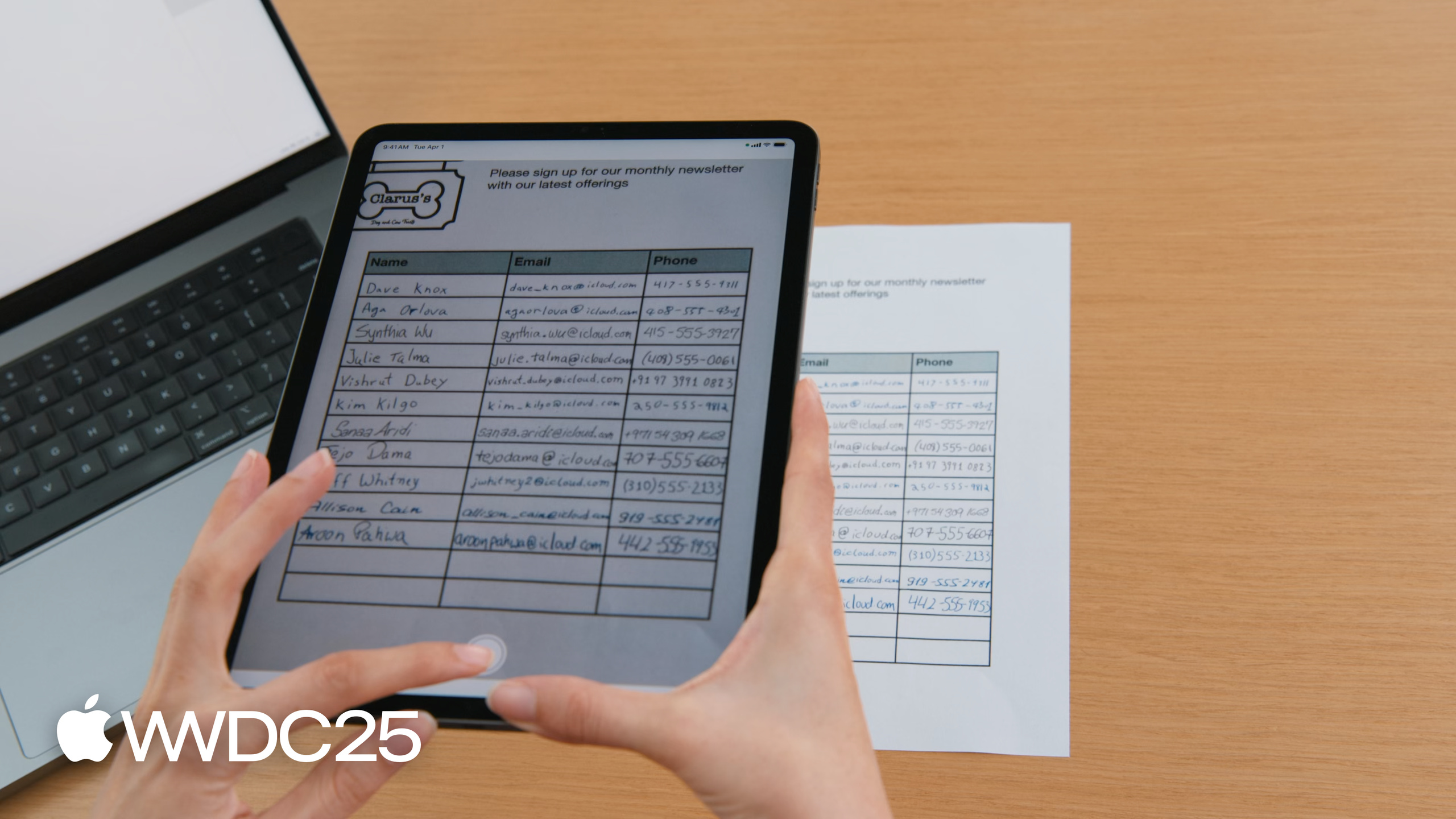
线下门店让顾客在登记表上手写姓名、邮箱、电话,然后扫描成图片入库——以前要把这张表变成联系人列表,开发者只能调用 RecognizeTextRequest 拿到一堆零散的文本框,再依靠每个文本框的坐标反推哪些单元格属于同一行。坐标稍一偏差,整张表就乱了。Megan Williams 在演讲开头展示的正是这个痛点(01:23):识别出文字没用,结构丢了一切都得重做。
WWDC25 给出的答案是 RecognizeDocumentsRequest。它返回的 DocumentObservation 是一棵树:Document 容器装着 Text、Table、List、Barcode;Table 由 Cell 组成的二维数组构成,Cell 自带 row/column 范围,Cell 内容又是一个容器,可以继续嵌套(05:15)。同一份登记表,旧 API 给一堆框,新 API 直接给行——遍历 table.rows,第一格是姓名,剩下几格丢给 DataDetection 抽邮箱和电话,几十行代码搞定(10:14)。Vision 同时还发布了 DetectLensSmudgeRequest(镜头污渍检测)和升级版手部姿态模型,把整条文档扫描流水线的质量问题也一并补齐。
详细内容
RecognizeDocumentsRequest 支持 26 种语言,运行在端侧。请求执行后,document.tables.first 就能直接拿到第一张表(06:39)。
/// Process an image and return the first table detected
func extractTable(from image: Data) async throws -> DocumentObservation.Container.Table {

    // The Vision request.
    let request = RecognizeDocumentsRequest()

    // Perform the request on the image data and return the results.
    let observations = try await request.perform(on: image)

    // Get the first observation from the array.
    guard let document = observations.first?.document else {
        throw AppError.noDocument
    }

    // Extract the first table detected.
    guard let table = document.tables.first else {
        throw AppError.noTable
    }

    return table
}
关键点:
RecognizeDocumentsRequest()无参数构造,默认开启文字、表格、列表、条码与 DataDetection。request.perform(on:)是 async 方法,接受Data(也接受CGImage、URL等),结果是观测对象的数组。observations.first?.document取出DocumentObservation——每张图片只产出一个 document。document.tables.first直接拿表格;同理还有document.lists、document.barcodes、document.paragraphs。
拿到 Table 之后,按行遍历就能把每一行变成一条联系人记录。文本访问有四种视图:transcript(整段字符串)、lines(行数组)、paragraphs(按自然阅读分组)、words(中日韩泰语不返回)(08:30)。detectedData 由 DataDetection 框架提供,覆盖邮箱、电话、地址、URL、日期(识别为日历事件)、度量单位、金额、追踪号、付款标识、航班号(09:13)。
/// Extract name, email addresses, and phone number from a table into a list of contacts.
private func parseTable(_ table: DocumentObservation.Container.Table) -> [Contact] {
    var contacts = [Contact]()

    // Iterate over each row in the table.
    for row in table.rows {
        // The contact name will be taken from the first column.
        guard let firstCell = row.first else {
            continue
        }
        // Extract the text content from the transcript.
        let name = firstCell.content.text.transcript

        // Look for emails and phone numbers in the remaining cells.
        var detectedPhone: String? = nil
        var detectedEmail: String? = nil

        for cell in row.dropFirst() {
            // Get all detected data in the cell, then match emails and phone numbers.
            let allDetectedData = cell.content.text.detectedData
            for data in allDetectedData {
                switch data.match.details {
                case .emailAddress(let email):
                    detectedEmail = email.emailAddress
                case .phoneNumber(let phoneNumber):
                    detectedPhone = phoneNumber.phoneNumber
                default:
                    break
                }
            }
        }
        // Create a contact if an email was detected.
        if let email = detectedEmail {
            let contact = Contact(name: name, email: email, phoneNumber: detectedPhone)
            contacts.append(contact)
        }
    }
    return contacts
}
关键点:
for row in table.rows:rows 是[[Cell]]的逻辑视图,按视觉行序排列。firstCell.content.text.transcript:content是 Container,text是文本视图,transcript把所有文字拼成单串字符串。cell.content.text.detectedData:返回 DataDetection 找到的所有匹配项,每项有match.details的强类型枚举。case .emailAddress(let email)/case .phoneNumber(let phoneNumber):用 Swift switch 模式匹配解开关联值,分别拿到email.emailAddress、phoneNumber.phoneNumber字符串。row.dropFirst():跳过姓名列,只在剩余列里找联系方式。
DetectLensSmudgeRequest 是另一个新请求(13:35)。它返回 SmudgeObservation,confidence 介于 0 到 1 之间,越接近 1 越可能是污渍镜头拍出的图。Megan 用 0.9 作为阈值过滤(15:34);阈值越低拒绝越严,但也会拒掉好图,需要在自己数据集上调。她还提醒,运动模糊、长曝光、云雾等场景会触发假阳性。可与 DetectFaceCaptureQualityRequest(人脸质量)和 CalculateImageAestheticScoresRequest(美学评分 + 实用图片识别)级联使用,做多维质量筛选。
手部姿态模型也做了一次悄悄的换代:21 个关节定义不变,模型变小、精度更高、内存与延迟降低;但关节点位置与旧模型不同,已训练的手势分类器需要用新数据重训。
核心启发
-
做什么:用
RecognizeDocumentsRequest替换登记表 / 收据 / 表单类应用里的RecognizeTextRequest+ 坐标推断逻辑。- 为什么值得做:旧方案对单元格倾斜、合并行、空格容忍度差,行列错配率高;新 API 直接给行列结构,代码量缩短到原来 1/3。
- 怎么开始:找一个最简单的两列表(姓名 / 邮箱),用
table.rows加transcript跑通最小闭环,再扩展到多列与跨行 Cell。
-
做什么:在文本里找邮箱、电话、地址、追踪号时,全部交给
cell.content.text.detectedData。- 为什么值得做:自己写正则匹配国际格式(带括号的电话、带 + 国家码的电话、带子域名的邮箱)维护成本极高,DataDetection 已经覆盖且会随系统更新。
- 怎么开始:把现有正则替换成 switch
data.match.details的强类型分支;先并行运行两套结果对比覆盖率,再下线旧逻辑。
-
做什么:扫描入口加一道
DetectLensSmudgeRequest质量门。- 为什么值得做:污渍图会让后续 OCR、表格识别、条码识别全部劣化,提前拒绝可以省掉一连串重试。
- 怎么开始:先用宽阈值(如 0.9)记录命中率,再根据 precision/recall 调到适合自己场景的阈值;对边缘场景叠加美学评分做兜底。
-
做什么:把质量检查做成多级流水线——污渍检测 → 美学评分 → 实用图片识别。
- 为什么值得做:每个 API 只覆盖一个维度,单独使用会漏判;级联后能在不同失败模式上互补。
- 怎么开始:先在批量历史照片上跑离线分析,统计每一级的拒绝率,再决定线上启用顺序。
-
做什么:审计 app 中的 ML 手势分类器,决定是否随新 hand pose 模型重训。
- 为什么值得做:关节坐标分布变了,旧分类器在新模型上会出现稳态偏差,用户可能毫无察觉地手势失灵。
- 怎么开始:用新模型重新采集一份小样本,对比旧分类器输出;偏差超出阈值则用同样的标注重新训练。
关联 Session
- Discover Swift Enhancements in the Vision Framework — Vision 框架基础与请求/观测模型,本 session 推荐前置观看。
- Bring advanced speech-to-text to your app with SpeechAnalyzer — 端侧语音转文字新 API,与文档识别同属感知类工作流。
- Code-along: Bring on-device AI to your app using the Foundation Models framework — 在端侧大模型基础上构建 AI 功能,可与文档解析结果联动。
- Deep dive into the Foundation Models framework — guided generation 等机制,适合对识别结果做结构化重写。
- Design interactive snippets — App Intents 的紧凑视图,可把识别出的联系人 / 表格做成 snippet 直接展示。
评论
GitHub Issues · utterances