
Highlight
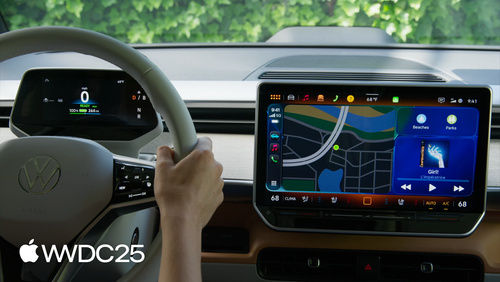
iOS 26 让 widget 与 Live Activity 无需 CarPlay App 即可上车,导航 App 还能把 54 种 maneuver 元数据投送到仪表盘和 HUD。
核心内容
车机屏幕一直是个尴尬的存在。司机想看一眼比赛比分、想确认充电进度、想瞄一下今天的天气,但只有那些专门做了 CarPlay App 的厂商才能露脸。绝大多数 App 在车里是隐身的,开发者也犯不上为车机单独投入一个工程团队。
iOS 26 把这道门槛拆了。只要 App 支持 systemSmall widget 或 Live Activity,它就会自动出现在 CarPlay Dashboard 左侧——不需要新建 CarPlay 工程,不需要申请额外 entitlement。司机在「设置 → 通用 → CarPlay」里勾一下就能用。Live Activity 在车上还会作为底部通知弹出,保证司机不会错过比赛进球或外卖到店这种关键节点(05:07)。
对真正做 CarPlay App 的开发者,模板系统也升级了。List 模板新增 headerGridButtons 把常用项钉在顶部;Now Playing 模板加了体育模式,能在车机上直接显示两队比分和比赛时钟;地图模板支持多点触控手势,CarPlay Ultra 上还能把转向元数据投到仪表盘和 HUD,由车厂自己渲染样式。Apple 这次把「上车」这件事从「重投入项目」变成了「顺手做」的小改动。
详细内容
Widget 上车:一个修饰符就够
widget 默认会被搬到 CarPlay,但有些场景不适合。比如需要频繁交互的游戏 widget、或依赖数据保护等级 A/B 的内容(CarPlay 大多在 iPhone 锁屏时使用,读不到这类数据)。这时用 disfavoredLocations 把 CarPlay 标记为不推荐位置(03:21):
// Disfavored locations modifier for CarPlay

WidgetConfiguration()
    .disfavoredLocations([.carPlay], for: [.systemSmall])
关键点:
disfavoredLocations接收一个位置数组,告诉系统这个 widget 在.carPlay里表现不好。for: [.systemSmall]限定只对 small 尺寸生效——CarPlay 只展示 small,其它尺寸不受影响。- 被标记的 widget 仍会出现在设置里,但会被分组到「未优化」区,即使司机强加进去也会禁用交互。
List 模板:把核心入口钉在顶部
iOS 26 给 CPListTemplate 增加了 headerGridButtons 属性,可以在第一个 list section 之前展示一排网格按钮(10:05):
// Pinned elements

var headerGridButtons: [CPGridButton]?

// For Communication apps

class CPGridButton

init(titleVariants: [String],
     image: UIImage,
     messageConfiguration: CPMessageGridItemConfiguration?,
     handler: ((CPGridButton) -> Void)?)

class CPMessageGridItemConfiguration

init(conversationIdentifier: String, unread: Bool)
关键点:
titleVariants是一组按优先级排列的标题候选,车机会根据可用宽度自动挑一个最合适的,避免截断。- 通信类 App 可以传
CPMessageGridItemConfiguration,把conversationIdentifier透传给 SiriKit,被点击时直接回到对应会话。 unread字段会在按钮上画一个未读小红点,让司机一眼判断有没有新消息。
Now Playing 体育模式:比赛比分上车
CarPlay 音频 App 在 iOS 18.4 起可以把 Now Playing 切到体育模式,展示两队对阵信息(11:20):
// Now playing template with sports mode

let clock = CPNowPlayingSportsClock(elapsedTime: time, paused: false)

let status = CPNowPlayingSportsEventStatus(
    eventStatusText: ["1st"], // 1st quarter
    eventStatusImage: UIImage(named: "Semifinals"),
    eventClock: clock
)

let sports = CPNowPlayingModeSports(
    leftTeam: getLeftTeam(), // CPNowPlayingSportsTeam
    rightTeam: getRightTeam(), // CPNowPlayingSportsTeam
    eventStatus: status,
    backgroundArtwork: getBackgroundArtwork() // get UIImage
)

CPNowPlayingTemplate.sharedTemplate.nowPlayingMode = sports
关键点:
CPNowPlayingSportsClock只需传入起点时间和暂停状态,系统会自动按真实时间向前或向后计时,App 不用每秒推送更新。eventStatusText用字符串数组传入比赛阶段(如「1st」「半决赛」),便于多语言适配。- 设置
nowPlayingMode后无需替换模板对象,可以在比赛进行中随时更新比分和控球指示,时移播放时记得同步元数据到对应时间点。
多点触控:地图模板的手势回调
CarPlay Ultra 及部分新车支持多点触控,CPMapTemplate 会通过回调把缩放、俯仰、旋转事件交给 App(14:15):
// Multitouch

// Zoom callback

func mapTemplate(_ mapTemplate: CPMapTemplate,
                 didUpdateZoomGestureWithCenter center: CGPoint,
                 scale: CGFloat,
                 velocity: CGFloat) {     }

// Pitch callback

func mapTemplate(_ mapTemplate: CPMapTemplate,
                 pitchWithCenter center: CGPoint) {     }

// Rotate callback

func mapTemplate(_ mapTemplate: CPMapTemplate,
                 didRotateWithCenter center: CGPoint,
                 rotation: CGFloat,
                 velocity: CGFloat) {     }
关键点:
center是手势在地图视图坐标系里的中心点,配合scale实现以触点为锚的缩放。velocity提供手势速度,可以用来做惯性动画,让缩放和旋转停下时更自然。- 三个回调互相独立,捏合、双指上下滑、双指旋转可同时发生,App 需要支持组合手势。
导航元数据:把 54 种 maneuver 送进仪表盘
CarPlay Ultra 允许 App 把转向信息送到仪表盘或 HUD,但具体怎么画由车厂决定,App 只负责描述语义(16:28):
// Add support for metadata

// Declare support

func mapTemplateShouldProvideNavigationMetadata(_ mapTemplate: CPMapTemplate) -> Bool {
    true
}

// Provide maneuver information up-front

cpNavigationSession.add(maneuvers)
cpNavigationSession.add(laneGuidance)

// Reroute

cpNavigationSession.pauseTrip(for: .rerouting, description: "Rerouting")
cpNavigationSession.resumeTrip(updatedRouteInformation: cpRouteInformation)
关键点:
- 返回
true是开关,告诉系统这个 App 愿意提供元数据,否则仪表盘只显示空白。 add(maneuvers)一次性提前提交多个 maneuver,比逐个推送省电省 CPU,尤其在长途路线上。- 重新规划路线时先
pauseTrip(for: .rerouting),仪表盘会显示「正在重新规划」状态,新路线就绪后用resumeTrip替换CPRouteInformation,避免画面跳变。 CPManeuver有 54 种类型,覆盖直行、转弯、环岛、上下匝道、进入轮渡、到达终点等场景;车厂根据语义选自己的图标渲染(19:13)。
核心启发
-
做什么:给现有 widget 加 CarPlay 适配,挑一个
systemSmall跑通。- 为什么值得做:成本极低,多了一块车机展示位,对依赖日活的工具类 App 几乎是白送的曝光。
- 怎么开始:检查 widget 是否依赖锁屏不可用数据,若依赖就用
disfavoredLocations排除;其它情况直接确认widgetContentMargins和containerBackgroundRemovable已设置。
-
做什么:把现有 Live Activity 适配到
activity family small。- 为什么值得做:CarPlay 会优先用 small 尺寸显示,若没有就退回到灵动岛的 compact leading/trailing,信息密度大打折扣。
- 怎么开始:复用 watchOS Smart Stack 的设计稿,只展示「最关键的一两个状态」,记住车上的 Live Activity 不可交互。
-
做什么:导航 App 立刻补上
mapTemplateShouldProvideNavigationMetadata返回true。- 为什么值得做:CarPlay Ultra 在中高端车型上铺开,仪表盘是司机视线最常停留的地方,没有元数据的 App 在那块屏上就是空的。
- 怎么开始:先把现有路径数据转成
CPManeuver数组提前add给CPNavigationSession,再用 CarPlay Simulator 在 Mac 上模拟测试。
-
做什么:体育/比赛类音频 App 接入 Now Playing 体育模式。
- 为什么值得做:开车听球的场景天然适合用比分代替专辑封面,比一个静态 logo 信息量高一个数量级。
- 怎么开始:把
CPNowPlayingSportsClock接到自己的赛事时间源,时移播放时同步比分,其它字段(队徽、状态文字)按需逐步补齐。
关联 Session
- Deliver age-appropriate experiences in your app — 用新声明工具为不同年龄段用户提供合规体验。
- Filter and tunnel network traffic with NetworkExtension — 用 NetworkExtension 过滤和隧道化网络流量。
- Finish tasks in the background — 后台执行新进展与系统调度策略。
- Get ahead with quantum-secure cryptography — 用后量子加密保护 App 数据。
评论
GitHub Issues · utterances