
Highlight
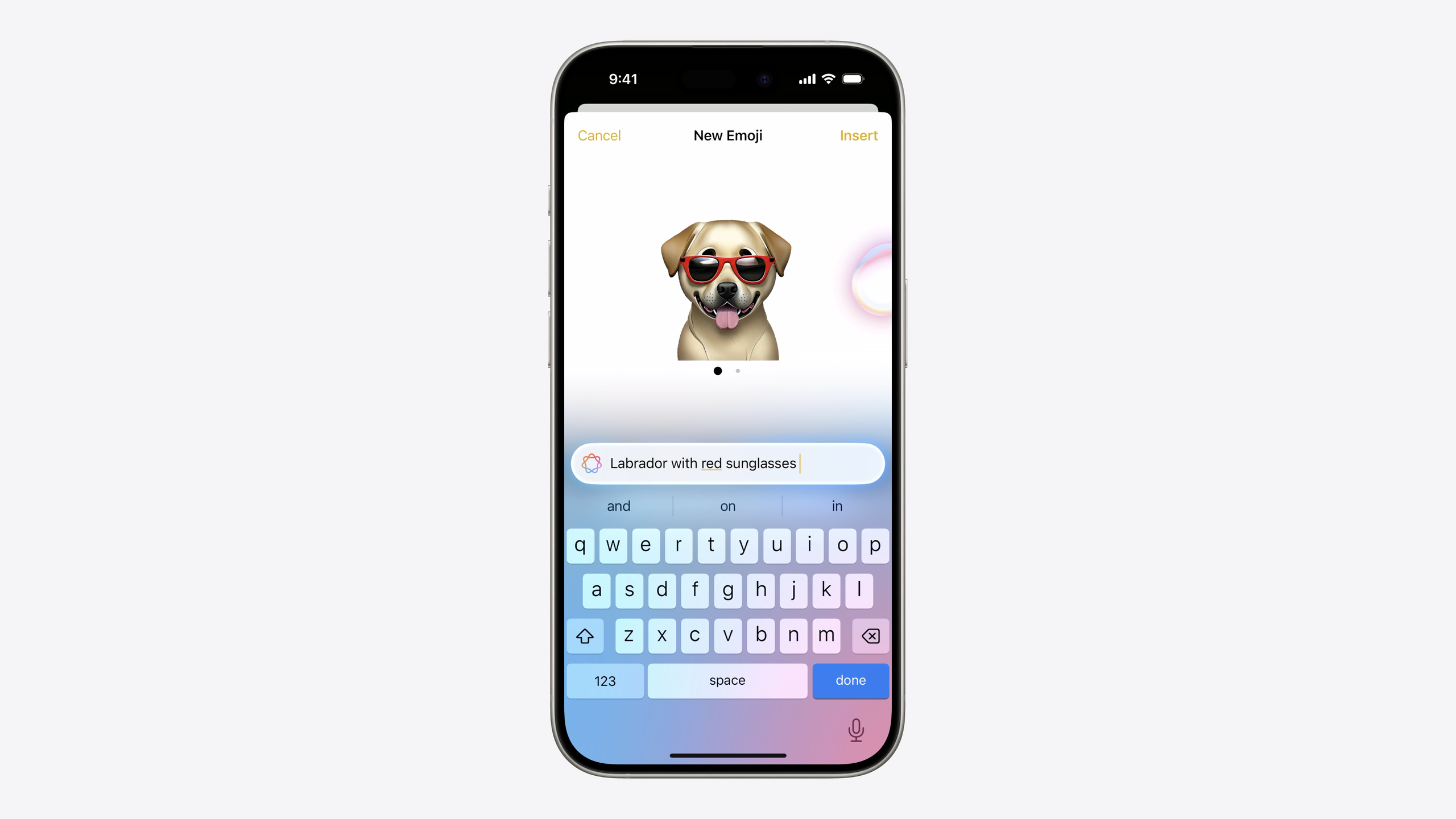
Apple 在 iOS 18/macOS 15 中引入了 Genmoji——用户可以生成完全自定义的表情图片。但 Genmoji 不是 Unicode 字符,它是带有元数据的位图图片。为了让 Genmoji 能像标准 emoji 一样在文本中使用(复制、粘贴、格式化、序列化),Apple 创建了 NSAdaptiveImageGlyph 这个新类。
核心内容
Emoji 是 Unicode 字符,发送时是纯文本,由接收端设备自己渲染。这套机制运行多年,但有一个硬限制:你只能用 Unicode 标准里已经定义的 emoji。Genmoji 打破了这个限制——用户可以在 iOS 18 的 emoji 键盘里即时生成完全自定义的表情图片。问题来了:Genmoji 是一张位图,没有对应的 Unicode 码位。它怎么像普通 emoji 一样嵌入文本、被复制粘贴、被序列化存储?
Apple 的答案是 NSAdaptiveImageGlyph。这是一个新类,把位图和元数据打包在一起:多分辨率的正方形图片、全局唯一且稳定的 contentIdentifier、用于无障碍的 contentDescription、以及用于文本对齐的排版度量值。有了这些信息,Genmoji 就能在富文本中占据一个字符的位置,跟随字体大小缩放,和周围文字一起排版。
Session 按照”几乎免费”到”完全自定义”的梯度讲解了三种集成场景。第一种:你的 App 已经用 NSTextView / UITextView 的富文本模式,数据用 RTFD 存储——Genmoji 支持自动开启,零代码。第二种:你的后端只接受纯文本——需要手动拆解和重组 attributed string,把图片存到 image store,文本里只留引用。第三种:你用 CoreText 做自定义排版——用新的 CTFont API 查询排版边界并绘制图片。
详细内容
自动支持:富文本视图
如果你的 UITextView 已经有 pasteConfiguration 或支持图片粘贴的 target action,supportsAdaptiveImageGlyph 默认就是 true,不需要额外代码(03:36)。macOS 上对应的属性是 importsGraphics。
手动开启也很简单(03:30):
let textView = UITextView()
textView.supportsAdaptiveImageGlyph = true
关键点:
supportsAdaptiveImageGlyph是 UITextView 的新属性,控制是否接受 Genmoji 输入- 如果 text view 已经支持图片粘贴,这个属性自动为 true
序列化方面,系统的 SecureCoding、Pasteboard 框架已经原生支持 NSAdaptiveImageGlyph。你只需要按原来的方式把 attributed string 序列化为 RTFD(04:41):
// Extract contents of text view as an attributed string
let textContents = textView.textStorage

// Serialize as data for storage or transport
let rtfData = try textContents.data(from: NSRange(location: 0, length: textContents.length),
              documentAttributes: [.documentType: NSAttributedString.DocumentType.rtfd])

// Create attributed string from serialized data
let textFromData = try NSAttributedString(data: rtfData, documentAttributes: nil)

// Set on text view
textView.textStorage.setAttributedString(textFromData)
关键点:
data(from:documentAttributes:)指定.rtfd类型即可序列化包含 Genmoji 的富文本- 反序列化用
NSAttributedString(data:documentAttributes:),Genmoji 会自动还原 - 如果你的数据层已经是 RTFD,无需任何改动
纯文本存储:拆解与重组
很多 App 的后端只接受纯文本(博客标题、消息内容等)。这时你需要把 attributed string 拆解为:纯文本字符串 + 图片位置引用 + 图片数据存储。Session 提供了完整的拆解和重组代码(06:08):
// Decompose an attributed string

func decomposeAttributedString(_ attrStr: NSAttributedString) -> (String, [(NSRange, String)], [String: Data]) {
    let string = attrStr.string
    var imageRanges: [(NSRange, String)] = []
    var imageData: [String: Data] = [:]
    attrStr.enumerateAttribute(.adaptiveImageGlyph, in: NSMakeRange(0, attrStr.length)) { (value, range, stop) in
        if let glyph = value as? NSAdaptiveImageGlyph {
            let id = glyph.contentIdentifier
            imageRanges.append((range, id))
            if imageData[id] == nil {
                imageData[id] = glyph.imageContent
            }
        }
    }
    return (string, imageRanges, imageData)
}

// Recompose an attributed string

func recomposeAttributedString(string: String, imageRanges: [(NSRange, String)], imageData: [String: Data]) -> NSAttributedString {
    let attrStr: NSMutableAttributedString = .init(string: string)
    var images: [String: NSAdaptiveImageGlyph] = [:]
    for (id, data) in imageData {
        images[id] = NSAdaptiveImageGlyph(imageContent: data)
    }
    for (range, id) in imageRanges {
        attrStr.addAttribute(.adaptiveImageGlyph, value: images[id]!, range: range)
    }
    return attrStr
}
关键点:
enumerateAttribute(.adaptiveImageGlyph, in:)遍历所有 Genmoji 位置contentIdentifier全局唯一且稳定,同一个 Genmoji 不会重复存储imageContent是图片的原始 Data,用于重建 NSAdaptiveImageGlyph- 拆解结果是三元组:纯文本 + 位置/ID 列表 + ID/图片数据字典,可以直接存到数据库的不同字段
HTML 输出与 Web 兼容
如果内容需要在 Web 上展示,把 attributed string 转为 HTML 即可(06:30):
// Converting NSAttributedString to HTML

let htmlData = try textContent.data(from: NSRange(location: 0, length: textContent.length),
               documentAttributes: [.documentType: NSAttributedString.DocumentType.html])
关键点:
- 支持
apple-adaptive-glyph类型的引擎(如 WebKit)会内联渲染图片 - 不支持的引擎会显示 fallback 图片,alt 文本来自
contentDescription - 这是跨平台显示 Genmoji 的最简方案
推送通知中的 Genmoji
Communication notifications 现在支持包含 Genmoji 的富文本消息(07:33):
func didReceive(_ request: UNNotificationRequest,
      withContentHandler contentHandler: @escaping (UNNotificationContent) -> Void) {

  ...
  let message: NSAttributedString = _myAttributedMessageStringWithGlyph
  let context = UNNotificationAttributedMessageContext(sendMessageIntent: sendMessageIntent,
                                                       attributedContent: _message)

  do {
    let messageContent = try request.content.updating(from: context)
    contentHandler(messageContent)
  } catch {
    // Handle error
  }
}
关键点:
UNNotificationAttributedMessageContext是新 API,接受包含 image glyph 的 attributed string- 在 Notification Service Extension 中解析推送载荷、下载资源、构建 attributed string,然后更新通知内容
自定义排版引擎:CoreText API
对于完全自定义的文本渲染引擎,CoreText 提供了两个新函数(09:45):
// Find typographic bounds for image in NSAdaptiveImageGlyph

let provider = adaptiveImageGlyph

let bounds = CTFontGetTypographicBoundsForAdaptiveImageProvider(font, provider)

// Draw it at the typographic origin point on the baseline

CTFontDrawImageFromAdaptiveImageProviderAtPoint(font, provider, point, context)
关键点:
CTFontGetTypographicBoundsForAdaptiveImageProvider返回排版边界(advance width 等),相对于基线上的原点CTFontDrawImageFromAdaptiveImageProviderAtPoint在指定基线位置绘制图片- 这两个 API 让 Genmoji 能在 TextKit 和 CoreText 的自定义排版流程中正确布局
兼容性注意
RTFD 格式中的 Genmoji 会被编码为标准的 text attachment,在不支持 image glyph 的旧系统上自动降级为附件图片。如果你的 App 不支持内联图片,应该用 contentDescription 的文本作为 fallback,而不是直接丢弃图片信息。对于邮箱地址、电话号码、搜索关键词等纯文本字段,不应该支持 image glyph。
核心启发
-
做什么:检查你的 App 中所有 UITextView / NSTextView 是否已启用富文本模式,如果是,确认
supportsAdaptiveImageGlyph(iOS)或importsGraphics(macOS)为 true。为什么值得做:这是零成本获取 Genmoji 支持的方式,用户立刻就能在输入框里使用自定义表情。怎么开始:遍历项目中的 text view 配置,确认数据存储使用 RTFD 格式。 -
做什么:为纯文本后端实现 Genmoji 的拆解/重组逻辑。为什么值得做:博客标题、消息内容等场景天然适合 Genmoji,但后端往往只接受纯文本,拆解方案让你的 App 兼顾表达力和数据兼容性。怎么开始:复用 Session 提供的
decomposeAttributedString和recomposeAttributedString函数,在数据库中增加 image store 表。 -
做什么:在 Communication Notifications 中集成 Genmoji。为什么值得做:消息类 App 的通知是用户触达的核心场景,Genmoji 能让通知内容更具辨识度。怎么开始:在 Notification Service Extension 中用
UNNotificationAttributedMessageContext替换原有的纯文本通知内容。 -
做什么:如果你的 App 有 Web 端展示,使用 HTML 序列化实现 Genmoji 跨平台显示。为什么值得做:用户生成的内容可能需要在 Web、Android 等非 Apple 平台展示,HTML fallback 机制确保信息不丢失。怎么开始:调用
data(from:documentAttributes:)并指定.html类型,确保contentDescription始终有值作为 alt 文本。
关联 Session
- Catch up on accessibility in SwiftUI — SwiftUI 无障碍更新,与 Genmoji 的 contentDescription 无障碍支持互补
- Demystify SwiftUI containers — SwiftUI 容器视图原理,理解文本容器如何承载 Genmoji
- Evolve your document launch experience — 文档型 App 的启动体验优化,涉及富文本文档的存储与呈现
- Extend your app’s controls across the system — 跨系统扩展控件,与 Genmoji 的跨场景表达思路一致
评论
GitHub Issues · utterances