
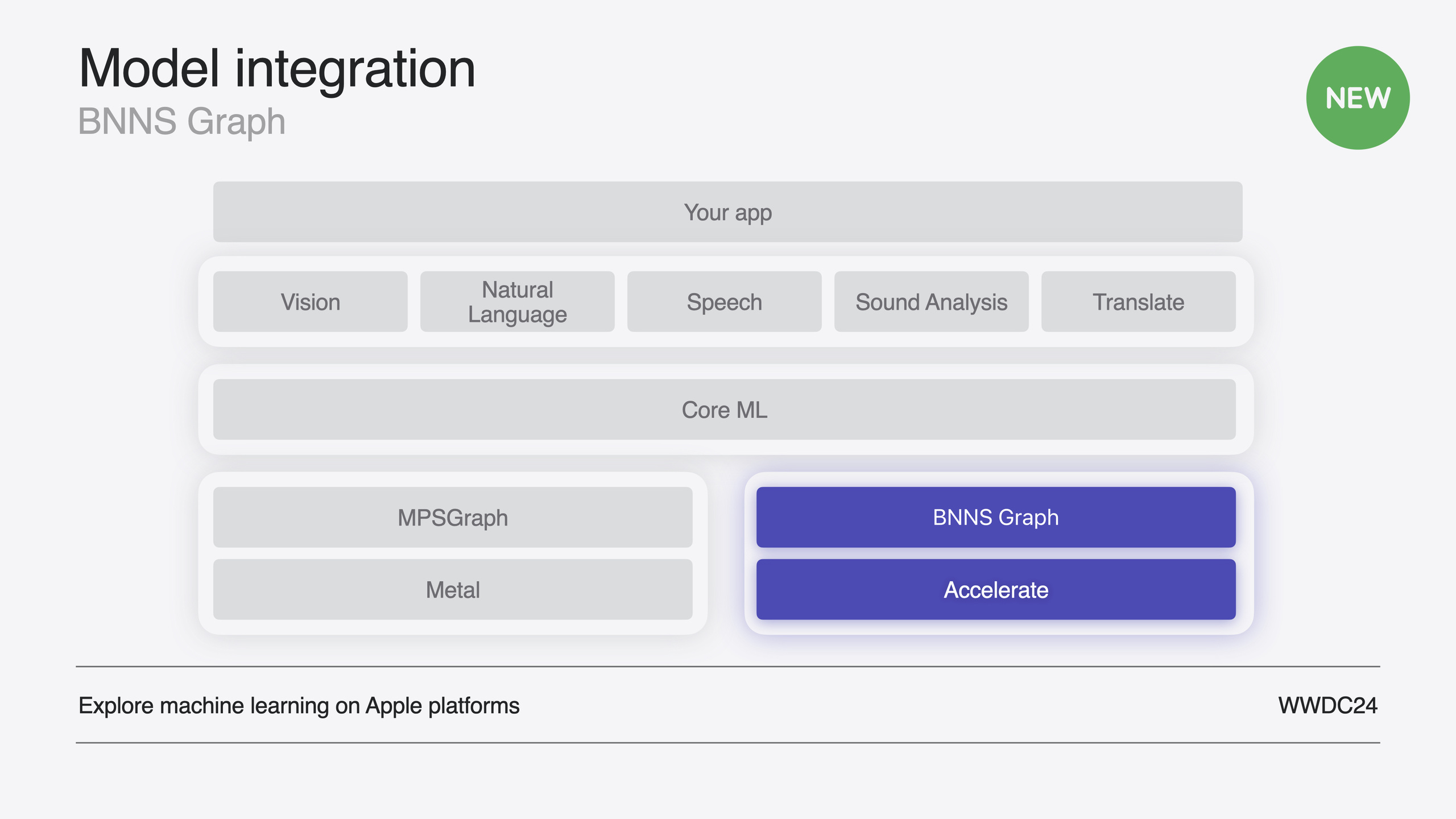
Highlight
BNNS Graph 是 Accelerate 框架中全新的图级别 ML 推理 API,能消费整个 Core ML 模型并自动执行数学变换、层融合、拷贝消除和权重重排等优化,平均性能比传统 BNNS 原语快 2 倍以上。
核心内容
传统 BNNS API 是逐层操作的:每一个卷积、激活、归一化,你都要手动创建输入/输出/权重/偏置的 n 维数组描述符,拼成参数结构体,再创建层对象,最后逐层执行推理。实现一个完整模型意味着为每一层重复这个流程,还要自己管理中间张量的内存。代码量大,且无法跨层优化。
BNNS Graph 改变了这个模式:你直接提供一个编译好的 .mlmodelc 文件,BNNSGraphCompileFromFile 会将整个模型编译成优化后的图对象——包含推理所需执行的 kernel 列表和中间张量的内存布局。你只需要创建一次图对象,再用 BNNSGraphContextMake 包装成可变的 context,就可以反复执行推理。因为 BNNS Graph 看到了完整的计算图,它能执行传统逐层 API 做不到的优化:将尾部的 slice 操作前移(数学变换)、把卷积和激活合并成一个 kernel(层融合)、用窗口视图替代数据拷贝(拷贝消除)、以及将权重从行优先重排为分块迭代顺序以提升缓存命中率(权重重排)。Apple 声称这些优化平均带来 2 倍以上的性能提升,且不需要你写任何额外代码。
Session 还重点演示了 BNNS Graph 在实时音频场景中的使用——Audio Unit 的渲染回调要求零内存分配、单线程执行,否则会触发内核上下文切换导致实时截止时间违约。BNNS Graph 提供了精细的控制来满足这些约束:编译时指定单线程目标、预分配 page-aligned workspace、动态形状声明、以及直接指针参数传递。
详细内容
编译图对象
从 .mlmodelc 文件编译图对象是第一步。编译选项可以控制是否单线程执行、优化偏好(性能 vs 体积)等。(00:44)
// Get the path to the mlmodelc.
NSBundle *main = [NSBundle mainBundle];
NSString *mlmodelc_path = [main pathForResource:@"bitcrusher"
                                         ofType:@"mlmodelc"];

// Specify single-threaded execution.
bnns_graph_compile_options_t options = BNNSGraphCompileOptionsMakeDefault();
BNNSGraphCompileOptionsSetTargetSingleThread(options, true);

// Compile the BNNSGraph.
bnns_graph_t graph = BNNSGraphCompileFromFile(mlmodelc_path.UTF8String,
                                              NULL, options);
assert(graph.data);
BNNSGraphCompileOptionsDestroy(options);
关键点:
BNNSGraphCompileFromFile接受.mlmodelc路径,返回不可变的图对象- 第二个参数传
NULL表示编译源模型中的所有函数;如果模型包含多个函数,可以指定函数名 BNNSGraphCompileOptionsSetTargetSingleThread关闭多线程执行——实时音频场景的必需设置- 编译选项用完后必须调用
BNNSGraphCompileOptionsDestroy释放
创建 Context 和 Workspace
图对象是不可变的,推理需要一个可变的 context 来支持动态形状和执行选项。实时场景还需要预分配 workspace 来避免执行阶段的内存分配。(10:41)
// Create the context.
context = BNNSGraphContextMake(graph);
assert(context.data);

// Set the argument type.
BNNSGraphContextSetArgumentType(context, BNNSGraphArgumentTypePointer);

// Specify the dynamic shape.
uint64_t shape[] = {mMaxFramesToRender, 1, 1};
bnns_graph_shape_t shapes[] = {
    (bnns_graph_shape_t) {.rank = 3, .shape = shape},
    (bnns_graph_shape_t) {.rank = 3, .shape = shape}
};
BNNSGraphContextSetDynamicShapes(context, NULL, 2, shapes);

// Create the workspace.
workspace_size = BNNSGraphContextGetWorkspaceSize(context, NULL) + NSPageSize();
workspace = (char *)aligned_alloc(NSPageSize(), workspace_size);
关键点:
BNNSGraphContextMake将不可变图包装为可变 contextBNNSGraphArgumentTypePointer指定参数直接使用裸指针而非张量结构体——适合直接对接音频 bufferBNNSGraphContextSetDynamicShapes告诉 context 输入输出的最大形状,基于音频单元最大帧数- workspace 必须是 page-aligned 的,大小由
BNNSGraphContextGetWorkspaceSize返回 - 加上
NSPageSize()是为了对齐余量
计算参数索引
模型中的参数顺序可能与原始 Python 代码不同,必须用 BNNSGraphGetArgumentPosition 查询。(11:58)
// Calculate indices into the arguments array.
dst_index = BNNSGraphGetArgumentPosition(graph, NULL, "dst");
src_index = BNNSGraphGetArgumentPosition(graph, NULL, "src");
resolution_index = BNNSGraphGetArgumentPosition(graph, NULL, "resolution");
saturationGain_index = BNNSGraphGetArgumentPosition(graph, NULL, "saturationGain");
dryWet_index = BNNSGraphGetArgumentPosition(graph, NULL, "dryWet");
关键点:
- 参数名(“dst”、“src” 等)对应模型定义中的名称
- 索引值用于在
arguments数组中定位各参数 - 这个查询只需要在初始化时做一次
执行推理
在音频渲染回调中,用预分配的 workspace 和索引执行推理。(13:29)
// Set the size of the first dimension.
BNNSGraphContextSetBatchSize(context, NULL, frameCount);

// Specify the direct pointer to the output buffer.
arguments[dst_index] = {
    .data_ptr = outputBuffers[channel],
    .data_ptr_size = frameCount * sizeof(outputBuffers[channel][0])
};

// Specify the direct pointer to the input buffer.
arguments[src_index] = {
    .data_ptr = (float *)inputBuffers[channel],
    .data_ptr_size = frameCount * sizeof(inputBuffers[channel][0])
};

// Specify the direct pointer to the resolution scalar parameter.
arguments[resolution_index] = {
    .data_ptr = &mResolution,
    .data_ptr_size = sizeof(float)
};

// Specify the direct pointer to the saturation gain scalar parameter.
arguments[saturationGain_index] = {
    .data_ptr = &mSaturationGain,
    .data_ptr_size = sizeof(float)
};

// Specify the direct pointer to the mix scalar parameter.
arguments[dryWet_index] = {
    .data_ptr = &mMix,
    .data_ptr_size = sizeof(float)
};

// Execute the function.
BNNSGraphContextExecute(context, NULL,
                        5, arguments,
                        workspace_size, workspace);
关键点:
BNNSGraphContextSetBatchSize动态设置当前帧的样本数——每帧可能不同- 每个参数通过
data_ptr和data_ptr_size指定内存位置和大小 - 标量参数(如 resolution、dryWet)直接指向 UI slider 的值
BNNSGraphContextExecute执行推理,结果直接写入 outputBuffers- 整个执行过程零内存分配、零多线程操作——满足实时音频要求
编译选项补充
编译选项还有两个值得注意的设置:(12:24)
- 优化偏好:默认优化性能(可能增加图对象体积);如果 App 体积敏感,可切换为优化体积,但执行性能可能下降
- NaNAndInfinityChecks:调试用的 NaN 和无穷大检查,能帮助发现 16 位累加器溢出等问题,但不应在发布版本中启用
核心启发
-
做什么:用 BNNS Graph 替代 Core ML 做 CPU 推理,降低延迟。为什么值得做:BNNS Graph 的图级优化(层融合、数学变换、拷贝消除)平均比逐层 BNNS 快 2 倍以上,且不需要改模型训练流程,同一个
.mlmodelc文件直接可用。怎么开始:在现有 Core ML 推理调用处,改用BNNSGraphCompileFromFile+BNNSGraphContextExecute的流程替换。 -
做什么:在音频处理 App 中集成 ML 模型做实时效果。为什么值得做:BNNS Graph 的单线程模式、预分配 workspace 和直接指针参数传递,天然满足 Audio Unit 渲染回调的实时约束——零分配、零上下文切换。怎么开始:用 Xcode 的 Audio Unit Extension App 模板创建项目,将
.mlpackage拖入项目,在 DSP Kernel 的初始化阶段编译图并创建 workspace,渲染回调中只做BNNSGraphContextExecute。 -
做什么:在 SwiftUI 界面中同步显示 ML 处理效果。为什么值得做:同一个模型可以用多个 context 分别服务于音频线程和 UI 线程,UI 上实时预览处理效果,提升用户体验。怎么开始:为 UI 组件创建独立的 graph context(因为 context 同一时刻只能在一个线程上执行),用 Swift 版 BNNS Graph API 执行推理,将输出 buffer 传给 Swift Charts 绘制波形。
关联 Session
- Bring your machine learning and AI models to Apple silicon — 介绍如何将 ML/AI 模型优化到 Apple 芯片上运行
- Deploy machine learning and AI models on-device with Core ML — Core ML 的模型转换与设备端部署优化新方法
- Explore the Accelerate framework — Accelerate 框架整体概览,BNNS 是其中的子库
评论
GitHub Issues · utterances