
Highlight
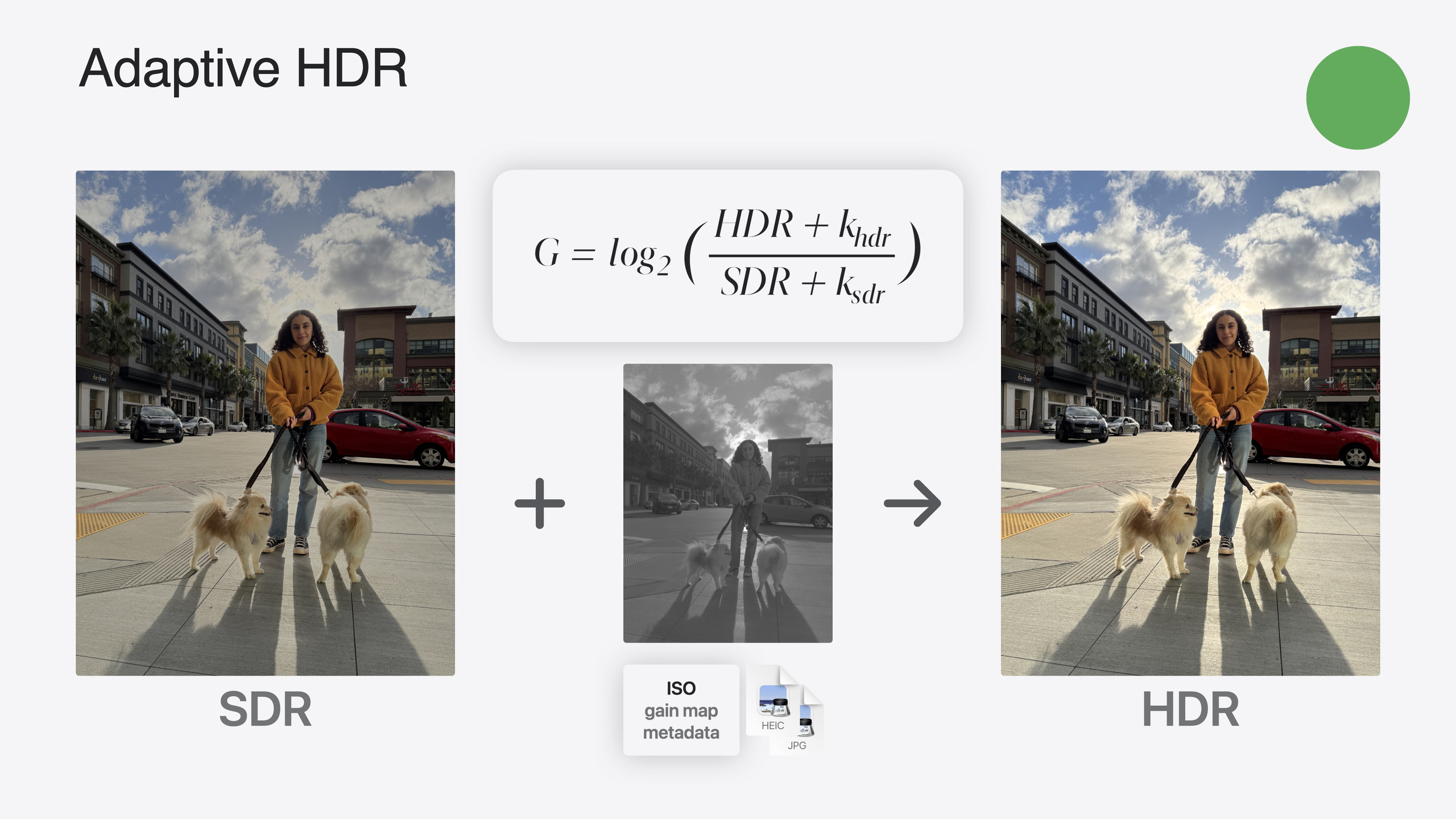
Adaptive HDR 是 ISO HDR 的演进版本,通过 Gain Map 技术实现向后兼容 SDR 系统,并在单个文件中同时存储 HDR 和 SDR 表示。
核心内容
HDR(高动态范围)图像技术近年取得了重要进展。去年 Apple 推出了 ISO HDR 标准,今年在此基础上进一步引入了 Adaptive HDR(自适应 HDR)技术。
ISO HDR 面临一个实际问题:当 HDR 图像在 SDR 显示器上查看时,需要进行 Tone Mapping(色调映射)调整。这种转换若使用默认算法,可能出现颜色失真或曝光异常。此外,HDR 文件无法直接被 SDR 解码器读取。
Adaptive HDR 解决了这三个问题:向后兼容 SDR 系统、解码器和应用;在单个文件中同时存储 HDR 和优化过的 SDR 表示;以及提供自适应 Tone Mapping 能力。
iPhone 从 2020 年就开始捕获嵌入 Gain Map 的图像来增强显示效果,至今已捕获超过万亿张这类图像。今年 Apple 正推动将 Gain Map 技术标准化为 Adaptive HDR,目前已达到 ISO 委员会草案阶段,正朝着国际标准草案迈进。
Adaptive HDR 的核心思想是在文件中存储一个完全向后兼容的 SDR 基线表示,以及特定的元数据和一个 Gain Map(增益图)。Gain Map 记录了场景中明亮区域的空间位置。当应用于基线图像时,可以产生 HDR 输出。
详细内容
Adaptive HDR 文件格式的新颖之处在于它不直接包含 HDR 图像,而是包含一组”原料”和”配方”,共同创建 HDR 效果。HEIC 文件仍然只包含一个图像,但开发者可以请求图像的替代外观。默认情况下,图像会解码为 SDR 表示。当应用请求时,可以获得 HDR 外观的替代表示。
(23:24)
// 读取 HDR 图像 - 使用 expandToHDR 选项
let hdrImage = CIImage(url: imageURL, options: [.expandToHDR: true])

// 查询图像的内容 Headroom
let headroom = hdrImage.contentHeadroom
// 对于 iPhone HDR 照片,值将大于 1 并高达 8
// 对于某些图像,属性可能返回零表示 Headroom 未知expandToHDR选项:告诉 Core Image 将图像加载为 HDR 格式,而不是默认的 SDR 格式contentHeadroom属性:返回图像的 Content Headroom 值,SDR 图像返回 1,HDR 图像返回大于 1 的值,未知时返回 0
(26:07)
// SDR 和 Gain 编辑策略示例
// 1. 加载 SDR 图像
let sdrImage = CIImage(url: imageURL)

// 2. 加载 Gain Map
let gainImage = CIImage(url: imageURL, options: [.auxiliaryHDRGainMap: true])

// 3. 将 Gain 图像缩放到与 SDR 图像相同的大小
let scaledGainImage = gainImage.transformed(by: CGAffineTransform(scaleX: 2, y: 2))

// 4. 对两个图像应用相同的滤镜(如裁剪、扭曲等)
let editedSdrImage = stretchCropFilter.apply(to: sdrImage)
let editedGainImage = stretchCropFilter.apply(to: scaledGainImage)auxiliaryHDRGainMap选项:加载文件中的 Gain Map 作为独立的 CIImage 对象- 缩放处理:Gain 图像通常是 SDR 图像大小的一半,编辑时需要考虑缩放差异
- 同步编辑:对 SDR 图像应用编辑时,应对 Gain 图像应用相同的编辑
(29:15)
// 使用 Core Image 和 Metal 显示 HDR 图像
// 1. 设置 MTKView 用于扩展范围内容
metalView.colorspace = CGColorSpace(name: CGColorSpace.extendedLinearSRGB)
metalView.pixelFormat = .rgba16Float
metalView.framebufferOnly = false

// 2. 应用 CIFilters 创建编辑后的 CIImage
let editedImage = applyFilters(to: hdrImage)

// 3. 获取视图的当前显示 Headroom
let displayHeadroom = metalView.currentDisplayHeadroom

// 4. 应用新的 CIToneMapHeadroom 滤镜
let toneMappedImage = editedImage.applyingFilter(
    "CIToneMapHeadroom",
    parameters: ["inputHeadroom": displayHeadroom]
)

// 5. 使用 CIRenderDestination API 渲染结果
let destination = CIRenderDestination(metalView)
try? context.startRendering(to: destination, from: toneMappedImage)- 扩展色彩空间:设置 MTKView 使用扩展线性 sRGB 色彩空间和 16 位浮点像素格式
currentDisplayHeadroom:获取当前显示器的可用 HeadroomCIToneMapHeadroom滤镜:根据显示 Headroom 自动调整 HDR 图像,对于 ISO HDR 文件使用新的 Reference White Tone Mapping Operator,对于 Adaptive HDR 文件使用优化的自定义 Tone Map 函数
(30:09)
// 使用 SDR 和 Gain Map 组合显示
let displayHeadroom = metalView.currentDisplayHeadroom

// 使用 imageByApplyingGainMap API 组合两个图像
let combinedImage = sdrImage.imageByApplyingGainMap(
    gainMap: editedGainImage,
    headroom: displayHeadroom
)

// 渲染结果
let destination = CIRenderDestination(metalView)
try? context.startRendering(to: destination, from: combinedImage)imageByApplyingGainMap:将 SDR 图像和 Gain Map 组合,根据指定的 Headroom 生成 Tone Mapping 后的图像- 单步操作:这个 API 在一个操作中完成组合和 Tone Mapping
系统提供了三种 Tone Mapping 方法。对于 ISO HDR 图像,系统使用 ITU 默认全局 Tone Mapping 技术。今年 Apple 开发了新的 Reference White Tone Mapping Operator,更好地保留输出质量,减少高光剪切并更好地保持颜色重现。对于 Adaptive HDR 图像,系统使用根据文件中 Gain Map 优化的曲线进行调整。
核心启发
-
使用系统 API 处理 Tone Mapping:不要自己实现 Tone Mapping 算法。Apple 的
CIToneMapHeadroom滤镜已经考虑了各种 Display Headroom 变化的场景,包括屏幕亮度设置、电池电量限制、前后台切换等。 -
选择合适的编辑策略:根据应用需求选择三种编辑策略之一。HDR 策略最简单,适合不需要修改原始 Gain Map 的场景。SDR 和 Gain 策略保留原始 Gain Map,适合简单编辑如旋转、扭曲和裁剪。SDR 和 HDR 策略最复杂,但允许为 SDR 和 HDR 分别优化编辑。
-
测试不同 Display Headroom 条件:在各种屏幕亮度设置、电量状态下测试 HDR 渲染效果。特别注意前后台切换时的 HDR 状态——当 app 进入后台时,系统会将图像 Tone Map 到 SDR,返回时需要重新加载完整 HDR 数据。
-
优先使用 Adaptive HDR 格式:新项目应该使用 Adaptive HDR 而不是 ISO HDR。它的向后兼容性确保在 SDR 设备上也能正常显示,在 HDR 设备上则展示完整的动态范围。
-
保持完整的色彩空间管线:从文件读取到编辑到写回,整个管线都要保持 HDR 色彩空间。任何一步的降级都是不可逆的,会丢失 HDR 信息。
关联 Session
- Display EDR content with Core Image, Metal, and SwiftUI — discover how you can add support for rendering in extended dynamic range (edr) from a core image based multi-platform swiftui application
- Build compelling spatial photo and video experiences — learn how to adopt spatial photos and videos in your apps, including the new quicklook preview application api in visionos
- Keep colors consistent across captures — meet the constant color api and find out how it can help people use your app to determine precise colors
- Discover media performance metrics in AVFoundation — discover how you can monitor, analyze, and improve user experience with the new media performance apis
- What’s new in DockKit — discover how intelligent tracking in dockkit allows for smoother transitions between subjects
评论
GitHub Issues · utterances